
ແນະນຳ
Thank you for choosing the Masterpro by Carlo Cracco Robot 1000 Multicooker. This advanced kitchen appliance is designed to simplify your cooking process with its versatile functions and integrated Wi-Fi connectivity. This manual provides essential information for safe operation, setup, usage, maintenance, and troubleshooting to ensure you get the most out of your device.

The Masterpro Robot 1000 multicooker with its main bowl and control panel.
ຄໍາແນະນໍາຄວາມປອດໄພ
Please read all safety instructions carefully before using the appliance. Failure to follow these instructions may result in injury or damage to the appliance.
- ໃຫ້ແນ່ໃຈວ່າເຄື່ອງໃຊ້ຖືກວາງຢູ່ເທິງພື້ນຜິວທີ່ຫມັ້ນຄົງ, ຮາບພຽງ, ທົນທານຕໍ່ຄວາມຮ້ອນ.
- Do not immerse the main unit in water or any other liquid. Clean with a damp ຜ້າເທົ່ານັ້ນ.
- Keep hands and utensils away from moving blades during operation. Always use the spatula provided.
- ໃຫ້ແນ່ໃຈວ່າທຸກພາກສ່ວນໄດ້ຖືກປະກອບຢ່າງຖືກຕ້ອງກ່ອນທີ່ຈະດໍາເນີນການ.
- ຖອດປລັກອຸປະກອນອອກຈາກປລັກສຽບໄຟເມື່ອບໍ່ໄດ້ໃຊ້, ກ່ອນທໍາຄວາມສະອາດ, ແລະກ່ອນທີ່ຈະປະກອບ ຫຼືຖອດຊິ້ນສ່ວນຕ່າງໆ.
- Do not operate the appliance with a damaged cord or plug, or if it malfunctions or has been damaged in any way.
- ເຄື່ອງໃຊ້ນີ້ແມ່ນໃຊ້ໃນຄົວເຮືອນເທົ່ານັ້ນ. ຢ່າໃຊ້ນອກ.
- ໃຫ້ລະມັດລະວັງເມື່ອຈັດການກັບຂອງແຫຼວຮ້ອນ ຫຼື ໄອນ້ຳຮ້ອນ.
ເນື້ອໃນຊຸດ
ກວດສອບວ່າລາຍການທັງຫມົດແມ່ນມີຢູ່ໃນຊຸດ:
- Masterpro Robot 1000 Main Unit
- 4.5 Liter Stainless Steel Bowl with ergonomic handle
- Preparation/Cooking Lid
- Blender Lid
- Internal Steamer Basket
- Steamer with Tray and Lid
- Shaft with Mixing Paddle
- Shaft with Butterfly Whisk
- Shaft with Stainless Steel Blades
- Extension Shaft with Slicing/Grating Disc
- Slicing/Grating Disc with Extension Shaft
- ໄມ້ຖູ່

ຫຼາຍກວ່າview of the Masterpro Robot 1000 multicooker and its comprehensive set of accessories, including various blades, whisks, steaming baskets, and lids.
ສິນຄ້າເກີນview
The Masterpro Robot 1000 is a high-tech multicooker designed for diverse culinary tasks. Key components include:
- ຫົວໜ່ວຍຫຼັກ: ຕິດຕັ້ງມໍເຕີ, ອົງປະກອບຄວາມຮ້ອນ, ແລະແຜງຄວບຄຸມ.
- ໂຖປັດສະວະສະແຕນເລດ: 4.5-liter capacity for large preparations.
- ໜ້າຈໍສຳຜັດ 7.7 ນິ້ວ: For intuitive control and recipe viewing.
- Quick Control Knob: With backlit ring for easy adjustments.
- ການເຊື່ອມຕໍ່ Wi-Fi: Enables integrated recipe updates and online features.
- ຂະໜາດປະສົມປະສານ: Accurate to 5 grams for precise ingredient measurement.
ຕັ້ງຄ່າ
ປະຕິບັດຕາມຂັ້ນຕອນເຫຼົ່ານີ້ສໍາລັບການຕັ້ງຄ່າເບື້ອງຕົ້ນ:
- ແກະກ່ອງ: ເອົາສ່ວນປະກອບທັງຫມົດອອກຈາກການຫຸ້ມຫໍ່ຢ່າງລະມັດລະວັງ.
- ສະອາດ: Wash the stainless steel bowl, lids, and all accessories with warm soapy water before first use. Rinse thoroughly and dry.
- ການຈັດວາງ: Place the main unit on a clean, dry, stable, and heat-resistant surface, away from edges and heat sources.
- ການເຊື່ອມຕໍ່ພະລັງງານ: Plug the appliance into a grounded electrical outlet (220V-240V, 50-60Hz).
- ການເປີດເຄື່ອງເບື້ອງຕົ້ນ: The touch screen display will illuminate. Follow any on-screen prompts for initial language selection or Wi-Fi setup.
ຄໍາແນະນໍາການດໍາເນີນງານ
ໂໝດຄູ່ມື ແລະອັດຕະໂນມັດ
The Masterpro Robot 1000 offers both manual and automatic operation modes. In manual mode, you control each setting (time, temperature, speed). In automatic mode, you can select from integrated recipes that guide you step-by-step.
Integrated Recipes and Wi-Fi
The appliance comes with over 500 integrated recipes. Connect the device to Wi-Fi to receive updates and potentially access new recipes. Each recipe provides step-by-step instructions on the 7.7-inch touch screen display.
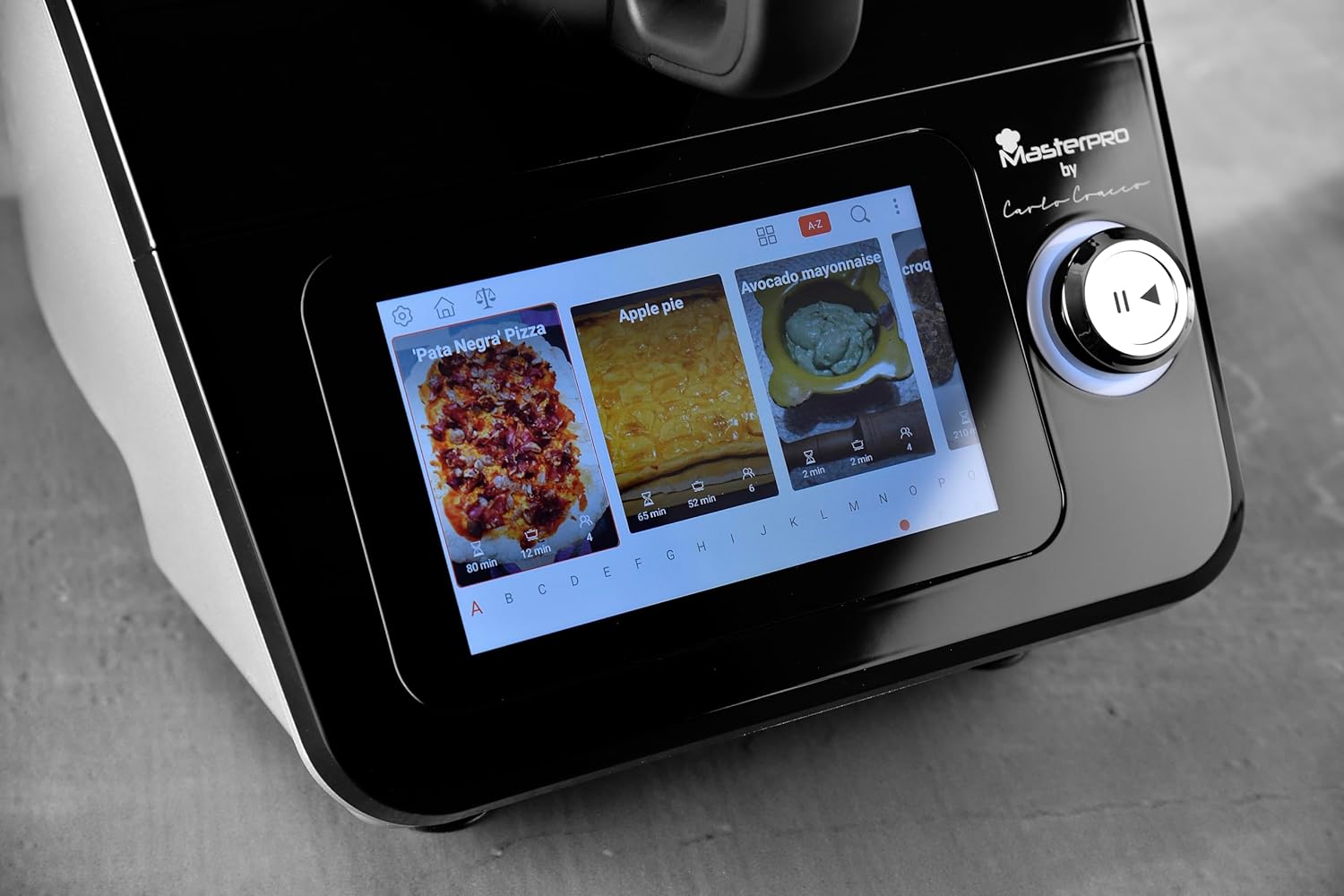
A close-up of the 7.7-inch touch screen display, illustrating the interface for selecting integrated recipes.
ຟັງຊັນຫຼັກ
The multicooker performs a wide range of functions:
- ການຊັ່ງນໍ້າໜັກ: Use the integrated scale for precise ingredient measurement.
- ການປະສົມ: Ideal for smoothies, sauces, and purees.
- ສານປະສົມ: Create perfect mayonnaise or dressings.
- ການນວດ: ກຽມແປ້ງສຳລັບເຂົ້າຈີ່, ພິຊຊ່າ, ຫຼື ເຂົ້າໜົມ.
- ການຊອຍໃຫ້ບາງສ່ວນ: Utilize the dedicated disc and extension shaft for uniform slicing and grating of vegetables.
- ການຕີ: Use the butterfly whisk for whipping cream or egg whites.
- ປຸງແຕ່ງອາຫານ: Various cooking methods, including simmering, sautéing, and stewing.
- ໜື້ງ: Use the internal basket or the external steamer with tray and lid for healthy steamed dishes.

The multicooker in use, demonstrating the steaming function with the steamer basket and lid in place, preparing seafood.

The multicooker demonstrating the slicing function with the dedicated accessory, processing carrots.
Temperature and Timer
Adjust the cooking temperature from 37°C to 130°C. Set the timer for up to 90 minutes. These settings are controlled via the touch screen and quick control knob.
Speed Control and Inverter Blade
The appliance features 12 speed levels. For delicate preparations like risottos, use the inverter blade function to stir gently without cutting ingredients.
ການບໍາລຸງຮັກສາແລະການທໍາຄວາມສະອາດ
Regular cleaning ensures the longevity and optimal performance of your Masterpro Robot 1000.
- ຖອດປລັກ: ຖອດປລັກເຄື່ອງທຸກຄັ້ງກ່ອນທຳຄວາມສະອາດ.
- ຖ້ວຍ ແລະ ອຸປະກອນເສີມ: The stainless steel bowl, lids, and most accessories are dishwasher safe. For manual cleaning, use warm soapy water and a non-abrasive sponge.
- ຫົວໜ່ວຍຫຼັກ: Wipe the main unit and touch screen display with a soft, damp ຜ້າ. ຫ້າມໃຊ້ເຄື່ອງເຮັດຄວາມສະອາດຂັດຫຼືຈຸ່ມຫົວໜ່ວຍໃນນ້ຳ.
- ການອົບແຫ້ງ: ໃຫ້ແນ່ໃຈວ່າທຸກພາກສ່ວນແຫ້ງຫມົດກ່ອນທີ່ຈະປະກອບຫຼືເກັບຮັກສາ.
ການແກ້ໄຂບັນຫາ
If you encounter issues with your Masterpro Robot 1000, refer to the table below for common problems and solutions.
| ບັນຫາ | ສາເຫດທີ່ເປັນໄປໄດ້ | ການແກ້ໄຂ |
|---|---|---|
| ເຄື່ອງໃຊ້ບໍ່ໄດ້ເປີດ. | ບໍ່ສຽບ; ພະລັງງານ outage; ຊ່ອງສຽບຜິດພາດ. | ກວດເບິ່ງການເຊື່ອມຕໍ່ສາຍໄຟ; ກວດສອບການສະຫນອງພະລັງງານ; ລອງຮ້ານອື່ນ. |
| Software update fails or gets stuck. | Unstable Wi-Fi connection; corrupted download; temporary software glitch. | Ensure stable Wi-Fi connection. Restart the appliance and attempt the update again. If the problem persists, contact customer support. |
| Touch screen unresponsive or inaccurate. | Screen is dirty; temporary software issue; hardware malfunction. | Clean the screen with a soft, dry cloth. Restart the appliance. If the issue continues, contact customer support. |
| Blade inverter function not engaging. | Incorrect setting; temporary glitch. | Ensure the correct function is selected on the display. Restart the appliance. |
| Bowl capacity appears less than stated. | Misinterpretation of usable vs. total capacity; specific recipe limits. | The stated capacity of 4.5L refers to the total volume. Usable capacity for certain preparations might be slightly less to prevent overflow. Refer to recipe guidelines. |
ຂໍ້ມູນຈໍາເພາະ
| ຄຸນສົມບັດ | ຂໍ້ມູນຈໍາເພາະ |
|---|---|
| ຍີ່ຫໍ້ | MasterPRO |
| ຕົວແບບ | ຫຸ່ນຍົນ 1000 |
| ສີ | ດຳ |
| ຄວາມອາດສາມາດຂອງໂຖປັດສະວະ | 4.5 ລິດ |
| ຈໍານວນຄວາມໄວ | 12 |
| ຄຸນນະສົມບັດພິເສດ | Adjustable speed control, Wi-Fi connectivity, Integrated recipes, Integrated scale, Inverter blade function |
| ປັບອຸນຫະພູມໄດ້ | 37-130°C |
| ຊ່ວງເວລາຈັບເວລາ | 0-90 ນາທີ |
| ຄວາມຖືກຕ້ອງຂອງຂະຫນາດ | 5 ກຣາມ |
| ພະລັງງານ | 1000 Watts (motor and heating) |
| ສະບັບtage/ຄວາມຖີ່ | 220V-240V ~ 50-60HZ |
| ຂະໜາດສິນຄ້າ | 38P x 22lx 32H ຊມ |
ການຮັບປະກັນແລະການສະຫນັບສະຫນູນ
The Masterpro by Carlo Cracco Robot 1000 Multicooker comes with a standard manufacturer's warranty. Please refer to the warranty card included in your product packaging for specific terms and conditions. For technical support, service, or spare parts, please contact your retailer or the MasterPRO customer service department. Keep your proof of purchase for warranty claims.