
Maxcom FW58
Maxcom FW58 Vanad Pro Smartwatch User Manual
ຮູບແບບ: FW58
1. ບົດແນະນຳ
Thank you for choosing the Maxcom FW58 Vanad Pro Smartwatch. This manual provides essential information for setting up, operating, and maintaining your device. The FW58 Vanad Pro is designed to enhance your daily life by offering comprehensive health monitoring, seamless communication, and robust activity tracking capabilities. Its lightweight design and customizable features make it an ideal companion for both busy individuals and active sports enthusiasts.
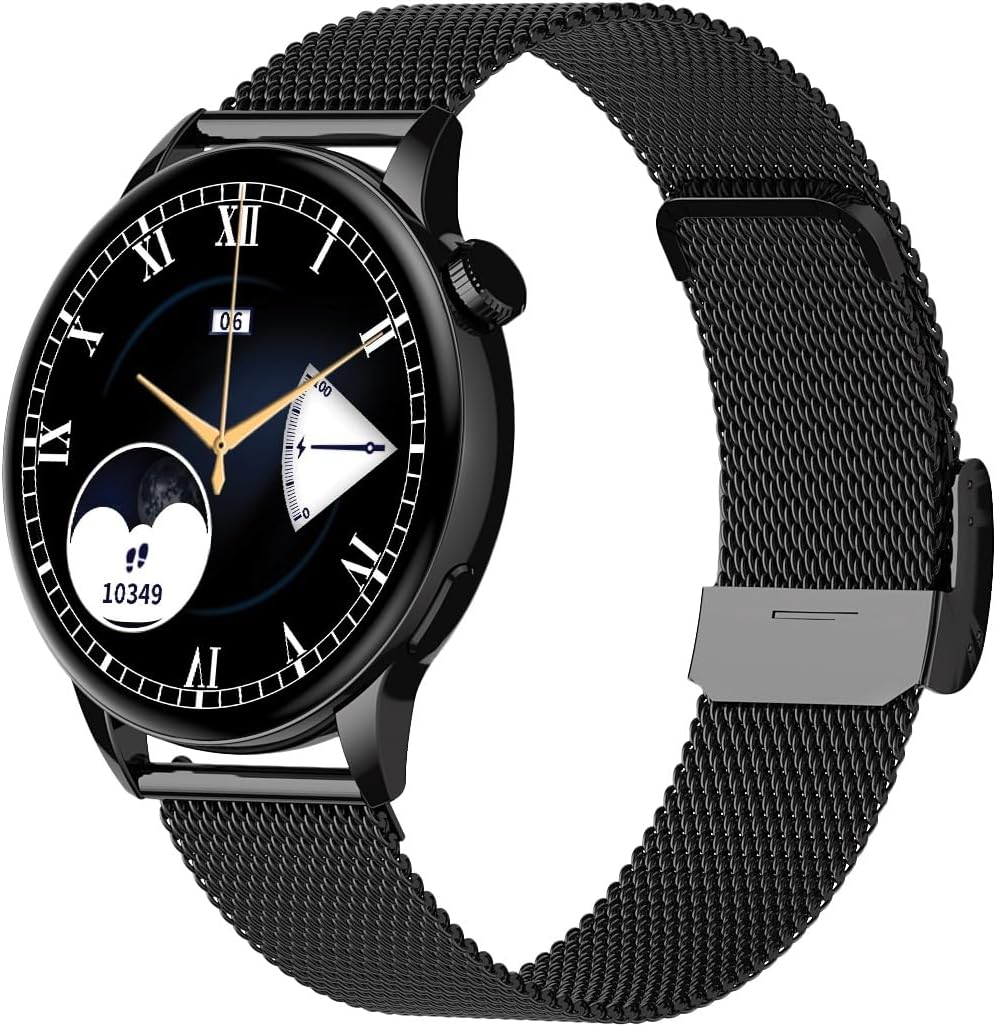
Image 1.1: Maxcom FW58 Vanad Pro Smartwatch, showcasing its elegant design with a black mesh strap and a classic watch face.
2. ຕັ້ງຄ່າ
2.1. ເນື້ອໃນຊຸດ
ກ່ອນທີ່ທ່ານຈະເລີ່ມຕົ້ນ, ກະລຸນາກວດສອບວ່າລາຍການທັງໝົດຢູ່ໃນຊຸດຂອງທ່ານ:
- Maxcom FW58 Vanad Pro Smartwatch
- ສາຍສາກໄຟແມ່ເຫລັກ
- ສາຍຊິລິໂຄນເພີ່ມເຕີມ
- ຄູ່ມືຜູ້ໃຊ້ (ເອກະສານນີ້)
2.2. ການສາກ Smartwatch
For optimal performance, fully charge your smartwatch before first use.
- Connect the magnetic charging cable to the charging contacts on the back of the smartwatch. Ensure the pins align correctly.
- ສຽບປາຍສາຍ USB ເຂົ້າກັບອະແດບເຕີໄຟ USB ມາດຕະຖານ (ແນະນຳ 5V/1A) ຫຼື ພອດ USB ຂອງຄອມພິວເຕີ.
- ຈໍສະແດງຜົນໂມງຈະຊີ້ບອກສະຖານະການສາກໄຟ. ໂດຍປົກກະຕິການສາກເຕັມຈະໃຊ້ເວລາປະມານ 2 ຊົ່ວໂມງ.

ຮູບພາບ 2.1: ດ້ານຫລັງ view of the Maxcom FW58 Smartwatch, highlighting the optical sensor for health monitoring and the magnetic charging contacts.
2.3. ການຈັບຄູ່ກັບໂທລະສັບສະຫຼາດຂອງທ່ານ
To unlock all features, pair your smartwatch with the dedicated Maxcom smartwatch application on your smartphone.
- Download the official Maxcom smartwatch application from your smartphone's app store (e.g., Google Play Store or Apple App Store). ຊອກຫາ "Maxcom Smartwatch" or refer to the QR code in the quick start guide if provided.
- ໃຫ້ແນ່ໃຈວ່າ Bluetooth ຖືກເປີດໃຊ້ຢູ່ໃນໂທລະສັບສະຫຼາດຂອງທ່ານ.
- Open the Maxcom app and follow the on-screen instructions to add a new device.
- Select "FW58" from the list of available devices. Confirm the pairing request on both your phone and the smartwatch.
3. ການໃຊ້ງານ Smartwatch
3.1. ການນໍາທາງພື້ນຖານ
The Maxcom FW58 features a responsive touchscreen and a side button/crown for navigation.
- ໜ້າຈໍສຳຜັດ: ປັດຊ້າຍ/ຂວາ, ຂຶ້ນ/ລົງເພື່ອນຳທາງຜ່ານເມນູ ແລະ ຄຸນສົມບັດຕ່າງໆ. ແຕະເພື່ອເລືອກ.
- ປຸ່ມຂ້າງ / ເຮືອນຍອດ: Press to wake the screen, return to the home screen, or access the app menu. Rotate the crown (if applicable) to scroll through lists or adjust settings.

ຮູບພາບ 3.1: Side profile of the Maxcom FW58 Smartwatch, illustrating the physical crown and button for intuitive control and navigation.
3.2. ລັກສະນະການສື່ສານ
- ໂທອອກ/ຮັບສາຍ: Once paired, you can answer incoming calls directly from your smartwatch. You can also initiate calls from your watch's call log or contacts (synced via the app).
- ການແຈ້ງເຕືອນ: Receive real-time notifications for SMS messages, app alerts, emails, social media updates, and news directly on your wrist. Manage notification settings through the Maxcom app.
3.3. ການຕິດຕາມສຸຂະພາບ
The smartwatch provides various health metrics to help you monitor your well-being.
- ອັດຕາການເຕັ້ນຫົວໃຈ: Continuous or on-demand heart rate monitoring.
- ຄວາມດັນເລືອດ: Measure your blood pressure (for reference only, not a medical device).
- ອົກຊີໃນເລືອດ (SpO2): ຕິດຕາມລະດັບຄວາມອີ່ມຕົວຂອງອົກຊີເຈນໃນເລືອດຂອງທ່ານ.
- ການຕິດຕາມການນອນ: Automatically monitors your sleep patterns, including deep sleep, light sleep, and awake times.
3.4. ການຕິດຕາມກິດຈະກຳ ແລະ ໂໝດກິລາ
ຕິດຕາມກິດຈະກໍາປະຈໍາວັນຂອງທ່ານແລະການອອກກໍາລັງກາຍສະເພາະ.
- ກິດຈະກໍາປະຈໍາວັນ: Records steps taken, calories burned, and distance traveled (mileage).
- ໂໝດກິລາ: Select from various sports modes such as fitness, hiking, running, badminton, cycling, and football to track specific workout data.
3.5. ການຄວບຄຸມດົນຕີ
Control music playback on your connected smartphone directly from your smartwatch. Play, pause, skip tracks, and adjust volume without needing to access your phone.
3.6. ການປັບແຕ່ງ
Personalize your smartwatch experience.
- ເບິ່ງ ໜ້າ: Choose from over 100 pre-installed watch face models or download more via the Maxcom app to match your style or mood.
- ຮູບແບບເມນູ: Customize the layout and appearance of your smartwatch menu.
- ການປ່ຽນສາຍແອວ: Easily change between the included mesh and silicone straps to suit different occasions or activities.

Image 3.2: A digital watch face on the Maxcom FW58 Smartwatch, showing steps and heart rate data.

Image 3.3: The Maxcom FW58 Smartwatch showcasing a dynamic and colorful digital watch face option.
4. ບໍາລຸງຮັກສາ
4.1. Cleaning the Smartwatch
ການທຳຄວາມສະອາດເປັນປະຈຳຈະຊ່ວຍຮັກສາຮູບລັກສະນະ ແລະ ໜ້າທີ່ການໃຊ້ງານຂອງອຸປະກອນ.
- ເຊັດໜ້າຈໍ ແລະ ຮ່າງກາຍດ້ວຍຜ້າອ່ອນໆ, ທີ່ບໍ່ມີເສັ້ນດ່າງ.
- ສໍາລັບ smudges stubborn, ເລັກນ້ອຍ dampen ຜ້າທີ່ມີນ້ໍາ. ຫຼີກເວັ້ນການນໍາໃຊ້ສານເຄມີທີ່ຮຸນແຮງຫຼືວັດສະດຸຂັດ.
- ເຮັດຄວາມສະອາດພື້ນທີ່ເຊັນເຊີຢູ່ດ້ານຫຼັງຂອງໂມງເປັນປົກກະຕິເພື່ອຮັບປະກັນການອ່ານທີ່ຖືກຕ້ອງ.
4.2. ການດູແລຫມໍ້ໄຟ
ເພື່ອຍືດອາຍຸແບັດເຕີຣີ:
- ຫຼີກເວັ້ນອຸນຫະພູມທີ່ຮຸນແຮງ.
- ຢ່າປະໂມງອອກເຕັມທີ່ເປັນເວລາດົນ.
- Charge the device using only the provided charging cable.
4.3. ກັນນ້ຳ (IP67)
The Maxcom FW58 Vanad Pro Smartwatch is rated IP67, meaning it is protected against dust ingress and can withstand immersion in water up to 1 meter for up to 30 minutes. While it is suitable for daily use and splashes, it is not recommended for swimming, diving, or high-pressure water activities.
5. ການແກ້ໄຂບັນຫາ
ຖ້າທ່ານພົບບັນຫາກັບ smartwatch ຂອງທ່ານ, ລອງໃຊ້ວິທີແກ້ໄຂຕໍ່ໄປນີ້:
| ບັນຫາ | ການແກ້ໄຂ |
|---|---|
| ໂມງບໍ່ເປີດ | Ensure the watch is fully charged. Press and hold the side button for 5-10 seconds. |
| ບໍ່ສາມາດຈັບຄູ່ກັບສະມາດໂຟນໄດ້ | Ensure Bluetooth is on. Restart both the watch and phone. Clear app cache/data. Try pairing again. |
| ການອ່ານສຸຂະພາບບໍ່ຖືກຕ້ອງ | Ensure the watch is worn snugly on your wrist. Clean the sensor area. Remain still during measurements. |
| ບໍ່ໄດ້ຮັບການແຈ້ງເຕືອນ | Check app notification permissions on your phone. Ensure the watch is connected via Bluetooth. Verify notification settings within the Maxcom app. |
5.1. ຣີເຊັດເປັນຄ່າໂຮງງານ
If problems persist, you may need to perform a factory reset. This will erase all data on the smartwatch and restore it to its original settings. Navigate to 'Settings' on your smartwatch, then look for 'System' or 'Reset' options.
6. ຂໍ້ມູນຈໍາເພາະ
| ຄຸນສົມບັດ | ລາຍລະອຽດ |
|---|---|
| ໝາຍເລກຕົວແບບ | FW58 |
| ຂະຫນາດຈໍສະແດງຜົນ | 1.5 ນິ້ວ |
| ຊີວິດຫມໍ້ໄຟ | 6-10 days (intensive use) |
| ນ້ຳໜັກ | 46g |
| ຂະໜາດຂອງກໍລະນີ | 44 x 38 x 10 ມມ |
| ຂະ ໜາດ ຂອງສາຍ | 255 x 20 ມມ |
| ການຕໍ່ຕ້ານນ້ໍາ | IP67 (ເຖິງ 1 ແມັດເປັນເວລາ 30 ນາທີ) |
| ການເຊື່ອມຕໍ່ | Bluetooth |
| ລວມສາຍຮັດ | Mesh and Silicone |
7. ການຮັບປະກັນແລະການສະຫນັບສະຫນູນ
7.1. ຂໍ້ມູນການຮັບປະກັນ
Maxcom products are manufactured to the highest quality standards. For detailed warranty terms and conditions, please refer to the warranty card included with your purchase or visit the official Maxcom webເວັບໄຊ. ຮັກສາຫຼັກຖານການຊື້ຂອງທ່ານສໍາລັບການຮ້ອງຂໍການຮັບປະກັນ.
7.2. ການຊ່ວຍເຫຼືອລູກຄ້າ
If you require further assistance or have questions not covered in this manual, please contact Maxcom customer support:
- Webເວັບໄຊ: Visit the official Maxcom support website for FAQs, software updates, and contact forms.
- ອີເມວ/ໂທລະສັບ: Refer to the contact information provided on the Maxcom webສະຖານທີ່ຫຼືການຫຸ້ມຫໍ່ຜະລິດຕະພັນຂອງທ່ານ.
Ask a question about this manual
Ask about setup, troubleshooting, compatibility, parts, safety, or missing instructions. Manuals+ will review the question and use this page’s manual context to help answer it.