
1. ບົດແນະນຳ
This manual provides essential information for the safe and efficient operation of your JVC XS-N318B Portable Bluetooth Speaker. Please read it thoroughly before use and retain it for future reference. Your speaker features Bluetooth and Wi-Fi connectivity, integrated Alexa voice control, 360-degree omnidirectional audio with Dolby technology, and a long-lasting battery for extended playtime. It is also designed with IPX4 splash resistance for outdoor use.
2. ຜະລິດຕະພັນເກີນview
2.1 ເນື້ອໃນຊຸດ
- JVC XS-N318B Portable Bluetooth Speaker
- ສາຍສາກ
- ການຄວບຄຸມໄລຍະໄກ
- ຄູ່ມືຜູ້ໃຊ້
2.2 ອົງປະກອບ ແລະ ການຄວບຄຸມລຳໂພງ
The JVC XS-N318B speaker features an intuitive control panel located on the top surface, along with indicator lights for connectivity status. A remote control is also included for convenient operation from a distance.
- ປຸ່ມເປີດປິດ: Press and hold to turn the speaker On or Off.
- ປຸ່ມ + ລະດັບສຽງ: ເພີ່ມລະດັບສຽງການຫຼິ້ນ.
- ປະລິມານ - ປຸ່ມ: ຫຼຸດລະດັບສຽງການຫຼິ້ນຄືນ.
- ປຸ່ມຫຼິ້ນ/ຢຸດຊົ່ວຄາວ: Controls audio playback (play/pause).
- Tap Button (Alexa): Activates the Alexa voice assistant.
- ຕົວຊີ້ວັດ Bluetooth: Illuminates when connected via Bluetooth.
- ຕົວຊີ້ວັດ Wi-Fi: Illuminates when connected to a Wi-Fi network.
- ຕົວຊີ້ບອກ Aux: Illuminates when an auxiliary device is connected.

ຮູບ 1: ດ້ານຫນ້າ view of the JVC XS-N318B Portable Bluetooth Speaker, showcasing ການອອກແບບ sleek ຂອງຕົນ.

ຮູບ 2: ຂ້າງ view of the JVC XS-N318B Portable Bluetooth Speaker, highlighting its compact form factor.

ຮູບ 3: ກັບຄືນໄປບ່ອນ view of the JVC XS-N318B Portable Bluetooth Speaker, showing the rear panel.
3. ຕັ້ງຄ່າ
3.1 ກຳລັງສາກລຳໂພງ
Before initial use, fully charge the speaker. Connect the provided charging cable to the speaker's charging port and a compatible 5V USB power adapter (not included). The charging indicator will show the charging status and turn off when fully charged. A full charge provides up to 9 hours of playtime.

Figure 4: The JVC XS-N318B speaker is equipped with a built-in 7.4V 6600mAh lithium battery, offering extended playtime.
3.2 ການເປີດ/ປິດ
To power on the speaker, press and hold the Power button until the indicator lights illuminate. To power off, press and hold the Power button again until the lights turn off.
3.3 ການຈັບຄູ່ Bluetooth
- Ensure the speaker is powered on and the Bluetooth indicator is blinking, indicating it is in pairing mode.
- ໃນອຸປະກອນມືຖືຂອງທ່ານ, ເປີດໃຊ້ Bluetooth ແລະຊອກຫາອຸປະກອນທີ່ມີຢູ່.
- Select "JVC XS-N318B" from the list of devices.
- Once paired, the Bluetooth indicator on the speaker will glow steadily.
3.4 ການເຊື່ອມຕໍ່ Wi-Fi
For Wi-Fi streaming and Alexa functionality, connect your speaker to a Wi-Fi network. Refer to the JVC Connect app (if applicable, or general Wi-Fi setup instructions) for detailed steps on connecting your speaker to your home network. The Wi-Fi indicator will illuminate steadily once connected.
3.5 ການປ້ອນຂໍ້ມູນຊ່ວຍ
To connect an external audio device via the auxiliary input, use a 3.5mm audio cable (not included). Plug one end into the speaker's Aux-In port and the other into your device's headphone jack. The Aux indicator will illuminate.

Figure 5: The JVC XS-N318B offers seamless connectivity options including Bluetooth, Wi-Fi, and Aux In.
4. ຄໍາແນະນໍາການດໍາເນີນງານ
4.1 ການຫຼິ້ນສຽງ
Once connected via Bluetooth, Wi-Fi, or Aux-In, begin playing audio from your source device. Use the Play/Pause button on the speaker or remote to control playback. The speaker delivers 20 Watts RMS output for clear audio.

Figure 6: Experience crystal-clear audio with 20 Watts of output power from your JVC XS-N318B speaker.
4.2 ການຄວບຄຸມປະລິມານແລະການຕິດຕາມ
Adjust the volume using the Volume + and Volume - buttons on the speaker's top panel or the dedicated buttons on the remote control. For track selection, use the remote control's track navigation buttons.
4.3 ການໃຊ້ການຄວບຄຸມສຽງ Alexa
With Wi-Fi connected and Alexa configured (via the JVC Connect app or Amazon Alexa app), tap the Tap Button (Alexa icon) on the speaker to activate Alexa. You can then issue voice commands for music playback, information, smart home control, and more.
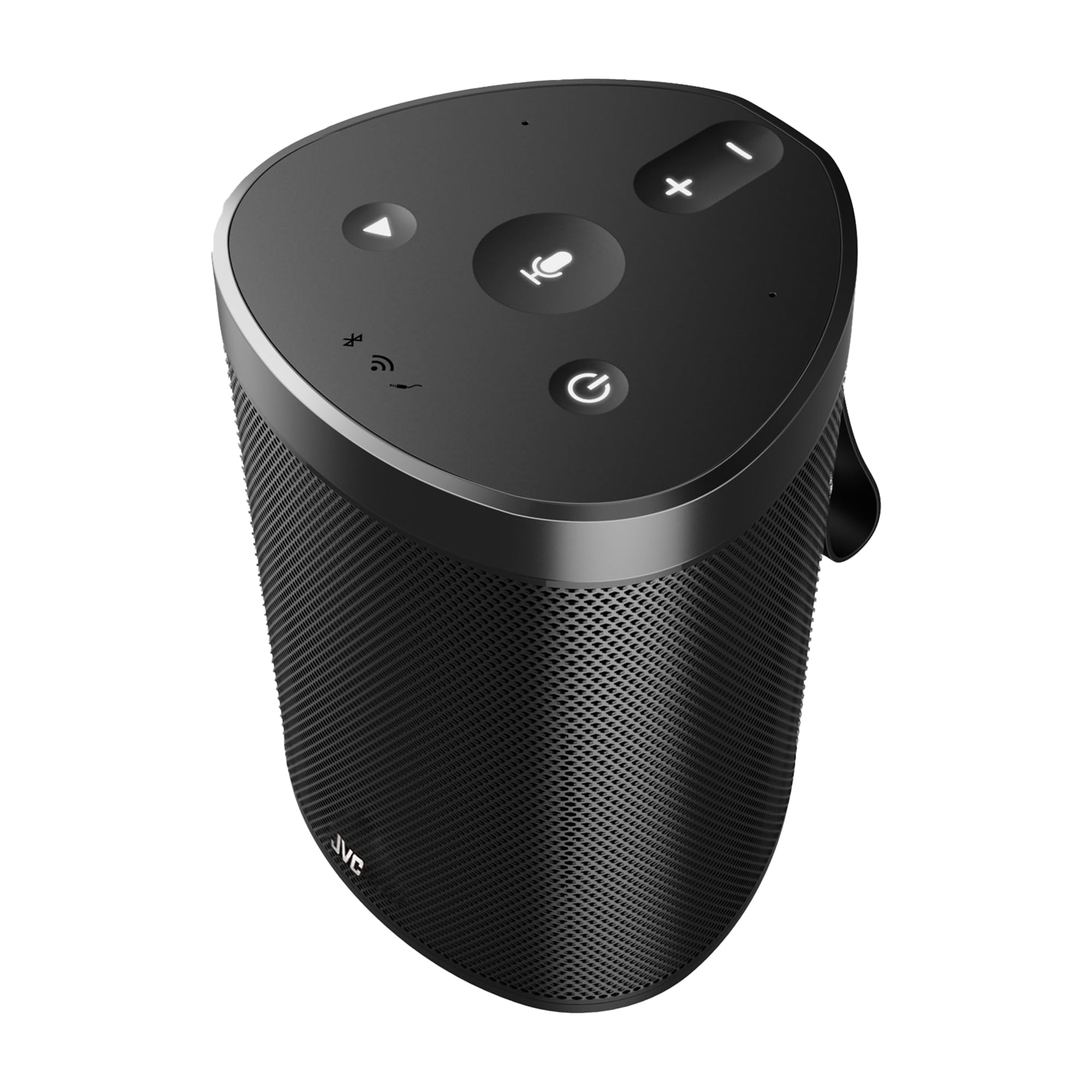
Figure 7: Control your music and more using just your voice with built-in Alexa support on the JVC XS-N318B speaker.
4.4 360-Degree Omnidirectional Audio and Dolby
The JVC XS-N318B is engineered with 360-degree omnidirectional audio and dual stereo speakers powered by Dolby technology, providing immersive sound that fills your space evenly.
5. ບໍາລຸງຮັກສາ
5.1 ການທໍາຄວາມສະອາດ
To clean the speaker, use a soft, dry, lint-free cloth. Do not use abrasive cleaners, waxes, or solvents. Ensure no liquids enter the speaker openings.
5.2 ການດູແລຫມໍ້ໄຟ
To prolong battery life, avoid fully discharging the speaker frequently. Recharge the battery regularly, even if the speaker is not in use for extended periods. Store the speaker in a cool, dry place.
5.3 ກັນນ້ຳ (IPX4)
The JVC XS-N318B speaker has an IPX4 rating, meaning it is resistant to splashes of water from any direction. It is suitable for outdoor use and can withstand light rain or splashes. Do not submerge the speaker in water or expose it to pressurized water jets.

Figure 8: The JVC XS-N318B speaker is IPX4 waterproof, making it suitable for use in splash-prone environments.
6. ການແກ້ໄຂບັນຫາ
- ບໍ່ມີພະລັງງານ: Ensure the speaker is charged. Connect the charging cable and allow it to charge for a few minutes before attempting to power on again.
- ບໍ່ມີສຽງ: Check the volume level on both the speaker and your connected device. Ensure the correct input source (Bluetooth, Wi-Fi, Aux) is selected and active.
- ບັນຫາການຈັບຄູ່ Bluetooth: Make sure the speaker is in pairing mode (blinking Bluetooth indicator). Turn off and on Bluetooth on your device, and try pairing again. Ensure no other devices are currently connected to the speaker.
- ບັນຫາການເຊື່ອມຕໍ່ Wi-Fi: Verify your Wi-Fi network is active and within range. Re-attempt the Wi-Fi setup process via the JVC Connect app.
- Alexa ບໍ່ຕອບສະໜອງ: Ensure the speaker is connected to Wi-Fi and your Alexa account is properly linked. Tap the Alexa button to activate it before speaking your command.
- ການຄວບຄຸມໄລຍະໄກບໍ່ເຮັດວຽກ: Check the battery in the remote control. Ensure there are no obstructions between the remote and the speaker.
7. ຂໍ້ມູນຈໍາເພາະ
| ຍີ່ຫໍ້ | JVC |
| ໝາຍເລກຕົວແບບ | XS-N318B |
| ລຳໂພງກຳລັງຜົນຜະລິດສູງສຸດ | 20 ວັດ RMS |
| ເຕັກໂນໂລຊີການເຊື່ອມຕໍ່ | Bluetooth, Wi-Fi, Aux |
| ຮູບແບບການອອກສຽງ | Stereo (Dual Stereo Speakers) |
| ການປ້ອນຂໍ້ມູນ Voltage | 5 ໂວນ |
| ວັດສະດຸ | ພາດສະຕິກ |
| ປະເພດລຳໂພງ | ກາງແຈ້ງ |
| ສີ | ດຳ |
| ຊ່ວງສູງສຸດ (Bluetooth) | 10 ແມັດ |
| ອັດຕາສ່ວນສັນຍານເຖິງສຽງດັງ | 70 dB |
| ແຫຼ່ງພະລັງງານ | ພະລັງງານຫມໍ້ໄຟ |
| ປະເພດຫມໍ້ໄຟ | 1 Lithium Ion (7.4V 6600mAh) |
| Approximate Playtime | ສູງສຸດ 9 ຊົ່ວໂມງ |
| ການຈັດອັນດັບຄວາມຕ້ານທານນ້ໍາ | IPX4 (ທົນທານຕໍ່ Splash) |
| ຂະໜາດ (ກວ້າງ x ສູງ) | ຂະໜາດປະມານ 12.7 cm x 17.2 cm |
| ປະເທດຕົ້ນກໍາເນີດ | ຈີນ |
8. ການຮັບປະກັນແລະການສະຫນັບສະຫນູນ
8.1 ຂໍ້ມູນການຮັບປະກັນ
Your JVC XS-N318B Portable Bluetooth Speaker comes with a ຮັບປະກັນ 1 ປີ from the date of purchase. This warranty covers manufacturing defects under normal use. Please retain your proof of purchase for warranty claims. The warranty does not cover damage caused by misuse, accidents, unauthorized modifications, or normal wear and tear.
8.2 ສະຫນັບສະຫນູນລູກຄ້າ
For technical assistance, warranty inquiries, or further information, please refer to the official JVC website or contact your local JVC customer support. Contact details can typically be found on the product packaging or the official brand webເວັບໄຊ.