
1. ການແນະນໍາ ແລະຫຼາຍກວ່າview
Thank you for choosing the TecTake Foldable Exercise Bike. This manual provides essential information for the safe and efficient use of your new fitness equipment. Designed for cardio training at home, this elliptical ergometer features a robust construction, an LCD computer, and a space-saving foldable design. Please read this manual thoroughly before assembly and use, and keep it for future reference.
ຄຸນນະສົມບັດທີ່ສໍາຄັນ:
- ການອອກແບບປະຢັດພື້ນທີ່: Easily foldable for convenient storage without cluttering your living space.
- ການກໍ່ສ້າງທົນທານ: Features a robust X-shaped frame made of epoxy-lacquered steel and a magnetic brake system for long-lasting performance.
- ຄວາມຕ້ານທານທີ່ສາມາດປັບໄດ້: 8 levels of resistance, adjustable via a knob, to customize your workout intensity.
- Comfortable and Secure: Adjustable seat with 7 height positions, padded handlebars with pulse sensors, and anti-slip pedals with adjustable foot straps.
- Integrated LCD Computer: Tracks time, speed, distance, calories burned, and pulse rate to monitor your progress.
2. ຄໍາແນະນໍາຄວາມປອດໄພ
ກ່ອນການໃຊ້ລົດຖີບອອກກຳລັງກາຍ, ກະລຸນາປະຕິບັດຕາມຂໍ້ຄວນລະວັງດ້ານຄວາມປອດໄພຕໍ່ໄປນີ້:
- ປຶກສາແພດກ່ອນເລີ່ມໂຄງການອອກກຳລັງກາຍໃໝ່, ໂດຍສະເພາະຖ້າທ່ານມີສະພາບສຸຂະພາບທີ່ມີຢູ່ກ່ອນແລ້ວ.
- Ensure the exercise bike is placed on a flat, stable surface. Use a protective mat to prevent damage to your floor.
- ຮັກສາເດັກນ້ອຍ ແລະສັດລ້ຽງຢູ່ຫ່າງຈາກອຸປະກອນໃນເວລານຳໃຊ້.
- The maximum user weight capacity for this device is 100 ກິໂລ (220 ປອນ). ບໍ່ເກີນຂອບເຂດຈໍາກັດນີ້.
- ໃສ່ເສື້ອຜ້າກິລາ ແລະ ເກີບທີ່ເໝາະສົມ. ຫຼີກລ່ຽງເຄື່ອງນຸ່ງທີ່ຫຼວມໆທີ່ອາດຈະຕິດຢູ່ໃນຊິ້ນສ່ວນທີ່ເຄື່ອນທີ່.
- Check all bolts and connections regularly to ensure they are securely tightened.
- ຢຸດການອອກກໍາລັງກາຍທັນທີຖ້າທ່ານຮູ້ສຶກອ່ອນເພຍ, ວິນຫົວ, ຫຼືມີອາການປວດ.
- Do not attempt to modify the equipment. Use only original replacement parts if necessary.
3. ເນື້ອໃນຊຸດ
Please verify that all components are present and undamaged before assembly. Refer to the packing list provided with your product for a detailed inventory. Typically, the package includes:
- ອົງປະກອບກອບຕົ້ນຕໍ
- ບ່ອນນັ່ງແລະບ່ອນນັ່ງ
- Handlebars with pulse sensors and LCD computer
- Pedals with foot straps
- Stabilizer bars
- Assembly hardware (screws, nuts, washers, tools)
- ຄູ່ມືຜູ້ໃຊ້
4. ສະພານແລະການຕິດຕັ້ງ
The TecTake Foldable Exercise Bike is designed for quick and easy assembly. Follow the step-by-step instructions provided in the separate assembly guide included in your package. Ensure all parts are correctly aligned and securely fastened.

ຮູບພາບ 1: ຫຼາຍກວ່າview of the TecTake Foldable Exercise Bike, illustrating its main components and features such as the training computer, adjustable resistance, 7-level adjustable seat, and foldable design.
4.1. ການປັບຄວາມສູງບ່ອນນັ່ງ
The seat can be adjusted to 7 different height positions to accommodate various user heights. To adjust:
- Loosen the adjustment knob located on the seat post.
- Raise or lower the seat to your desired height. Ensure your leg has a slight bend at the knee when the pedal is at its lowest point.
- Tighten the adjustment knob firmly to secure the seat in place.
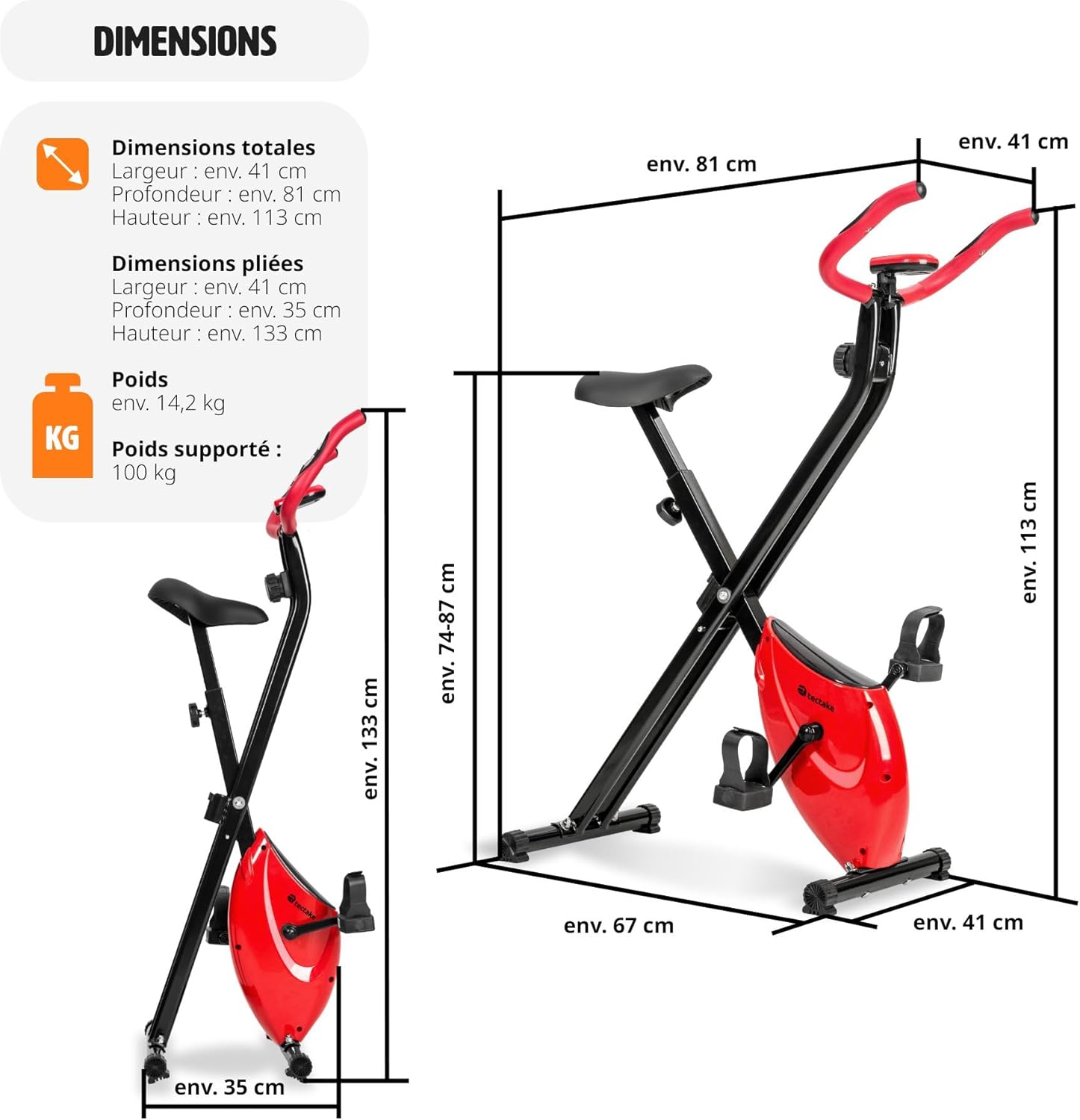
Image 2: Detailed dimensions of the exercise bike, showing both its unfolded state (approx. 81 x 41 x 113 cm) and folded state (approx. 35 x 41 x 133 cm), highlighting its compact storage capability.
4.2. ພັບແລະການເກັບຮັກສາ
To fold the exercise bike for storage:
- Locate the folding pin or mechanism on the main frame.
- Pull the pin or release the mechanism to unlock the frame.
- Carefully fold the bike until it is in its compact position.
- Secure the folding mechanism to prevent accidental unfolding.
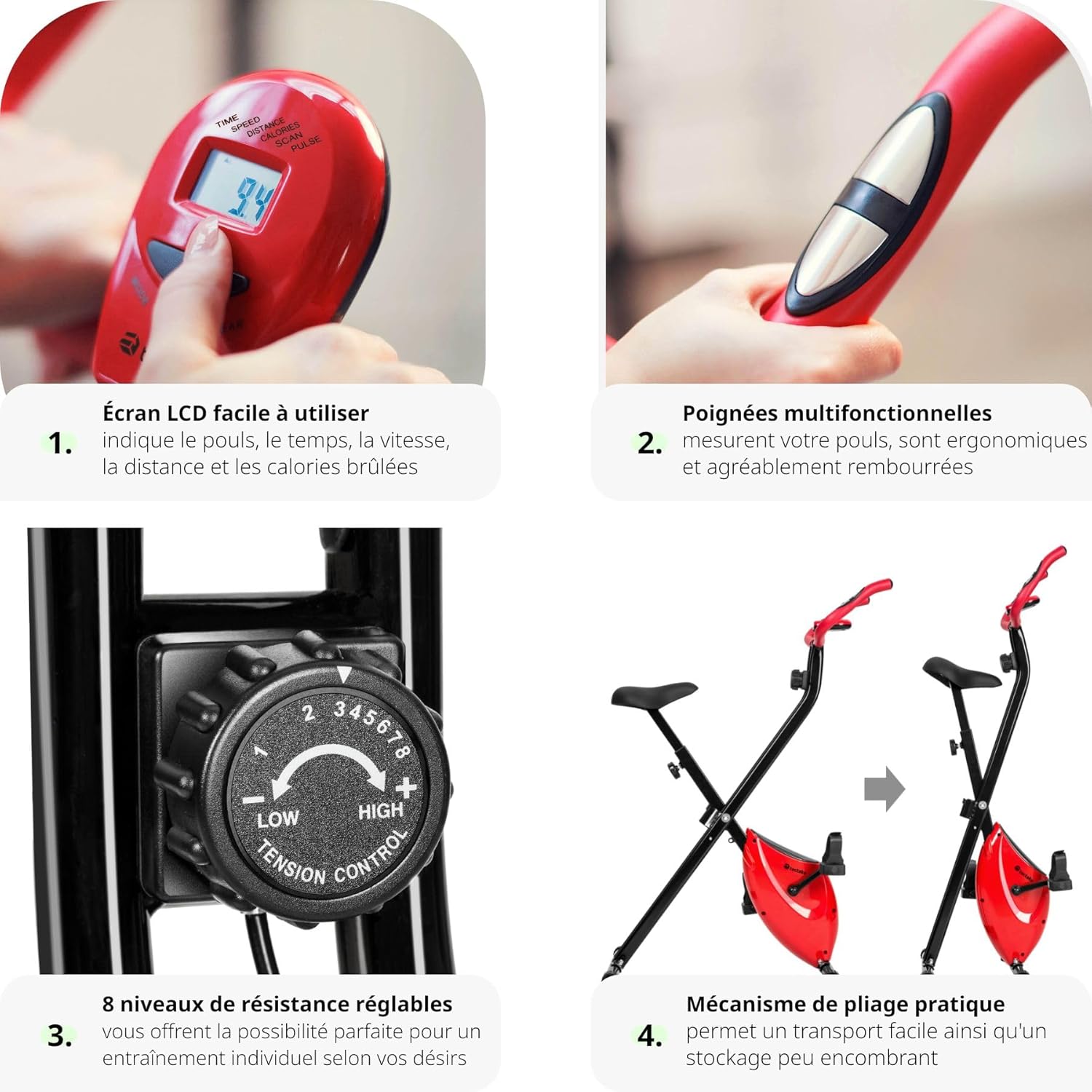
Image 3: A composite image showcasing four key features: 1. Easy-to-use LCD screen displaying pulse, time, speed, distance, and calories. 2. Multifunctional padded handles with pulse sensors. 3. 8 levels of adjustable resistance. 4. Practical folding mechanism for space-saving storage.
5. ຄໍາແນະນໍາການດໍາເນີນງານ
5.1. Using the LCD Computer
The integrated LCD computer helps you track your workout progress. It displays the following metrics:
- ເວລາ: ໄລຍະເວລາຂອງການອອກກໍາລັງກາຍຂອງທ່ານ.
- ຄວາມໄວ: ຄວາມໄວຮອບວຽນປະຈຸບັນ.
- ໄລຍະຫ່າງ: Distance covered during your session.
- ກາລະໂອກາດ: ຄາດຄະເນການເຜົາຜານພະລັງງານ.
- PULSE: Your heart rate, measured via the handlebar sensors.
- ສະແກນ: ຮອບວຽນອັດຕະໂນມັດຜ່ານຕົວວັດແທກທັງໝົດ.
To operate the computer:
- Press the 'MODE' button to select the desired display function.
- To reset values, press and hold the 'MODE' button for a few seconds.
- The computer automatically turns on when you start pedaling or press any button. It will turn off automatically after a period of inactivity.
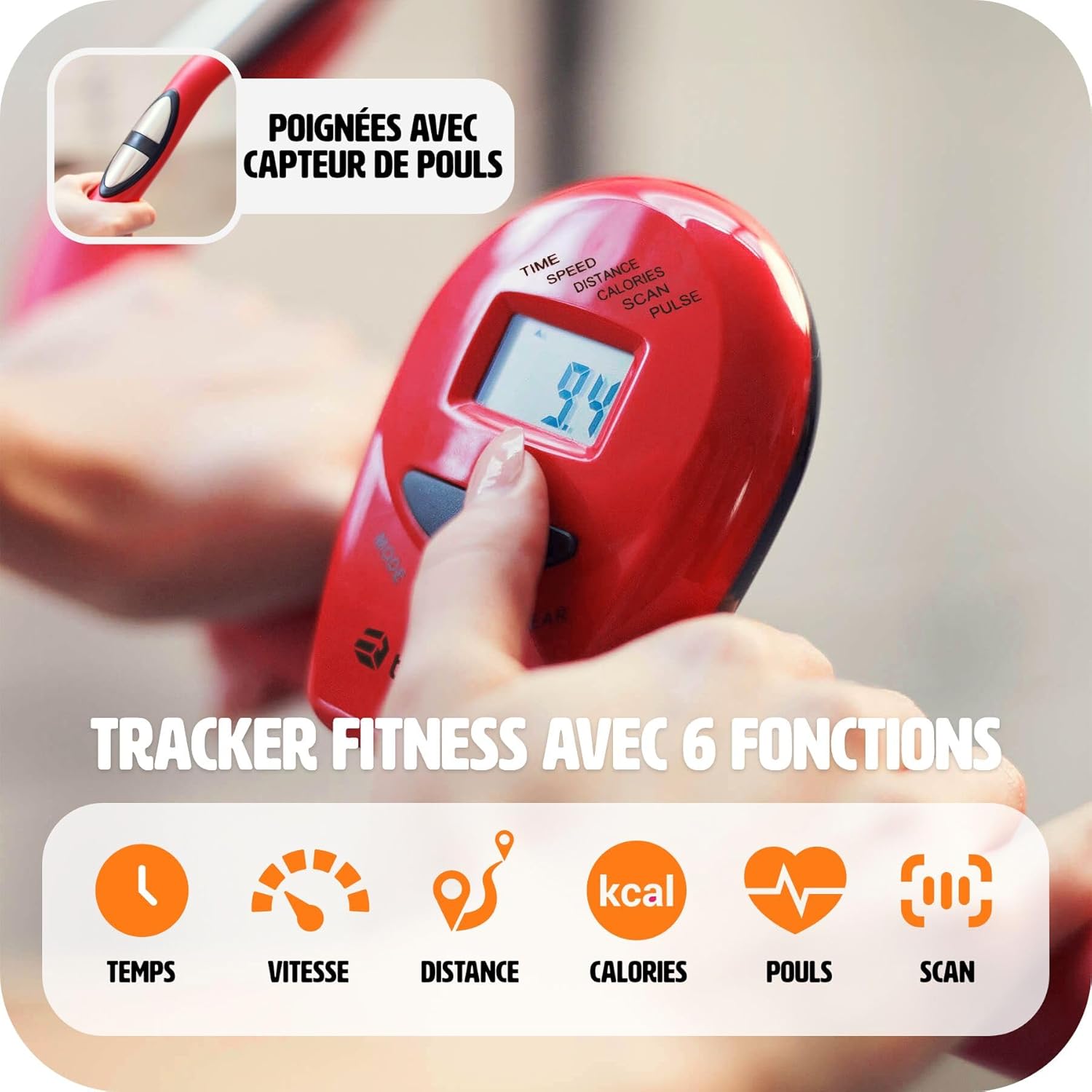
ຮູບພາບ 4: A ລາຍລະອຽດ view of the LCD training computer, showing the display of time, speed, distance, calories, pulse, and scan functions. A hand is shown pressing the mode button.
5.2. ການປັບຄວາມຕ້ານທານ
The exercise bike offers 8 levels of magnetic resistance. To adjust the intensity of your workout:
- Locate the tension control knob on the front post of the bike.
- Turn the knob clockwise to increase resistance (higher numbers for more intense workouts).
- Turn the knob counter-clockwise to decrease resistance (lower numbers for easier workouts).

Image 5: A close-up of the resistance knob, indicating 8 adjustable levels. Levels 1-3 are suggested for easy exercises, 4-6 for cardio training, and 7-8 for muscle strengthening.
5.3. ການກວດສອບອັດຕາການເຕັ້ນຂອງຫົວໃຈ
The handlebars are equipped with pulse sensors. To measure your heart rate:
- Grip both pulse sensors firmly with your hands during your workout.
- Your heart rate will be displayed on the LCD computer after a few seconds.

Image 6: A close-up image showing a hand properly gripping the pulse sensor integrated into the handlebar, demonstrating how to measure heart rate during exercise.

Image 7: This image highlights the comfortable seat and the 100% anti-slip rubber feet, ensuring stability and floor protection during use.
6. ບໍາລຸງຮັກສາ
ການບຳລຸງຮັກສາເປັນປະຈຳຮັບປະກັນອາຍຸການໃຊ້ງານທີ່ຍາວນານ ແລະ ປອດໄພຂອງລົດຖີບອອກກຳລັງກາຍຂອງທ່ານ.
- ທໍາຄວາມສະອາດ: ເຊັດລົດຖີບດ້ວຍການໂຄສະນາamp ຜ້າຫຼັງຈາກແຕ່ລະການນໍາໃຊ້ເພື່ອເອົາເຫື່ອແລະຝຸ່ນ. ຫຼີກລ້ຽງການເຮັດຄວາມສະອາດຂັດ.
- ການກວດກາ: Periodically check all moving parts, bolts, and connections for tightness and wear. Tighten any loose fasteners.
- ການລະບາຍສີ: The magnetic brake system is designed to be maintenance-free. No lubrication is required for the internal mechanism.
- ການເກັບຮັກສາ: ເມື່ອບໍ່ໄດ້ໃຊ້ງານ, ໃຫ້ພັບລົດຖີບ ແລະ ເກັບຮັກສາໄວ້ໃນບ່ອນແຫ້ງ ແລະ ເຢັນ ຫ່າງຈາກແສງແດດໂດຍກົງ ແລະ ອຸນຫະພູມສູງສຸດ.
7. ການແກ້ໄຂບັນຫາ
If you encounter issues with your TecTake Exercise Bike, refer to the following common problems and solutions:
- ຈໍ LCD ບໍ່ເຮັດວຽກ:
- Check if the batteries are correctly installed or need replacement. (The product specifications state 'Piles incluses ? Non', so batteries are not included and need to be purchased separately).
- Ensure all cable connections to the computer are secure. - No Resistance or Incorrect Resistance:
- Verify that the resistance knob is properly engaged and turning freely.
- Ensure the magnetic brake system is correctly assembled according to the instructions. - ສິ່ງລົບກວນຜິດປົກກະຕິໃນລະຫວ່າງການປະຕິບັດງານ:
- Check all bolts and nuts for tightness. Loose parts can cause rattling or squeaking.
- Inspect pedals and crank arms for any signs of damage or looseness. - Unstable Bike:
- Ensure the bike is on a level surface. Adjust the leveling caps on the stabilizer bars if present.
- Confirm all frame connections are securely tightened.
If the problem persists, please contact TecTake customer support.
8. ຂໍ້ມູນຈໍາເພາະ
| ຄຸນສົມບັດ | ລາຍລະອຽດ |
|---|---|
| ຍີ່ຫໍ້ | TecTake |
| ໝາຍເລກຕົວແບບ | 404950 |
| ສີ | ດຳ |
| ວັດສະດຸ | Epoxy-lacquered Steel, Plastic |
| ລະບົບຂັບ | ສາຍແອວ |
| ກົນໄກການຕໍ່ຕ້ານ | ແມ່ເຫຼັກ |
| ລະດັບຄວາມຕ້ານທານ | 8 (ປັບໄດ້) |
| ການປັບບ່ອນນັ່ງ | 7 Height Positions |
| ຄຸນສົມບັດ | Foldable, Adjustable Seat, Pulse Sensors |
| ແຫຼ່ງພະລັງງານ | ສາກແບັດເຕີຣີ (ບໍ່ລວມແບັດເຕີຣີ) |
| ຂະຫຍາຍຂະໜາດ (L x W x H) | ປະມານ. ຂະ ໜາດ 81 x 41 x 113 ຊມ |
| ຂະໜາດພັບ (L x W x H) | ປະມານ. ຂະ ໜາດ 35 x 41 x 133 ຊມ |
| ນ້ໍາຫນັກລາຍການ | 14.2 ກິໂລ |
| ຄວາມອາດສາມາດນ້ໍາຫນັກສູງສຸດ | 100 ກິໂລ |
| ການນໍາໃຊ້ທີ່ແນະນໍາ | ພາຍໃນ |
9. ວິດີໂອຜະລິດຕະພັນ
9.1. Ffitness FLC201BN Exercise Bike Overview
ວິດີໂອ 1: ວິດີໂອນີ້ສະຫນອງໃຫ້ຫຼາຍກວ່າview of the Ffitness FLC201BN exercise bike, demonstrating its features and use for home cardio and fitness workouts. (Note: This video is for a similar product, Ffitness FLC201BN, and is provided by a seller.)
9.2. F-Bike Foldable Exercise Bike Features
Video 2: This video showcases the features of an F-Bike foldable exercise bike, including its adjustable seat, multifunctional handles, LCD display, anti-slip pedals, magnetic resistance, and space-saving foldable design. (Note: This video is for a similar product, F-Bike, and is provided by a seller.)
10. ການຮັບປະກັນແລະການສະຫນັບສະຫນູນ
For warranty information, please refer to the documentation included with your purchase or contact the retailer. For technical support, spare parts, or any questions not covered in this manual, please contact TecTake customer service directly. Have your model number (404950) and purchase date ready when contacting support.