
LS VISION LS-MS2
LS VISION 4K 180-Degree Ultra-Wide Angle 4G Solar-Powered Outdoor Security Camera
Model: LS-MS2
ຍີ່ຫໍ້: LS VISION
1. ບົດແນະນຳ
This user manual provides detailed instructions for the installation, operation, and maintenance of your LS VISION 4K 180-Degree Ultra-Wide Angle 4G Solar-Powered Outdoor Security Camera. Please read this manual thoroughly before using the product to ensure proper functionality and safety.
2. ຜະລິດຕະພັນເກີນview
2.1 ລັກສະນະທີ່ສໍາຄັນ
- 4K/8MP Resolution for clear video capture.
- 180-Degree Ultra-Wide Angle Dual Lens for comprehensive coverage without distortion.
- Integrated 4G Module for connectivity without Wi-Fi, ideal for remote locations.
- Solar-Powered with 6W solar panel and built-in 18000 mAh batteries for continuous operation. Supports integrated and separate solar panel installation.
- ສຽງສອງທາງສຳລັບການສື່ສານແບບເວລາຈິງ.
- Cloud Storage and local TF card storage (up to 128GB, TF card not included).
- ໄລຍະໄກ Viewing and Playback via Niview app (Android/iOS).
- PIR + Human Detection with automatic human tracking, wake-up video recording, and push notifications.
- Multiple Recording Modes: 24-hour continuous recording, 24-hour + trigger recording, and three trigger recording modes.
- Dual Light Source Design: Full-color night vision up to 20 meters and infrared night vision up to 40 meters.
- IP66 Waterproof Rating for outdoor durability.
2.2 ແຜນວາດຜະລິດຕະພັນ
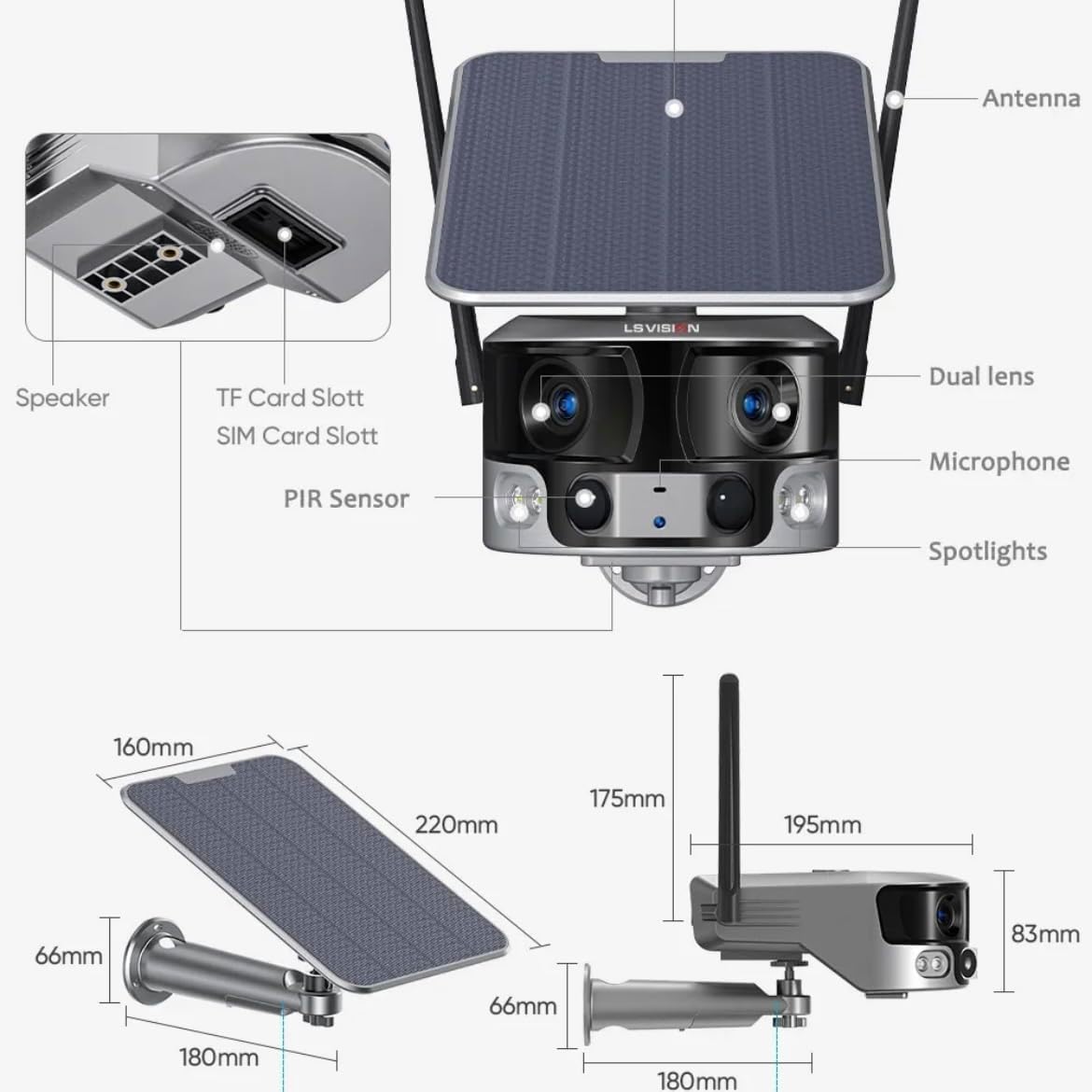
Figure 2.1: Product components and dimensions. Key parts include the solar panel, antennas, dual lens, microphone, spotlights, PIR sensor, speaker, TF card slot, and SIM card slot.
3. ເນື້ອໃນຊຸດ
ກະລຸນາກວດເບິ່ງເນື້ອໃນຂອງແພັກເກັດເມື່ອເປີດເພື່ອຮັບປະກັນວ່າລາຍການທັງໝົດມີຢູ່ ແລະ ບໍ່ເສຍຫາຍ:
- 1 x LS VISION 4K 180-Degree Ultra-Wide Angle 4G Solar-Powered Outdoor Security Camera
- 1 x Solar Panel (6W)
- 1 x ຊຸດຕົວຍຶດຕິດ
- ເສົາອາກາດ 1 x 4G
- 1 x ຊຸດຂອງ screws ແລະ plugs ຝາ
- 1 x 2-meter Extension Cable for Solar Panel
4. ຄູ່ມືການຕິດຕັ້ງ
4.1 ການສາກໄຟເບື້ອງຕົ້ນ
Although the camera is solar-powered, it is recommended to fully charge the built-in batteries before the first use. Connect the camera to a 5V/2A USB power adapter (not included) using a standard USB cable for initial charging. The charging indicator will show the status.
4.2 SIM Card & TF Card Installation
Locate the SIM card slot and TF card slot on the camera (refer to Figure 2.1). Ensure the camera is powered off before inserting or removing cards.
- Open the protective cover of the card slots.
- Insert a standard 4G SIM card into the SIM card slot with the gold contacts facing down. Ensure it clicks into place.
- Insert a TF (microSD) card (up to 128GB, not included) into the TF card slot with the gold contacts facing down. Ensure it clicks into place.
- Close the protective cover firmly to maintain the IP66 waterproof rating.
4.3 ຕິດຕັ້ງກ້ອງ
The camera is designed for wall mounting and outdoor use. Consider the following for optimal placement:
- ເລືອກສະຖານທີ່ທີ່ມີ ampແສງແດດໂດຍກົງສຳລັບແຜງແສງຕາເວັນ.
- ໃຫ້ແນ່ໃຈວ່າກ້ອງຖ່າຍຮູບມີຄວາມຊັດເຈນ view ຂອງພື້ນທີ່ທີ່ທ່ານຕ້ອງການຕິດຕາມ.
- Mount the camera at a height that provides good coverage and deters tampສຽບ.

Figure 4.1: The LS VISION camera shown with its solar panel and mounting bracket, ready for outdoor installation.

Figure 4.2: The camera operates on a 4G network, eliminating the need for a Wi-Fi router, making it suitable for locations without existing Wi-Fi infrastructure.
The solar panel can be installed integrated with the camera or separately using the 2-meter extension cable for optimal sun exposure.
4.4 ການຕິດຕັ້ງແອັບ ແລະ ການເຊື່ອມຕໍ່
To access and control your camera, download the Niview ແອັບຈາກຮ້ານແອັບໃນໂທລະສັບສະຫຼາດຂອງທ່ານ (ມີໃຫ້ໃຊ້ສຳລັບ Android ແລະ iOS).
- ຊອກຫາ "Niview" in the App Store or Google Play Store and install it.
- ລົງທະບຽນບັນຊີໃຫມ່ຫຼືເຂົ້າສູ່ລະບົບຖ້າຫາກວ່າທ່ານມີຢູ່ແລ້ວ.
- ປະຕິບັດຕາມຄຳແນະນຳໃນແອັບເພື່ອເພີ່ມກ້ອງຖ່າຍຮູບຂອງທ່ານ. ໂດຍປົກກະຕິແລ້ວສິ່ງນີ້ກ່ຽວຂ້ອງກັບການສະແກນລະຫັດ QR ໃນກ້ອງຖ່າຍຮູບ ຫຼື ການປ້ອນລະຫັດຂອງມັນດ້ວຍຕົນເອງ.
- ເມື່ອເຊື່ອມຕໍ່ແລ້ວ, ທ່ານສາມາດເຮັດໄດ້ view ດໍາລົງຊີວິດ footage, access recordings, and configure settings.
5. ຄໍາແນະນໍາການດໍາເນີນງານ
5.1 ດໍາລົງຊີວິດ View & ຫຼິ້ນຄືນ
Access the Niview app on your smartphone or tablet to view live video streams from your camera anytime, anywhere. The app also allows you to review ບັນທຶກ footage.

Figure 5.1: The Niview app interface demonstrating real-time monitoring and timeline playback, ensuring no moment is missed.
5.2 ການກວດຈັບການເຄື່ອນໄຫວ ແລະ ການແຈ້ງເຕືອນ
The camera features advanced PIR and human detection capabilities. When motion or a human figure is detected, the camera will:
- Automatically begin recording a wake-up video.
- Send instant push notifications to your connected smartphone.
- Initiate automatic human tracking to follow the detected subject.

Figure 5.2: The camera's human tracking feature automatically follows detected individuals, ensuring continuous monitoring of their movement.
5.3 ວິໄສທັດກາງຄືນ
The camera is equipped with a dual light source design for enhanced night vision:
- ວິໄສທັດກາງຄືນເຕັມສີ: Provides clear, colored images up to 20 meters in low-light conditions when spotlights are activated.
- Infrared (IR) ວິໄສທັດກາງຄືນ: Offers black and white vision up to 40 meters using infrared LEDs.
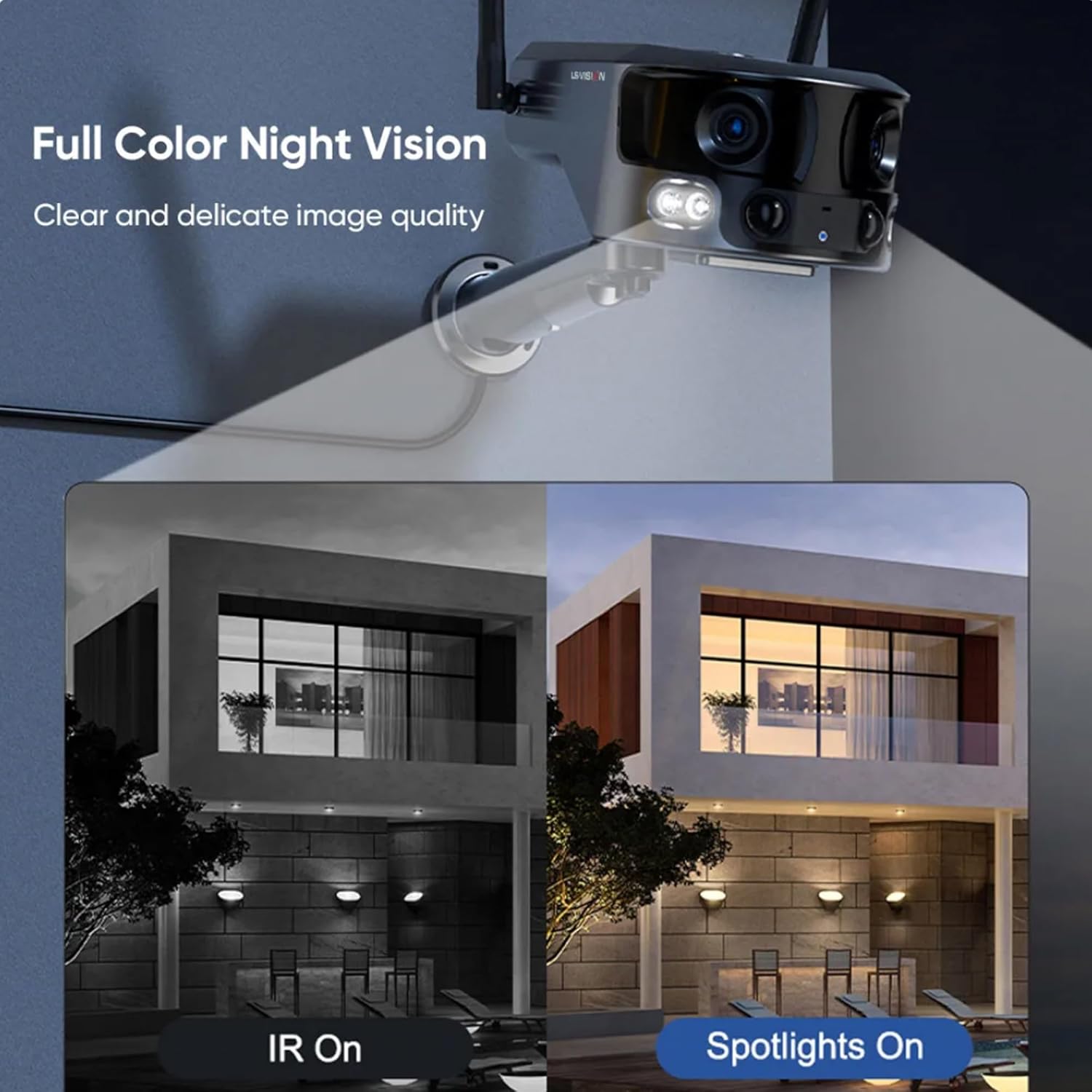
Figure 5.3: Comparison illustrating the difference between standard IR night vision and full-color night vision when the camera's spotlights are active.
5.4 ສຽງສອງທາງ
Utilize the built-in microphone and speaker for two-way audio communication through the Niview app. This allows you to listen in on the camera's surroundings and speak through the camera.
5.5 ຮູບແບບການບັນທຶກ
The camera supports various recording modes to suit your needs:
- 24-Hour Continuous Recording: Records continuously throughout the day.
- Trigger Recording: Records only when motion or human detection is triggered. This mode has three sub-options for customization.
6. ບໍາລຸງຮັກສາ
ການບໍາລຸງຮັກສາເປັນປົກກະຕິຮັບປະກັນປະສິດທິພາບທີ່ດີທີ່ສຸດແລະອາຍຸຍືນຂອງກ້ອງຖ່າຍຮູບຂອງທ່ານ:
- ທໍາຄວາມສະອາດ: ເຊັດເລນກ້ອງຖ່າຍຮູບ ແລະ ແຜງແສງຕາເວັນເປັນໄລຍະໆ ດ້ວຍການອ່ອນ, ງamp ຜ້າເພື່ອເອົາຂີ້ຝຸ່ນແລະສິ່ງເສດເຫຼືອ. ຢ່າໃຊ້ສານເຄມີທີ່ຮຸນແຮງ.
- ການດູແລຫມໍ້ໄຟ: Ensure the solar panel is exposed to sufficient sunlight to keep the built-in batteries charged. In prolonged periods of low sunlight, consider manually charging the camera.
- ການອັບເດດເຟີມແວ: Check the Niview app regularly for firmware updates. Keeping the firmware updated ensures the latest features and security patches.
- ການປົກປ້ອງສິ່ງແວດລ້ອມ: While IP66 rated, avoid exposing the camera to extreme weather conditions beyond its specified operating range if possible.

Figure 6.1: The camera's IP66 industrial-grade waterproof design ensures reliable operation even in adverse outdoor weather conditions like rain.
7. ການແກ້ໄຂບັນຫາ
ຖ້າເຈົ້າພົບບັນຫາກັບກ້ອງຂອງເຈົ້າ, ໃຫ້ອ້າງອີງເຖິງບັນຫາ ແລະວິທີແກ້ໄຂບັນຫາທົ່ວໄປຕໍ່ໄປນີ້:
| ບັນຫາ | ສາເຫດທີ່ເປັນໄປໄດ້ | ການແກ້ໄຂ |
|---|---|---|
| ກ້ອງຖ່າຍຮູບອອບລາຍ | No 4G signal; Low battery; SIM card issue. | Check 4G signal strength; Recharge battery; Reinsert SIM card or try a different one. |
| ຄຸນນະພາບຮູບພາບບໍ່ດີ | Dirty lens; Insufficient light; Network bandwidth. | Clean the lens; Ensure adequate lighting or enable night vision; Check 4G network speed. |
| ການກວດຈັບການເຄື່ອນໄຫວບໍ່ເຮັດວຽກ | Detection sensitivity too low; Incorrect settings; Obstructions. | Adjust sensitivity in app; Verify detection zone settings; Clear any obstructions. |
| ແບັດເຕີຣີບໍ່ໄດ້ສາກ | Insufficient sunlight; Dirty solar panel; Faulty connection. | Relocate solar panel to direct sunlight; Clean solar panel; Check cable connections. |
ຖ້າບັນຫາຍັງຄົງຢູ່, ກະລຸນາຕິດຕໍ່ຝ່າຍຊ່ວຍເຫຼືອລູກຄ້າ.
8. ຂໍ້ມູນຈໍາເພາະ
| ຄຸນສົມບັດ | ຂໍ້ມູນຈໍາເພາະ |
|---|---|
| ຊື່ຕົວແບບ | LS-MS2 |
| ຄວາມລະອຽດການຖ່າຍວິດີໂອ | 4K |
| Viewໃນມຸມ | 180 Degrees (Ultra-Wide) |
| ເຕັກໂນໂລຊີການເຊື່ອມຕໍ່ | 4G Cellular Network (also supports Wi-Fi) |
| ແຫຼ່ງພະລັງງານ | Solar Powered (6W Solar Panel) |
| ຄວາມອາດສາມາດຫມໍ້ໄຟ | 18000 mAh (ໃນຕົວ) |
| ລະດັບວິໄສທັດກາງຄືນ (ສີ) | ເຖິງ 20 ແມັດ |
| Night Vision Range (IR) | ເຖິງ 40 ແມັດ |
| ການເກັບຮັກສາ | Cloud Storage, TF Card (Max 128GB, not included) |
| ການປະເມີນກັນນ້ໍາ | IP66 |
| ວັດສະດຸ | Acrylonitrile Butadiene Styrene (ABS) and Metal |
| ປະເພດການຕິດຕັ້ງ | ຕິດຝາ |
| ອຸປະກອນທີ່ເຂົ້າກັນໄດ້ | Tablet, Smartphone (Android/iOS) |
| ຂະໜາດສິນຄ້າ | 18 x 18 x 15 cm |
| ນ້ໍາຫນັກລາຍການ | 1.25 ກິໂລກຣາມ |
9. ຂໍ້ມູນການຮັບປະກັນ
This product comes with a standard manufacturer's warranty. For specific warranty terms, duration, and claim procedures, please refer to the warranty card included in your product packaging or contact the retailer/manufacturer directly. Keep your purchase receipt as proof of purchase.
10. ການຊ່ວຍເຫຼືອລູກຄ້າ
For technical assistance, product inquiries, or troubleshooting beyond this manual, please contact LS VISION customer support. Contact details can typically be found on the product packaging, the manufacturer's official webເວັບໄຊທ໌, ຫຼືຜ່ານຈຸດຊື້ຂອງທ່ານ.
Ask a question about this manual
Ask about setup, troubleshooting, compatibility, parts, safety, or missing instructions. Manuals+ will review the question and use this page’s manual context to help answer it.