1. ບົດແນະນຳ
Thank you for choosing the Bifanuo Walking Pad Under Desk Treadmill. This manual provides essential information for the safe and effective use of your new fitness equipment. Please read it thoroughly before operation and retain it for future reference. This walking pad is designed to integrate physical activity into your daily routine, whether at home or in the office, promoting a healthier lifestyle.

Image 1.1: The Bifanuo Walking Pad Under Desk Treadmill in a typical usage scenario, demonstrating its compact design for use with a standing desk.
2. ຄໍາແນະນໍາຄວາມປອດໄພ
ເພື່ອຮັບປະກັນການປະຕິບັດທີ່ປອດໄພແລະປ້ອງກັນການບາດເຈັບ, ກະລຸນາປະຕິບັດຕາມຄໍາແນະນໍາດ້ານຄວາມປອດໄພຕໍ່ໄປນີ້:
- Read this entire manual before assembling or operating the walking pad.
- Place the walking pad on a flat, stable surface, ensuring adequate clearance around the unit.
- ໃຫ້ເດັກນ້ອຍ ແລະ ສັດລ້ຽງຢູ່ຫ່າງຈາກບ່ອນຍ່າງໃນລະຫວ່າງການປະຕິບັດງານ.
- Wear appropriate athletic footwear while using the walking pad.
- In case of emergency, immediately pull the safety key to stop the machine.
- Do not use the walking pad if you feel unwell, dizzy, or experience any pain. Consult a physician if necessary.
- Unplug the power cord from the outlet when the walking pad is not in use, before cleaning, or performing maintenance.
- ບໍ່ເກີນຄວາມອາດສາມາດນ້ໍາຫນັກສູງສຸດຂອງ 265 ປອນ (120 ກິໂລກໍາ).
- ກວດໃຫ້ແນ່ໃຈວ່າສາຍໄຟບໍ່ຖືກຈີກ ຫຼືເສຍຫາຍ.
3. ເນື້ອໃນຊຸດ
ກວດສອບວ່າອົງປະກອບທັງໝົດມີຢູ່ໃນຊຸດ:
- Bifanuo Walking Pad Treadmill
- ການຄວບຄຸມໄລຍະໄກ
- ກະແຈຄວາມປອດໄພ
- ສາຍໄຟ
- ນໍ້າມັນເຊື້ອໄຟ
- ຄູ່ມືຜູ້ໃຊ້ (ເອກະສານນີ້)
4. ຕັ້ງຄ່າ
The Bifanuo Walking Pad arrives fully assembled. Follow these steps for initial setup:
- ການຫຸ້ມຫໍ່: ເອົາແຜ່ນຍ່າງອອກຈາກເຄື່ອງຫຸ້ມຫໍ່ຂອງມັນຢ່າງລະມັດລະວັງ.
- ການຈັດວາງ: Place the walking pad on a firm, level surface. Ensure there is sufficient space around the unit for safe operation. The compact design allows it to be placed under a standing desk or in a dedicated exercise area.
- ການເຊື່ອມຕໍ່ພະລັງງານ: Connect the power cord to the walking pad and then to a grounded electrical outlet.
- ການຈັບຄູ່ການຄວບຄຸມໄລຍະໄກ: The remote control should be pre-paired. If it does not respond, ensure batteries are correctly inserted and try re-pairing according to instructions in the remote control section.
- ການຫລໍ່ລື່ນເບື້ອງຕົ້ນ: Although pre-lubricated, it is recommended to check the lubrication level before first use. Refer to the Maintenance section for lubrication instructions.

Image 4.1: The walking pad features transport wheels and a lightweight design for easy movement and storage, with dimensions of 46.2 inches length, 20.3 inches width, and 4.3 inches height.
5. ຄໍາແນະນໍາການດໍາເນີນງານ
Familiarize yourself with the controls and functions before beginning your workout.
5.1 ການເປີດ/ປິດ
- To power on, ensure the power cord is connected and the main power switch (if present) is in the 'ON' position. The LED display will illuminate.
- To power off, press the power button on the remote control or unplug the unit.
5.2 ການນໍາໃຊ້ການຄວບຄຸມໄລຍະໄກ
ການຄວບຄຸມໄລຍະໄກຊ່ວຍໃຫ້ທ່ານສາມາດເລີ່ມຕົ້ນ, ຢຸດ, ແລະປັບຄວາມໄວຂອງແຜ່ນຍ່າງ.
- ເລີ່ມ/ຢຸດ: ກົດ ເລີ່ມ/ຢຸດ button to begin or end your exercise.
- ການປັບຄວາມໄວ: ໃຊ້ + ແລະ - buttons to increase or decrease the speed. The speed range is 0.6 to 4 miles per hour (MPH).
5.3 ໜ້າທີ່ສະແດງຜົນ LED
The multi-functional LED display tracks your exercise data:
- ຄວາມໄວ: Displays your current walking/running speed.
- ໄລຍະທາງ: Shows the total distance covered during your session.
- ເວລາ: ຊີ້ບອກໄລຍະເວລາຂອງການອອກກຳລັງກາຍຂອງທ່ານ.
- ເຜົາຜານແຄລໍຣີ່: Estimates the calories expended during your exercise.

Image 5.1: The LED display provides real-time feedback on your workout, while the remote control offers convenient speed adjustments.
5.4 ໂໝດຄວາມໄວ
The walking pad supports various speed modes to suit different activity levels:
- ໂໝດເຮັດວຽກ: 0.6 - 1 MPH (Ideal for light activity while working).
- ໂໝດຍ່າງ: 0.6 - 2.5 MPH (Suitable for a steady walk).
- ແບບແລ່ນ: 2.5 - 4 MPH (For a brisk walk or light jog).

Image 5.2: The walking pad offers multiple speed modes, allowing users to transition from a slow walk while working to a light jog.
ກະແຈຄວາມປອດໄພ 5.5 ອັນ
The safety key is a crucial safety feature. Attach the clip of the safety key to your clothing before starting the walking pad. If you accidentally step off or fall, the safety key will detach, immediately stopping the machine to prevent injury.
6. ບໍາລຸງຮັກສາ
ການບຳລຸງຮັກສາເປັນປະຈຳຮັບປະກັນອາຍຸການໃຊ້ງານທີ່ຍາວນານ ແລະ ປະສິດທິພາບທີ່ດີທີ່ສຸດຂອງຜ້າປູຍ່າງຂອງທ່ານ.
6.1 ການຫຼໍ່ຫຼອມ
The walking belt requires periodic lubrication to reduce friction and prevent wear. Use the provided lubricant or a compatible silicone-based treadmill lubricant.
- ຄວາມຖີ່: Lubricate the belt every 30-50 hours of use, or if you notice increased friction or squeaking.
- ຂັ້ນຕອນ:
- Turn off and unplug the walking pad.
- ຄາຍສະກູລໍ້ດ້ານຫຼັງອອກເລັກນ້ອຍເພື່ອຍົກສາຍແອວຂຶ້ນ.
- Apply a small amount of lubricant evenly under the center of the walking belt.
- ຮັດລູກກອກຫລັງ.
- Plug in the walking pad and run it at a low speed (e.g., 1 MPH) for 2-3 minutes to distribute the lubricant.
6.2 ການທໍາຄວາມສະອາດ
ເຊັດແຜ່ນຍ່າງດ້ວຍການໂຄສະນາamp ຜ້າຫຼັງຈາກແຕ່ລະການນໍາໃຊ້ເພື່ອເອົາເຫື່ອແລະຂີ້ຝຸ່ນ. ຫຼີກເວັ້ນການນໍາໃຊ້ເຄື່ອງເຮັດຄວາມສະອາດຂັດຫຼືສານລະລາຍ.
6.3 ການປັບສາຍແອວ
If the walking belt shifts to one side or slips, it may require adjustment. Refer to the detailed instructions in the full user manual for precise belt alignment procedures.
7. ການແກ້ໄຂບັນຫາ
ພາກສ່ວນນີ້ແກ້ໄຂບັນຫາທົ່ວໄປທີ່ທ່ານອາດຈະພົບ.
- Walking Pad Not Starting:
- Ensure the power cord is securely plugged into both the walking pad and a working electrical outlet.
- Check if the safety key is properly inserted. The walking pad will not operate without it.
- Verify the main power switch (if applicable) is in the 'ON' position.
- ການຄວບຄຸມໄລຍະໄກບໍ່ຕອບສະຫນອງ:
- ກວດເບິ່ງແບດເຕີຣີໃນການຄວບຄຸມໄລຍະໄກແລະປ່ຽນແທນຖ້າຈໍາເປັນ.
- Ensure there are no obstructions between the remote control and the walking pad's receiver.
- If the remote control completely fails, contact customer support for a replacement.
- Squeaking Noise During Operation:
- This often indicates insufficient lubrication. Refer to the Lubrication section (6.1) for instructions.
- Walking Belt Slipping or Shifting:
- The walking belt may need adjustment. Refer to the Belt Adjustment section (6.3) or the comprehensive manual for detailed steps.
If you encounter issues not covered here or require further assistance, please contact Bifanuo customer support.
8. ຂໍ້ມູນຈໍາເພາະ
Detailed technical specifications for the Bifanuo Walking Pad Under Desk Treadmill:
- ໝາຍເລກຕົວແບບ:
- TM008BK
- ຂະໜາດຜະລິດຕະພັນ:
- 117.35 cm (L) x 51.56 cm (W) x 10.92 cm (H)
- ນ້ໍາຫນັກລາຍການ:
- 18 ກິໂລ (39.68 ປອນ)
- ຄວາມອາດສາມາດນ້ໍາຫນັກສູງສຸດ:
- 265 lbs (120 ກິໂລ)
- ສີ:
- ດຳ
- ວັດສະດຸ:
- ທາດເຫຼັກ
- ມ້າ:
- 2.25 HP
- ຊ່ວງຄວາມໄວ:
- 0.6 - 4 MPH (miles per hour)
- ປະເພດການສະແດງ:
- LED
- ຟັງຊັນເຄື່ອງວັດແທກ:
- ເຜົາຜານແຄລໍລີ່, ໄລຍະທາງ, ຄວາມໄວ, ເວລາ
- ແຫຼ່ງພະລັງງານ:
- ໄຟຟ້າສາຍ
- ຄຸນນະສົມບັດພິເສດ:
- Compact Design, Lightweight, Portable, Shock Absorbent, Wheeled
- ອົງປະກອບລວມ:
- Lubricant, Power Cord, Remote Control, Safety Key, User Manual

Image 8.1: The walking pad is equipped with a 2.25 HP motor, designed for quiet operation (under 45dB) and a maximum weight capacity of 265 lbs.
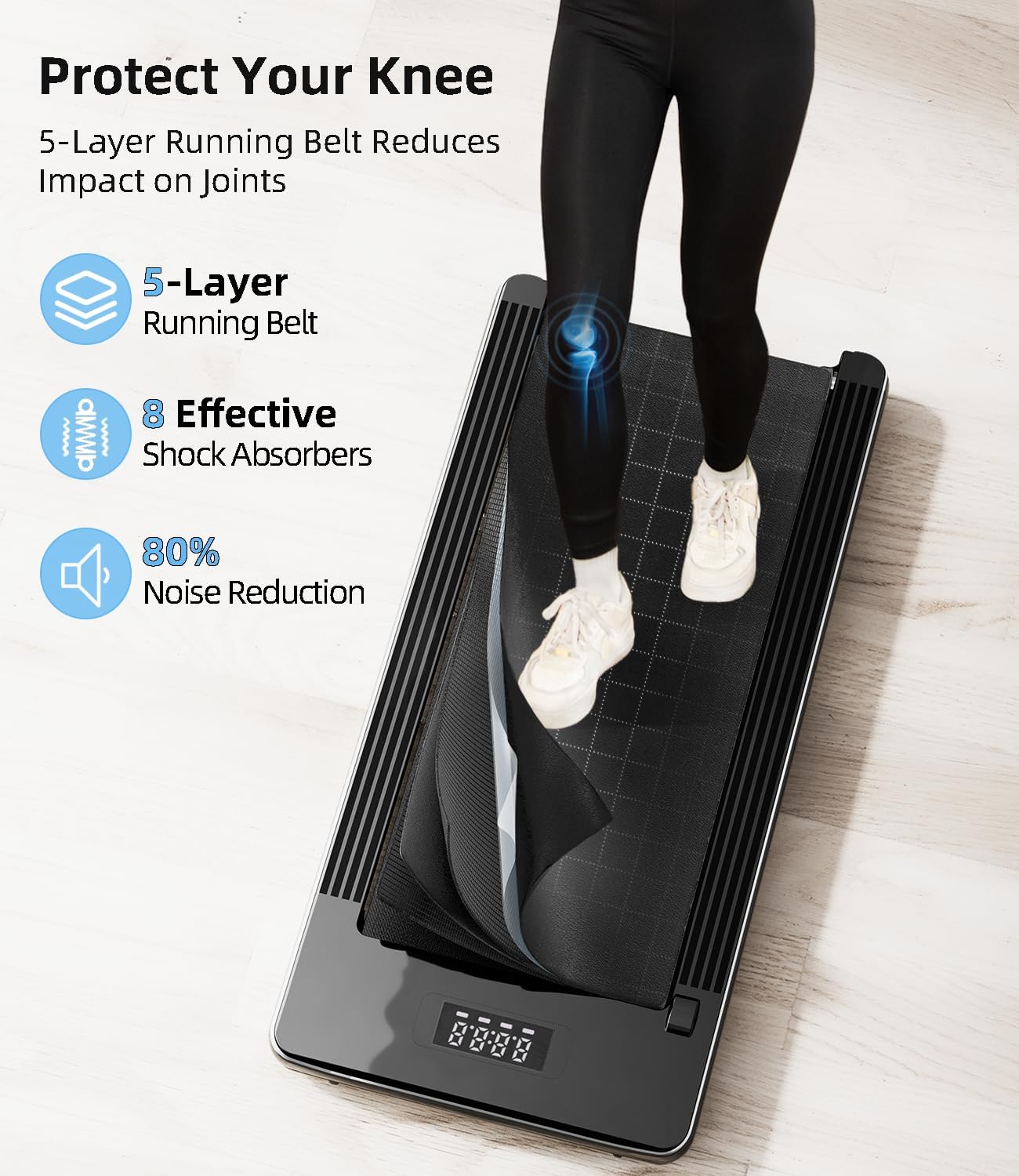
Image 8.2: The 5-layer anti-slip running belt combined with 8 effective shock absorbers provides joint protection and reduces noise by 80%.
9. ການຮັບປະກັນແລະການສະຫນັບສະຫນູນ
For warranty information, please refer to the documentation included with your purchase or contact the retailer. If you experience any issues with your Bifanuo Walking Pad or require technical assistance, please contact Bifanuo customer support. When contacting support, please have your model number (TM008BK) and purchase details readily available.