
ແນະນຳ
The Acoustic Research Portable Outdoor Wireless Speaker with LED Flickering Flame Light is designed to provide high-quality audio and ambient lighting for various indoor and outdoor settings. This rechargeable speaker features multiple light modes, including a realistic flickering flame, and is built with an IPX5 water-resistant rating, making it suitable for outdoor use. It also includes built-in nature sounds for relaxation and can be stereo-paired with another compatible AR speaker for an enhanced audio experience.
ເນື້ອໃນຊຸດ
- Acoustic Research Portable Outdoor Wireless Speaker (Model: AWSF9R)
- ສາຍສາກ USB
- ຄູ່ມືຜູ້ໃຊ້
ຄຸນສົມບັດຜະລິດຕະພັນ
- 7 ໂໝດແສງ: Soft White, Bright White, Flicker Flame, Soft Glow, Candlelight, Aurora. Separate controls for light and speaker.
- ຂະຫຍາຍເວລາຫຼິ້ນ: ການຫຼິ້ນສຽງສູງສຸດ 12 ຊົ່ວໂມງດ້ວຍການສາກຄັ້ງດຽວ.
- ຄວາມຕ້ານທານນ້ໍາ: IPX5 rated for protection against splashing water.
- ສຽງທໍາມະຊາດ: Includes Forest, Waves, Running Stream, and Rain.
- ການອອກແບບແບບພົກພາ: Attractive lantern style with a handle for easy carrying or hanging.
- ການເຊື່ອມຕໍ່ Bluetooth: ການຖ່າຍທອດສຽງໄຮ້ສາຍແບບບໍ່ມີຮອຍຕໍ່ຈາກອຸປະກອນທີ່ເຂົ້າກັນໄດ້.
- ການຈັບຄູ່ສະເຕຣິໂອ: Connect two AWSF9R speakers for true wireless stereo sound (second speaker sold separately).
ການຄວບຄຸມແລະຕົວຊີ້ວັດ

ຮູບທີ 1: Speaker Control Panel. This image shows a close-up of the speaker's control buttons, including power, volume, track skip, light mode, and nature sound buttons, along with the DC charging port.
| ປຸ່ມ/ຕົວຊີ້ວັດ | ຟັງຊັນ |
|---|---|
| ປຸ່ມເປີດປິດ (⏻) | Press and hold to power the speaker ON or OFF. Press briefly to Play/Pause music. |
| ປະລິມານລົງ / ຕິດຕາມກ່ອນຫນ້າ (− / ⏮) | ກົດສັ້ນໆເພື່ອຫຼຸດລະດັບສຽງ. ກົດຄ້າງໄວ້ເພື່ອໄປທີ່ເພງກ່ອນໜ້າ. |
| ລະດັບສຽງຂື້ນ / ຕິດຕາມຕໍ່ໄປ (+ / ⏭) | Press briefly to increase volume. Press and hold to go to the next track. |
| ປຸ່ມໂໝດແສງ (💡) | Press to cycle through 7 light modes: Soft White, Bright White, Flicker Flame, Soft Glow, Candlelight, Aurora, and OFF. |
| ປຸ່ມສຽງທໍາມະຊາດ (♫) | Press to cycle through 4 nature sounds: Forest, Waves, Running Stream, Rain, and OFF. |
| ພອດສາກໄຟ DC | Connect the USB charging cable here to recharge the speaker's battery. |
| ຕົວຊີ້ວັດ LED | Indicates charging status and Bluetooth pairing status. |
ຕັ້ງຄ່າ
ກຳລັງສາກລຳໂພງ
- Locate the DC charging port on the speaker's control panel.
- Connect the small end of the provided USB charging cable to the speaker's DC port.
- ເຊື່ອມຕໍ່ປາຍໃຫຍ່ກວ່າຂອງສາຍ USB ກັບອະແດັບເຕີໄຟ USB (ບໍ່ລວມ) ຫຼືພອດ USB ຂອງຄອມພິວເຕີ.
- The LED indicator will illuminate to show charging status. Allow approximately 3-4 hours for a full charge. The indicator will change or turn off when charging is complete.
ໝາຍເຫດ: Fully charge the speaker before first use to maximize battery life.
ຄໍາແນະນໍາການດໍາເນີນງານ
ເປີດ/ປິດ
- To power ON, press and hold the ⏻ Power button for 2-3 seconds until you hear an audible prompt.
- To power OFF, press and hold the ⏻ Power button for 2-3 seconds until you hear an audible prompt.
ການຈັບຄູ່ Bluetooth
- Ensure the speaker is powered ON and within 10 meters (33 feet) of your Bluetooth device (smartphone, tablet, etc.).
- ລຳໂພງຈະເຂົ້າສູ່ໂໝດຈັບຄູ່ Bluetooth ໂດຍອັດຕະໂນມັດເມື່ອເປີດເຄື່ອງເປັນຄັ້ງທຳອິດ ຫຼື ຖ້າບໍ່ມີອຸປະກອນໃດເຊື່ອມຕໍ່. ໄຟ LED ຈະກະພິບ, ຊີ້ບອກວ່າມັນພ້ອມທີ່ຈະຈັບຄູ່ແລ້ວ.
- ໃນອຸປະກອນ Bluetooth ຂອງທ່ານ, ໃຫ້ໄປທີ່ການຕັ້ງຄ່າ Bluetooth ແລະເປີດໃຊ້ງານ Bluetooth.
- ຊອກຫາ available devices and select "AR Speaker" (or similar name) from the list.
- Once paired, the LED indicator will stop flashing and remain solid, and you will hear a confirmation sound.
- ດຽວນີ້ທ່ານສາມາດຫຼິ້ນເພງຈາກອຸປະກອນຂອງທ່ານຜ່ານລຳໂພງໄດ້ແລ້ວ.
ໝາຍເຫດ: ລຳໂພງຈະພະຍາຍາມເຊື່ອມຕໍ່ໃໝ່ກັບອຸປະກອນທີ່ຈັບຄູ່ສຸດທ້າຍໂດຍອັດຕະໂນມັດເມື່ອເປີດເຄື່ອງ.
Controlling Light Modes
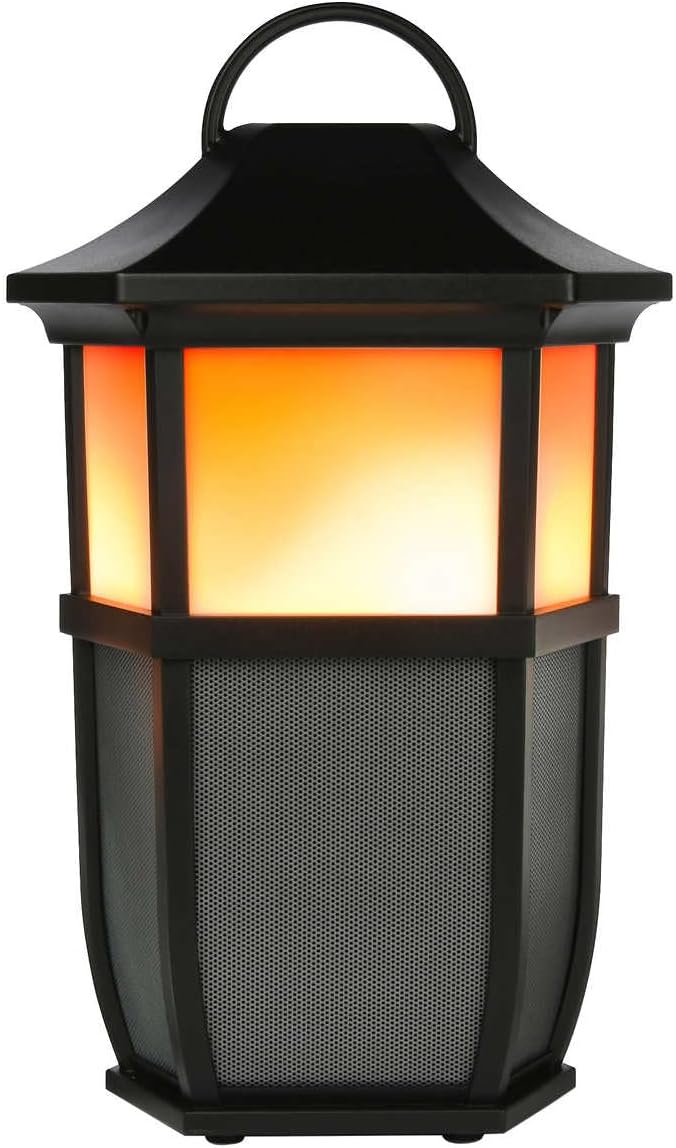

ຮູບທີ 2: Speaker Light Modes. The left image shows the speaker with a warm, flickering flame light, while the right image shows it with a bright white light, demonstrating two of the available light modes.
ກົດ 💡 Light Mode button repeatedly to cycle through the 7 available light modes:
- Flicker Flame
- ສີຂາວອ່ອນ
- ສີຂາວສົດໃສ
- ເງົາອ່ອນ
- ແສງທຽນ
- ແສງເງິນແສງທອງ
- ປິດໄຟ
Playing Nature Sounds
ກົດ ♫ Nature Sound button repeatedly to cycle through the 4 built-in nature sounds:
- ປ່າໄມ້
- ຄື້ນ
- Running Stream
- ຝົນ
- Nature Sound OFF
True Wireless Stereo (TWS) ການຈັບຄູ່ (ທາງເລືອກ)
To achieve a true stereo sound experience, you can pair two Acoustic Research AWSF9R speakers together. (Second speaker sold separately).
- Ensure both speakers are powered ON and not connected to any Bluetooth device.
- ໃນລໍາໂພງຫນຶ່ງ (ນີ້ຈະເປັນລໍາໂພງຕົ້ນຕໍຂອງທ່ານ), ກົດຄ້າງໄວ້ ⏻ Power button for 5 seconds until you hear a distinct pairing tone.
- The primary speaker will now search for the second speaker.
- Once connected, you will hear a confirmation tone, and the LED indicators on both speakers will change to indicate a successful TWS connection.
- Now, connect your Bluetooth device to the primary speaker as described in the "Bluetooth Pairing" section. Audio will play in stereo through both speakers.
ໝາຍເຫດ: TWS pairing only works with two identical AWSF9R speakers.
ບໍາລຸງຮັກສາ
- ທໍາຄວາມສະອາດ: ໃຊ້ຜ້າປຽກແຫ້ງເພື່ອເຮັດຄວາມສະອາດດ້ານນອກຂອງລຳໂພງ. ຢ່າໃຊ້ເຄື່ອງເຮັດຄວາມສະອາດຂັດຫຼືສານລະລາຍ.
- ການເປີດເຜີຍນ້ໍາ: While IPX5 water-resistant, do not submerge the speaker in water. Ensure the charging port cover is securely closed when exposed to water.
- ການເກັບຮັກສາ: ເກັບຮັກສາລຳໂພງໄວ້ໃນບ່ອນທີ່ເຢັນ, ແຫ້ງ, ຫ່າງຈາກແສງແດດໂດຍກົງ ແລະ ອຸນຫະພູມສູງສຸດເມື່ອບໍ່ໄດ້ໃຊ້ເປັນເວລາດົນ.
- ການດູແລຫມໍ້ໄຟ: ເພື່ອຍືດອາຍຸການໃຊ້ງານຂອງແບັດເຕີຣີ, ໃຫ້ສາກລຳໂພງໃຫ້ເຕັມຢ່າງໜ້ອຍທຸກໆສາມເດືອນ, ເຖິງແມ່ນວ່າຈະບໍ່ໄດ້ໃຊ້ເປັນປະຈຳກໍຕາມ.
ການແກ້ໄຂບັນຫາ
| ບັນຫາ | ການແກ້ໄຂທີ່ເປັນໄປໄດ້ |
|---|---|
| ລຳໂພງບໍ່ເປີດ. | Ensure the battery is charged. Connect the speaker to a power source using the USB cable and allow it to charge for at least 30 minutes before attempting to power on again. |
| ບໍ່ສາມາດຈັບຄູ່ກັບອຸປະກອນ Bluetooth ໄດ້. |
|
| ບໍ່ມີສຽງ ຫຼືສຽງຕໍ່າ. |
|
| Light modes are not working. | Press the Light Mode button repeatedly to cycle through all modes. Ensure the speaker has sufficient battery charge. |
| Nature sounds are not working. | Press the Nature Sound button repeatedly to cycle through all sounds. |
ຂໍ້ມູນຈໍາເພາະ

ຮູບທີ 3: Product Dimensions. This image illustrates the height (9.76 inches), width (7.2 inches), and depth (6.54 inches) of the speaker.
| ຄຸນສົມບັດ | ລາຍລະອຽດ |
|---|---|
| ຊື່ຕົວແບບ | AWSF9R |
| ຍີ່ຫໍ້ | ການຄົ້ນຄວ້າສຽງ |
| ປະເພດລຳໂພງ | ກາງແຈ້ງ, Portable |
| ການເຊື່ອມຕໍ່ | Bluetooth (ໄຮ້ສາຍ) |
| ຊ່ວງ Bluetooth | ສູງເຖິງ 10 ແມັດ (33 ຟຸດ) |
| ການຕໍ່ຕ້ານນ້ໍາ | IPX5 (ກັນນໍ້າ) |
| ຜົນຜະລິດພະລັງງານ | 30 ວັດ |
| ຮູບແບບການອອກສຽງ | ສະເຕີລິໂອ (ມີການຈັບຄູ່ TWS) |
| ຊີວິດຫມໍ້ໄຟ | ສູງສຸດ 12 ຊົ່ວໂມງ |
| ແຫຼ່ງພະລັງງານ | ພະລັງງານຫມໍ້ໄຟ |
| ຂະໜາດສິນຄ້າ (ກວ້າງ x ຍາວ x ສູງ) | 6.54" x 7.2" x 9.76" |
| ນ້ໍາຫນັກລາຍການ | 5 ປອນ |
| UPC | 044476151811 |
ການຮັບປະກັນແລະການສະຫນັບສະຫນູນ
This Acoustic Research product comes with a ການຮັບປະກັນຈໍາກັດ. For detailed warranty information, technical support, or service inquiries, please refer to the warranty card included with your product or visit the official Acoustic Research webເວັບໄຊ. ກະລຸນາຮັກສາຫຼັກຖານການຊື້ຂອງທ່ານສໍາລັບການຮຽກຮ້ອງການຮັບປະກັນ.
For further assistance, you may contact Acoustic Research customer support through their official channels.