
Ampire CPM 101
AMPIRE CPM 101 Smartphone Monitor User Manual
Model: CPM 101
1. ບົດແນະນຳ
This user manual provides comprehensive instructions for the installation, operation, and maintenance of your AMPIRE CPM 101 Smartphone Monitor. Please read this manual thoroughly before using the device to ensure proper functionality and safety.
2. ຂໍ້ມູນຄວາມປອດໄພ
ໃຫ້ປະຕິບັດຕາມຂໍ້ຄວນລະວັງດ້ານຄວາມປອດໄພຕໍ່ໄປນີ້ສະເໝີ ເພື່ອປ້ອງກັນຄວາມເສຍຫາຍຕໍ່ອຸປະກອນ ຫຼື ການບາດເຈັບຕໍ່ຕົວທ່ານເອງ:
- ຢ່າພະຍາຍາມຖອດປະກອບ ຫຼືດັດແປງອຸປະກອນ.
- ໃຫ້ແນ່ໃຈວ່າການເຊື່ອມຕໍ່ທັງຫມົດແມ່ນປອດໄພກ່ອນທີ່ຈະເປີດ.
- ຫຼີກເວັ້ນການເປີດເຜີຍອຸປະກອນກັບອຸນຫະພູມທີ່ຮຸນແຮງ, ແສງແດດໂດຍກົງ, ຫຼືຄວາມຊຸ່ມຊື່ນ.
- Install the monitor in a location that does not obstruct the driver's view ຫຼືແຊກແຊງລະບົບຄວາມປອດໄພຂອງຍານພາຫະນະ.
- Only use the provided cables and accessories.
3. ຜະລິດຕະພັນເກີນview
ໄດ້ AMPIRE CPM 101 is a 10-inch high-resolution touchscreen monitor designed to integrate smartphone functionalities like Apple CarPlay and Android Auto into your vehicle. It also supports the display of an optional rearview ກ້ອງຖ່າຍຮູບ.
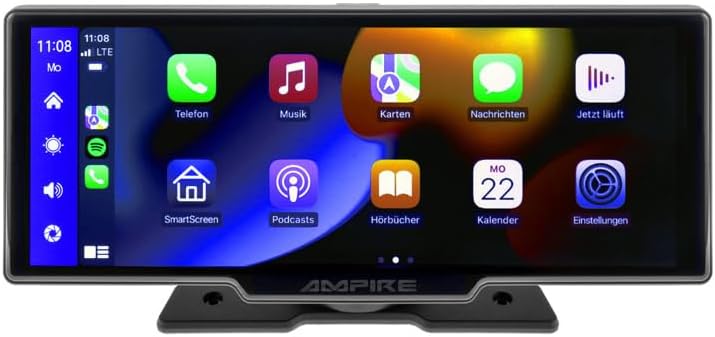
ຮູບ 3.1: ດ້ານຫນ້າ view ຂອງ AMPIRE CPM 101 monitor showing the user interface with various app icons.

ຮູບທີ 3.2: The AMPIRE CPM 101 monitor with its base, highlighting key features such as Bluetooth, Apple CarPlay, Android Auto, 1080p Full HD, Wi-Fi, and 10-inch display.

Figure 3.3: Contents of the AMPIRE CPM 101 package, including the monitor, rearview camera, and various connection cables.

ຮູບທີ 3.4: The AMPIRE CPM 101 monitor displaying a split screen with navigation on one side and a rearview camera feed on the other.
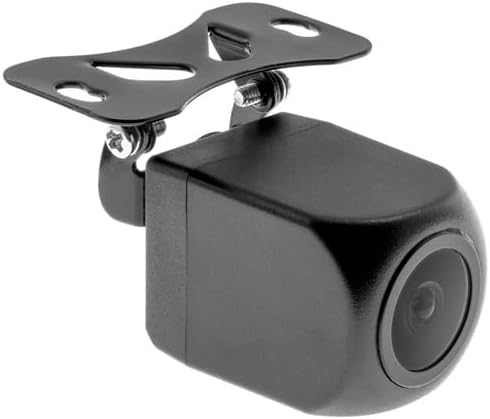
ຮູບທີ 3.5: ໄລຍະໃກ້ view of the compact rearview camera with its mounting bracket.
4. ການຕິດຕັ້ງແລະການຕິດຕັ້ງ
ໄດ້ AMPIRE CPM 101 is designed for easy integration into most vehicles. Professional installation is recommended for optimal performance and safety.
4.1. ເນື້ອໃນຊຸດ
ກ່ອນທີ່ຈະເລີ່ມຕົ້ນການຕິດຕັ້ງ, ກວດເບິ່ງວ່າອົງປະກອບທັງຫມົດແມ່ນຢູ່:
- AMPIRE CPM 101 Monitor
- Power Cable Set
- ຫລັງview Camera (optional, if included in your package)
- ສາຍເຊື່ອມຕໍ່ກ້ອງຖ່າຍຮູບ
- ວົງເລັບຕິດຕັ້ງ
- ຄູ່ມືຜູ້ໃຊ້
4.2. ການຕິດຕັ້ງ Monitor
- Choose a suitable location on your dashboard that does not obstruct your view ຫຼືແຊກແຊງຖົງລົມນິລະໄພ.
- ເຮັດຄວາມສະອາດພື້ນຜິວຂອງການຕິດຕັ້ງຢ່າງລະອຽດ.
- Attach the mounting bracket to the monitor.
- Securely mount the monitor to the dashboard using the provided adhesive or screws, ensuring it is stable.
4.3. ການເຊື່ອມຕໍ່ສາຍໄຟ
Connect the power cable set to your vehicle's power source (ACC, B+, GND). If installing a rearview camera, connect its video cable to the monitor's camera input and its power cable to the vehicle's reverse light circuit for automatic activation.
- ສາຍສີແດງ: Connect to ACC (Accessory Power).
- ສາຍສີເຫຼືອງ: Connect to B+ (Constant Power).
- ສາຍດຳ: Connect to GND (Ground).
- Reverse Trigger Wire (if applicable): Connect to the vehicle's reverse light positive wire.
5. ຄໍາແນະນໍາການດໍາເນີນງານ
5.1. ເປີດ / ປິດພະລັງງານ
The monitor will power on automatically when the vehicle's ignition is turned on (ACC power). To manually turn off, press and hold the power button (if available) or turn off the vehicle's ignition.
5.2. ການເຊື່ອມຕໍ່ກັບ Apple CarPlay / Android Auto
The CPM 101 supports wireless connection to Apple CarPlay and Android Auto. ໝາຍເຫດ: Devices with only 2.4 GHz Wi-Fi are not supported. iPhone 5 or newer is required for Apple CarPlay.
- ກວດໃຫ້ແນ່ໃຈວ່າ Bluetooth ແລະ Wi-Fi ຂອງສະມາດໂຟນຂອງທ່ານຖືກເປີດໃຊ້ງານແລ້ວ.
- On the CPM 101 monitor, navigate to the "Phone" or "Connect" menu.
- Select "Pair New Device" or similar option.
- On your smartphone, search for and select the CPM 101 in the Bluetooth device list.
- ຢືນຢັນລະຫັດການຈັບຄູ່ໃນອຸປະກອນທັງສອງ.
- Once paired via Bluetooth, the monitor will automatically establish a Wi-Fi connection for CarPlay or Android Auto.
5.3. Using the Rearview ກ້ອງຖ່າຍຮູບ
ຖ້າຫລັງview camera is connected, the monitor will automatically switch to the camera view when the vehicle is put into reverse gear. The image will revert to the previous screen when taken out of reverse.
5.4. ການຕັ້ງຄ່າລະບົບ
Access the system settings menu on the monitor to adjust display brightness, audio output, language, and other preferences. Refer to the on-screen prompts for specific setting options.
6. ບໍາລຸງຮັກສາ
ເພື່ອຮັບປະກັນອາຍຸຍືນແລະປະສິດທິພາບທີ່ດີທີ່ສຸດຂອງທ່ານ AMPIRE CPM 101 monitor, follow these maintenance guidelines:
- ທໍາຄວາມສະອາດຫນ້າຈໍ: ໃຊ້ຜ້າທີ່ອ່ອນນຸ່ມ, ບໍ່ມີສານດ່າງເພື່ອເຊັດໜ້າຈໍຢ່າງຄ່ອຍໆ. ສໍາລັບ smudges stubborn, ເລັກນ້ອຍ dampen the cloth with water or a screen-cleaning solution. Do not use abrasive cleaners or solvents.
- ທໍາຄວາມສະອາດທົ່ວໄປ: Keep the monitor and its surroundings free from dust and debris. Use a soft brush or compressed air to clean vents and connectors.
- ອຸນຫະພູມ: Avoid exposing the device to extreme hot or cold temperatures for prolonged periods.
- ການເກັບຮັກສາ: If storing the vehicle for an extended period, consider disconnecting the monitor's power to prevent battery drain.
7. ການແກ້ໄຂບັນຫາ
ຖ້າເຈົ້າພົບບັນຫາກັບເຈົ້າ AMPIRE CPM 101 monitor, refer to the following common problems and solutions:
| ບັນຫາ | ສາເຫດທີ່ເປັນໄປໄດ້ | ການແກ້ໄຂ |
|---|---|---|
| ຈໍສະແດງຜົນບໍ່ເປີດ. | ບໍ່ມີການສະຫນອງພະລັງງານ; ການເຊື່ອມຕໍ່ວ່າງ; ຟິວເປົ່າ. | Check power cable connections. Verify vehicle's fuse box. Ensure ignition is on. |
| ບໍ່ສາມາດເຊື່ອມຕໍ່ກັບ Apple CarPlay/Android Auto ໄດ້. | Smartphone Wi-Fi/Bluetooth off; incompatible phone; 2.4 GHz Wi-Fi only. | Ensure Bluetooth and Wi-Fi are on. Check phone compatibility (iPhone 5+). Confirm phone supports 5 GHz Wi-Fi. Re-pair device. |
| ຫລັງview ກ້ອງຖ່າຍຮູບບໍ່ສະແດງ. | Camera not connected; reverse trigger wire not connected; faulty camera. | Check camera video and power connections. Ensure vehicle is in reverse. Test camera if possible. |
| ບໍ່ມີສຽງ. | Volume too low; incorrect audio output setting; Bluetooth not connected. | Increase volume. Check audio output settings on monitor. Ensure Bluetooth is connected to your vehicle's audio system. |
ຖ້າບັນຫາຍັງຄົງຢູ່ຫຼັງຈາກພະຍາຍາມແກ້ໄຂເຫຼົ່ານີ້, ກະລຸນາຕິດຕໍ່ຝ່າຍຊ່ວຍເຫຼືອລູກຄ້າ.
8. ຂໍ້ມູນຈໍາເພາະ
Below are the technical specifications for the AMPIRE CPM 101 Smartphone Monitor:
| ຄຸນສົມບັດ | ຂໍ້ມູນຈໍາເພາະ |
|---|---|
| ຍີ່ຫໍ້ | Ampອິອິ |
| ຂະຫນາດຈໍສະແດງຜົນ | 10 ນິ້ວ |
| ປະເພດການສະແດງ | LCD, Color Screen |
| ເຕັກໂນໂລຊີການເຊື່ອມຕໍ່ | Bluetooth, WiFi |
| ອຸປະກອນທີ່ເຂົ້າກັນໄດ້ | Smartphones with Apple CarPlay or Android Auto (wireless connection) |
| ຄຸນນະສົມບັດພິເສດ | Wireless Apple CarPlay & Android Auto, Optional Rearview ຈໍສະແດງຜົນກ້ອງຖ່າຍຮູບ |
| ຮູບແບບການອອກສຽງ | ສະເຕຣິໂອ |
| ພະລັງງານຜົນຜະລິດ | 50 ວັດ |
| ຂະໜາດສິນຄ້າ | 29 x 15 x 10 cm |
| ASIN | B0CKLSWGY7 |
| ວັນທີທີ່ມີໃຫ້ທໍາອິດ | ວັນທີ 6 ຕຸລາ 2023 |
9. ການຮັບປະກັນແລະການສະຫນັບສະຫນູນ
For warranty information and technical support, please refer to the documentation included with your purchase or visit the official Ampອິອິ webເວັບໄຊ. ຮັກສາຫຼັກຖານການຊື້ຂອງທ່ານສໍາລັບການຮ້ອງຂໍການຮັບປະກັນ.
ສະຫນັບສະຫນູນອອນໄລນ໌: www.ampire.de
Ask a question about this manual
Ask about setup, troubleshooting, compatibility, parts, safety, or missing instructions. Manuals+ will review the question and use this page’s manual context to help answer it.