
ແນະນຳ
Thank you for choosing the HyperGear Stealth2 ANC Wireless Headphones. This manual provides detailed instructions for setting up, operating, and maintaining your headphones to ensure optimal performance and longevity. Please read this manual thoroughly before use.

Image: HyperGear Stealth2 ANC Wireless Headphones, Bone color, showcasing key features like Active Noise Cancelling, 40mm Neodymium Drivers, Deep HD Stereo Sound, up to 24-hour playing time, rapid charge, and lightweight foldable design.
ເນື້ອໃນຊຸດ
ກວດສອບວ່າລາຍການທັງຫມົດແມ່ນມີຢູ່ໃນຊຸດ:
- HyperGear Stealth2 ANC Wireless Headphones
- ສາຍສາກ USB-C
- ຄູ່ມືຜູ້ໃຊ້ (ເອກະສານນີ້)
ສິນຄ້າເກີນview
Familiarize yourself with the various components and controls of your headphones.

Image: Detailed diagram of the HyperGear Stealth2 ANC Wireless Headphones, highlighting the on-ear controls. Labels include Power On/Off, Enter Pairing Mode, Volume Up/Next Track, Play/Pause/Answer/End Call, Reject Call, Activate Voice Assistant, Gaming Mode On/Off, Volume Down/Previous Track, and Active Noise Cancellation On/Off. Also shows Quick Pairing and Auto Reconnection features.
ການຄວບຄຸມໃນຫູ:
- ປຸ່ມເປີດປິດ: Press and hold to power on/off. Press and hold to enter pairing mode.
- ປະລິມານຂຶ້ນ / ປຸ່ມຕິດຕາມຕໍ່ໄປ: ກົດເພື່ອເພີ່ມລະດັບສຽງ. ກົດຄ້າງໄວ້ເພື່ອຂ້າມໄປເພງຕໍ່ໄປ.
- ປຸ່ມຫຼາຍຟັງຊັນ (ຫຼິ້ນ/ຢຸດ): Press to play/pause audio. Press to answer/end calls. Press and hold to reject calls. Double-press to activate voice assistant. Triple-press to toggle Gaming Mode.
- ປະລິມານລົງ / ປຸ່ມຕິດຕາມທີ່ຜ່ານມາ: ກົດເພື່ອຫຼຸດລະດັບສຽງ. ກົດຄ້າງໄວ້ເພື່ອໄປທີ່ເພງກ່ອນໜ້າ.
- ປຸ່ມ ANC: Press to toggle Active Noise Cancellation on/off.
ຕັ້ງຄ່າ
1. ການສາກຫູຟັງ
ກ່ອນທີ່ຈະໃຊ້ຄັ້ງທໍາອິດ, ໃຫ້ສາກຫູຟັງຂອງທ່ານໃຫ້ເຕັມ.
- ເຊື່ອມຕໍ່ສາຍສາກ USB-C ທີ່ໃຫ້ມາເຂົ້າກັບພອດສາກໄຟໃນຫູຟັງ.
- ເຊື່ອມຕໍ່ປາຍອື່ນໆຂອງສາຍກັບແຫຼ່ງພະລັງງານ USB (ເຊັ່ນ: ອະແດບເຕີຝາ, ພອດ USB ຄອມພິວເຕີ).
- The LED indicator will show charging status. It typically takes about 2 hours for a full charge.
- A 10-minute rapid charge can provide approximately 3 hours of playback.
Image: A person wearing HyperGear Stealth2 ANC Wireless Headphones on an airplane, illustrating battery life: 18 hours with ANC on, 24 hours with ANC off. Also highlights rapid charge: 10 minutes of charging provides 3 hours of playback.
2. ການຈັບຄູ່ Bluetooth
ຈັບຄູ່ຫູຟັງຂອງທ່ານກັບອຸປະກອນຂອງທ່ານເພື່ອສຽງໄຮ້ສາຍ.
- ກວດໃຫ້ແນ່ໃຈວ່າຫູຟັງຖືກສາກ ແລະປິດແລ້ວ.
- ກົດປຸ່ມເປີດປິດຄ້າງໄວ້ຈົນກ່ວາຕົວຊີ້ວັດ LED ຈະກະພິບສີຟ້າແລະສີແດງ, ສະແດງເຖິງຮູບແບບການຈັບຄູ່.
- ໃນອຸປະກອນຂອງທ່ານ (ໂທລະສັບສະຫຼາດ, ແທັບເລັດ, ຄອມພິວເຕີ), ເປີດ Bluetooth ແລະຊອກຫາອຸປະກອນທີ່ມີຢູ່.
- Select "HyperGear Stealth2" from the list of found devices.
- ເມື່ອເຊື່ອມຕໍ່ແລ້ວ, ໄຟ LED ຈະສະແດງໄຟສີຟ້າທີ່ສະຫວ່າງຂຶ້ນ ຫຼື ກະພິບຊ້າໆ.
ການຈັບຄູ່ດ່ວນ: The headphones are designed for instant connection with your device in seconds after initial pairing.
ການເຊື່ອມຕໍ່ແບບອັດຕະໂນມັດ: The headphones will remember and automatically reconnect to the last paired device when powered on and within range.
ຄໍາແນະນໍາການດໍາເນີນງານ
ເປີດ/ປິດ
- ເພື່ອເປີດເຄື່ອງ, ໃຫ້ກົດປຸ່ມເປີດປິດຄ້າງໄວ້ຈົນກວ່າໄຟ LED ຈະສະຫວ່າງຂຶ້ນ.
- ເພື່ອປິດເຄື່ອງ, ໃຫ້ກົດປຸ່ມເປີດປິດຄ້າງໄວ້ຈົນກວ່າໄຟ LED ຈະປິດ.
ການຍົກເລີກສິ່ງລົບກວນທີ່ໃຊ້ວຽກ (ANC)
- ກົດປຸ່ມ ANC ສະເພາະເພື່ອເປີດ ຫຼື ປິດ ການຕັດສຽງລົບກວນແບບ Active Noise Cancellation.
- When ANC is active, ambient noise is significantly reduced, providing a quieter listening experience.
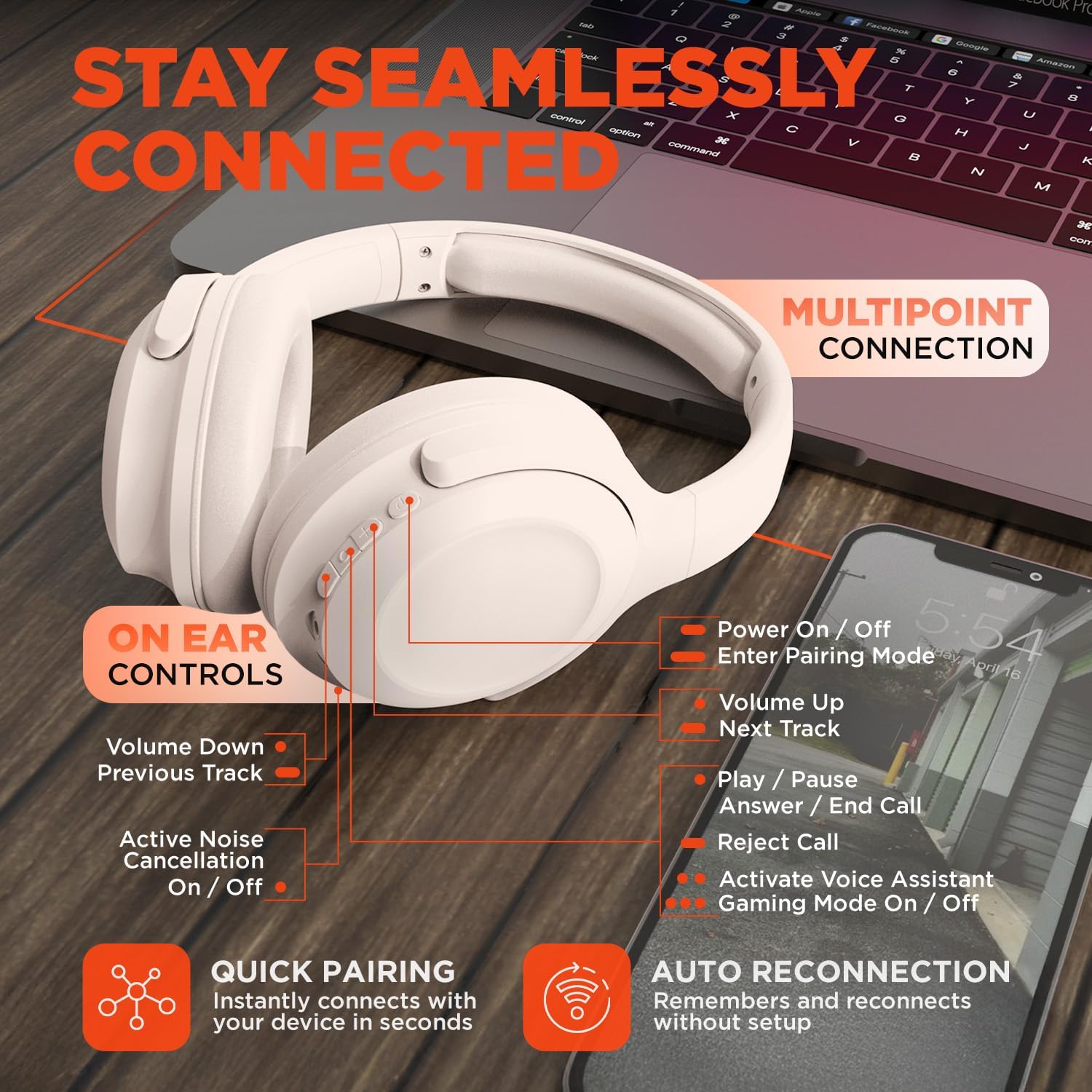
Image: HyperGear Stealth2 ANC Wireless Headphones highlighting "Pure Sound Anywhere" with Dual ANC Microphones for blocking unwanted noise and Adaptive Sound Control for real-time environment adjustment. Also shows compatibility with Siri and Google Assistant, and use cases for exercise, gaming, and travel.
ການຫຼິ້ນສຽງ ແລະການໂທ
- ຫຼິ້ນ/ຢຸດ: ກົດປຸ່ມ Multi-function ຄັ້ງດຽວ.
- ເພງຕໍ່ໄປ: ກົດປຸ່ມເພີ່ມສຽງຄ້າງໄວ້.
- ຕິດຕາມກ່ອນ ໜ້າ ນີ້: ກົດປຸ່ມປະລິມານລົງຄ້າງໄວ້.
- ການຄວບຄຸມລະດັບສຽງ: ກົດປຸ່ມ Volume Up ຫຼື Volume Down.
- ຮັບ/ສາຍໂທ: ກົດປຸ່ມ Multi-function ຄັ້ງດຽວ.
- ປະຕິເສດການໂທ: ກົດປຸ່ມຫຼາຍຟັງຊັນຄ້າງໄວ້.
ຜູ້ຊ່ວຍສຽງ
- Double-press the Multi-function button to activate your device's voice assistant (Siri, Google Assistant, etc.).
ໂໝດເກມ
- Triple-press the Multi-function button to toggle the no-lag Gaming Mode. This mode optimizes audio synchronization for enhanced gameplay.
ການເຊື່ອມຕໍ່ຫຼາຍຈຸດ
The headphones support multipoint connection, allowing them to be connected to two Bluetooth devices simultaneously.
- Pair the headphones with the first device as described in the "Bluetooth Pairing" section.
- ປິດໃຊ້ງານ Bluetooth ໃນອຸປະກອນທໍາອິດ.
- ເອົາຫູຟັງກັບຄືນສູ່ໂໝດຈັບຄູ່ ແລະຈັບຄູ່ມັນກັບອຸປະກອນທີສອງ.
- Re-enable Bluetooth on the first device. The headphones should now be connected to both devices.
- Audio will play from the device that is actively playing content.

Image: HyperGear Stealth2 ANC Wireless Headphones positioned between a laptop and a smartphone, demonstrating the multipoint connection feature. This allows the headphones to stay seamlessly connected to multiple devices.
ບໍາລຸງຮັກສາ
ການດູແລທີ່ເໝາະສົມຮັບປະກັນອາຍຸການໃຊ້ງານ ແລະ ປະສິດທິພາບຂອງຫູຟັງຂອງທ່ານ.
- Keep the headphones dry. Do not expose them to water or excessive moisture. They are not water resistant.
- ເຮັດຄວາມສະອາດຫູຟັງ ແລະສາຍພັນຫົວດ້ວຍຜ້າອ່ອນ, ແຫ້ງ. ຫຼີກເວັ້ນການນໍາໃຊ້ສານເຄມີທີ່ຮຸນແຮງຫຼືວັດສະດຸຂັດ.
- ເກັບຮັກສາຫູຟັງໄວ້ໃນບ່ອນທີ່ເຢັນ, ແຫ້ງເມື່ອບໍ່ໄດ້ໃຊ້. ການອອກແບບທີ່ສາມາດພັບໄດ້ຊ່ວຍໃຫ້ມີການເກັບຮັກສາທີ່ຫນາແຫນ້ນ.
- ຫຼີກເວັ້ນອຸນຫະພູມທີ່ຮຸນແຮງ.
- ຢ່າພະຍາຍາມຖອດຫຼືດັດແປງຫູຟັງ, ເພາະວ່ານີ້ຈະເປັນການປະຖິ້ມການຮັບປະກັນ.
ການແກ້ໄຂບັນຫາ
ຖ້າທ່ານພົບບັນຫາ, ໃຫ້ອ້າງອີງເຖິງວິທີແກ້ໄຂທົ່ວໄປຕໍ່ໄປນີ້.
| ບັນຫາ | ການແກ້ໄຂ |
|---|---|
| ຫູຟັງຈະບໍ່ເປີດ. | ກວດໃຫ້ແນ່ໃຈວ່າຫູຟັງຖືກສາກເຕັມແລ້ວ. ເຊື່ອມຕໍ່ຫາແຫຼ່ງພະລັງງານໂດຍໃຊ້ສາຍ USB-C. |
| ບໍ່ສາມາດຈັບຄູ່ກັບອຸປະກອນໄດ້. |
|
| ບໍ່ມີສຽງ ຫຼືສຽງຕໍ່າ. |
|
| ANC ບໍ່ມີປະສິດທິພາບ. |
|
ຂໍ້ມູນຈໍາເພາະ
| ຄຸນສົມບັດ | ລາຍລະອຽດ |
|---|---|
| ຊື່ຕົວແບບ | HyperGear Stealth2 ANC Headphones |
| ໝາຍເລກຕົວແບບ | 15860 |
| ເຕັກໂນໂລຊີການເຊື່ອມຕໍ່ | ໄຮ້ສາຍ (Bluetooth) |
| ລຸ້ນ Bluetooth | 5.2 |
| ຊ່ວງ Bluetooth | 10 ແມັດ |
| ຂະໜາດໄດເວີສຽງ | 40ມມ |
| ຊ່ວງຄວາມຖີ່ | 20 Hz - 20,000 Hz |
| ການຄວບຄຸມສິ່ງລົບກວນ | Active Noise Cancellation |
| ຊີວິດຫມໍ້ໄຟ | ສູງສຸດ 24 ຊົ່ວໂມງ (ປິດ ANC) |
| ເວລາສາກໄຟ | 2 ຊົ່ວໂມງ |
| ພອດສາກໄຟ | USB-C |
| ວັດສະດຸ | ພາດສະຕິກ |
| ນ້ໍາຫນັກລາຍການ | 0.38 ກິໂລກຣາມ (13.3 ອອນສ໌) |
| ຂະໜາດສິນຄ້າ | 7.88 x 2.25 x 10.51 ນິ້ວ |
| ລະດັບຄວາມຕ້ານທານນ້ໍາ | ບໍ່ທົນທານຕໍ່ນ້ໍາ |
| UPC | 633755158605 |
ການຮັບປະກັນແລະການສະຫນັບສະຫນູນ
HyperGear products are designed for reliability and performance. For warranty information and customer support, please refer to the warranty card included with your purchase or visit the official HyperGear webເວັບໄຊ.
ນະໂຍບາຍການສົ່ງຄືນ: This product typically includes a 30-day return policy for refunds or replacements. Please check your purchase details for specific terms.
ຜູ້ຜະລິດ: ໄຮເປີເກຍ