
1. ບົດແນະນຳ
The Daytech Wireless Caregiver Pager System is designed to provide prompt assistance for individuals who may require immediate help, such as the elderly, seniors, patients, or disabled persons. This system includes a plug-in receiver and wireless call buttons, enabling a simple and effective way to alert caregivers.

Image 1.1: Daytech Wireless Caregiver Pager System components.
2. ອົງປະກອບຂອງຜະລິດຕະພັນ
Your Daytech Wireless Caregiver Pager System package includes the following items:
- 1 x Plug-in Receiver
- 2 x Wireless Call Buttons
- 2 x Neck Straps (for call buttons)
- Double-sided Adhesive Stickers (for call buttons)
- 2 x 12V Batteries (pre-installed in call buttons)
3. ການຕິດຕັ້ງແລະການຕິດຕັ້ງ
3.1 ການຕິດຕັ້ງຕົວຮັບ
- Unpack the receiver from its packaging.
- Plug the receiver into a standard electrical outlet in a central location where the alert can be easily heard by the caregiver. Ensure the outlet is easily accessible.

Image 3.1: Receiver plugged into an electrical outlet.
3.2 Call Button Setup and Placement
The call buttons come with pre-installed 12V batteries. There are multiple options for attaching and placing the call buttons:
- ສາຍຄໍ: Attach the included neck strap to the call button. This allows the user to wear the button as a pendant, keeping it readily accessible.
- ກາວສອງດ້ານ: Use the provided double-sided adhesive stickers to mount the call button on a flat surface. Common placements include beside a bed, in a bathroom, or near a chair.
The call button is designed to be waterproof and dustproof (IP55 rated), making it suitable for use in environments like bathrooms where splashes may occur. However, it should not be immersed in water.

Image 3.2: Attaching the neck strap to the call button.

Image 3.3: Using double-sided adhesive for wall mounting.

Image 3.4: Versatile placement options for the call button.
4. ຄໍາແນະນໍາການດໍາເນີນງານ
4.1 Initiating a Call
To alert the caregiver, simply press the large red 'CALL' button on the wireless call button. The receiver will then sound an alarm and flash its LED indicator.

Image 4.1: Pressing the call button for assistance.
4.2 ໜ້າທີ່ຂອງຕົວຮັບ
The receiver offers customizable settings for alerts:
- ການເລືອກສຽງເອີ້ນເຂົ້າ: The receiver has 20 unique ringtones to choose from. The default ringtone is "Ding-Dong". Use the 'Forward' and 'Backward' buttons on the side of the receiver to cycle through the available tones.
- ການປັບລະດັບສຽງ: There are 5 adjustable volume levels, ranging from 0 dB (mute mode) to 110 dB. Use the 'Volume Control' button on the side of the receiver to adjust the loudness.
- ຕົວຊີ້ວັດ LED: The receiver features an LED light that flashes when an alert is received, providing a visual notification even if the volume is set low or in mute mode.
- ຟັງຊັນຫນ່ວຍຄວາມຈໍາ: The receiver retains your selected ringtone and volume settings even after being unplugged.
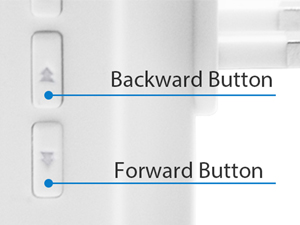
Image 4.2: Ringtone selection buttons.

Image 4.3: Volume control button.

ຮູບພາບ 4.4: ຫຼາຍກວ່າview of receiver features.
4.3 ຊ່ວງໄຮ້ສາຍ
The system operates with a wireless range of over 300 feet (approximately 150 meters) in an open area. This allows for reliable communication between the call button and receiver across different rooms or floors within a home, hospital, or nursing home setting.

Image 4.5: Wireless range illustration.
5. ບໍາລຸງຮັກສາ
5.1 Battery Replacement (Call Button)
The call button uses a 12V battery. If the call button stops functioning or its range decreases significantly, the battery may need replacement. To replace the battery:
- ເປີດ c ດ້ານຫຼັງຢ່າງລະມັດລະວັງasing of the call button.
- ຖອດແບັດເຕີຣີ 12V ເກົ່າອອກ.
- ໃສ່ແບັດເຕີຣີ 12V ໃໝ່, ຮັບປະກັນວ່າຂົ້ວຖືກຕ້ອງ.
- ປິດຄasing ຢ່າງປອດໄພ.
5.2 ການທໍາຄວາມສະອາດ
To clean the receiver and call buttons, use a soft, dry cloth. For stubborn dirt, a slightly damp cloth can be used, but ensure no moisture enters the devices. Do not use abrasive cleaners or solvents.
5.3 ການຕໍ່ຕ້ານນ້ໍາ
While the call button is IP55 waterproof and dustproof, it is designed to withstand splashes and light rain. It is not intended for submersion in water. Avoid prolonged exposure to heavy rain or direct water jets.
6. ການແກ້ໄຂບັນຫາ
| ບັນຫາ | ສາເຫດທີ່ເປັນໄປໄດ້ | ການແກ້ໄຂ |
|---|---|---|
| ເຄື່ອງຮັບບໍ່ມີສຽງເມື່ອກົດປຸ່ມ. | Receiver unplugged or power outage. Call button battery is low or dead. Call button is out of range. | ຮັບປະກັນວ່າຕົວຮັບໄດ້ສຽບໃສ່ປລັກສຽບຢ່າງປອດໄພ. Replace the 12V battery in the call button. Move the call button closer to the receiver. |
| Receiver volume is too low or silent. | Volume setting is too low or in mute mode. | Adjust the volume using the 'Volume Control' button on the receiver. |
| Interference or reduced range. | Thick walls, metal objects, or other electronic devices causing interference. | Relocate the receiver or call button to minimize obstructions. Avoid placing near large metal structures or strong electromagnetic fields. |
7. ຂໍ້ມູນຈໍາເພາະ
| ຄຸນສົມບັດ | ລາຍລະອຽດ |
|---|---|
| ໝາຍເລກຕົວແບບ | B0CJB971BF |
| ວິທີການຄວບຄຸມ | ແຕະ |
| ລະດັບສຽງ | ເຖິງ 110 dB |
| ປະເພດການຕິດຕັ້ງ | Wall Mount (for call button) |
| ຊ່ວງໄຮ້ສາຍສູງສຸດ | 500 Feet (150 meters) in open area |
| ເຕັກໂນໂລຢີເຊັນເຊີ | Manual (button press) |
| ຜູ້ຜະລິດ | ເດເທັກ |
| ຂະໜາດແພັກເກັດ | 4.37 x 3.7 x 3.62 ນິ້ວ |
| ນ້ໍາຫນັກລາຍການ | 7.9 ອອນ |
| Call Button Batteries | ແບັດເຕີຣີ 2 x 12V (ລວມຢູ່) |
| ແຫຼ່ງພະລັງງານຜູ້ຮັບ | Plug-in (AC powered) |
| ສີ | ສີຂາວ |
| ການຕໍ່ຕ້ານນ້ໍາ | IP55 (Call Button) |
8. ວິດີໂອຜະລິດຕະພັນ
The following videos provide additional visual guidance on the Daytech Wireless Caregiver Pager System:
Receiver Features Overview
This video demonstrates the various features of the receiver unit, including ringtone selection and volume adjustment.
Call Button Functionality
This video illustrates how to use the call button and its immediate response from the receiver.
ຄູ່ມືການຕິດຕັ້ງ
This video provides a step-by-step guide on installing the call button using the neck strap and adhesive options.
ການທົດສອບກັນນ້ໍາ
This video demonstrates the IP55 water resistance of the call button.
ການທົດສອບຂອບເຂດ
This video showcases the effective wireless range of the Daytech Caregiver Pager System.
9. ການຊ່ວຍເຫຼືອລູກຄ້າ
Daytech is committed to providing reliable products and support. If you encounter any issues or have questions regarding your Wireless Caregiver Pager System, please contact Daytech customer service. We aim to provide round-the-clock assistance to resolve your concerns.