
1. ບົດແນະນຳ
Thank you for choosing the ARROWMAX SES PRO Electric Precision Screwdriver. This cordless tool is designed for precision tasks, featuring smart motion control and a comprehensive set of 34 magnetic bits. It is ideal for electronics, laptops, glasses, and other delicate applications. This manual provides essential information for safe operation, setup, maintenance, and troubleshooting to ensure optimal performance and longevity of your device.
2. ຂໍ້ມູນຄວາມປອດໄພ
ກະລຸນາອ່ານຄໍາເຕືອນຄວາມປອດໄພທັງຫມົດແລະຄໍາແນະນໍາຢ່າງລະອຽດກ່ອນທີ່ຈະນໍາໃຊ້ຜະລິດຕະພັນນີ້. ການບໍ່ປະຕິບັດຕາມຄໍາແນະນໍາເຫຼົ່ານີ້ອາດຈະເຮັດໃຫ້ໄຟຟ້າຊ໊ອກ, ໄຟໄຫມ້, ແລະ / ຫຼືການບາດເຈັບທີ່ຮ້າຍແຮງ.
- ຮັກສາພື້ນທີ່ເຮັດວຽກໃຫ້ສະອາດ ແລະ ມີແສງສະຫວ່າງດີ. ພື້ນທີ່ວຸ້ນວາຍ ຫຼືບ່ອນມືດພາໃຫ້ເກີດອຸປະຕິເຫດ.
- ຫ້າມໃຊ້ເຄື່ອງມືໄຟຟ້າໃນບັນຍາກາດທີ່ລະເບີດ, ເຊັ່ນໃນທີ່ປະທັບຂອງຂອງແຫຼວ, ອາຍແກັສ, ຫຼືຝຸ່ນ. ເຄື່ອງມືພະລັງງານສ້າງປະກາຍໄຟທີ່ອາດຈະຕິດເຊື້ອຂີ້ຝຸ່ນຫຼືຄວັນ.
- ຮັກສາເດັກນ້ອຍ ແລະຜູ້ຢືນຢູ່ຫ່າງໆ ໃນຂະນະທີ່ໃຊ້ເຄື່ອງມືໄຟຟ້າ. ສິ່ງລົບກວນສາມາດເຮັດໃຫ້ເຈົ້າສູນເສຍການຄວບຄຸມ.
- ຫຼີກເວັ້ນການເລີ່ມຕົ້ນໂດຍບັງເອີນ. ກວດໃຫ້ແນ່ໃຈວ່າສະວິດຢູ່ໃນບ່ອນປິດກ່ອນທີ່ຈະເຊື່ອມຕໍ່ກັບຊຸດຫມໍ້ໄຟ, ເອົາຫຼືເອົາເຄື່ອງມື.
- ບໍ່ເກີນ. ຮັກສາຕີນທີ່ຖືກຕ້ອງແລະສົມດຸນຢູ່ຕະຫຼອດເວລາ. ນີ້ເຮັດໃຫ້ການຄວບຄຸມເຄື່ອງມືພະລັງງານທີ່ດີກວ່າໃນສະຖານະການທີ່ບໍ່ຄາດຄິດ.
- ແຕ່ງຕົວໃຫ້ຖືກຕ້ອງ. ຢ່າໃສ່ເຄື່ອງນຸ່ງຫລູຫລາຫຼືເຄື່ອງປະດັບ. ຮັກສາຜົມ ແລະເຄື່ອງນຸ່ງຂອງເຈົ້າໃຫ້ຫ່າງຈາກພາກສ່ວນທີ່ເຄື່ອນຍ້າຍ. ເຄື່ອງນຸ່ງຫລູຫລາ, ເຄື່ອງປະດັບ, ຫຼືຜົມຍາວສາມາດຈັບໄດ້ໃນສ່ວນທີ່ເຄື່ອນຍ້າຍ.
- ໃຊ້ອຸປະກອນປ້ອງກັນສ່ວນບຸກຄົນ. ໃສ່ເຄື່ອງປ້ອງກັນຕາສະເໝີ. ອຸປະກອນປ້ອງກັນເຊັ່ນ: ຫນ້າກາກຂີ້ຝຸ່ນ, ເກີບຄວາມປອດໄພທີ່ບໍ່ເລື່ອນ, ຫມວກແຂງ, ຫຼືເຄື່ອງປ້ອງກັນການໄດ້ຍິນທີ່ໃຊ້ໃນເງື່ອນໄຂທີ່ເຫມາະສົມຈະຊ່ວຍຫຼຸດຜ່ອນການບາດເຈັບສ່ວນບຸກຄົນ.
- ເກັບຮັກສາເຄື່ອງໃຊ້ໄຟຟ້າທີ່ບໍ່ໄດ້ໃຊ້ໄວ້ໃຫ້ໄກຈາກມືຂອງເດັກນ້ອຍ ແລະບໍ່ໃຫ້ບຸກຄົນທີ່ບໍ່ຄຸ້ນເຄີຍກັບເຄື່ອງມືໄຟຟ້າ ຫຼືຄໍາແນະນໍາເຫຼົ່ານີ້ເພື່ອໃຊ້ເຄື່ອງມືໄຟຟ້າ.
- ຮັກສາເຄື່ອງມືໄຟຟ້າ. ກວດເບິ່ງຄວາມຜິດປົກກະຕິຫຼືການຜູກມັດຂອງຊິ້ນສ່ວນເຄື່ອນທີ່, ການແຕກຫັກຂອງຊິ້ນສ່ວນແລະສະພາບອື່ນໆທີ່ອາດຈະສົ່ງຜົນກະທົບຕໍ່ການເຮັດວຽກຂອງເຄື່ອງມືໄຟຟ້າ. ຖ້າເສຍຫາຍ, ໃຫ້ສ້ອມແປງເຄື່ອງມືໄຟຟ້າກ່ອນທີ່ຈະໃຊ້.
- ການນໍາໃຊ້ເຄື່ອງມືພະລັງງານ, ອຸປະກອນເສີມແລະ bits ເຄື່ອງມືແລະອື່ນໆ. ຕາມຄໍາແນະນໍາເຫຼົ່ານີ້, ຄໍານຶງເຖິງສະພາບການເຮັດວຽກແລະການເຮັດວຽກທີ່ຈະປະຕິບັດ. ການນໍາໃຊ້ເຄື່ອງມືພະລັງງານສໍາລັບການປະຕິບັດງານທີ່ແຕກຕ່າງຈາກຈຸດປະສົງທີ່ສາມາດສົ່ງຜົນໃຫ້ສະຖານະການອັນຕະລາຍ.
- ເຕີມເງິນດ້ວຍເຄື່ອງສາກທີ່ລະບຸໂດຍຜູ້ຜະລິດເທົ່ານັ້ນ. ເຄື່ອງສາກທີ່ເໝາະສົມກັບແບັດເຕີລີຊະນິດໜຶ່ງອາດຈະເຮັດໃຫ້ເກີດຄວາມສ່ຽງໄຟໄໝ້ເມື່ອໃຊ້ກັບແບັດເຕີລີອື່ນ.
- ຢ່າໃຊ້ເຄື່ອງມືຖ້າສະຫວິດບໍ່ເປີດແລະປິດມັນ. ເຄື່ອງມືພະລັງງານໃດໆທີ່ບໍ່ສາມາດຄວບຄຸມດ້ວຍສະວິດແມ່ນເປັນອັນຕະລາຍແລະຕ້ອງໄດ້ຮັບການສ້ອມແປງ.
- ຖອດຊຸດແບັດເຕີລີ່ອອກຈາກເຄື່ອງມືໄຟຟ້າກ່ອນທີ່ຈະເຮັດການປັບປ່ຽນ, ປ່ຽນອຸປະກອນເສີມ, ຫຼືເກັບຮັກສາເຄື່ອງມືພະລັງງານ. ມາດຕະການປ້ອງກັນຄວາມປອດໄພດັ່ງກ່າວຫຼຸດຜ່ອນຄວາມສ່ຽງຂອງການເລີ່ມຕົ້ນເຄື່ອງມືໄຟຟ້າໂດຍບັງເອີນ.
3. ເນື້ອໃນຊຸດ
The ARROWMAX SES PRO Electric Precision Screwdriver package typically includes the following items:
- 1 x ARROWMAX SES PRO Electric Precision Screwdriver
- 1 x Magnetic Storage Case
- 34 x Magnetic Precision Bits (S2 Steel, 4mm)
- 1 x ສາຍສາກ USB-A ເຖິງ USB-C

Image: The ARROWMAX SES PRO Electric Precision Screwdriver, its magnetic bit case, and the included 34 precision bits.
4. ຜະລິດຕະພັນເກີນview ແລະອົງປະກອບ
Familiarize yourself with the main components of your ARROWMAX SES PRO screwdriver:

Image: Labeled diagram of the ARROWMAX SES PRO screwdriver's key components.
- ຜອດສາກໄຟ Type-C: Located at the top for recharging the internal battery.
- ການສະແດງສະຖານະ LED: An OLED screen showing battery level, torque setting, and operational status.
- ປຸ່ມເປີດປິດ: Used to turn the device on/off and adjust torque settings.
- ຮ່າງກາຍໂລຫະປະສົມອາລູມິນຽມ: Durable and lightweight construction.
- ໄຟ LED: ເຮັດໃຫ້ມີແສງພື້ນທີ່ເຮັດວຽກສໍາລັບການເບິ່ງເຫັນທີ່ດີກວ່າ.
- Bit Installation Port: Where precision bits are inserted.
5. ຕັ້ງຄ່າ
5.1 ການສາກໄຟ Screwdriver
- Locate the USB-C charging port at the top of the screwdriver.
- Connect the provided USB-A to USB-C charging cable to the screwdriver and a compatible USB-A power adapter (not included).
- The LED Status Display will indicate the charging progress. A full charge allows for tightening approximately 900 screws.
- ໝາຍເຫດສຳຄັນ: This electric screwdriver only supports USB-A to USB-C charging and is not compatible with USB-C PD (Power Delivery) chargers.

ຮູບພາບ: ຫຼາຍກວ່າview of charging port, battery, torque adjustment, and OLED display.
5.2 Installing Precision Bits
- Select the appropriate precision bit from the magnetic storage case. The case features a pop-up design for easy access.
- Insert the bit firmly into the Bit Installation Port at the tip of the screwdriver. The magnetic holder will secure the bit in place.
- To remove a bit, simply pull it out.
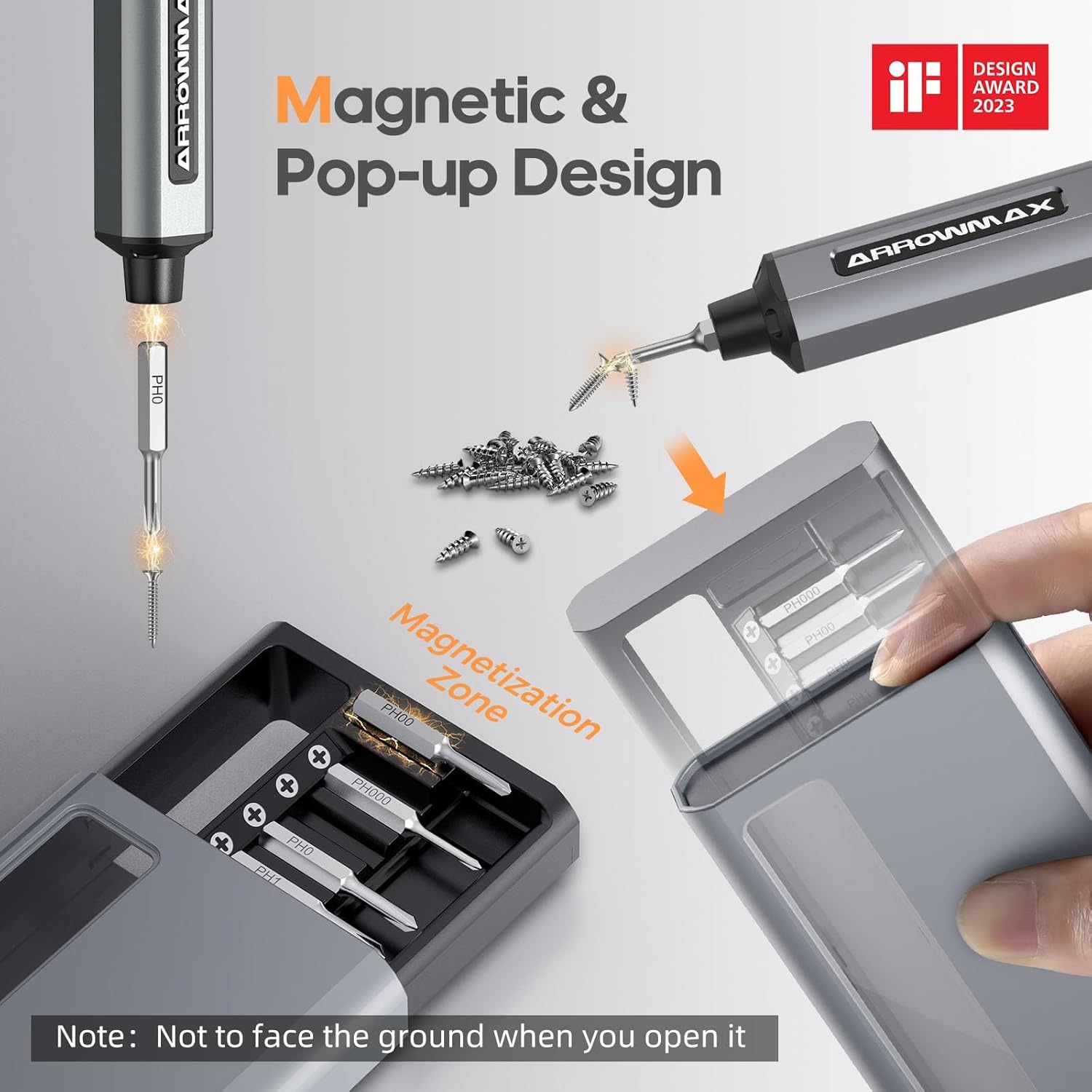
Image: Magnetic pop-up bit case design and bit magnetization zone.
6. ຄໍາແນະນໍາການດໍາເນີນງານ
6.1 ການເປີດ/ປິດ
Press and hold the Power Button for a few seconds to turn the screwdriver on or off. The OLED screen will illuminate upon activation.
6.2 ການປັບຄ່າແຮງບິດ
The SES PRO offers 5 adjustable torque levels, including an auto-sensing mode, to suit various tasks. The electric torque ranges from 0.049 N.m to 0.30-0.35 N.m, with a manual torque of 3 N.m.
- With the screwdriver powered on, press the Power Button three times continuously to cycle through the torque settings.
- The OLED screen will display the current torque level (e.g., 1, 2, 3, 4, A for Auto-Sensing).
- Select a lower torque for delicate items like glasses or small electronics, and higher torque for more robust applications.
- For screws that are too tight for the electric motor, the screwdriver can be used in manual mode by applying direct force.
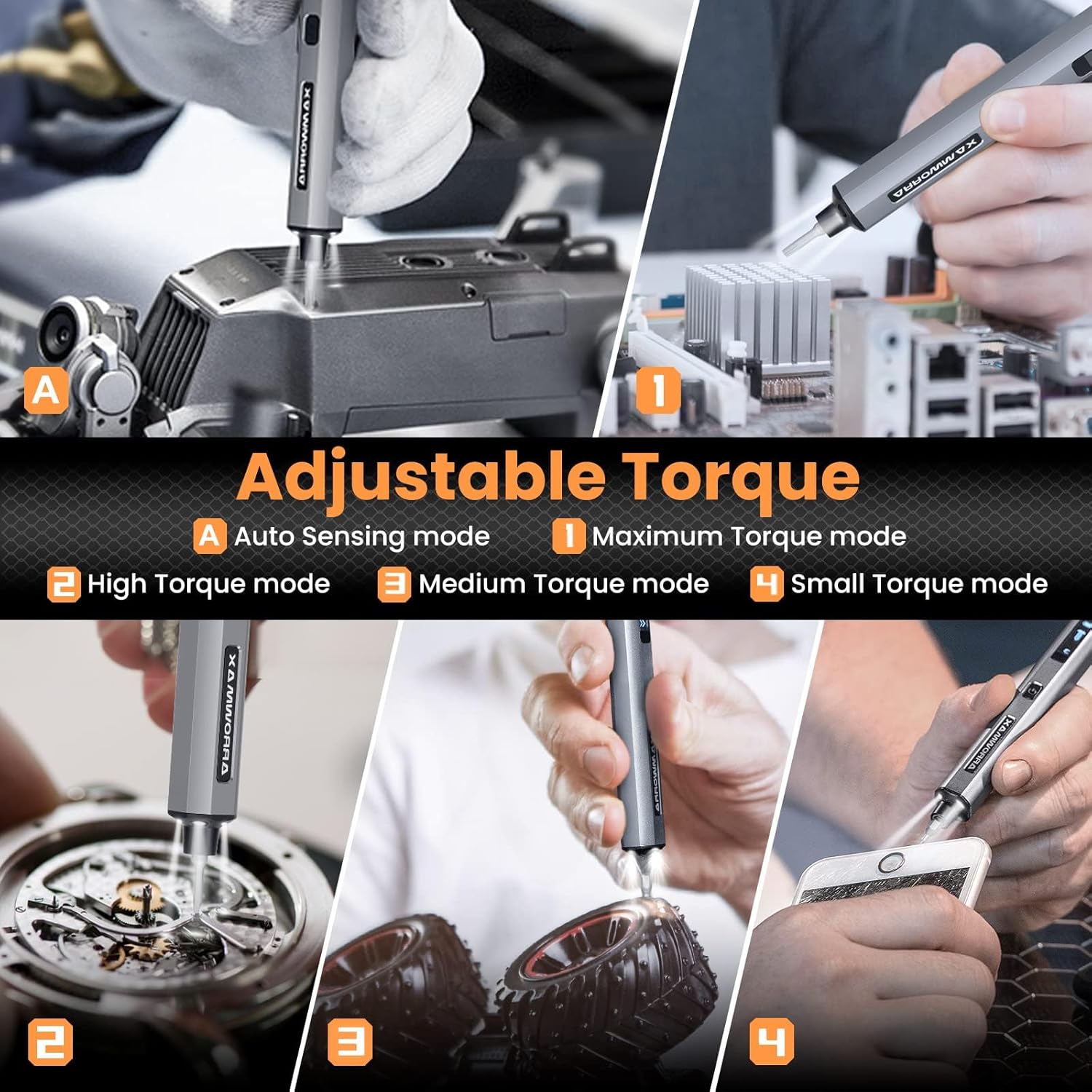
Image: Adjustable torque settings for various applications.
6.3 Body Sensory Dual-Mode (Forward/Reverse)
The SES PRO features a body sensory dual-mode for intuitive control of rotation direction.
- To drive a screw in (tighten), gently rotate your wrist in a clockwise direction while holding the screwdriver.
- To remove a screw (loosen), gently rotate your wrist in a counter-clockwise direction.
- The screwdriver's internal gyroscope detects your wrist movement and activates the motor accordingly.
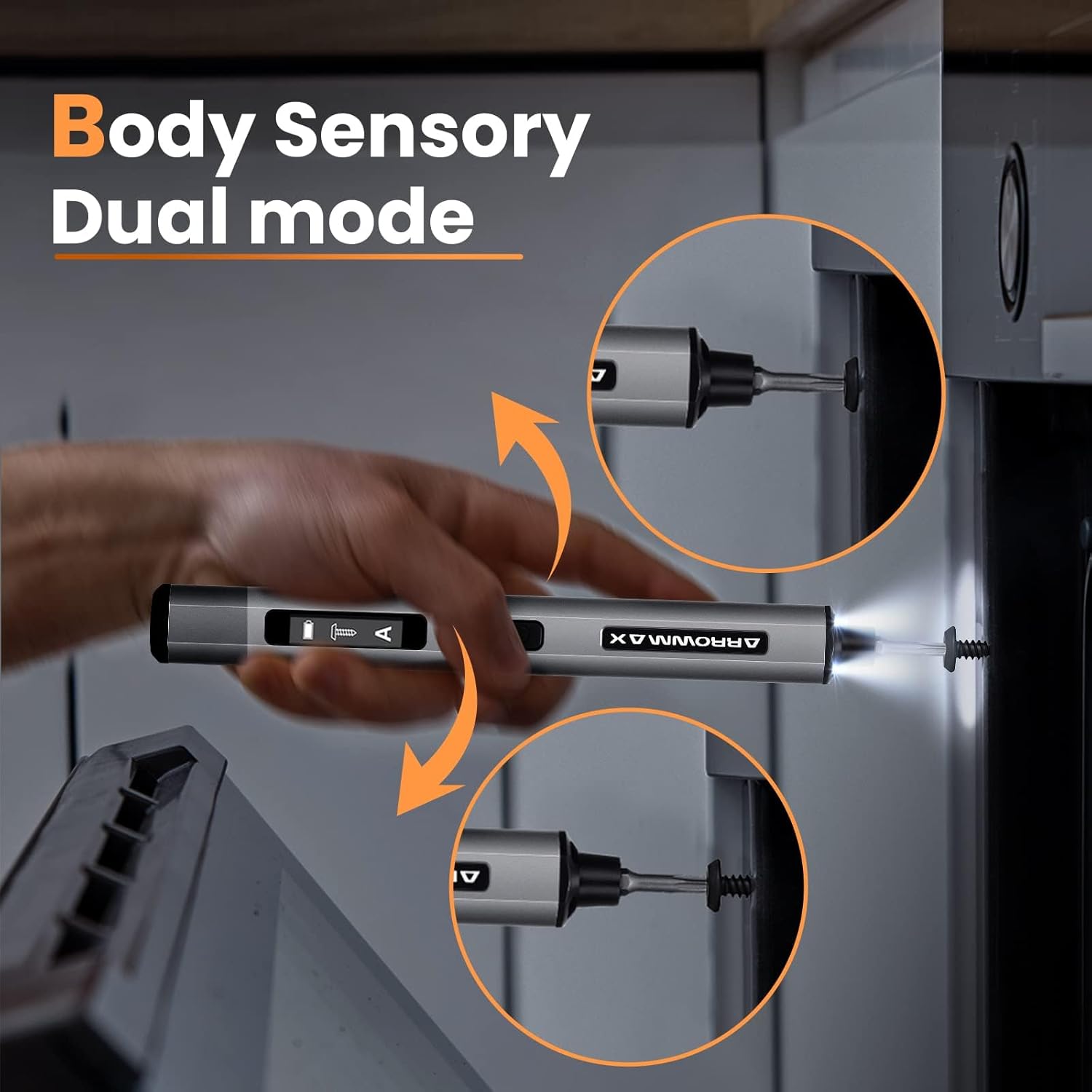
Image: Body sensory dual-mode in action for forward and reverse operation.
6.4 LED Work Lights
The integrated LED lights at the tip of the screwdriver automatically illuminate when the motor is active, providing clear visibility of your work area.
7. ບໍາລຸງຮັກສາ
7.1 ການທໍາຄວາມສະອາດ
- Wipe the screwdriver body with a soft, dry cloth. Do not use abrasive cleaners or solvents.
- Ensure the bit installation port is free of debris.
7.2 ການດູແລຫມໍ້ໄຟ
- ເພື່ອຍືດອາຍຸແບັດເຕີລີ, ຫຼີກເວັ້ນການຖອດແບດເຕີລີ່ເຕັມເລື້ອຍໆ.
- Store the screwdriver in a cool, dry place when not in use.
- ໃຫ້ສາກແບັດເຕີຣີຄືນໃໝ່ເປັນໄລຍະຖ້າເກັບຮັກສາໄວ້ເປັນເວລາດົນເພື່ອປ້ອງກັນການຮົ່ວໄຫຼຫຼາຍເກີນໄປ.

Image: The SES PRO's long-lasting battery capacity.
7.3 Bit Care
- Keep the precision bits clean and free of rust.
- Store bits securely in the magnetic case to prevent loss and damage.
8. ການແກ້ໄຂບັນຫາ
If you encounter issues with your ARROWMAX SES PRO screwdriver, refer to the following common problems and solutions:
| ບັນຫາ | ສາເຫດທີ່ເປັນໄປໄດ້ | ການແກ້ໄຂ |
|---|---|---|
| Screwdriver does not turn on or respond. | Low battery; device is off. | Charge the screwdriver using the provided USB-A to USB-C cable. Ensure the power button is pressed to turn it on. |
| Screwdriver does not charge. | Incorrect charger type; faulty cable/adapter. | Ensure you are using a USB-A to USB-C cable and a standard USB-A power adapter. USB-C PD chargers are not supported. Try a different cable or adapter. |
| Motor lacks power or cannot loosen/tighten screws. | Low battery; incorrect torque setting; screw is too tight for electric mode. | Charge the screwdriver. Increase the torque setting. For very tight screws, manually loosen or tighten them first, then use the electric mode. |
| Directional control (forward/reverse) is inconsistent. | Improper wrist movement; gyroscope calibration issue. | Ensure clear and deliberate wrist movements. If issues persist, try restarting the device. |
| Bits fall out or are not held securely. | Bit installation port is dirty; bit is not fully inserted. | Clean the bit installation port. Ensure the bit is pushed in firmly until it clicks or feels secure. |
9. ຂໍ້ມູນຈໍາເພາະ
Key technical specifications for the ARROWMAX SES PRO Electric Precision Screwdriver:
| ຄຸນສົມບັດ | ຂໍ້ມູນຈໍາເພາະ |
|---|---|
| ຍີ່ຫໍ້ | ARROWMAX |
| ຕົວແບບ | SES PRO (AM-199913-G) |
| ຄວາມໄວ | 200 RPM |
| ແຫຼ່ງພະລັງງານ | ພະລັງງານຫມໍ້ໄຟ |
| ສະບັບtage | 3.7 ໂວນ (DC) |
| ແຮງບິດໄຟຟ້າ | 0.049 N.m - 0.30-0.35 N.m (Adjustable) |
| ແຮງບິດຄູ່ມື | 3 Nm |
| ປະເພດຫມໍ້ໄຟ | ລີທຽມໄອອອນ (500mAh) |
| ພອດສາກໄຟ | USB-C (USB-A to USB-C charging only) |
| ນ້ໍາຫນັກລາຍການ | 13.7 ອອນ |
| ຂະໜາດແພັກເກັດ | 7.48 x 3.43 x 1.73 ນິ້ວ |
| ຄຸນນະສົມບັດພິເສດ | OLED Screen, Smart Motion Control, Ergonomic Design, LED Lights |
10. ການຮັບປະກັນແລະການສະຫນັບສະຫນູນ
The manufacturer's warranty information for this product is not explicitly provided in the available data. For details regarding warranty coverage, duration, and terms, please refer to the documentation included with your purchase or contact the retailer where the product was acquired.
For technical support, product inquiries, or assistance with troubleshooting that is not covered in this manual, please visit the official ARROWMAX website or contact their customer service department. Contact information can typically be found on the product packaging or the manufacturer's official online channels.