
ແນະນຳ
The Havit Gamenote KB885L mechanical keyboard is engineered for precision, durability, and customization. It features a gasket structure design, providing a soft and stable typing experience while minimizing noise. The full key rollover with multi-key response ensures fast and accurate input, crucial for gaming. With customizable RGB backlighting, you can personalize your keyboard with various lighting modes and effects. The detachable USB-C cable enhances portability and simplifies cable management. This keyboard is built with mechanical switches rated for 50 million key presses, making it suitable for gamers, typists, and professionals who require long-lasting performance.
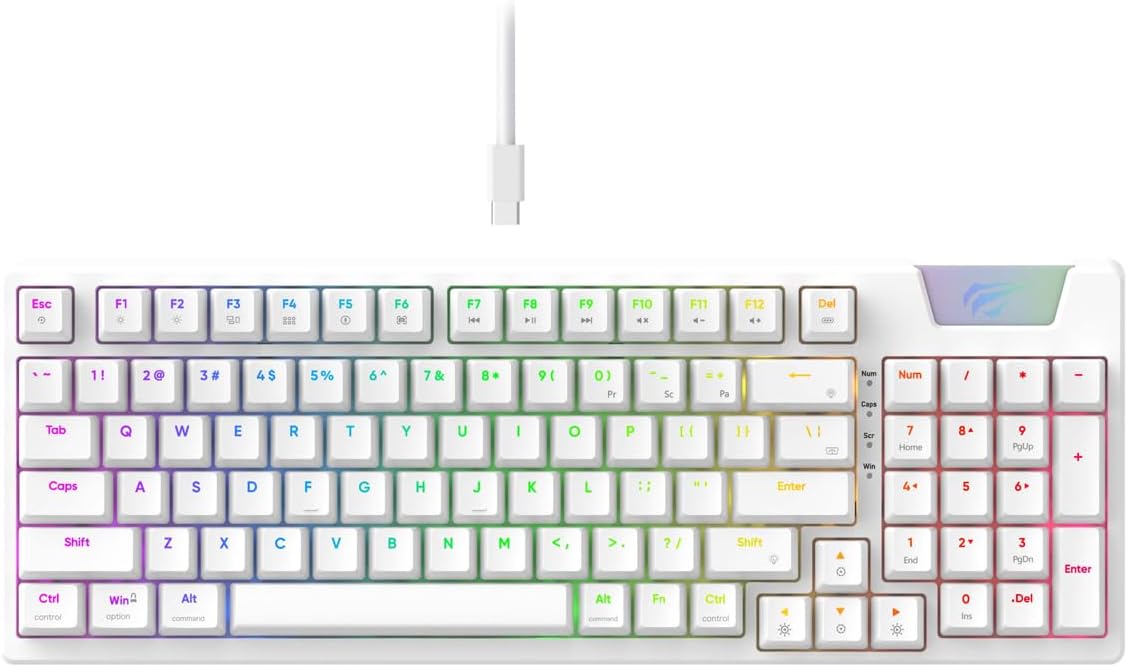
Image: The Havit Gamenote KB885L mechanical keyboard in white, showcasing its full layout and detachable USB-C cable.
ຄູ່ມືການຕິດຕັ້ງ
Follow these steps to set up your Havit Gamenote KB885L mechanical keyboard:
- ຖອດແປ້ນພິມ: ເອົາແປ້ນພິມແລະອຸປະກອນເສີມຂອງມັນອອກຈາກການຫຸ້ມຫໍ່ຢ່າງລະມັດລະວັງ.
- ເຊື່ອມຕໍ່ສາຍ USB-C: Insert the detachable USB Type-C cable into the port on the keyboard.
- ເຊື່ອມຕໍ່ກັບຄອມພິວເຕີ: ສຽບປາຍອື່ນຂອງສາຍ USB ເຂົ້າໄປໃນຜອດ USB ທີ່ມີຢູ່ໃນຄອມພິວເຕີຂອງທ່ານ.
- ການຕິດຕັ້ງໄດເວີ: The keyboard is plug-and-play and typically does not require additional drivers. Your operating system should automatically detect and install the necessary drivers.
- ການທໍາງານຂອງການທົດສອບ: Open a text editor or browser to test key presses and ensure all functions are working correctly.

Image: A close-up of the Havit Gamenote KB885L keyboard highlighting its portable design and detachable cable for easy setup and transport.
ຄໍາແນະນໍາການດໍາເນີນງານ
The Havit Gamenote KB885L keyboard offers various features for an enhanced user experience:
ການຄວບຄຸມໄຟ Backlighting RGB
The keyboard features customizable RGB backlighting. Use the following key combinations to adjust lighting effects:
- Fn + [ຄີ]: Cycle through different RGB lighting modes. (Specific key combinations may vary, refer to on-keyboard legends if available).
- Fn + ປຸ່ມລູກສອນ: Adjust brightness and speed of lighting effects.

Image: The Havit Gamenote KB885L keyboard displaying its vibrant RGB backlighting, illustrating customizable lighting effects.
ການມ້ວນປຸ່ມເຕັມຮູບແບບ (NKRO)
This keyboard supports Full Key Rollover, meaning every key press is registered independently, regardless of how many keys are pressed simultaneously. This feature is essential for fast-paced gaming and typing, preventing ghosting or missed inputs.
ການອອກແບບ Ergonomic
The keyboard is designed with ergonomics in mind to provide comfort during extended use. Its layout and keycap profile aim to reduce strain on your wrists and fingers.

ຮູບພາບ: ກ view of the Havit Gamenote KB885L keyboard highlighting its ergonomic design for comfortable use.
ບໍາລຸງຮັກສາ
ການບຳລຸງຮັກສາທີ່ຖືກຕ້ອງ ຮັບປະກັນຄວາມທົນທານ ແລະປະສິດທິພາບສູງສຸດຂອງແປ້ນພິມຂອງທ່ານ:
- ທໍາຄວາມສະອາດ: Regularly clean the keyboard with a soft, dry cloth. For deeper cleaning, use compressed air to remove dust and debris from between the keycaps. For stubborn dirt, a slightly damp ຜ້າທີ່ມີສະບູອ່ອນສາມາດໃຊ້ໄດ້, ຮັບປະກັນວ່າບໍ່ມີນ້ໍາເຂົ້າໄປໃນແປ້ນພິມ.
- ຫຼີກເວັ້ນການຮົ່ວໄຫຼ: ຮັກສານໍ້າໃຫ້ຫ່າງຈາກແປ້ນພິມເພື່ອປ້ອງກັນຄວາມເສຍຫາຍຕໍ່ອົງປະກອບພາຍໃນ. ໃນກໍລະນີທີ່ມີການຮົ່ວໄຫຼ, ໃຫ້ຖອດແປ້ນພິມອອກທັນທີ ແລະ ປ່ອຍໃຫ້ມັນແຫ້ງໝົດກ່ອນທີ່ຈະເຊື່ອມຕໍ່ຄືນໃໝ່.
- ການດູແລສາຍໄຟ: ຈັບສາຍ USB-C ທີ່ສາມາດຖອດອອກໄດ້ດ້ວຍຄວາມລະມັດລະວັງ. ຫຼີກລ່ຽງການງໍແຫຼມ ຫຼື ການດຶງຫຼາຍເກີນໄປເພື່ອປ້ອງກັນຄວາມເສຍຫາຍຕໍ່ສາຍ ຫຼື ຕົວເຊື່ອມຕໍ່.
- ການເກັບຮັກສາ: ເມື່ອບໍ່ໄດ້ໃຊ້, ໃຫ້ເກັບຮັກສາແປ້ນພິມໄວ້ໃນສະພາບແວດລ້ອມທີ່ສະອາດ, ແຫ້ງຫ່າງຈາກອຸນຫະພູມທີ່ຮຸນແຮງ.
ການແກ້ໄຂບັນຫາ
If you encounter issues with your Havit Gamenote KB885L keyboard, try the following solutions:
- ແປ້ນພິມບໍ່ຕອບສະໜອງ:
- ກວດໃຫ້ແນ່ໃຈວ່າສາຍ USB-C ເຊື່ອມຕໍ່ຢ່າງປອດໄພກັບທັງແປ້ນພິມ ແລະຄອມພິວເຕີ.
- ລອງສຽບແປ້ນພິມໃສ່ພອດ USB ອື່ນໃນຄອມພິວເຕີຂອງທ່ານ.
- ທົດສອບແປ້ນພິມໃນຄອມພິວເຕີເຄື່ອງອື່ນເພື່ອກວດສອບວ່າບັນຫາຢູ່ໃນແປ້ນພິມ ຫຼືລະບົບຂອງເຈົ້າ.
- ໄຟ RGB ບໍ່ເຮັດວຽກ:
- Check if the lighting is turned off using the Fn key combinations.
- ໃຫ້ແນ່ໃຈວ່າແປ້ນພິມໄດ້ຮັບພະລັງງານຢ່າງຖືກຕ້ອງຜ່ານການເຊື່ອມຕໍ່ USB.
- ກະແຈບໍ່ໄດ້ລົງທະບຽນ / ບໍ່ເປັນເງົາ:
- Due to full key rollover, this is unlikely. However, ensure no debris is lodged under the keycap.
- If a specific key is consistently failing, it might indicate a switch issue. Contact support if the problem persists.
ຂໍ້ມູນຈໍາເພາະ
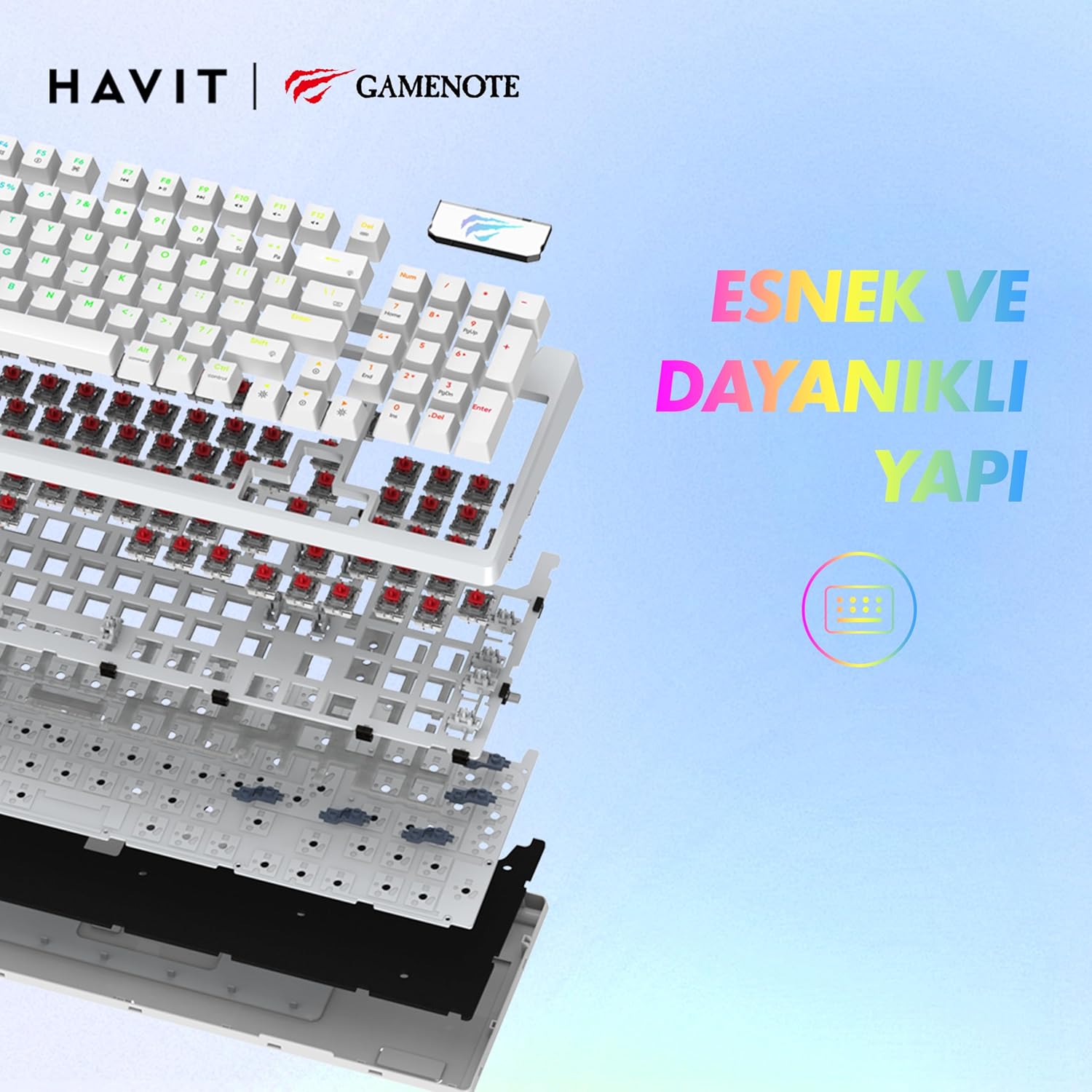
ຮູບພາບ: ລະເບີດ view of the Havit Gamenote KB885L keyboard, illustrating its internal gasket structure for enhanced stability and typing feel.
| ຄຸນສົມບັດ | ລາຍລະອຽດ |
|---|---|
| ຍີ່ຫໍ້ | ຮາວິດ |
| ໝາຍເລກຕົວແບບ | KB885L |
| ອຸປະກອນທີ່ເຂົ້າກັນໄດ້ | ຄອມພິວເຕີ |
| ເຕັກໂນໂລຊີການເຊື່ອມຕໍ່ | USB |
| ຄຳອະທິບາຍແປ້ນພິມ | ເກມ |
| ການນໍາໃຊ້ທີ່ແນະນໍາ | ເກມ |
| ຄຸນນະສົມບັດພິເສດ | ແບບພົກພາ |
| ສີ | ສີຂາວ |
| ຮອງຮັບສີ Backlight | RGB (Red, Green, Blue model) |
| ແບບ | ທັນສະໄຫມ |
| ຂະໜາດສິນຄ້າ (L x W x H) | 38.7 x 14 x 4.5 cm |
| ພາສາ | ພາສາອັງກິດ |
| ແຫຼ່ງພະລັງງານ | ພະລັງງານ USB |
| ປະເພດສະຫຼັບ | ແຕະຕ້ອງ |
| ຮູບແບບແປ້ນພິມ | QWERTY |
| ທິດທາງມື | ຂີ້ຄ້ານ |
| ຈໍານວນກະແຈ | 95 |
| ປະລິມານປຸ່ມ | 104 |
| ອົງປະກອບລວມ | ສາຍ USB |
| ວັດສະດຸ | ພາດສະຕິກ |
| Key Press Lifespan | 50 Million (from description) |

Image: An illustration highlighting the Havit Gamenote KB885L's durable mechanical switches, rated for a 50 million key press lifespan.
ຂໍ້ມູນການຮັບປະກັນ
The Havit Gamenote KB885L Mechanical Keyboard comes with a ການຮັບປະກັນຫນຶ່ງປີ from the date of purchase. This warranty covers manufacturing defects and issues arising from normal use. It does not cover damage caused by misuse, accidents, unauthorized modifications, or improper maintenance. Please retain your proof of purchase for warranty claims.
ການຊ່ວຍເຫຼືອລູກຄ້າ
For further assistance, technical support, or warranty inquiries, please contact Havit customer service through their official website or the retailer where you purchased the product. Have your model number (KB885L) and proof of purchase ready when contacting support.