
ແນະນຳ
Thank you for choosing the AODK 59-inch Reversible L-Shaped Gaming Desk. This manual provides essential information for the safe assembly, operation, and maintenance of your new desk. Please read all instructions carefully before beginning assembly and retain this manual for future reference.
ຂໍ້ມູນຄວາມປອດໄພ
ເພື່ອຮັບປະກັນການນຳໃຊ້ທີ່ປອດໄພ ແລະ ປ້ອງກັນຄວາມເສຍຫາຍ, ກະລຸນາປະຕິບັດຕາມຄຳແນະນຳດ້ານຄວາມປອດໄພຕໍ່ໄປນີ້:
- Always assemble the desk strictly according to the provided instructions.
- Ensure the desk is stable and properly secured to the floor to prevent tipping.
- Exercise caution when handling electrical components. Follow all safety guidelines for electrical devices, including proper connection to power sources.
- Do not overload the desk with excessive weight. Refer to the specifications for weight limits.
- Keep liquids away from electrical outlets and components to prevent electrical hazards.
ເນື້ອໃນຊຸດ
ກ່ອນການປະກອບ, ໃຫ້ກວດສອບວ່າອົງປະກອບທັງໝົດມີຢູ່ ແລະ ບໍ່ເສຍຫາຍ. ການຫຸ້ມຫໍ່ຄວນປະກອບມີ:
- 1 x USB Holder
- 2 x Storage Shelves
- 2 x Iron Hooks
- 2 x Power Outlets (each with 3 AC outlets and 2 USB charging ports)
- 2 x Types of Lighting Strips (LED and warm reading light)
- All necessary screws, tools, and assembly hardware
- ຄູ່ມືການສອນ
ການຕິດຕັ້ງແລະການປະກອບ
The AODK L-shaped desk is designed for straightforward assembly. Follow the step-by-step instructions provided in the included manual. All parts are clearly labeled to assist with the process.
ການອອກແບບປີ້ນກັບກັນ
This desk features a reversible design, allowing you to configure the L-shape to either the left or right side to best suit your room layout. Decide on your preferred orientation before beginning assembly.

Figure 1: AODK L-shaped gaming desk in a typical setup, showcasing ການອອກແບບທີ່ກວ້າງຂວາງແລະລັກສະນະປະສົມປະສານຂອງມັນ.
Monitor Stand / Storage Shelf Configuration
The upper two-tier storage shelf can be assembled in two ways: as a standard storage shelf for books and decor, or as a monitor stand to elevate your screen for improved ergonomics. This helps prevent neck and back pain by providing a comfortable viewມຸມ ing.

Figure 2: The AODK L-shaped desk arranged for a home office, highlighting the warm reading light and organized workspace.
ຂະໜາດສິນຄ້າ
Refer to the diagram below for detailed product dimensions to ensure the desk fits your space.
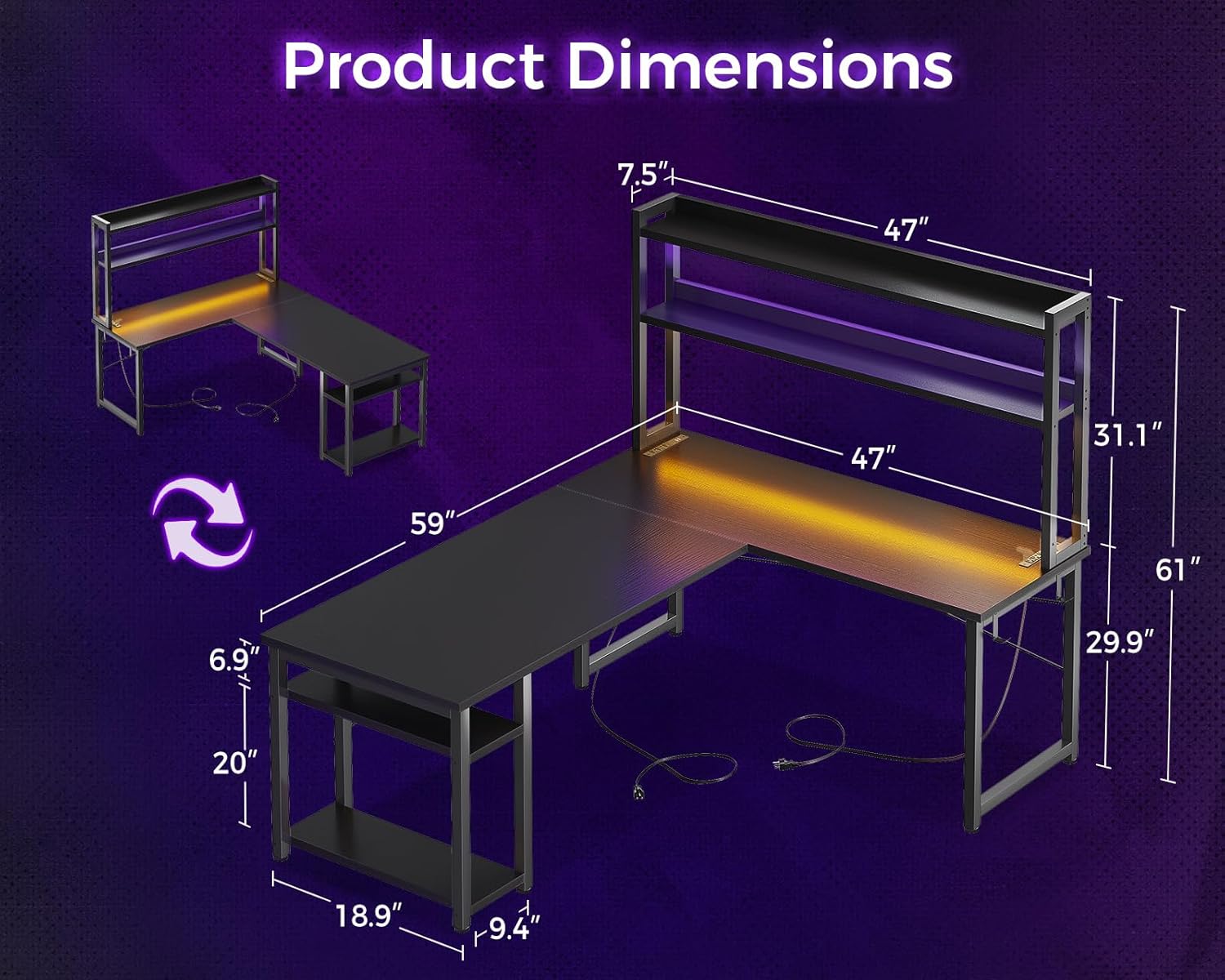
Figure 3: Detailed dimensions of the AODK L-shaped desk, illustrating its size and reversible setup options.
ຄໍາແນະນໍາການດໍາເນີນງານ
ລະບົບແສງປະສົມປະສານ
The desk is equipped with two types of lighting strips to suit different activities:
- Warm Yellow Reading Light: Activate this light for working or studying to protect your eyes.
- ໄຟ LED ປ່ຽນສີ: Switch to these lights for an immersive gaming experience or to enhance the ambiance of your room during leisure time.

Figure 4: The desk's lighting options, showing vibrant LED lights for gaming and a warm yellow light for focused work.
Power Outlets and USB Charging Ports
The L-shaped desk includes two charging stations, each featuring 3 AC power outlets and 2 USB charging ports. This allows for convenient charging of your smartphone, gaming equipment, Bluetooth devices, and other electronics while you work or play.
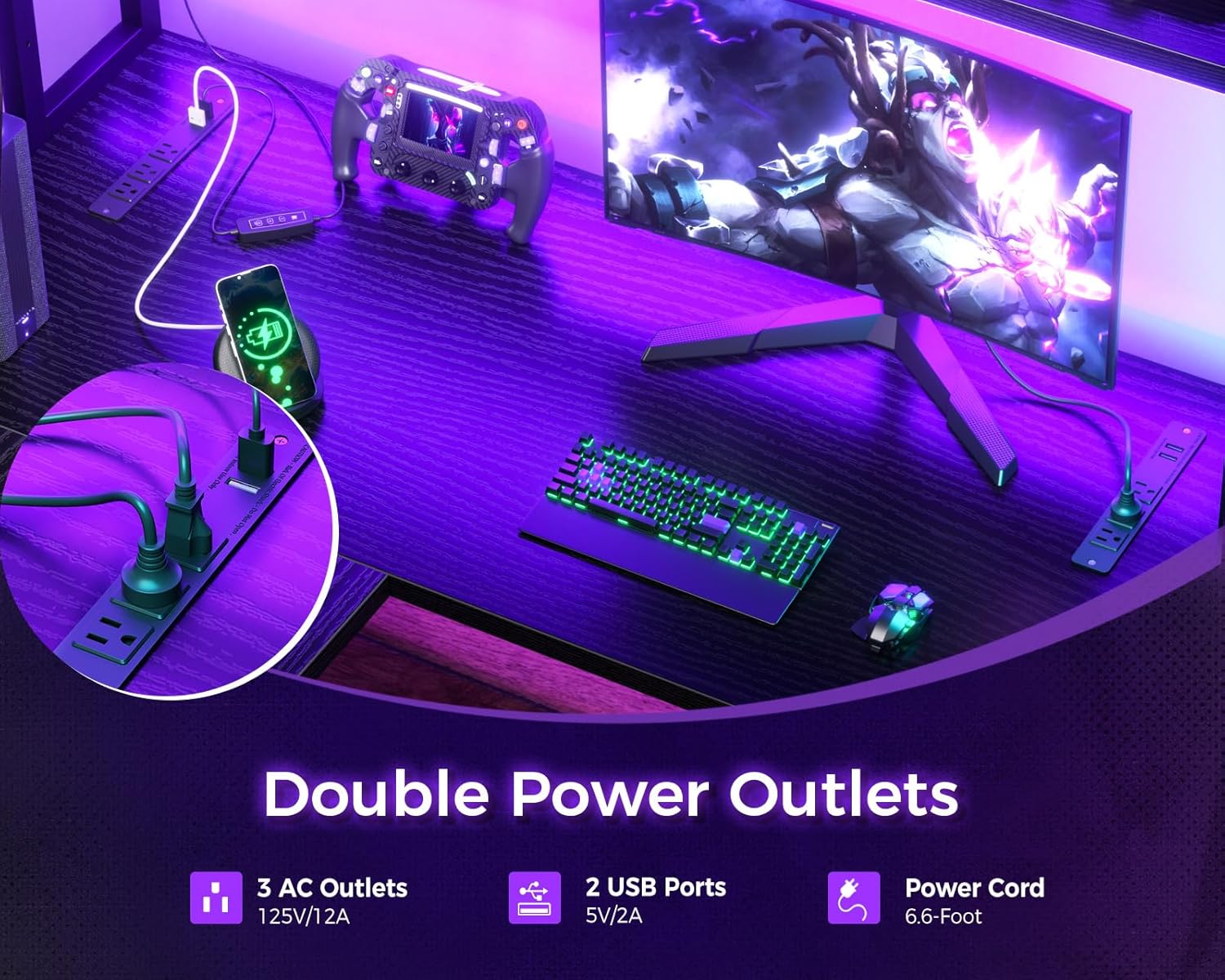
ຮູບທີ 5: ຮູບທີ່ໃກ້ຊິດ view of the desk's integrated power outlets, providing easy access to charging for multiple devices.
ບໍາລຸງຮັກສາ
Proper maintenance will extend the life and appearance of your desk:
- ທໍາຄວາມສະອາດ: ເຊັດພື້ນຜິວໃຫ້ອ່ອນໆ, ງamp ຜ້າ. ຫຼີກເວັ້ນການສານເຄມີທີ່ຮຸນແຮງຫຼືເຄື່ອງເຮັດຄວາມສະອາດຂັດທີ່ອາດຈະທໍາລາຍການສໍາເລັດຮູບ.
- ການຮົ່ວໄຫລ: ເຮັດຄວາມສະອາດຂີ້ເຫຍື້ອທັນທີເພື່ອປ້ອງກັນບໍ່ໃຫ້ເກີດຮອຍເປື້ອນຫຼືຄວາມເສຍຫາຍຕໍ່ຫນ້າໄມ້ທີ່ຖືກວິສະວະກໍາ.
- ຮາດແວ: ກວດສອບ ແລະ ຂັນສະກູ ແລະ ຕົວຍຶດທັງໝົດໃຫ້ແໜ້ນເປັນໄລຍະເພື່ອຮັບປະກັນວ່າໂຕະຍັງຄົງໝັ້ນຄົງ.
- ອົງປະກອບໄຟຟ້າ: Ensure power cords are not pinched or damaged. Do not attempt to repair electrical components yourself; contact a qualified technician if issues arise.
ການແກ້ໄຂບັນຫາ
If you encounter any issues with your AODK L-shaped gaming desk, refer to the following common solutions:
- Desk Wobbles: Check that all screws are securely tightened. Ensure the desk is on a level surface. Adjust leveling feet if present.
- ໄຟບໍ່ເຮັດວຽກ: Verify that the power cord for the lights is properly plugged into a functional outlet. Check connections of the lighting strips.
- ປລັກໄຟຟ້າບໍ່ເຮັດວຽກ: Ensure the desk's main power cord is securely plugged into a wall outlet. Test the wall outlet with another device. Check for tripped circuit breakers.
- ຊິ້ນສ່ວນທີ່ຂາດຫາຍໄປ: If any parts were missing upon delivery, refer to the 'Warranty and Support' section for assistance.
ຂໍ້ມູນຈໍາເພາະ
| ຍີ່ຫໍ້ | AODK |
| ໝາຍເລກຕົວແບບ | 850056234245 |
| ASIN | B0CGR769SP |
| GTIN | 850056234245 |
| ຮູບຮ່າງ | Rectangular (L-shaped configuration) |
| ການອອກແບບໂຕະ | ໂຕະຄອມພິວເຕີ |
| ສີ | ດຳ |
| ແບບ | ທັນສະໄຫມ |
| ວັດສະດຸປະຖົມ | ເຫຼັກໂລຫະປະສົມ |
| ປະເພດວັດສະດຸສູງສຸດ | ໄມ້ວິສະວະກໍາ |
| ປະເພດສໍາເລັດຮູບ | Powder Coated |
| ຄຸນນະສົມບັດພິເສດ | ປີ້ນກັບກັນໄດ້ |
| ປະເພດຫ້ອງ | ຫ້ອງການ |
| ນ້ໍາຫນັກລາຍການ | 29.94 ກິໂລ |
| ຂະໜາດ | 59 ນິ້ວ |
| ຈໍານວນຊັ້ນວາງ | 2 |
| Worktop Diagonal Length | 59 ນິ້ວ |
| ຄວາມສູງສູງສຸດ | 29.9 ນິ້ວ |
| ຂະໜາດລາຍການ (L x W x H) | 149.9 x 47.2 x 75.9 cm |
| ວັດສະດຸຂາ | ເຫຼັກໂລຫະປະສົມ |
| ວັດສະດຸກອບ | ໄມ້ວິສະວະກໍາ |
| ຕ້ອງການສະພາແຫ່ງ | ແມ່ນແລ້ວ |
| UL ລາຍຊື່ | ບໍ່ |
| ຕົວເລືອກການເກັບຮັກສາ | ຊັ້ນວາງ |
| ສາມາດປັບແຕ່ງໄດ້ | ບໍ່ |
| ຄຸນສົມບັດໄຟຟ້າ | Yes (Integrated Power Outlets, USB Ports, LED Lights) |
| ປະເພດການຕິດຕັ້ງ | ຊັ້ນເທິງ |
ການຮັບປະກັນແລະການສະຫນັບສະຫນູນ
AODK is committed to providing high-quality products and customer satisfaction. If your AODK computer desk arrives damaged, with missing parts, or scratched, please do not hesitate to contact our customer support team. Our professional team is available to help you resolve any issues within 24 hours.
For support, please refer to the contact information provided with your purchase or visit the official AODK webເວັບໄຊ.