
ແນະນຳ
This manual provides detailed instructions for the installation, operation, and maintenance of your INSTAR IN-8403 2K+ PoE Surveillance Camera. This camera features a Sony STARVIS 2K+ image sensor, AI-based object detection, an integrated PIR heat sensor, and Power over Ethernet (PoE) for simplified installation. Please read this manual thoroughly before using the product to ensure proper functionality and safety.
ສິນຄ້າເກີນview
ເນື້ອໃນຊຸດ
- INSTAR IN-8403 2K+ PoE Camera with built-in 32GB MicroSD card
- 1.5m 12V/1A Power Adapter
- ສາຍໄຟເຄືອຂ່າຍ 1.5m
- ຮາດແວຕິດຕັ້ງ
- User Manual (German / English)
ສ່ວນປະກອບຂອງກ້ອງຖ່າຍຮູບ
Familiarize yourself with the various parts of your INSTAR IN-8403 camera:

ລາຍລະອຽດຮູບພາບ: A detailed diagram of the INSTAR IN-8403 camera, highlighting its key components. These include the bracket for mounting, photosensor, status LEDs, dual LEDs for illumination, the main lens, PIR detector, microphone, and MicroSD card slot. The diagram also shows the cable connections for the network LED, power connector, network port, reset button, alarm input, and alarm output.
ຕັ້ງຄ່າ
ການຕິດຕັ້ງກ້ອງຖ່າຍຮູບ
The INSTAR IN-8403 camera is designed for both indoor and outdoor use and supports ceiling mount and wall mount installations. Use the provided mounting hardware to securely attach the camera to your desired location. Ensure the mounting surface is stable and can support the camera's weight. The camera is rated IP65 for weather resistance.
ພະລັງງານແລະການເຊື່ອມຕໍ່ເຄືອຂ່າຍ
The IN-8403 supports Power over Ethernet (PoE), allowing both power and data to be transmitted through a single Ethernet cable (IEEE 802.3af standard). Connect one end of the network cable to the camera's network port and the other end to a PoE-enabled switch or injector. Alternatively, if PoE is not available, connect the provided 12V/1A power adapter to the camera's power connector and a standard Ethernet cable to the network port.

ລາຍລະອຽດຮູບພາບ: A diagram illustrating the Power over Ethernet (PoE) connection. It shows a network cable connecting a camera to an IN-POE SWITCH, indicating that both power and data are supplied through this single cable, simplifying installation.
ການຕັ້ງຄ່າເບື້ອງຕົ້ນ
Once powered and connected to your network, the camera can be accessed via its web interface or the INSTAR mobile application. Refer to the included quick start guide for initial network discovery and password setup. It is recommended to change the default password immediately for security.
ຄໍາແນະນໍາການດໍາເນີນງານ
High-Resolution Video Monitoring
The IN-8403 features a Sony STARVIS 2K+ image sensor, providing a resolution of 2560 x 1440p for clear and detailed surveillance. The 90-degree wide-angle lens captures a broad area. The camera supports both 1080p and 1440p video capture resolutions.
ລາຍລະອຽດຮູບພາບ: A visual comparison demonstrating the superior detail of 1440p (2K+) resolution compared to 1080p. The 1440p image shows significantly more detail, especially for distant objects, highlighting the camera's advanced sensor capabilities.
Infrared Night Vision
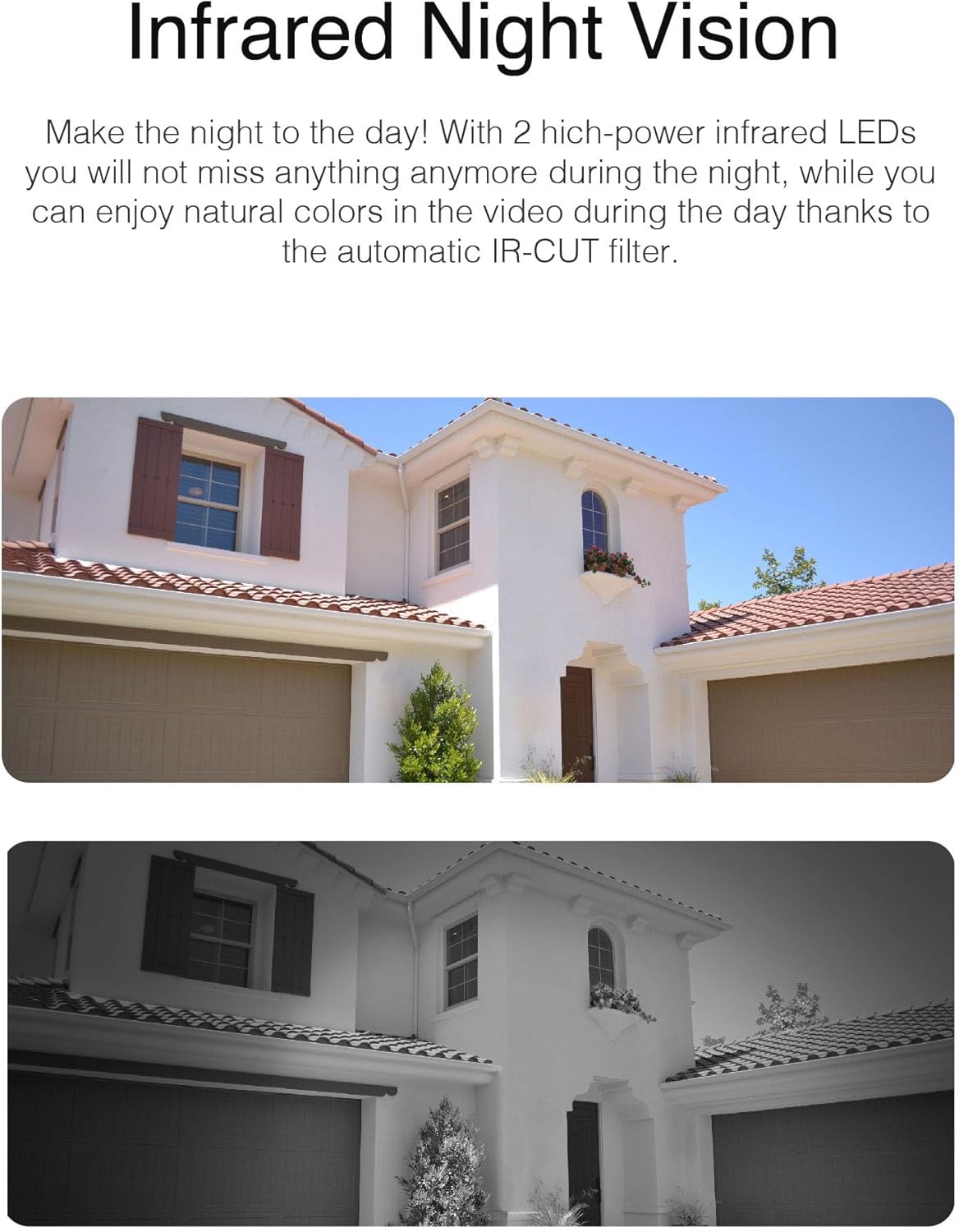
Equipped with 2 high-power infrared LEDs and an automatic IR-CUT filter, the camera provides clear night vision up to 12 meters. During the day, the IR-CUT filter ensures natural color reproduction. At night, the infrared LEDs activate to provide black and white surveillance footage.

ລາຍລະອຽດຮູບພາບ: Two images showing the same house. The top image displays the scene in natural daylight colors, while the bottom image shows the scene in black and white, demonstrating the camera's infrared night vision capability.
AI Object Detection
The camera features advanced AI technology for object detection, capable of identifying humans, vehicles, and animals. This intelligent monitoring helps reduce false alarms and provides more relevant alerts.

ລາຍລະອຽດຮູບພາບ: An image depicting the camera's AI object detection feature. It shows a person, a dog, and a car highlighted with icons, indicating that the camera can distinguish between different types of objects for intelligent monitoring.
PIR Heat Sensor and Microphone
An integrated PIR (Passive Infrared) heat sensor helps to minimize false alarms by detecting heat signatures, ensuring that motion alerts are triggered by living beings rather than environmental factors. The built-in microphone with noise and echo suppression allows for audio recording alongside video footage.

ລາຍລະອຽດຮູບພາບ: A split image showing the camera's PIR heat sensor and microphone features. On the left, a person is shown near the camera, illustrating motion detection. On the right, a smartphone displays the camera's live feed with audio controls, indicating the microphone's function.
ການບັນທຶກແລະການເກັບຮັກສາ
The camera supports memory cards up to a maximum of 256GB for local storage. It also supports secure data transmission via HTTPS, FTPS, and SFTP encryption. Recordings can be stored directly on the MicroSD card or uploaded to an external server via FTP. The camera also supports scheduled photo series for time-lapse recordings.

ລາຍລະອຽດຮູບພາບ: A series of images transitioning from day to night over a landscape, illustrating the camera's scheduled photo series feature for creating time-lapse recordings.
ການເຊື່ອມໂຍງເຮືອນອັດສະລິຍະ
The IN-8403 offers extensive smart home compatibility, including Apple HomeKit, MQTT, Amazon Alexa, Google Assistant, and IFTTT. This allows for seamless integration into existing smart home ecosystems and enables voice control or automated actions based on camera events.

ລາຍລະອຽດຮູບພາບ: An image showing a tablet and smartphone displaying the Apple Home app interface, with a voice bubble indicating a command: "Hey Siri, show camera entrance." This illustrates the camera's integration with Apple HomeKit for voice control and monitoring.

ລາຍລະອຽດຮູບພາບ: A woman in a kitchen interacting with a smart display, which shows the camera's live feed. A voice bubble indicates a command: "... show all alarms with vehicles." This demonstrates compatibility with Amazon Alexa and Google Assistant for voice-controlled surveillance.

ລາຍລະອຽດຮູບພາບ: A diagram illustrating the camera's MQTT integration within a smart home ecosystem. Various smart home devices (door sensors, motion sensors, lights, thermostats, alarms) are shown connected to a central "Smart Home" hub via MQTT, with the INSTAR camera as part of this network.
ບໍາລຸງຮັກສາ
ການທໍາຄວາມສະອາດກ້ອງຖ່າຍຮູບ
To maintain optimal image quality, regularly clean the camera lens and housing. Use a soft, damp cloth to wipe away dust and dirt. Avoid using harsh chemicals or abrasive materials that could scratch the lens or damage the camera's finish.
ອັບເດດເຟີມແວ
INSTAR provides regular firmware updates to enhance camera performance, add new features, and improve security. It is recommended to check for and install available firmware updates periodically through the camera's web interface or mobile app. Follow the instructions provided with each update carefully.
ການຄຸ້ມຄອງການເກັບຮັກສາ
If using a MicroSD card for local storage, periodically review and manage your recordings. You can configure recording schedules, overwrite old footage, or manually delete files through the camera's interface. Ensure sufficient storage space is available for continuous recording or event-triggered footage.
ການແກ້ໄຂບັນຫາ
ບໍ່ມີຮູບພາບ/ວິດີໂອ
- ກວດສອບພະລັງງານ: Ensure the camera is receiving power, either via PoE or the 12V power adapter. Verify power connections are secure.
- ກວດສອບການເຊື່ອມຕໍ່ເຄືອຂ່າຍ: Confirm the Ethernet cable is securely connected to both the camera and your network device (router/switch). Check network status LEDs.
- ການຕັ້ງຄ່າເຄືອຂ່າຍ: Verify the camera's IP address and network settings are correct and that there are no IP conflicts.
ສັນຍານເຕືອນທີ່ບໍ່ຖືກຕ້ອງ
- ປັບຄວາມອ່ອນໄຫວ PIR: Reduce the sensitivity of the PIR heat sensor in the camera settings to prevent triggers from minor heat fluctuations.
- Configure Detection Zones: Utilize the camera's software to define specific motion detection zones, excluding areas prone to irrelevant movement (e.g., swaying trees).
- AI Object Detection: Ensure AI object detection is enabled and configured to filter out non-human/vehicle/animal movements.
ບໍ່ສາມາດເຂົ້າເຖິງກ້ອງຖ່າຍຮູບຈາກໄລຍະໄກໄດ້
- Port Forwarding/UPnP: Ensure necessary network ports are forwarded on your router or that UPnP is correctly configured for remote access.
- DDNS/P2P Service: Verify your Dynamic DNS (DDNS) or P2P service settings are active and correctly configured.
- ການຕັ້ງຄ່າ Firewall: Check if your network firewall is blocking access to the camera.
ຂໍ້ມູນຈໍາເພາະ
| ຄຸນສົມບັດ | ຂໍ້ມູນຈໍາເພາະ |
|---|---|
| ຊື່ຕົວແບບ | IN-8403 2K+ PoE |
| ເຊັນເຊີຮູບພາບ | Sony STARVIS 2K+ |
| ຄວາມລະອຽດວິດີໂອ | 2560 x 1440p (2K+) |
| Viewໃນມຸມ | 90 ອົງສາ |
| ຂອບເຂດວິໄສທັດກາງຄືນ | 12 Meters (Infrared) |
| ການເຊື່ອມຕໍ່ | Wired (Ethernet, PoE IEEE 802.3af) |
| ການເກັບຮັກສາ | MicroSD card up to 256GB (32GB included) |
| ຄຸນນະສົມບັດ AI | Object Detection (Humans, Vehicles, Animals) |
| ເຊັນເຊີ | PIR Heat Sensor, Microphone with noise/echo suppression |
| ຄວາມເຂົ້າກັນໄດ້ຂອງເຮືອນອັດສະລິຍະ | Apple HomeKit, MQTT, Amazon Alexa, Google Assistant, IFTTT |
| ແຫຼ່ງພະລັງງານ | Corded Electric (12V DC or PoE) |
| ການບໍລິໂພກພະລັງງານ | 8 ວັດ |
| ຂະໜາດ (L x W x H) | 4.65 x 4.65 x 3.94 ນິ້ວ |
| ນ້ໍາຫນັກລາຍການ | 5.6 ອອນສ໌ (158 ກຣາມ) |
| ການຈັດອັນດັບການປົກປ້ອງຂາເຂົ້າ | IP65 |
ການຮັບປະກັນແລະການສະຫນັບສະຫນູນ
ຂໍ້ມູນການຮັບປະກັນ
INSTAR products are designed for quality and durability. Please refer to the product packaging or the official INSTAR webເວັບໄຊທ໌ສຳລັບເງື່ອນໄຂ ແລະ ຂໍ້ກຳນົດການຮັບປະກັນສະເພາະທີ່ນຳໃຊ້ກັບພາກພື້ນຂອງທ່ານ. ເກັບຫຼັກຖານການຊື້ຂອງທ່ານໄວ້ເພື່ອການຮຽກຮ້ອງການຮັບປະກັນ.
ການຊ່ວຍເຫຼືອລູກຄ້າ
INSTAR provides professional customer support for all its products. Should you encounter any issues or have questions regarding your IN-8403 camera, please contact INSTAR customer service. Support includes assistance with setup, troubleshooting, and general inquiries. Regular firmware and software updates are also provided to ensure optimal performance and security.
ຊິ້ນສ່ວນທົດແທນ
Replacement parts for INSTAR camera models are generally available. For inquiries about specific replacement parts, please contact INSTAR customer support.