
ແນະນຳ
Thank you for choosing the ROCAM Digital Projection Alarm Clock, Model CR1024. This device combines a digital alarm clock with a 270° rotatable projection feature, FM radio, dual alarm settings, and a USB charging port. Please read this manual carefully to ensure proper use and to fully enjoy all its features.

Image: The ROCAM Digital Projection Alarm Clock displaying time, date, temperature, and humidity, positioned on a bedside table next to a cup of coffee and a notebook.
ຄຸນສົມບັດຜະລິດຕະພັນ
- 270° Rotatable Projection: Project time onto your wall or ceiling with adjustable angle and focus.
- 5-Level Dimmable LED Display: Adjust the brightness of the main display to your preference.
- FM Radio & Sleep Timer: Enjoy your favorite radio stations and set a sleep timer for automatic shutdown.
- Dual Alarm with Weekend/Weekday Mode: Set two independent alarms with customizable schedules (Mon-Sun, Mon-Fri, Sat-Sun, One-Time).
- USB-C Power Input & USB-A Charging Output: Power the clock via USB-C and charge external devices like smartphones via USB-A.
- ແບັດ ສຳ ຮອງ: Maintains time and alarm settings during power outages (batteries not included).
- ການສະແດງອຸນຫະພູມແລະຄວາມຊຸ່ມຊື່ນ: Shows indoor temperature (°C/°F) and humidity.
- ຟັງຊັນແສງກາງຄືນ: Integrated night light for soft illumination.
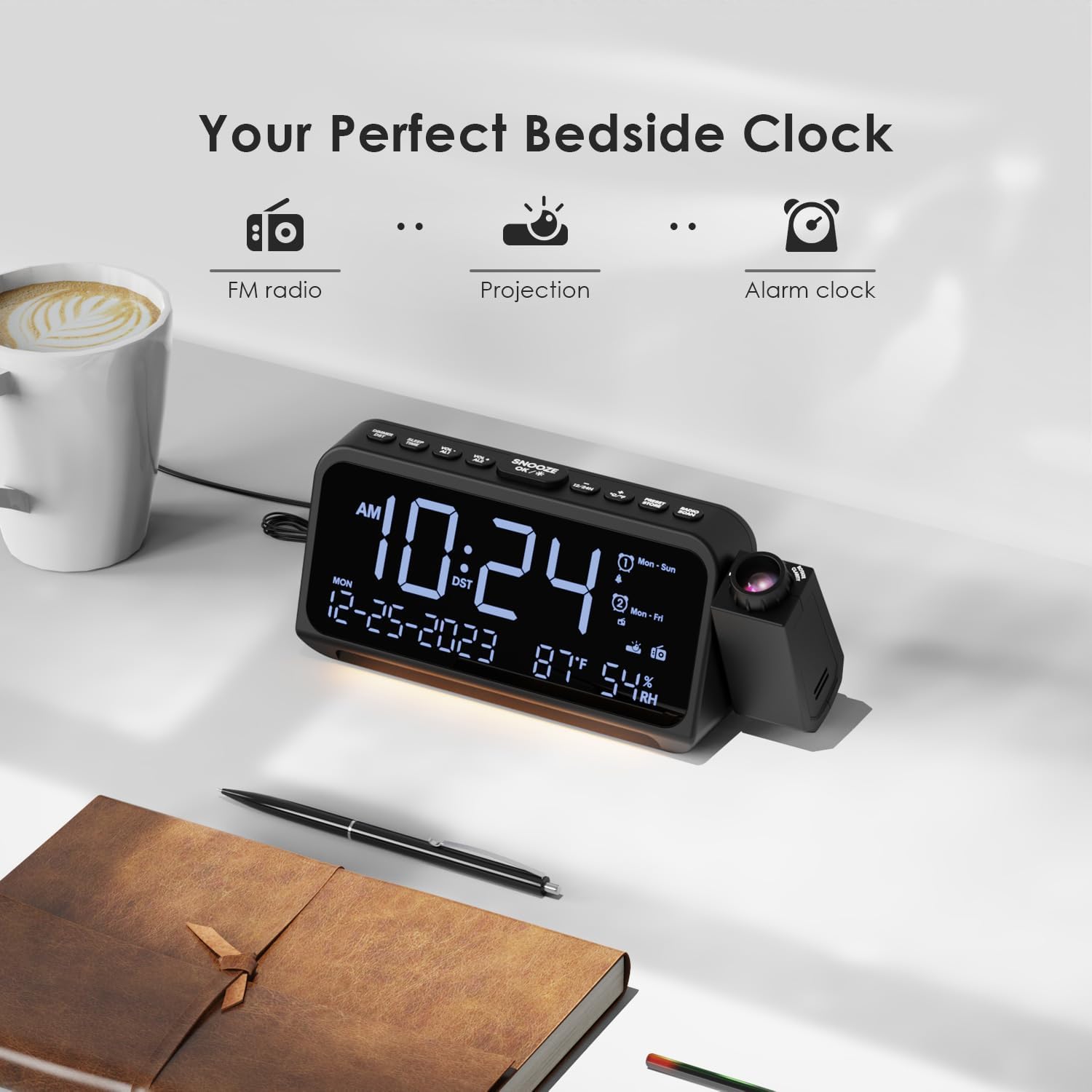
Image: Visual representation of the clock's main functions: FM radio, projection, and alarm clock.
ເນື້ອໃນຊຸດ
ກະລຸນາກວດເບິ່ງຊຸດສຳລັບລາຍການຕໍ່ໄປນີ້:
- ROCAM Digital Projection Alarm Clock (CR1024)
- ສາຍໄຟ USB Type-C
- Power Adapter
- ຄູ່ມືຜູ້ໃຊ້
Note: 1 CR2 battery is required for backup functionality and is not included in the package.

Image: The alarm clock, USB-C cable, power adapter, and user manual laid out, with product dimensions (20cm x 8.7cm x 3.81cm) and weight (240g) indicated.
ສິນຄ້າເກີນview
ປຸ່ມແຜງດ້ານເທິງ:
- SNOOZE/OK/*: Snooze alarm, confirm settings, or activate night light.
- VOL-/AL1: Decrease volume, set Alarm 1.
- VOL+/AL2: Increase volume, set Alarm 2.
- 12/24H: ສະຫຼັບລະຫວ່າງຮູບແບບເວລາ 12 ຊົ່ວໂມງ ແລະ 24 ຊົ່ວໂມງ.
- °C/°F: Switch between Celsius and Fahrenheit temperature display.
- PRESET/STORE: Save FM radio presets.
- RADIO/SCAN: Turn FM radio on/off, scan for stations.
- ກຳ ນົດເວລາ: ເຂົ້າສູ່ໂໝດການຕັ້ງເວລາ.
- ຕັ້ງ ALARM: ເຂົ້າສູ່ໂໝດຕັ້ງປຸກ.
Side Panel & Rear:
- ເລນການສາຍ: Projects time onto a surface.
- Focus Wheel: ປັບຄວາມຊັດເຈນຂອງຮູບທີ່ຄາດໄວ້.
- ການຫມຸນການຄາດຄະເນ: Allows 270° adjustment of the projection angle.
- ປຸ່ມ DIM: Adjusts projection brightness.
- ປຸ່ມເປີດປິດ: Turns the projection on/off.
- Type-C Input (5V-2A): Main power connection.
- USB-A Output (5V-1A): ສໍາລັບການສາກໄຟອຸປະກອນພາຍນອກ.
- ເສົາອາກາດ FM: ຂະຫຍາຍສໍາລັບການຮັບວິທະຍຸທີ່ດີກວ່າ.
- ຊ່ອງໃສ່ຫມໍ້ໄຟ: For CR2 backup batteries.

ຮູບພາບ: ລາຍລະອຽດ view of the top control buttons and the projection unit, highlighting the dual alarm settings.

Image: The back of the alarm clock, illustrating the Type-C power input and the USB-A output port for charging other devices.
ຕັ້ງຄ່າ
1. ການເຊື່ອມຕໍ່ພະລັງງານ:
- Connect the provided USB Type-C cable to the Type-C input port on the back of the alarm clock.
- ສຽບປາຍອີກດ້ານໜຶ່ງຂອງສາຍ USB ເຂົ້າກັບອະແດບເຕີໄຟ, ຈາກນັ້ນສຽບອະແດບເຕີເຂົ້າກັບປລັກສຽບຝາຜະໜັງມາດຕະຖານ.
- ໜ້າຈໍຈະສະຫວ່າງຂຶ້ນ, ຊີ້ບອກວ່າໂມງເປີດຢູ່.

Image: The alarm clock is shown connected to a wall outlet via its USB-C power cable and adapter.
2. Battery Backup Installation:
- ຊອກຫາຊ່ອງໃສ່ຫມໍ້ໄຟຢູ່ລຸ່ມສຸດຂອງໂມງ.
- ເປີດຝາປິດ.
- Insert 1 CR2 battery (not included) according to the polarity markings (+/-).
- Close the battery compartment cover. This battery will preserve time and alarm settings during a power outage.

Image: The bottom of the alarm clock with the battery compartment open, showing where to insert CR2 batteries.
ຄໍາແນະນໍາການດໍາເນີນງານ
1. ກໍານົດເວລາ ແລະວັນທີ:
- ກົດຄ້າງໄວ້ ເວລາ ກຳ ນົດ ປຸ່ມ. ຕົວເລກຊົ່ວໂມງຈະເລີ່ມກະພິບ.
- ໃຊ້ VOL+ or VOL- ປຸ່ມເພື່ອປັບຊົ່ວໂມງ. ກົດ ເວລາ ກຳ ນົດ ອີກເທື່ອຫນຶ່ງເພື່ອຢືນຢັນ.
- ເຮັດຊ້ໍາຂະບວນການສໍາລັບນາທີ, ປີ, ເດືອນ, ແລະມື້.
- ກົດ 12/24ຊ to switch between 12-hour and 24-hour format.
- ກົດ ° C / ° F to switch between Celsius and Fahrenheit for temperature display.
2. Setting Alarms (Alarm 1 & Alarm 2):
- ກົດຄ້າງໄວ້ ຕັ້ງໂມງປຸກ button. The Alarm 1 icon and hour digits will flash.
- ໃຊ້ VOL+ or VOL- to set the desired alarm hour. Press ຕັ້ງໂມງປຸກ ເພື່ອຢືນຢັນ.
- ເຮັດເລື້ມຄືນສໍາລັບນາທີ.
- Select alarm mode (Mon-Sun, Mon-Fri, Sat-Sun, One-Time) using VOL+ or VOL-. ກົດ ຕັ້ງໂມງປຸກ ເພື່ອຢືນຢັນ.
- Choose alarm sound: buzzer or FM radio. Use VOL+ or VOL- ເພື່ອເລືອກ. ກົດ ຕັ້ງໂມງປຸກ ເພື່ອຢືນຢັນ.
- To set Alarm 2, briefly press ຕັ້ງໂມງປຸກ again and repeat the steps.
- ເພື່ອເປີດ/ປິດການໃຊ້ງານໂມງປຸກ, ກົດໄວໆ AL1 or AL2. The alarm icon will appear/disappear on the display.
Image: The clock display showing options for setting two alarms with different ringtone choices and day modes (Mon-Sun, Mon-Fri, Sat-Sun, One-Time).
3. ຟັງຊັນເລື່ອນ:
ເມື່ອມີສຽງປຸກ, ກົດປຸ່ມ SNOOZE/OK/* button to temporarily silence it for 9 minutes. The alarm will sound again after the snooze period.
4. Display Brightness (Dimmer):
ກົດ SNOOZE/OK/* button repeatedly to cycle through 5 levels of display brightness (L-1 to L-5) or turn the display off.

Image: The clock display showing five different brightness levels (L-1 to L-5) for the main LED screen.
5. Projection Settings:
- ເປີດ/ປິດ: ກົດ ປຸ່ມເປີດປິດ on the side of the projection unit to turn the projection on or off.
- ປັບຄວາມສະຫວ່າງ: ກົດ DIM button on the side of the projection unit to cycle through 5 levels of projection brightness.
- ປັບມຸມ: Rotate the projection unit up to 270° to direct the time onto your desired surface (wall or ceiling).
- ປັບຈຸດສຸມ: ໝຸນ ຈຸດສຸມຂອງລໍ້ on the projection unit to sharpen the projected image.

Image: The digital time '10:24' projected in red onto a dark wall, demonstrating the projection feature.

Image: The projection unit rotating 270 degrees, showing how the projected time can be adjusted for optimal viewing.

Image: The projected time showing five distinct brightness levels, from level 1 (dimmest) to level 5 (brightest).
6. FM Radio Operation:
- ໃຫ້ຂະຫຍາຍເສົາອາກາດ FM ເພື່ອໃຫ້ຮັບສັນຍານໄດ້ດີຂຶ້ນ.
- ກົດ RADIO/SCAN button to turn the FM radio on.
- ກົດຄ້າງໄວ້ RADIO/SCAN to automatically scan and save available stations.
- ໃຊ້ VOL+ or VOL- to manually tune to a station or cycle through saved presets.
- ກົດ PRESET/STORE to save the current station as a preset.
- ກົດ RADIO/SCAN again to turn the FM radio off.

Image: The clock displaying an FM radio frequency (108.0 MHz) and options for a sleep timer (OFF, 15, 30, 60, 90 minutes).
7. ໂມງຈັບເວລານອນ:
When the FM radio is on, press the SNOOZE/OK/* button repeatedly to set a sleep timer (15, 30, 60, 90 minutes, or OFF). The radio will automatically turn off after the selected duration.

Image: A hand pressing a button on the clock, with sleep timer options (P01, P06, P12, P15, P20) displayed, indicating timed radio playback.
8. USB Charging Output:
Connect your smartphone or other USB-powered device to the USB-A output port (5V-1A) on the back of the clock to charge it. Ensure the alarm clock is powered via its USB-C input.
ບໍາລຸງຮັກສາ
- ທໍາຄວາມສະອາດ: ເຊັດໂມງດ້ວຍຜ້າອ່ອນໆ, ແຫ້ງ. ຢ່າໃຊ້ເຄື່ອງເຮັດຄວາມສະອາດຂັດຫຼືສານລະລາຍ.
- ການປ່ຽນແບັດເຕີຣີ: If the clock loses time during a power outage, replace the CR2 backup battery.
- ການຈັດວາງ: Avoid placing the clock in direct sunlight, high temperatures, or high humidity.
ການແກ້ໄຂບັນຫາ
| ບັນຫາ | ການແກ້ໄຂ |
|---|---|
| ໜ້າຈໍໂມງວ່າງເປົ່າ. | Ensure the USB-C power cable is securely connected to both the clock and a working power outlet. Check if the display brightness is set to OFF. |
| ໂມງປຸກບໍ່ມີສຽງ. | Verify that the alarm is activated (alarm icon visible). Check the alarm volume. Ensure the alarm mode (Mon-Sun, Mon-Fri, etc.) is correctly set for the current day. |
| ການສະແດງພາບມົວ. | ໝຸນ ຈຸດສຸມຂອງລໍ້ on the projection unit until the image is clear. Ensure the projection surface is within optimal range. |
| ການຮັບວິທະຍຸ FM ບໍ່ດີ. | Fully extend the FM antenna. Try repositioning the clock to improve signal. Perform an auto-scan to find stronger stations. |
| ພອດສາກໄຟ USB ບໍ່ເຮັດວຽກ. | Ensure the alarm clock is powered by the USB-C input. Check the charging cable and the device being charged. |
ຂໍ້ມູນຈໍາເພາະ
- ໝາຍເລກຕົວແບບ: CR1024
- ຂະໜາດ: 20 x 3.81 x 8.7 cm (L x W x H)
- ນ້ຳໜັກ: 240 g
- ການປ້ອນຂໍ້ມູນພະລັງງານ: USB Type-C, 5V-2A
- USB Output: USB Type-A, 5V-1A
- ແບັດ ສຳ ຮອງ: ແບັດເຕີຣີ 1 x CR2 (ບໍ່ລວມ)
- ລະດັບຄວາມຖີ່ຂອງ FM: 87.5 - 108 MHz
ການຮັບປະກັນແລະການສະຫນັບສະຫນູນ
ROCAM products are designed for reliability and performance. This product comes with a standard manufacturer's warranty. For specific warranty details, please refer to the warranty card included in your package or contact ROCAM customer support.
If you encounter any issues or have questions regarding your ROCAM Digital Projection Alarm Clock, please contact our customer support team. Contact information can typically be found on our official webສະຖານທີ່ຫຼືຢູ່ໃນການຫຸ້ມຫໍ່ຜະລິດຕະພັນ.