
1. ບົດແນະນຳ
Thank you for choosing the WORKPRO 1500W Rotary Hammer Drill. This heavy-duty tool is designed for demanding tasks such as drilling in concrete, wood, and steel, as well as chiseling applications. This manual provides essential information for the safe and efficient operation, maintenance, and troubleshooting of your rotary hammer drill. Please read it thoroughly before first use and keep it for future reference.

Image 1.1: WORKPRO 1500W Rotary Hammer Drill and included accessories.
2. ຄໍາແນະນໍາກ່ຽວກັບຄວາມປອດໄພທົ່ວໄປ
ຕິດຕາມການລະມັດລະວັງດ້ານຄວາມປອດໄພຂັ້ນພື້ນຖານສະເໝີ ເພື່ອຫຼຸດຜ່ອນຄວາມສ່ຽງຕໍ່ການເກີດອັກຄີໄພ, ໄຟຊັອດ ແລະ ການບາດເຈັບສ່ວນບຸກຄົນ. ການບໍ່ປະຕິບັດຕາມຄໍາແນະນໍາເຫຼົ່ານີ້ອາດຈະເຮັດໃຫ້ເກີດການບາດເຈັບທີ່ຮ້າຍແຮງ.
- ຄວາມປອດໄພໃນພື້ນທີ່ເຮັດວຽກ: ຮັກສາພື້ນທີ່ເຮັດວຽກໃຫ້ສະອາດ ແລະ ມີແສງສະຫວ່າງດີ. ພື້ນທີ່ວຸ້ນວາຍ ຫຼືບ່ອນມືດພາໃຫ້ເກີດອຸປະຕິເຫດ. ຫ້າມໃຊ້ເຄື່ອງມືໄຟຟ້າໃນບັນຍາກາດທີ່ລະເບີດ, ເຊັ່ນໃນທີ່ປະທັບຂອງຂອງແຫຼວ, ອາຍແກັສ, ຫຼືຝຸ່ນ.
- ຄວາມປອດໄພທາງໄຟຟ້າ: ປລັກເຄື່ອງມືໄຟຟ້າຕ້ອງກົງກັບປລັກສຽບໄຟ. ບໍ່ເຄີຍດັດແປງປລັກສຽບໃນທາງໃດກໍ່ຕາມ. ຫຼີກເວັ້ນການສໍາຜັດກັບຮ່າງກາຍກັບພື້ນດິນຫຼືຫນ້າດິນ. ຫ້າມບໍ່ໃຫ້ເຄື່ອງໃຊ້ໄຟຟ້າຖືກຝົນ ຫຼືສະພາບທີ່ປຽກ.
- ຄວາມປອດໄພສ່ວນຕົວ: Always wear eye protection. Use hearing protection when operating the tool for extended periods. Wear a dust mask if drilling in dusty conditions. Dress properly; avoid loose clothing or jewelry.
- ການນໍາໃຊ້ແລະການດູແລເຄື່ອງມື: ຢ່າບັງຄັບເຄື່ອງມືພະລັງງານ. ໃຊ້ເຄື່ອງມືພະລັງງານທີ່ຖືກຕ້ອງສໍາລັບຄໍາຮ້ອງສະຫມັກຂອງທ່ານ. ຖອດປລັກສຽບອອກຈາກແຫຼ່ງພະລັງງານກ່ອນທີ່ຈະເຮັດການປັບ, ປ່ຽນອຸປະກອນເສີມ, ຫຼືເກັບຮັກສາເຄື່ອງມືພະລັງງານ.
- ບໍາລຸງຮັກສາ: ຮັກສາເຄື່ອງມືພະລັງງານ. ກວດເບິ່ງການຈັດວາງຜິດຫຼືການຜູກມັດຂອງພາກສ່ວນເຄື່ອນຍ້າຍ, ການແຕກຂອງພາກສ່ວນ, ແລະສະພາບການອື່ນ other ທີ່ອາດຈະກະທົບກັບການເຮັດວຽກຂອງເຄື່ອງມືໄຟຟ້າ.
3. Product Components and Included Items
Familiarize yourself with the parts of your WORKPRO Rotary Hammer Drill and the accessories provided.

Image 3.1: Key components of the rotary hammer drill, including SDS-PLUS Chuck, Four Functions Switch, Grease Pot, Shock Absorber, On/Off Switch, Cushioned Handle, Variable Speed Control, 360° Rotatable Handle, and Heat Outlet.
ອຸປະກອນເສີມລວມ:

Image 3.2: The complete set of accessories includes a carrying case, rotary hammer drill, SDS-plus point flat bit (250mm), SDS-plus point chisel bit (250mm), wrench, grease, SDS-plus drill bits (8mm, 10mm, 12mm), and a dust collector.
- 1 x Heavy-duty Rotary Hammer Drill
- 3 x SDS-plus Drill Bits (8 mm, 10 mm, 12 mm)
- 1 x Round Shank Chisel (Φ14 × 250 mm)
- 1 x Flat Chisel (Φ14 × 250 mm)
- 1 x Grease container
- 1 x Carbon Brush set
- 1 x ການປົກຫຸ້ມຂອງຝຸ່ນ
- 1 x ປະແຈ
- 1 x ກະເປົາຖື
4. ການຕິດຕັ້ງແລະການປະກອບ
4.1 ການຕິດຕົວຈັບຕົວຊ່ວຍ
The 360° rotatable handle provides better control and comfort. Loosen the handle clamp, position the handle to your desired angle, and tighten the clamp ຢ່າງປອດໄພ.
4.2 Inserting and Removing SDS-plus Bits
The SDS-plus chuck allows for quick and secure bit changes.
- ແຊກ: Clean the bit shank. Pull back the chuck collar, insert the bit into the chuck until it clicks into place. Release the collar. Pull on the bit to ensure it is securely locked.
- ກຳລັງເອົາອອກ: Pull back the chuck collar and pull the bit out.

Image 4.1: Illustration of the auto-lock SDS-plus chuck for secure bit clamping.
4.3 Attaching the Dust Collector
For cleaner operation and to protect the user, attach the dust collector to the front of the tool when drilling.

Image 4.2: The anti-dust cover protects users and the machine from dust and debris.
5. ຄໍາແນະນໍາການດໍາເນີນງານ
The WORKPRO Rotary Hammer Drill features four operating modes and variable speed control for versatile applications.
5.1 ການເລືອກໂໝດ
Use the four-function switch located on the side of the tool to select the desired operating mode:
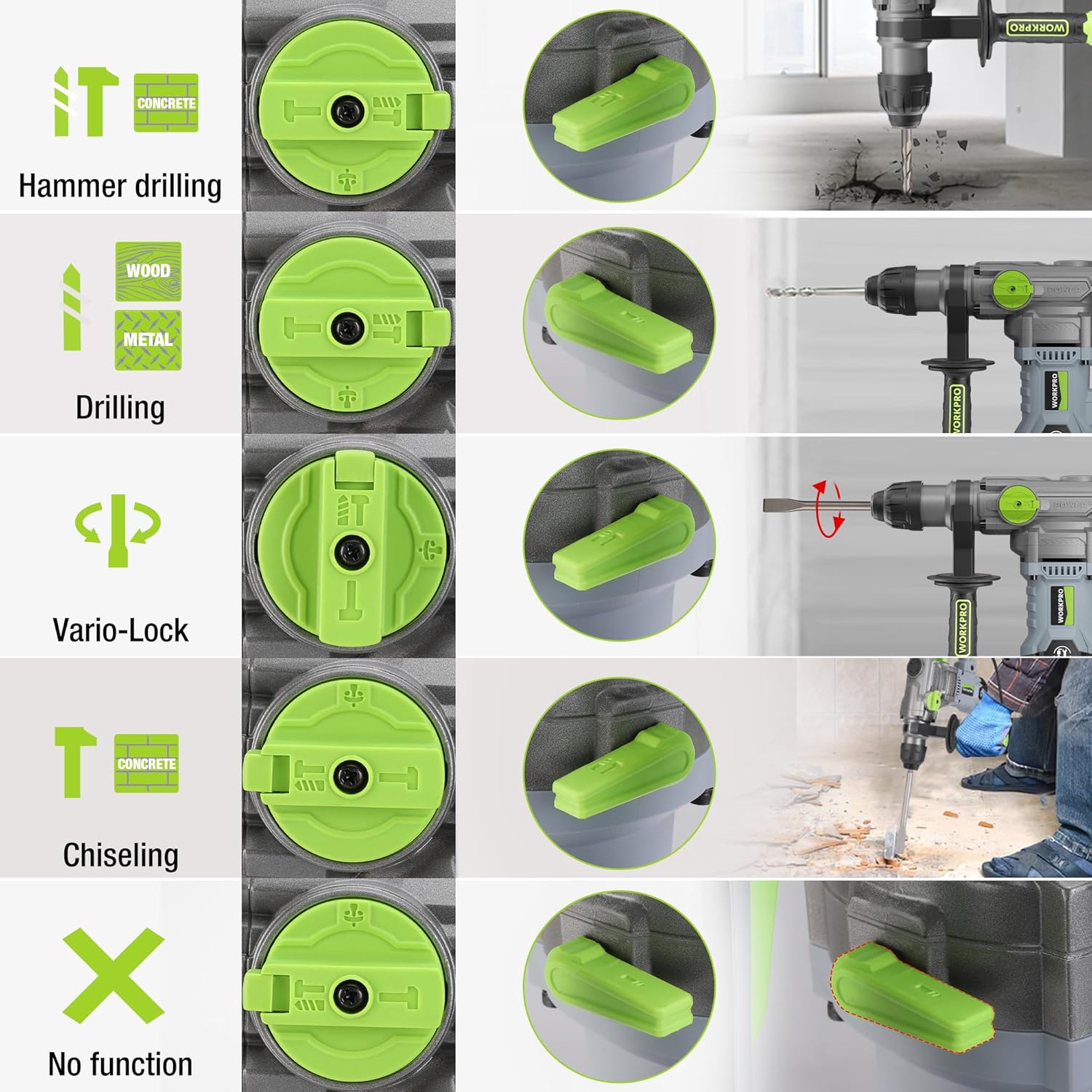
Image 5.1: The four-function switch allows selection between Hammer Drilling, Drilling, Vario-Lock (Chisel Adjust), and Chiseling modes.
- ການເຈາະດ້ວຍຄ້ອນ: ສໍາລັບການເຈາະໃນຊີມັງແລະ masonry ມີຜົນກະທົບ.
- ການຂຸດເຈາະ: ສໍາລັບການເຈາະໃນໄມ້, ໂລຫະ, ແລະພາດສະຕິກໂດຍບໍ່ມີຜົນກະທົບ.
- Chiseling (Hammer Only): For light chiseling work in concrete and masonry.
- Vario-Lock (Chisel Adjust): Allows you to rotate and lock the chisel in various positions to optimize the working angle.

Image 5.2: Visual representation of the hammer drilling, drilling, hammer, and chisel adjust modes.
5.2 ການຄວບຄຸມຄວາມໄວຕົວປ່ຽນແປງ
The variable speed control allows you to adjust the rotation speed (0-930 RPM) and impact frequency (0-4300 BPM) to match the material and application.
- Rotate the speed adjustment dial to increase or decrease the speed.
- Start with a lower speed for precise drilling and increase as needed.
5.3 ຄວາມສາມາດໃນການເຈາະ
The tool offers excellent drilling performance across various materials:
- ຄອນກີດ: ເຖິງ 32 ມມ
- ໄມ້: ເຖິງ 42 ມມ
- ເຫຼັກກ້າ: ເຖິງ 13 ມມ
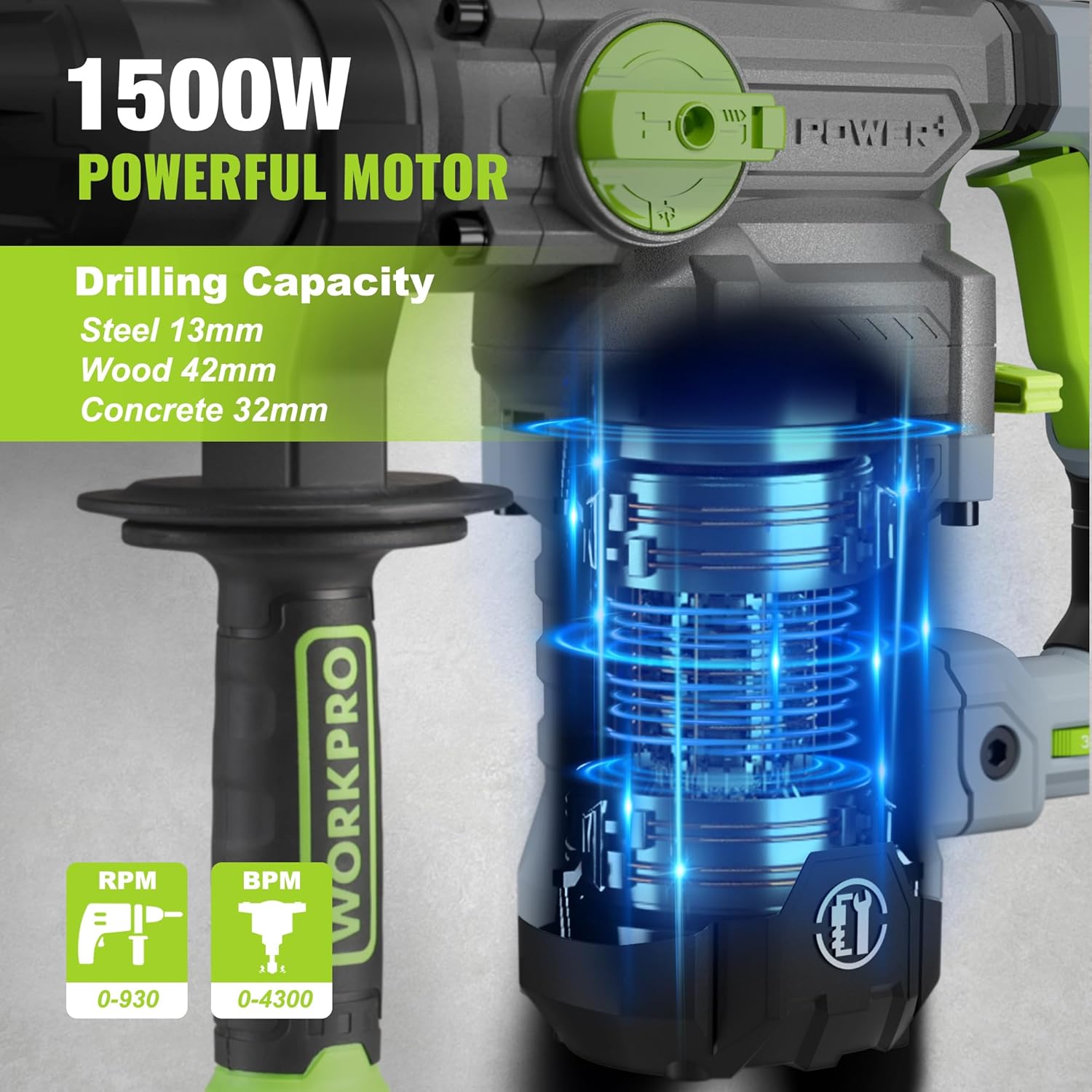
Image 5.3: The 1500W motor provides sufficient power for drilling in steel, wood, and concrete.
5.4 ຄໍາຮ້ອງສະຫມັກ Examples

Image 5.4: The tool is suitable for various tasks including chiseling concrete, removing tiles, concrete drilling, and floor breaking.
6. ບໍາລຸງຮັກສາ
ການບໍາລຸງຮັກສາເປັນປົກກະຕິຮັບປະກັນອາຍຸຍືນແລະການປະຕິບັດທີ່ດີທີ່ສຸດຂອງເຄື່ອງມືຂອງທ່ານ.
6.1 ການທໍາຄວາມສະອາດ
- Always disconnect the tool from the power supply before cleaning.
- ທຳຄວາມສະອາດຊ່ອງລະບາຍອາກາດເປັນປະຈຳເພື່ອປ້ອງກັນຄວາມຮ້ອນເກີນໄປ.
- ເຊັດທີ່ຢູ່ອາໃສຂອງເຄື່ອງມືທີ່ມີຄວາມອ່ອນ, damp ຜ້າ. ຢ່າໃຊ້ສານເຄມີທີ່ຮຸນແຮງຫຼືເຄື່ອງເຮັດຄວາມສະອາດຂັດ.
- The tool features a dust-proof design and anti-dust bottom structure to extend its service life.
6.2 Grease Replenishment
To maintain optimal performance and durability, replenish the grease every 30-40 hours of cumulative use.
- Use the provided wrench to open the grease pot.
- Apply the advanced lubricant (grease) as instructed.
- Securely close the grease pot after replenishment.
Image 6.1: Instructions for grease replenishment using the provided spanner and grease.
6.3 ການປ່ຽນແປງກາກບອນ
Carbon brushes are wear parts and should be checked periodically. Replace them when they are worn down to their limit to ensure consistent motor performance.
7. ການແກ້ໄຂບັນຫາ
ພາກສ່ວນນີ້ແກ້ໄຂບັນຫາທົ່ວໄປທີ່ທ່ານອາດຈະພົບ. ສໍາລັບບັນຫາທີ່ບໍ່ໄດ້ລະບຸໄວ້ຢູ່ທີ່ນີ້, ໃຫ້ຕິດຕໍ່ຝ່າຍຊ່ວຍເຫຼືອລູກຄ້າ.
| ບັນຫາ | ສາເຫດທີ່ເປັນໄປໄດ້ | ການແກ້ໄຂ |
|---|---|---|
| ເຄື່ອງມືບໍ່ເລີ່ມຕົ້ນ | ບໍ່ມີການສະຫນອງພະລັງງານ; ສະຫຼັບຜິດພາດ; ແປງກາກບອນໃສ່ | Check power connection; Test switch; Replace carbon brushes |
| ປະສິດທິພາບການຂຸດເຈາະຫຼຸດລົງ | Dull drill bit; Incorrect mode selected; Insufficient grease | Replace or sharpen drill bit; Select correct mode; Replenish grease |
| ການສັ່ນສະເທືອນ/ສຽງລົບກວນຫຼາຍເກີນໄປ | Loose components; Damaged bit; Internal issue | Check all connections; Replace bit; Contact service center |
| ຮ້ອນເກີນໄປ | Blocked ventilation slots; Prolonged heavy use | Clean ventilation slots; Allow tool to cool down |
8. ຂໍ້ກໍານົດດ້ານວິຊາການ
| ຄຸນສົມບັດ | ຂໍ້ມູນຈໍາເພາະ |
|---|---|
| ໝາຍເລກຕົວແບບ | W125244A |
| ການປ້ອນຂໍ້ມູນ Voltage | 230-240 V |
| ຄວາມຖີ່ | 50 Hz |
| ລະດັບພະລັງງານການປ້ອນຂໍ້ມູນ | 1500 ວ |
| ຄວາມໄວບໍ່ມີການໂຫຼດ | 0-930 rpm ±10% |
| ຄວາມຖີ່ຂອງຜົນກະທົບ | 0-4300 bpm ±10% |
| ແຮງກະທົບດ່ຽວ | 5.5 J |
| ຄວາມອາດສາມາດເຈາະ (ຄອນກີດ) | 32 ມມ |
| ຄວາມອາດສາມາດເຈາະ (ໄມ້) | 42 ມມ |
| ຄວາມອາດສາມາດເຈາະ (ເຫຼັກກ້າ) | 13 ມມ |
| ປະເພດ Chuck | SDS-plus |
| ຂະໜາດສິນຄ້າ (L x W x H) | 38.6 x 10.4 x 26.4 cm |
| ນ້ຳໜັກ | 8.34 ກິໂລ |
| ແຫຼ່ງພະລັງງານ | ໄຟຟ້າສາຍ |
| ຈໍານວນ Gears | 6 (ຄວາມໄວທີ່ປ່ຽນແປງໄດ້) |
9. ຂໍ້ມູນການຮັບປະກັນ ແລະການຊ່ວຍເຫຼືອ
For warranty details, product support, or service inquiries, please refer to the warranty card included with your purchase or contact WORKPRO customer service directly. Keep your proof of purchase for any warranty claims.