
ແນະນຳ
This manual provides detailed instructions for the YOTON Portable DVD Player, Model YD155M. Designed for portable entertainment, this device features a 14.1-inch HD swivel screen, a built-in rechargeable battery, and broad media compatibility. Please read this manual thoroughly to ensure proper use and maintenance of your device.

Image: The YOTON Portable DVD Player YD155M, showcasing its sleek design and screen.
ຕັ້ງຄ່າ
ເນື້ອໃນຊຸດ
ກ່ອນທີ່ຈະເລີ່ມຕົ້ນ, ກວດເບິ່ງວ່າລາຍການທັງຫມົດແມ່ນຢູ່ໃນຊຸດ:
- YOTON Portable DVD Player YD155M
- ເຄື່ອງສາກໄຟ AC
- Car Charger (1.8 meters)
- ສາຍ AV 3-in-1
- ການຄວບຄຸມໄລຍະໄກ
- ຄູ່ມືຜູ້ໃຊ້ (ເອກະສານນີ້)

Image: The YOTON Portable DVD Player YD155M alongside its accessories, including the AC charger, car charger, AV cable, and remote control.
ການສາກໄຟເບື້ອງຕົ້ນ
For optimal performance, fully charge the device before first use. Connect the AC charger to the player's power input and plug it into a wall outlet. The charging indicator will illuminate. A full charge typically takes several hours.
ເປີດ/ປິດ
ກົດຄ້າງໄວ້ ພະລັງງານ button located on the device to turn it on or off.
ຄໍາແນະນໍາການດໍາເນີນງານ
Screen Rotation and Swivel
The 14.1-inch HD screen can be rotated 270 degrees and flipped 180 degrees, allowing for multiple viewing angles. Adjust the screen to your preferred position for comfortable viewing.

Image: The portable DVD player's screen demonstrating its 270-degree rotation and 180-degree flip capabilities.
ຄວາມເຂົ້າກັນໄດ້ຂອງແຜ່ນ
The player supports a wide range of disc formats, including:
- ດີວີດີ, ຊີດີ, ຊີດີ-ອາ/ຣໍວິນ
- DVD-R/+R, DVD+RW/-RW
It also supports DVDs from any region. Note: This player supports DVDs with a resolution of 720x480. It does not support 1080P, 4K, or Blu-ray discs.

Image: An illustration showing the YOTON Portable DVD Player's compatibility with various disc types, including DVD and CD formats.
ການຫຼິ້ນບັດ USB/SD
Insert a USB drive or SD card (up to 16 GB) into the designated slot to play media files. Supported formats include WMA, MPG/MPG2, DIVX, and AVI.
ຟັງຊັນຫນ່ວຍຄວາມຈໍາສຸດທ້າຍ
The player features a last memory function. If playback is interrupted (e.g., by powering off), the device will resume from the last stopped point when powered on again.

Image: A visual representation of the last memory function, showing how the player resumes playback from where it left off after being powered off and on.
ຕົວເລືອກພະລັງງານ
The YD155M can be powered in several ways:
- ຜູ້ດັດແປງໄຟຟ້າ AC: For home use, connect the included AC charger to a wall outlet.
- ແບັດເຕີຣີໃນຕົວ: The 2500 mAh rechargeable battery provides 4-6 hours of playback time.
- ເຄື່ອງສາກລົດ: Use the 1.8-meter car charger for power during travel.
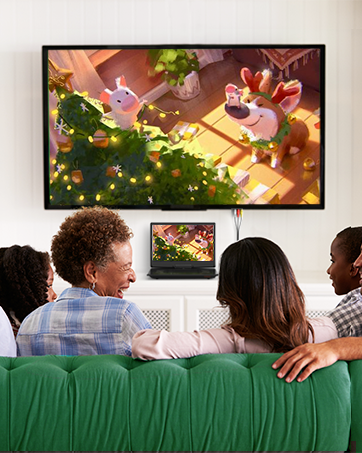
Image: An illustration depicting the various power options for the portable DVD player: AC adapter, internal battery, and car charger.
Connecting to External Displays
Use the included 3-in-1 AV cable to connect the portable DVD player to external displays such as a television or projector. This allows you to synchronize the screen content for a larger viewປະສົບການ.
- Sync to Television: Connect the AV cable from the player's AV OUT port to your TV's AV IN ports.
- Sync to Projector: Connect the AV cable from the player's AV OUT port to your projector's AV IN ports.
- Sync to Similar Player: Connect two compatible players using an AV cable for synchronized playback.

Image: The portable DVD player connected to a television, demonstrating its capability to sync content to larger screens or other similar players.
ສຽງອອກ
The player features dual built-in stereo speakers for clear sound. For private listening, use the 3.5mm headphone jack.
ບໍາລຸງຮັກສາ
ການເຮັດຄວາມສະອາດອຸປະກອນ
Use a soft, dry cloth to clean the exterior of the DVD player. For the screen, use a specialized screen cleaning cloth. Avoid using liquid cleaners or abrasive materials.
ການດູແລແຜ່ນ
Handle discs by their edges to avoid fingerprints. Store discs in their cases when not in use to prevent scratches. Clean dirty discs with a soft, lint-free cloth, wiping from the center outwards.
ການເກັບຮັກສາ
When not in use for extended periods, store the player in a cool, dry place away from direct sunlight and extreme temperatures. Ensure the battery is partially charged before storage to prolong its lifespan.
ການແກ້ໄຂບັນຫາ
If you encounter issues with your YOTON Portable DVD Player, refer to the following common solutions:
- ບໍ່ມີພະລັງງານ: Ensure the AC adapter or car charger is securely connected, or that the internal battery is charged.
- Disc ບໍ່ໄດ້ຫຼິ້ນ: Check if the disc is inserted correctly with the label side up. Ensure the disc is clean and free of scratches. Verify that the disc format is supported (not Blu-ray, 1080P, or 4K).
- ບໍ່ມີສຽງ: Check the volume level on the player and any connected external speakers or headphones. Ensure headphones are fully plugged into the 3.5mm jack. Note that sound quality can be affected by the original disc's soundtrack.
- ຄຸນນະພາບຮູບບໍ່ດີ: Ensure the disc is clean and undamaged. If connected to an external display, check the AV cable connections.
- ການຄວບຄຸມໄລຍະໄກບໍ່ເຮັດວຽກ: Check the remote control's batteries and ensure there are no obstructions between the remote and the player's IR sensor.
For more detailed troubleshooting or persistent issues, please contact YOTON customer service.
ຂໍ້ມູນຈໍາເພາະ
| ຄຸນສົມບັດ | ລາຍລະອຽດ |
|---|---|
| ຍີ່ຫໍ້ | ຢອດຕັນ |
| ໝາຍເລກຕົວແບບ | YD155M |
| ຂະໜາດໜ້າຈໍ | 14.1 ນິ້ວ |
| ປະເພດການສະແດງ | ຈໍ LCD |
| ຄວາມລະອຽດໜ້າຈໍ | 1366x768 |
| ຂະໜາດສິນຄ້າ | 34L x 23.6W x 4.6ຊມ |
| ນ້ໍາຫນັກລາຍການ | 1800 ກຣາມ (1.8 ກິໂລ) |
| ແບັດເຕີຣີ | 1 Lithium Ion (ລວມ) |
| Playtime (Battery) | 4-6 ຊົ່ວໂມງ |
| ປະເພດສື່ | DVD, CD, CD-R/RW, DVD-R/+R, DVD+RW/-RW, WMA, MPG/MPG2, DIVX, AVI |
| ເຕັກໂນໂລຊີການເຊື່ອມຕໍ່ | 3.5 mm Headphone Jack, AV Input/Output, USB, SD Card Slot |
| ອຸປະກອນທີ່ເຂົ້າກັນໄດ້ | ໂທລະພາບ |
| ສີ | ດຳ |
| UPC | 850048157248 |
ການຮັບປະກັນແລະການສະຫນັບສະຫນູນ
ຂໍ້ມູນການຮັບປະກັນ
YOTON offers a 12-month warranty for this product. Please retain your proof of purchase for warranty claims.
ການບໍລິການລູກຄ້າ
For any questions, technical support, or assistance with defective/missing parts, please contact YOTON customer service. We provide 24-hour customer service and professional technical support.
- ສະຫນັບສະຫນູນດ້ານວິຊາການ: Our team offers 100% technical support within one day.
- ອຸປະກອນເສີມ: For defective or missing parts, contact customer service directly to receive new parts free of charge.
- ຄູ່ມືລາຍລະອຽດ: A more detailed manual may be available for download on the Amazon product page or by contacting YOTON directly.