
Vorago BSP-500-V2
ຄູ່ມືຜູ້ໃຊ້ລຳໂພງ Bluetooth Vorago BSP-500-V2
ຮູບແບບ: BSP-500-V2
ຍີ່ຫໍ້: Vorago
1. ຜະລິດຕະພັນເກີນview
The Vorago BSP-500-V2 is a portable Bluetooth speaker designed for robust performance and durability. It features IPX5 water resistance, making it suitable for various environments, including outdoor adventures and parties. This manual provides detailed instructions for setting up, operating, and maintaining your speaker.
ຄຸນນະສົມບັດທີ່ສໍາຄັນ:
- True Wireless Stereo (TWS) Connectivity: Connect two BSP-500-V2 speakers for an immersive stereo sound experience.
- ອາຍຸແບັດເຕີຣີທີ່ຂະຫຍາຍອອກ: Enjoy up to 7 hours of music playback at 70% volume, thanks to its 2000 mAh battery.
- ການສາກ USB Type-C: Convenient and modern USB-C port for charging.
- ການເຊື່ອມຕໍ່ອະເນກປະສົງ: Supports Bluetooth for wireless streaming and a 3.5mm auxiliary input for wired connections.
- IPX5 ກັນນ້ໍາ: ປ້ອງກັນຈາກກະແສນໍ້າທີ່ມີຄວາມດັນຕໍ່າຈາກທຸກທິດທາງ.
ເນື້ອໃນຊຸດ:
- ລຳໂພງ Bluetooth Vorago BSP-500-V2
- ສາຍສາກໄຟ USB Type-C
- ສາຍສຽງ 3.5 ມມ
- ຄູ່ມືຜູ້ໃຊ້ (ເອກະສານນີ້)
ແຜນວາດຜະລິດຕະພັນ:

ຮູບ 1.1: ດ້ານຫນ້າ view of the Vorago BSP-500-V2 Bluetooth speaker, showcasing its mesh grille and central Vorago logo.

ຮູບທີ 1.2: ມຸມ view of the speaker, highlighting its robust, rectangular design and integrated carrying strap.

ຮູບທີ 1.3: ທາງເທິງ view showing the control panel with power, volume down, play/pause, and volume up buttons.
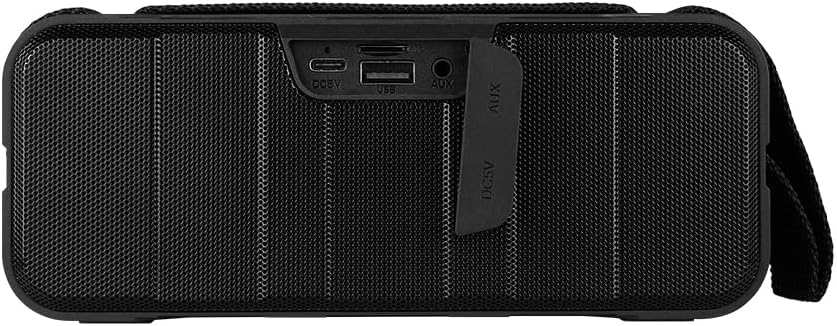
ຮູບ 1.4: ດ້ານຫລັງ view of the speaker, showing the protective flap covering the input ports.

Figure 1.5: Close-up of the input ports, including DC 5V (USB-C), USB-A, and AUX (3.5mm) inputs, protected by a rubber cover.
2. ຂໍ້ມູນຄວາມປອດໄພ
- ຢ່າໃຫ້ລຳໂພງຖືກອຸນຫະພູມສູງ ຫຼື ຕໍ່າເກີນໄປ.
- ຫຼີກລ່ຽງການລຸດລົງ ຫຼື ວາງລຳໂພງຕໍ່ກັບຜົນກະທົບທີ່ຮຸນແຮງ.
- Keep the speaker away from direct sunlight and heat sources.
- ຢ່າຖອດປະກອບ, ສ້ອມແປງ ຫຼື ດັດແປງລຳໂພງດ້ວຍຕົນເອງ. ນີ້ຈະເຮັດໃຫ້ການຮັບປະກັນເປັນໂມຄະ.
- Ensure the port cover is securely closed when using the speaker near water to maintain IPX5 water resistance.
- Do not immerse the speaker in water. IPX5 rating protects against splashes and light rain, not submersion.
- Use only the provided charging cable or a certified USB Type-C cable for charging.
- ເຮັດຄວາມສະອາດລໍາໂພງດ້ວຍຜ້າອ່ອນໆ, ແຫ້ງ. ຢ່າໃຊ້ເຄື່ອງເຮັດຄວາມສະອາດຂັດຫຼືສານລະລາຍ.
3. ຕັ້ງຄ່າ
3.1 ກຳລັງສາກລຳໂພງ
- Open the protective rubber cover on the rear of the speaker to access the charging port.
- Connect the USB Type-C end of the charging cable to the speaker's DC 5V port.
- ເຊື່ອມຕໍ່ອີກສົ້ນຂອງສາຍ USB ກັບອະແດັບເຕີໄຟ USB (ບໍ່ລວມ) ຫຼືພອດ USB ຂອງຄອມພິວເຕີ.
- ໄຟສະແດງການສາກຈະສະຫວ່າງຂຶ້ນໃນລະຫວ່າງການສາກ ແລະ ຈະດັບລົງເມື່ອສາກເຕັມ.
- Once charging is complete, securely close the protective rubber cover to maintain water resistance.
3.2 ການເປີດ/ປິດ
- ເພື່ອເປີດເຄື່ອງ: ກົດຄ້າງໄວ້ ປຸ່ມເປີດປິດ on the top panel for approximately 3 seconds until you hear an audible prompt.
- ປິດເຄື່ອງ: ກົດຄ້າງໄວ້ ປຸ່ມເປີດປິດ ປະມານ 3 ວິນາທີ ຈົນກວ່າທ່ານຈະໄດ້ຍິນສຽງແຈ້ງເຕືອນ.
3.3 ການຈັບຄູ່ Bluetooth
- Ensure the speaker is powered on. It will automatically enter Bluetooth pairing mode, indicated by a flashing LED light.
- ໃນອຸປະກອນຂອງທ່ານ (ໂທລະສັບສະຫຼາດ, ແທັບເລັດ, ແລັບທັອບ), ເປີດໃຊ້ Bluetooth ແລະຊອກຫາອຸປະກອນທີ່ມີຢູ່.
- Select "BSP-500-V2" from the list of found devices.
- ເມື່ອຈັບຄູ່ສຳເລັດແລ້ວ, ລຳໂພງຈະສົ່ງສຽງຢືນຢັນ, ແລະໄຟ LED ຈະຢຸດກະພິບ ແລະ ຍັງຄົງສະຫວ່າງຢູ່.
- ລຳໂພງຈະເຊື່ອມຕໍ່ຄືນໃໝ່ໂດຍອັດຕະໂນມັດກັບອຸປະກອນທີ່ຈັບຄູ່ສຸດທ້າຍເມື່ອເປີດ, ຖ້າອຸປະກອນຢູ່ໃນຂອບເຂດ ແລະ Bluetooth ຖືກເປີດໃຊ້.
3.4 True Wireless Stereo (TWS) ການຈັບຄູ່
TWS allows you to connect two BSP-500-V2 speakers together for a true stereo sound experience.
- Ensure both BSP-500-V2 speakers are powered on and not connected to any other Bluetooth device.
- On one of the speakers (this will be the primary speaker), double-press the ປຸ່ມຫຼິ້ນ/ຢຸດຊົ່ວຄາວ. The speaker will enter TWS pairing mode.
- The two speakers will automatically search for and connect to each other. You will hear an audible confirmation once they are successfully paired.
- Once TWS is established, connect your device to the primary speaker via Bluetooth as described in Section 3.3.
- To disconnect TWS, double-press the ປຸ່ມຫຼິ້ນ/ຢຸດຊົ່ວຄາວ ທັງ ລຳ ໂພງ.
3.5 ການເຊື່ອມຕໍ່ເສີມ (AUX).
For devices without Bluetooth, you can use the 3.5mm audio cable.
- Open the protective rubber cover on the rear of the speaker.
- Connect one end of the 3.5mm audio cable to the speaker's AUX port.
- ເຊື່ອມຕໍ່ສົ້ນອື່ນຂອງສາຍກັບຊ່ອງສຽບອອກສຽງຂອງອຸປະກອນຂອງທ່ານ.
- ລຳໂພງຈະປ່ຽນເປັນໂໝດ AUX ໂດຍອັດຕະໂນມັດ.
- Once disconnected, securely close the protective rubber cover.
4. ຄໍາແນະນໍາການດໍາເນີນງານ
4.1 ໜ້າທີ່ຂອງປຸ່ມ:
| ປຸ່ມ | ຟັງຊັນ (ກົດສັ້ນ) | ຟັງຊັນ (ກົດຄ້າງ) |
|---|---|---|
| ປຸ່ມເປີດປິດ | ບໍ່ມີ | ເປີດ/ປິດ |
| ປຸ່ມລະດັບສຽງລົງ | ຫຼຸດປະລິມານລົງ | ເພງກ່ອນໜ້າ |
| ປຸ່ມຫຼິ້ນ/ຢຸດຊົ່ວຄາວ | ຫຼິ້ນ/ຢຸດເພງ, ຮັບສາຍ/ວາງສາຍ | Reject Call, Double-press for TWS Pairing |
| ປຸ່ມເພີ່ມສຽງ | ເພີ່ມປະລິມານ | ຕິດຕາມຕໍ່ໄປ |
5. ບໍາລຸງຮັກສາ
- ທໍາຄວາມສະອາດ: Use a soft, dry, lint-free cloth to clean the speaker's surface. For stubborn dirt, slightly dampen ຜ້າທີ່ມີນ້ໍາ. ຢ່າໃຊ້ສານເຄມີທີ່ຮຸນແຮງ, ສານລະລາຍທໍາຄວາມສະອາດ, ຫຼືຢາຊັກຟອກທີ່ເຂັ້ມແຂງ.
- ການດູແລຕ້ານນ້ໍາ: Always ensure the rubber port cover on the back of the speaker is fully and securely sealed when using the speaker outdoors or near water. This maintains its IPX5 water resistance. After exposure to water, wipe the speaker dry before opening the port cover for charging or auxiliary connections.
- ການເກັບຮັກສາ: When not in use for extended periods, store the speaker in a cool, dry place, away from direct sunlight and extreme temperatures. It is recommended to charge the speaker fully before storing and to recharge it every few months to maintain battery health.
- ການດູແລຫມໍ້ໄຟ: To prolong battery life, avoid fully discharging the battery frequently. Charge the speaker when the low battery indicator is active.
6. ການແກ້ໄຂບັນຫາ
| ບັນຫາ | ສາເຫດທີ່ເປັນໄປໄດ້ | ການແກ້ໄຂ |
|---|---|---|
| ລຳໂພງບໍ່ເປີດ. | ແບັດເຕີຣີຕໍ່າ. | Charge the speaker fully using the provided USB Type-C cable. |
| ບໍ່ສາມາດຈັບຄູ່ຜ່ານ Bluetooth ໄດ້. | Speaker is not in pairing mode; Device's Bluetooth is off; Speaker is already connected to another device; Device is too far from speaker. | Ensure speaker is powered on and flashing (pairing mode). Turn on Bluetooth on your device. Disconnect from other devices. Move device closer to speaker (within 10 meters). |
| ບໍ່ມີສຽງ ຫຼືສຽງຕໍ່າ. | Volume too low on speaker or device; Incorrect input mode; Speaker not connected. | Increase volume on both speaker and connected device. Ensure correct mode (Bluetooth or AUX) is active. Verify successful Bluetooth pairing or AUX cable connection. |
| ການບິດເບືອນສຽງ. | ລະດັບສຽງສູງເກີນໄປ; ອຸປະກອນຢູ່ໄກຈາກລຳໂພງເກີນໄປ; ການລົບກວນ. | Reduce volume on speaker and/or device. Move device closer to speaker. Avoid obstacles between speaker and device. |
| ການຈັບຄູ່ TWS ລົ້ມເຫລວ. | Speakers are already paired to a device; Speakers are too far apart. | Ensure both speakers are disconnected from any Bluetooth devices. Place speakers close to each other during TWS pairing. |
7. ຂໍ້ມູນຈໍາເພາະ
| ຄຸນສົມບັດ | ລາຍລະອຽດ |
|---|---|
| ຊື່ຕົວແບບ | BSP-500-V2 |
| ປະເພດລຳໂພງ | ມັນຕິມີເດຍ |
| ຄຸນນະສົມບັດພິເສດ | Bluetooth |
| ການນໍາໃຊ້ທີ່ແນະນໍາ | ສຳລັບຜູ້ຫຼິ້ນເພງ |
| ອຸປະກອນທີ່ເຂົ້າກັນໄດ້ | ແລັບທັອບ, ເຄື່ອງຫຼິ້ນ MP3, ໂທລະສັບສະຫຼາດ, ແທັບເລັດ |
| ປະເພດການຄວບຄຸມ | ປຸ່ມ |
| ການຕັ້ງຄ່າຊ່ອງສຽງອ້ອມຮອບ | 5.0 |
| ຊີວິດຫມໍ້ໄຟ | 7 ຊົ່ວໂມງ |
| ສ່ວນປະກອບລວມ | ລໍາໂພງ |
| ຂະໜາດສິນຄ້າ | 5D x 15W x 18H ຊັງຕີແມັດ |
| ນ້ຳໜັກສິນຄ້າ | 1 ກິໂລກຣາມ |
| ກັນນ້ຳ | ແມ່ນແລ້ວ (IPX5) |
| ຄວາມອາດສາມາດຫມໍ້ໄຟ | 2000 mAh |
| Ampປະເພດທີ່ມີຊີວິດຊີວາ | ເຄື່ອນໄຫວ |
| ແຫຼ່ງພະລັງງານ | ແບັດເຕີຣີ |
| ການຕອບສະໜອງຄວາມຖີ່ | 180 Hz |
| ເຕັກໂນໂລຊີການເຊື່ອມຕໍ່ | Bluetooth |
| ຮູບແບບການອອກສຽງ | ສະເຕຣິໂອ |
| ປະເພດການຕິດຕັ້ງ | ພູຕັ້ງໂຕະ |
8. ການຮັບປະກັນແລະການສະຫນັບສະຫນູນ
The Vorago BSP-500-V2 Bluetooth Speaker comes with a limited warranty. Please refer to the warranty card included with your product for specific terms and conditions, or visit the official Vorago webເວັບໄຊສໍາລັບລາຍລະອຽດເພີ່ມເຕີມ.
For technical support, troubleshooting assistance, or warranty claims, please contact Vorago customer service through their official channels. You can find more information and contact details on the Vorago Brand Store on Amazon ຫຼືທາງການຂອງເຂົາເຈົ້າ webເວັບໄຊ.
ກະລຸນາຮັກສາຫຼັກຖານການຊື້ຂອງທ່ານໄວ້ເພື່ອຈຸດປະສົງການຮັບປະກັນ.
Ask a question about this manual
Ask about setup, troubleshooting, compatibility, parts, safety, or missing instructions. Manuals+ will review the question and use this page’s manual context to help answer it.