
1. ບົດແນະນຳ
The Topcon TP-L6B Pipe Laser is a precision instrument designed for accurate pipe laying, trenching, sewer, mining, and tunneling projects. Its compact design, extended battery life, and advanced mobile application integration enhance operational efficiency and safety on job sites. This manual provides essential information for the proper setup, operation, maintenance, and troubleshooting of your TP-L6B Pipe Laser.
2. ຄຸນລັກສະນະຂອງຜະລິດຕະພັນ
- Up to 60-hour battery life for extended operation.
- Compact design allows for flexible setup in confined spaces and tighter invert measurements.
- Mobile application for Android devices enables remote display, configuration, and adjustments, improving safety by reducing the need to enter manholes.
- Multi-use battery system compatible with other Topcon job site equipment.
- Includes RC-500 remote control with a range of 600 feet.
- Wide grade range of -15% to 40% for diverse project requirements.
- Class II laser with 4.5 mW output.
3. ຕັ້ງຄ່າ
Proper setup is crucial for accurate measurements and safe operation. Follow these steps to prepare your TP-L6B Pipe Laser for use.
3.1 ການຫຸ້ມຫໍ່ແລະການກວດກາ
- Carefully remove the TP-L6B Pipe Laser and all accessories from its packaging.
- Inspect the unit for any signs of damage that may have occurred during shipping. If damage is found, contact your supplier immediately.
- ກວດສອບວ່າອົງປະກອບທັງໝົດທີ່ລະບຸໄວ້ໃນລາຍການບັນຈຸມີຢູ່.
3.2 ການຕິດຕັ້ງ ແລະສາກແບັດ
- The TP-L6B uses a rechargeable NiMH battery. Ensure the battery is fully charged before initial use.
- Locate the battery compartment, typically secured by a latch or screw mechanism.
- Insert the charged battery, ensuring correct polarity. Close and secure the compartment.
- Refer to the separate battery charger manual for detailed charging instructions.
3.3 Initial Placement and Leveling
Place the pipe laser on a stable, level surface or mount it securely within the pipe. The integrated adjustable legs assist in initial positioning.
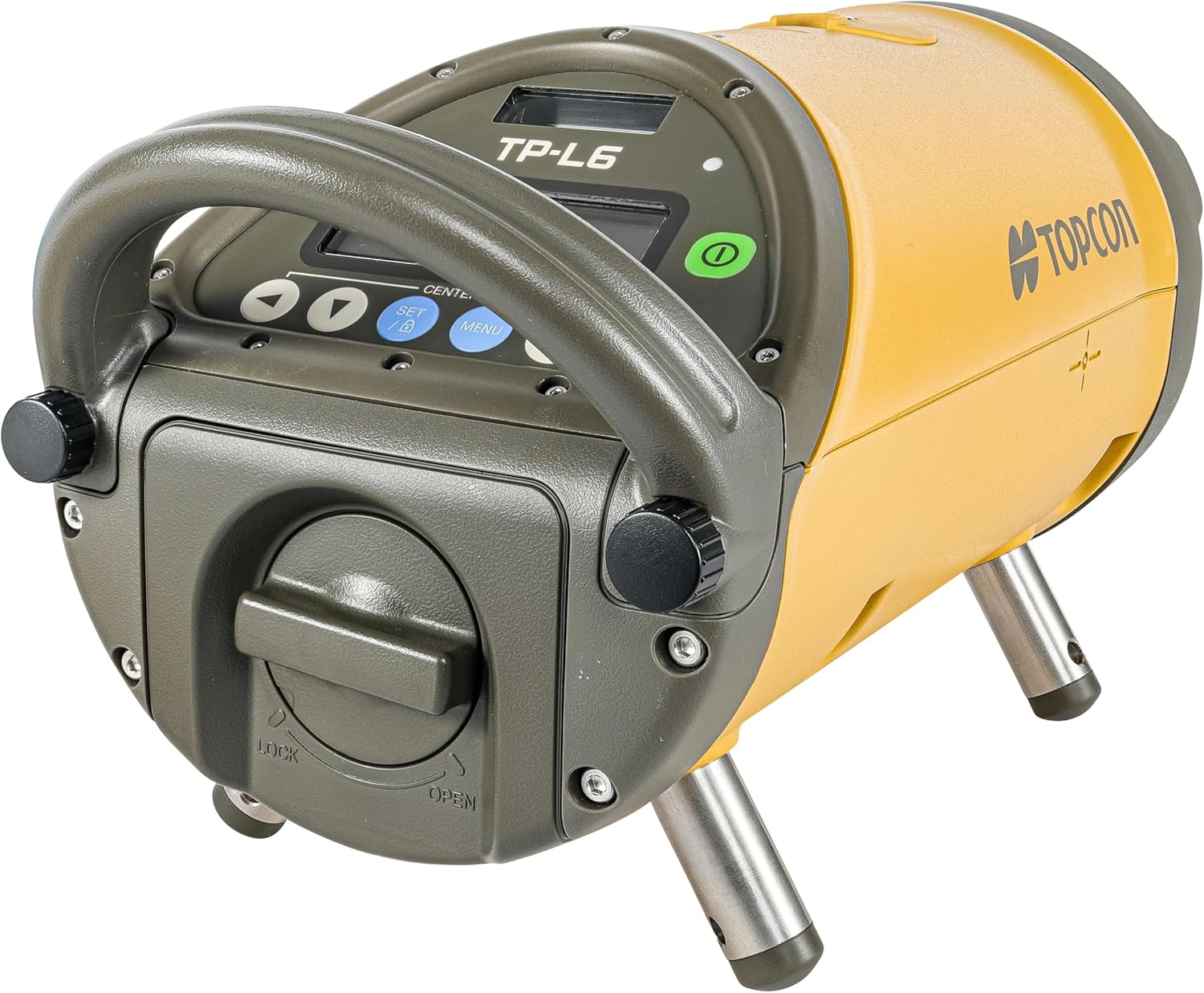
This image displays the Topcon TP-L6B Pipe Laser, a compact yellow and gray device with a sturdy handle, a digital control panel, and two adjustable metal legs for stable positioning.
4. ຄໍາແນະນໍາການດໍາເນີນງານ
This section outlines the basic steps for operating the TP-L6B Pipe Laser.
4.1 ການເປີດ/ປິດ
- To power on the unit, press and hold the green power button located on the control panel until the display illuminates.
- ເພື່ອປິດເຄື່ອງ, ໃຫ້ກົດປຸ່ມເປີດປິດຄ້າງໄວ້ອີກຄັ້ງຈົນກ່ວາຈໍສະແດງຜົນປິດ.
4.2 ການນໍາໃຊ້ກະດານຄວບຄຸມ
The control panel features a digital display and several buttons for direct control:
- ປຸ່ມລູກສອນ: Used to adjust grade, line, or other settings.
- SET/B Button: Confirms selections or accesses specific settings.
- ປຸ່ມເມນູ: Navigates through the laser's menu options.
- CENTER Button: Automatically centers the laser beam.
4.3 Remote Control (RC-500) Operation
The RC-500 remote control allows for convenient adjustments from a distance of up to 600 feet. Ensure the remote has fresh batteries and is pointed towards the laser's receiver window.
- Use the remote's buttons to adjust grade, line, and access menu functions without physically interacting with the unit.
- The remote can control the laser's grade range from -15% to 40%.
4.4 ການເຊື່ອມໂຍງແອັບຯມືຖື
The Topcon TP-L6B can be controlled and monitored via a dedicated mobile application for Android devices. This app provides a visual interface for settings and adjustments, enhancing safety and ease of use.
- Download the official Topcon TP-L6B app from the Android app store.
- ກວດໃຫ້ແນ່ໃຈວ່າ Bluetooth ຂອງອຸປະກອນມືຖືຂອງທ່ານຖືກເປີດໃຊ້ງານແລ້ວ.
- Open the app and follow the on-screen instructions to pair with your TP-L6B unit.
- Once connected, you can remotely configure settings, monitor status, and make adjustments.
5. ບໍາລຸງຮັກສາ
Regular maintenance ensures the longevity and accuracy of your TP-L6B Pipe Laser.
5.1 ການທໍາຄວາມສະອາດ
- After each use, wipe down the exterior of the unit with a soft, damp ຜ້າ.
- Do not use abrasive cleaners or solvents, as these can damage the housing or display.
- Keep the laser aperture clean and free of dust or debris to maintain beam clarity. Use a soft, lint-free cloth for this purpose.
5.2 ການດູແລຫມໍ້ໄຟ
- Always fully charge the battery before storage if the unit will not be used for an extended period.
- ເກັບຮັກສາຫມໍ້ໄຟໃນບ່ອນທີ່ເຢັນ, ແຫ້ງ.
- ຫຼີກລ່ຽງອຸນຫະພູມທີ່ຮຸນແຮງເກີນໄປ, ເຊິ່ງສາມາດເຮັດໃຫ້ອາຍຸການໃຊ້ງານຂອງແບັດເຕີຣີຫຼຸດລົງ.
5.3 ການເກັບຮັກສາ
When not in use, store the TP-L6B Pipe Laser in its original carrying case in a dry, temperature-controlled environment to protect it from dust, moisture, and impact.
6. ການແກ້ໄຂບັນຫາ
This section provides solutions to common issues you might encounter with your TP-L6B Pipe Laser.
6.1 Laser Not Powering On
- ກວດສອບຫມໍ້ໄຟ: ໃຫ້ແນ່ໃຈວ່າໄດ້ສາກໄຟເຕັມ ແລະຕິດຕັ້ງຢ່າງຖືກຕ້ອງ.
- ປຸ່ມເປີດປິດ: Confirm the power button is pressed and held sufficiently.
6.2 ການຄວບຄຸມໄລຍະໄກບໍ່ຕອບສະຫນອງ
- ແບັດເຕີຣີ: Replace the batteries in the RC-500 remote control.
- Line of Sight: Ensure there is a clear line of sight between the remote and the laser's receiver.
- ໄລຍະທາງ: Verify you are within the 600-foot operating range.
6.3 ການອ່ານບໍ່ຖືກຕ້ອງ
- ຄວາມໝັ້ນຄົງ: Ensure the laser is placed on a stable surface and is not subject to vibrations.
- ການປັບທຽບ: If persistent inaccuracies occur, the unit may require professional calibration. Contact Topcon support.
- ອຸປະສັກ: Check for any obstructions in the laser beam path.
For issues not covered here, please refer to the official Topcon support resources or contact customer service.
7. ຂໍ້ມູນຈໍາເພາະ
| ຂໍ້ມູນຈໍາເພາະ | ລາຍລະອຽດ |
|---|---|
| ຍີ່ຫໍ້ | Topcon |
| ໝາຍເລກຕົວແບບ | 1034437-05 |
| ນ້ໍາຫນັກລາຍການ | 15 ປອນ |
| ວັດສະດຸ | ໂລຫະ, ພາດສະຕິກ |
| ຮູບແບບການເຮັດວຽກ | ອັດຕະໂນມັດ |
| ແຫຼ່ງພະລັງງານ | ພະລັງງານຫມໍ້ໄຟ |
| ວັດtage | 4.5 ມິນລິວັດ |
| ປະເພດຫມໍ້ໄຟ | NiMH (included) |
| ຊັ້ນເລເຊີ | ຫ້ອງຮຽນ II |
| ລະດັບຊັ້ນຮຽນ | -15% ເຖິງ 40% |
| ໄລຍະການຄວບຄຸມໄລຍະໄກ | 600 Feet (RC-500) |
| ຄວາມເຂົ້າກັນໄດ້ຂອງແອັບຯມືຖື | ອຸປະກອນ Android |
8. ການຮັບປະກັນແລະການສະຫນັບສະຫນູນ
For information regarding product warranty, service, or technical support, please refer to the warranty card included with your product or visit the official Topcon website. Contacting Topcon customer service directly will provide the most accurate and up-to-date support information.