ແນະນຳ
Thank you for choosing the Coby Pro Fitness True Wireless Earbuds. These earbuds are designed to provide a superior audio experience with features tailored for an active lifestyle, including sweat resistance, secure fit, and high-definition audio. This manual will guide you through the setup, operation, and maintenance of your new earbuds.
ແມ່ນຫຍັງຢູ່ໃນກ່ອງ
ຮັບປະກັນວ່າລາຍການທັງໝົດມີຢູ່ເມື່ອ unboxing:
- Coby Pro Fitness True Wireless Earbuds (Left and Right)
- ກ່ອງສາກ
- Eartips (ຂະຫນາດຕ່າງໆເພື່ອໃຫ້ເຫມາະທີ່ສຸດ)
- ສາຍສາກ USB
- ຄູ່ມືຜູ້ໃຊ້ (ເອກະສານນີ້)
ສິນຄ້າເກີນview
Familiarize yourself with the components of your Coby Pro Fitness True Wireless Earbuds.

Image: The Coby Pro Fitness True Wireless Earbuds, showing both earbuds and the open charging case with charging contacts visible.

Image: A visual representation of the earbuds and charging case, emphasizing key features such as 15 hours playtime, noise isolating design, sweat-resistance, non-slip fit, auto pairing, voice assistant compatibility, and wide compatibility.
ຕັ້ງຄ່າ
1. ການສາກຫູຟັງ ແລະ ເຄສ
ກ່ອນທີ່ຈະໃຊ້ຄັ້ງທຳອິດ, ໃຫ້ສາກທັງຫູຟັງຫູຟັງ ແລະ ຊ່ອງສາກໃຫ້ເຕັມ.
- ໃສ່ຫູຟັງເອຍບັດໃສ່ໃນກ່ອງສາກໄຟ. ໃຫ້ແນ່ໃຈວ່າພວກມັນຢູ່ໃນຕຳແໜ່ງທີ່ຖືກຕ້ອງ ແລະ ໄຟສະແດງການສາກໄຟສະຫວ່າງຂຶ້ນ.
- ເຊື່ອມຕໍ່ກ່ອງສາກໄຟເຂົ້າກັບແຫຼ່ງພະລັງງານ USB ໂດຍໃຊ້ສາຍ USB ທີ່ໃຫ້ມາ.
- The charging case provides up to 20 hours of additional battery life, while the earbuds offer 15 hours of playtime on a full charge.
2. ການຈັບຄູ່ກັບອຸປະກອນຂອງທ່ານ
The Coby Pro Fitness Earbuds feature auto-pairing for seamless connectivity.
- ເປີດກ່ອງສາກໄຟ. ຫູຟັງເອຍບັດຈະເຂົ້າສູ່ໂໝດຈັບຄູ່ໂດຍອັດຕະໂນມັດ.
- ໃນອຸປະກອນຂອງທ່ານ (ໂທລະສັບສະຫຼາດ, ແທັບເລັດ, ແລັບທັອບ), ໄປທີ່ການຕັ້ງຄ່າ Bluetooth.
- Select "COBY-CETW553" from the list of available devices.
- ເມື່ອເຊື່ອມຕໍ່ແລ້ວ, ທ່ານຈະໄດ້ຍິນສຽງຢືນຢັນ, ແລະຫູຟັງເອຍບັດຈະພ້ອມໃຫ້ໃຊ້.
- Thanks to Bluetooth version 5.3, you can expect lightning-fast pairing and uninterrupted audio streaming within a 10-meter range.
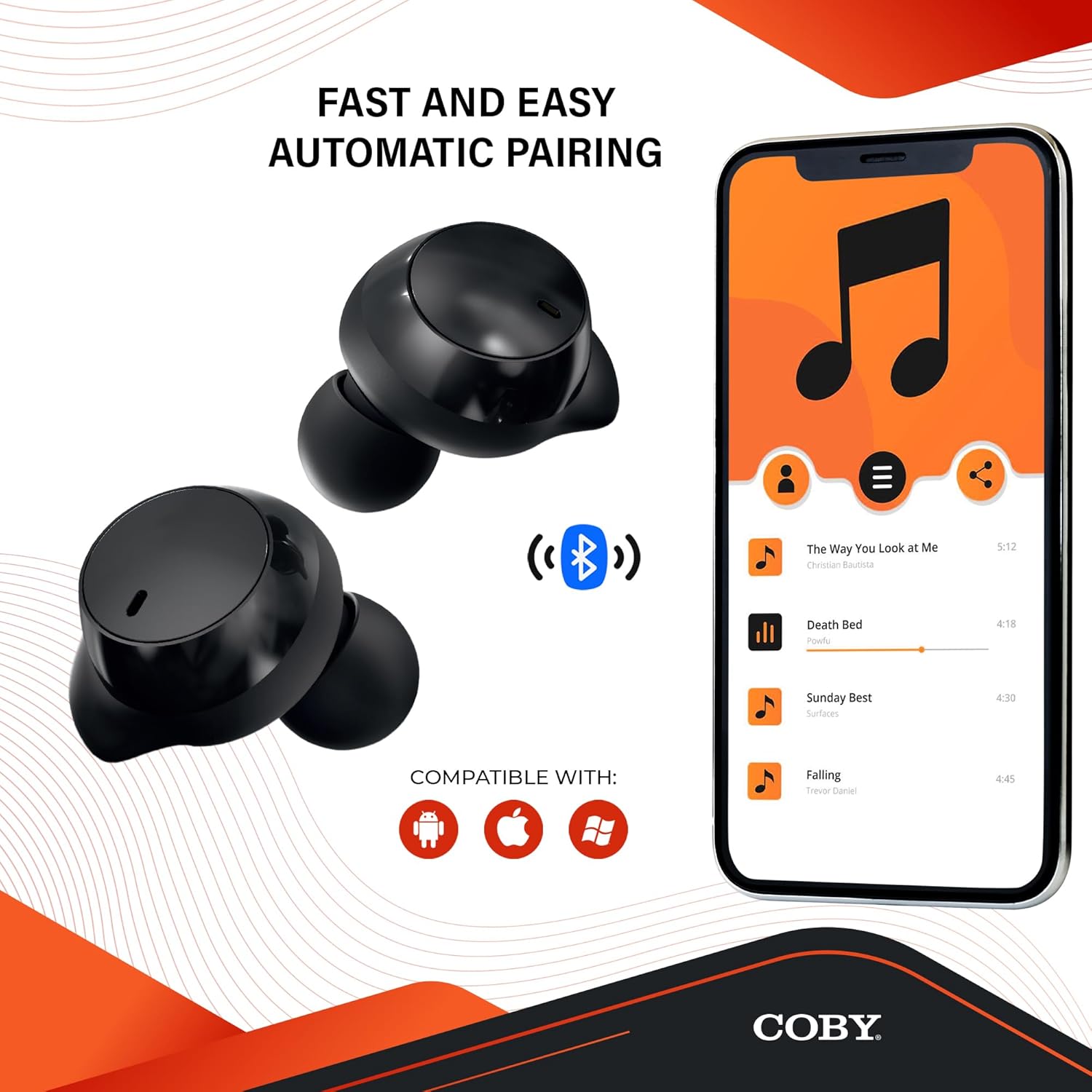
Image: The earbuds next to a smartphone displaying a music playlist, illustrating the fast and easy automatic pairing process and compatibility with Android, Apple, and Windows devices.
ຄໍາແນະນໍາການດໍາເນີນງານ
ການຫຼິ້ນສຽງ
Enjoy high-fidelity sound quality with dynamic audio and crystal-clear clarity for your music, podcasts, and audiobooks.
ໂທຟຣີ
The earbuds support hands-free calling, allowing you to take calls directly through the earbuds.
ຜູ້ຊ່ວຍສຽງ
Activate your preferred voice assistant (Siri or Google Assistant) with a quick voice command. This allows you to make calls, send texts, check notifications, and more without needing to access your phone.

Image: The earbuds with accompanying text emphasizing high-fidelity sound quality, sweat-resistant design, comfortable and secure fit, and compatibility with Siri and Google Assistant.

Image: The Coby Pro Fitness Earbuds displayed with logos indicating compatibility with Google Assistant and Siri.
ການບໍາລຸງຮັກສາແລະການດູແລ
ເພື່ອຮັບປະກັນອາຍຸຍືນ ແລະປະສິດທິພາບສູງສຸດຂອງຫູຟັງເອຍບັດຂອງທ່ານ:
- Sweat Resistant Design: The earbuds are thoughtfully crafted to divert sweat and moisture, making them ideal for workouts. However, they are not fully waterproof; avoid submerging them in water.
- ທໍາຄວາມສະອາດ: Regularly clean the earbuds and charging case with a soft, dry, lint-free cloth. Gently remove any earwax or debris from the eartips and speaker mesh using a small, soft brush or cotton swab.
- ການເກັບຮັກສາ: ເມື່ອບໍ່ໄດ້ໃຊ້, ໃຫ້ເກັບຫູຟັງເອຍບັດໃສ່ໃນກະເປົ໋າສາກໄຟເພື່ອປົກປ້ອງພວກມັນ ແລະ ສືບຕໍ່ສາກໄຟ.
- ອຸນຫະພູມ: ຫຼີກເວັ້ນການເປີດເຜີຍຫູຟັງໃສ່ກັບອຸນຫະພູມທີ່ຮຸນແຮງ (ຮ້ອນ ຫຼື ເຢັນ) ຫຼື ແສງແດດໂດຍກົງເປັນເວລາດົນ.

Image: A person in athletic wear preparing to run, wearing the earbuds, illustrating the sweat-resistant design suitable for active use.

Image: Two individuals engaged in a workout, both wearing the earbuds, demonstrating their suitability for fitness activities.
ການແກ້ໄຂບັນຫາ
If you encounter any issues with your Coby Pro Fitness Earbuds, try the following steps:
- ບໍ່ມີສຽງ:
- ກວດໃຫ້ແນ່ໃຈວ່າໄດ້ສາກຫູຟັງຫູຟັງແລ້ວ.
- ກວດເບິ່ງການເຊື່ອມຕໍ່ Bluetooth ໃນອຸປະກອນຂອງທ່ານ.
- ເພີ່ມລະດັບສຽງໃນທັງຫູຟັງເອຍບັດ ແລະອຸປະກອນຂອງທ່ານ.
- ຫູຟັງບໍ່ຈັບຄູ່:
- ໃຫ້ແນ່ໃຈວ່າ Bluetooth ຖືກເປີດໃຊ້ຢູ່ໃນອຸປະກອນຂອງທ່ານ.
- ກວດໃຫ້ແນ່ໃຈວ່າຫູຟັງເອຍບັດຢູ່ໃນໂໝດຈັບຄູ່ (ກໍລະນີເປີດ).
- ລືມອຸປະກອນຈາກລາຍຊື່ Bluetooth ຂອງໂທລະສັບຂອງທ່ານ ແລະລອງຈັບຄູ່ອີກຄັ້ງ.
- ກວດໃຫ້ແນ່ໃຈວ່າຫູຟັງຫູຟັງຢູ່ພາຍໃນ 10 ແມັດຈາກອຸປະກອນຂອງທ່ານ.
- ບັນຫາການສາກໄຟ:
- ກວດສອບວ່າສາຍສາກໄຟ ແລະ ແຫຼ່ງພະລັງງານເຮັດວຽກໄດ້.
- ຮັບປະກັນວ່າຫູຟັງເອຍບັດຖືກນັ່ງຢ່າງຖືກຕ້ອງຢູ່ໃນກ່ອງສາກ.
- ລ້າງລາຍຊື່ຜູ້ຕິດຕໍ່ການສາກໄຟຢູ່ທັງຫູຟັງເອຍບັດ ແລະ ເຄສ.
ຂໍ້ມູນຈໍາເພາະ
| ຄຸນສົມບັດ | ລາຍລະອຽດ |
|---|---|
| ຊື່ຕົວແບບ | CETW553 |
| ໝາຍເລກຕົວແບບ | COBY-CETW553 |
| ເຕັກໂນໂລຊີການເຊື່ອມຕໍ່ | ໄຮ້ສາຍ (Bluetooth) |
| ລຸ້ນ Bluetooth | 5.3 |
| ຊ່ວງ Bluetooth | 10 ແມັດ |
| ອາຍຸແບັດເຕີຣີ (ຫູຟັງ) | 15 ຊົ່ວໂມງ |
| ແບດເຕີລີ່ກະເປົ໋າຖື | 20 ຊົ່ວໂມງ (ເພີ່ມເຕີມ) |
| ລະດັບຄວາມຕ້ານທານນ້ໍາ | Water Resistant (Sweat Resistant) |
| ການຄວບຄຸມສິ່ງລົບກວນ | ການແຍກສຽງ |
| ປະເພດການຄວບຄຸມ | Voice (Google Assistant, Siri Compatible) |
| ຊ່ວງຄວາມຖີ່ | 20 Hz - 20,000 Hz |
| ນ້ໍາຫນັກລາຍການ | 1.4 ອອນ |
| ຂະໜາດສິນຄ້າ | 0.96 x 0.7 x 0.94 ນິ້ວ |
| ວັດສະດຸ | Silicone (Eartips) |
| UPC | 643620020401 |
| ຜູ້ຜະລິດ | Summit Electronics LLC |
| ປະເທດຕົ້ນກໍາເນີດ | ຈີນ |
ການຮັບປະກັນແລະການສະຫນັບສະຫນູນ
For warranty information and customer support, please refer to the warranty card included with your product or visit the official Coby webເວັບໄຊ.
You can also visit the Coby Store on Amazon for more information: Coby Amazon Store.