
ແນະນຳ
Thank you for choosing the Coby Pro Fitness True Wireless Earbuds. These earbuds are designed to provide a high-quality audio experience with features tailored for an active lifestyle. They offer a secure fit, sweat resistance, noise isolation, HD audio, and seamless connectivity with Bluetooth 5.3. This manual will guide you through the setup, operation, and maintenance of your new earbuds.
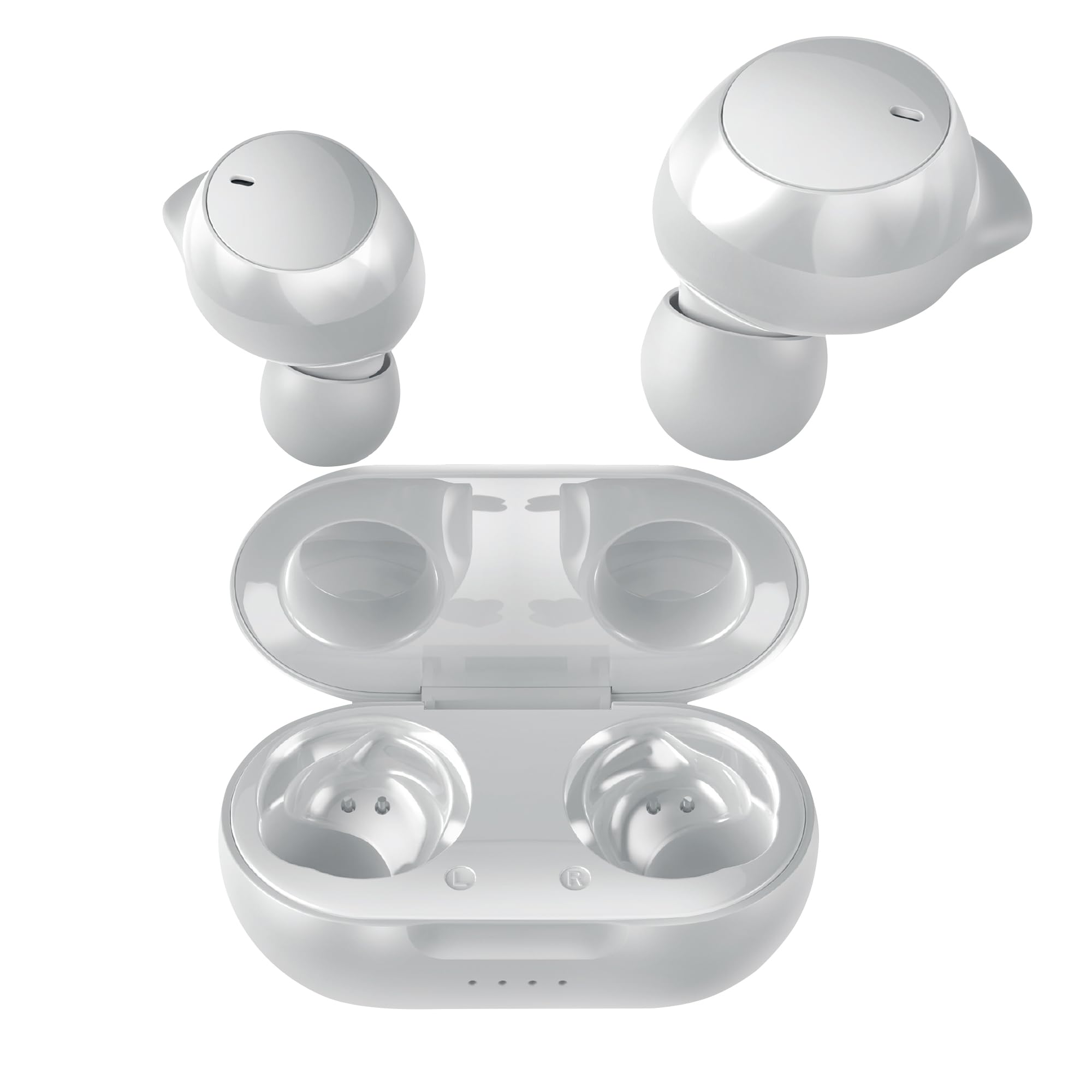
Image: Coby Pro Fitness True Wireless Earbuds and their charging case.
ຕັ້ງຄ່າ
ເນື້ອໃນຊຸດ
- Coby Pro Fitness True Wireless Earbuds (Left and Right)
- ກ່ອງສາກ
- ສາຍສາກ USB
- ເຄັດລັບຫູ Silicone ຫຼາຍຂະຫນາດ
- ຄູ່ມືຜູ້ໃຊ້
ກຳລັງສາກຫູຟັງ ແລະ ເຄສ
- ວາງຫູຟັງເອຍບັດໃສ່ໃນກະເປົ໋າສາກໄຟ, ຮັບປະກັນວ່າພວກມັນຖືກນັ່ງຢ່າງຖືກຕ້ອງຢູ່ໃນຊ່ອງຂອງເຂົາເຈົ້າ.
- ເຊື່ອມຕໍ່ສາຍສາກ USB ເຂົ້າກັບພອດສາກໄຟໃນເຄສ ແລະ ສຽບອີກສົ້ນໜຶ່ງເຂົ້າກັບແຫຼ່ງພະລັງງານ USB (ເຊັ່ນ: ອະແດບເຕີຕິດຝາ, ພອດ USB ຂອງຄອມພິວເຕີ).
- The indicator lights on the charging case will illuminate to show charging status. A full charge typically takes approximately 1-2 hours for the earbuds and 2-3 hours for the case.
- Once fully charged, the indicator lights will change or turn off. Disconnect the charging cable.
ການຈັບຄູ່ເບື້ອງຕົ້ນ
Follow these steps to pair your earbuds with your device for the first time:
- Ensure the earbuds are charged. Open the charging case. The earbuds will automatically enter pairing mode, indicated by a flashing LED light on one or both earbuds.
- ໃນສະມາດໂຟນ, ແທັບເລັດ ຫຼືອຸປະກອນທີ່ເປີດໃຊ້ Bluetooth ຂອງທ່ານ, ໃຫ້ໄປທີ່ການຕັ້ງຄ່າ Bluetooth.
- ຊອກຫາ available devices. You should see "Coby CETW553" or a similar name appear in the list.
- Select "Coby CETW553" to connect. Once connected, you will hear an audio prompt, and the earbud LED lights will stop flashing.

Image: Illustration of earbuds automatically pairing with a smartphone.
ໃສ່ຫູຟັງ
For optimal sound quality and a secure fit, choose the correct size ear tips and insert the earbuds properly:
- Experiment with the different sizes of silicone ear tips provided to find the pair that creates a comfortable and snug seal in your ear canal. A good seal is crucial for noise isolation and bass response.
- Gently insert each earbud into your ear, twisting slightly until it feels secure and comfortable. The earbuds are ergonomically designed to stay in place during physical activity.

Image: A woman demonstrating the snug and secure fit of the ear tips.
ປະຕິບັດການຫູຟັງ
ເປີດ/ປິດ
- ເປີດ: ເປີດກ່ອງສາກ, ແລະຫູຟັງເອຍບັດຈະເປີດອັດຕະໂນມັດ. ອີກທາງເລືອກ, ກົດພື້ນທີ່ຄວບຄຸມການສຳຜັດຢູ່ຫູຟັງທັງສອງຄ້າງໄວ້ເປັນເວລາ 3 ວິນາທີ.
- ປິດພະລັງງານ: ໃສ່ຫູຟັງຄືນໃນກ່ອງສາກໄຟ ແລະ ປິດຝາປິດ. ພວກມັນຈະປິດໂດຍອັດຕະໂນມັດ. ຫຼື, ກົດພື້ນທີ່ຄວບຄຸມແບບສຳຜັດໃນຫູຟັງທັງສອງຂ້າງຄ້າງໄວ້ 5 ວິນາທີ.
ເພັງ Playback
- ຫຼິ້ນ/ຢຸດ: ແຕະພື້ນທີ່ຄວບຄຸມການສໍາພັດຢູ່ຫູຟັງຫູຟັງທັງສອງຄັ້ງ.
- ເພງຕໍ່ໄປ: ແຕະສອງເທື່ອໃສ່ພື້ນທີ່ຄວບຄຸມການສຳຜັດຢູ່ຫູຟັງເບື້ອງຂວາ.
- ຕິດຕາມກ່ອນ ໜ້າ ນີ້: ແຕະສອງເທື່ອໃສ່ພື້ນທີ່ຄວບຄຸມການສໍາພັດຢູ່ຫູຟັງທາງຊ້າຍ.
- ປະລິມານຂຶ້ນ: ແຕະສາມເທື່ອໃສ່ພື້ນທີ່ຄວບຄຸມການສຳຜັດຢູ່ຫູຟັງເບື້ອງຂວາ.
- ປະລິມານລົງ: ແຕະສາມເທື່ອໃສ່ພື້ນທີ່ຄວບຄຸມການສໍາພັດຢູ່ຫູຟັງທາງຊ້າຍ.
ການຄຸ້ມຄອງການໂທ
- ຮັບ/ສາຍໂທ: ແຕະພື້ນທີ່ຄວບຄຸມການສໍາພັດຢູ່ຫູຟັງຫູຟັງທັງສອງຄັ້ງ.
- ປະຕິເສດການໂທ: ກົດພື້ນທີ່ຄວບຄຸມການສຳຜັດຢູ່ຫູຟັງອັນໃດອັນໜຶ່ງຄ້າງໄວ້ເປັນເວລາ 2 ວິນາທີ.
ຜູ້ຊ່ວຍສຽງ
The earbuds are compatible with Siri and Google Assistant. To activate your device's voice assistant:
- ກະຕຸ້ນຜູ້ຊ່ວຍສຽງ: ກົດພື້ນທີ່ຄວບຄຸມການສໍາພັດຢູ່ໃນຫູຟັງຫູຟັງທັງສອງຂ້າງຄ້າງໄວ້ເປັນເວລາ 2 ວິນາທີ (ເມື່ອບໍ່ໄດ້ຢູ່ໃນສາຍ).

Image: Earbuds shown with compatibility logos for Siri and Google Assistant.
ບໍາລຸງຮັກສາ
ທໍາຄວາມສະອາດ
- Regularly clean the earbuds and charging case to ensure optimal performance and hygiene.
- ໃຊ້ຜ້າແພທີ່ອ່ອນ, ແຫ້ງ, ບໍ່ມີເຈວເພື່ອເຊັດພື້ນຜິວພາຍນອກຂອງຫູຟັງຫູຟັງ ແລະ ເຄສ.
- For ear tips, remove them from the earbuds and wash with mild soap and water. Rinse thoroughly and allow them to dry completely before reattaching.
- Gently remove any earwax or debris from the earbud mesh using a clean, dry cotton swab or a small, soft brush. Avoid using sharp objects.
ການເກັບຮັກສາ
- ເມື່ອບໍ່ໄດ້ໃຊ້, ໃຫ້ເກັບຮັກສາຫູຟັງໃສ່ໃນກະເປົ໋າສາກໄຟສະເໝີເພື່ອປົກປ້ອງພວກມັນຈາກຄວາມເສຍຫາຍ ແລະ ຮັກສາໃຫ້ພວກມັນສາກໄຟໄດ້.
- Store the charging case and earbuds in a cool, dry place, away from extreme temperatures, humidity, and direct sunlight.
ການແກ້ໄຂບັນຫາ
| ສະບັບ | ການແກ້ໄຂ |
|---|---|
| ຫູຟັງບໍ່ຈັບຄູ່ກັບອຸປະກອນ |
|
| ມີຫູຟັງຫູຟັງອັນດຽວເທົ່ານັ້ນທີ່ເຮັດວຽກ |
|
| ບໍ່ມີສຽງຫລືປະລິມານຕ່ ຳ |
|
| ກ່ອງສາກບໍ່ສາກ |
|
ຂໍ້ມູນຈໍາເພາະ
| ຄຸນສົມບັດ | ລາຍລະອຽດ |
|---|---|
| ໝາຍເລກຕົວແບບ | COBY-CETW553 |
| ເຕັກໂນໂລຊີການເຊື່ອມຕໍ່ | ໄຮ້ສາຍ (Bluetooth) |
| ລຸ້ນ Bluetooth | 5.3 |
| ການຈັດວາງຫູ | ໃນຫູ |
| ການຄວບຄຸມສິ່ງລົບກວນ | ການແຍກສຽງ |
| ລະດັບຄວາມຕ້ານທານນ້ໍາ | ກັນນ້ຳ (ກັນເຫື່ອ) |
| Battery Average Life (Earbuds) | 5 ຊົ່ວໂມງ (ຕໍ່ຄ່າບໍລິການ) |
| ຊ່ວງຄວາມຖີ່ | 20 Hz - 20,000 Hz |
| ປະເພດໄດເວີສຽງ | ໄດນາມິກໄດເວີ |
| ວິທີການຄວບຄຸມ | ສຽງ, ສຳຜັດ |
| ອຸປະກອນທີ່ເຂົ້າກັນໄດ້ | ໂທລະສັບສະຫຼາດ, ແທັບເລັດ, ລຳໂພງອັດສະລິຍະ, ແລັບທັອບ, ຄອມພິວເຕີຕັ້ງໂຕະ |
| ວັດສະດຸ | ຊິລິໂຄນ (ຈຸກຫູ) |
| ນ້ໍາຫນັກລາຍການ | 1.4 ອອນ |
ຂໍ້ມູນການຮັບປະກັນ
The Coby Pro Fitness True Wireless Earbuds (Model CETW553) come with a ການຮັບປະກັນຂອງຜູ້ຜະລິດ 90 ວັນ. This warranty covers defects in materials and workmanship under normal use. Please retain your proof of purchase for warranty claims. For specific terms and conditions, or to initiate a warranty claim, please refer to the official Coby webເວັບໄຊທ໌ຫຼືຕິດຕໍ່ສະຫນັບສະຫນູນລູກຄ້າ.
ສະຫນັບສະຫນູນ
If you encounter any issues not covered in this manual or require further assistance, please visit the official Coby website for FAQs, support resources, and contact information. You can typically find support details on the product page or in the 'Support' section of the Coby brand webເວັບໄຊ.