
1. ບົດແນະນຳ
This manual provides essential instructions for setting up, operating, maintaining, and troubleshooting your VIBOX VI-63 PC Gamer. Please read this guide thoroughly before using your new computer to ensure optimal performance and longevity.
2. ຂໍ້ມູນຄວາມປອດໄພ
- Ensure the PC is placed on a stable, flat surface with adequate ventilation.
- Do not block any ventilation openings on the PC case.
- Keep the PC away from direct sunlight, heat sources, and liquids.
- Use only the power adapter supplied with your PC.
- ໃຫ້ຖອດສາຍໄຟອອກກ່ອນທຳຄວາມສະອາດ ຫຼື ປະຕິບັດການບຳລຸງຮັກສາໃດໆ.
- Avoid opening the PC case unless instructed by VIBOX support, as this may void your warranty.
3. ເນື້ອໃນຊຸດ
ກວດສອບວ່າລາຍການທັງຫມົດທີ່ລະບຸໄວ້ຂ້າງລຸ່ມນີ້ແມ່ນລວມຢູ່ໃນຊຸດຂອງທ່ານ:
- VIBOX VI-63 PC Gamer Tower
- ຈໍສະແດງຜົນ 22 ນິ້ວ
- ແປ້ນພິມ RGB Gaming
- ຫນູເກມ RGB
- Black Mouse Pad
- ຊຸດຫູຟັງເກມກັບໄມໂຄຣໂຟນ
- Wireless WiFi Network Adapter (600 Mbps)
- ສາຍໄຟ
- Display Cable (HDMI or VGA, depending on monitor)
- ເອກະສານ (ຄູ່ມືສະບັບນີ້)
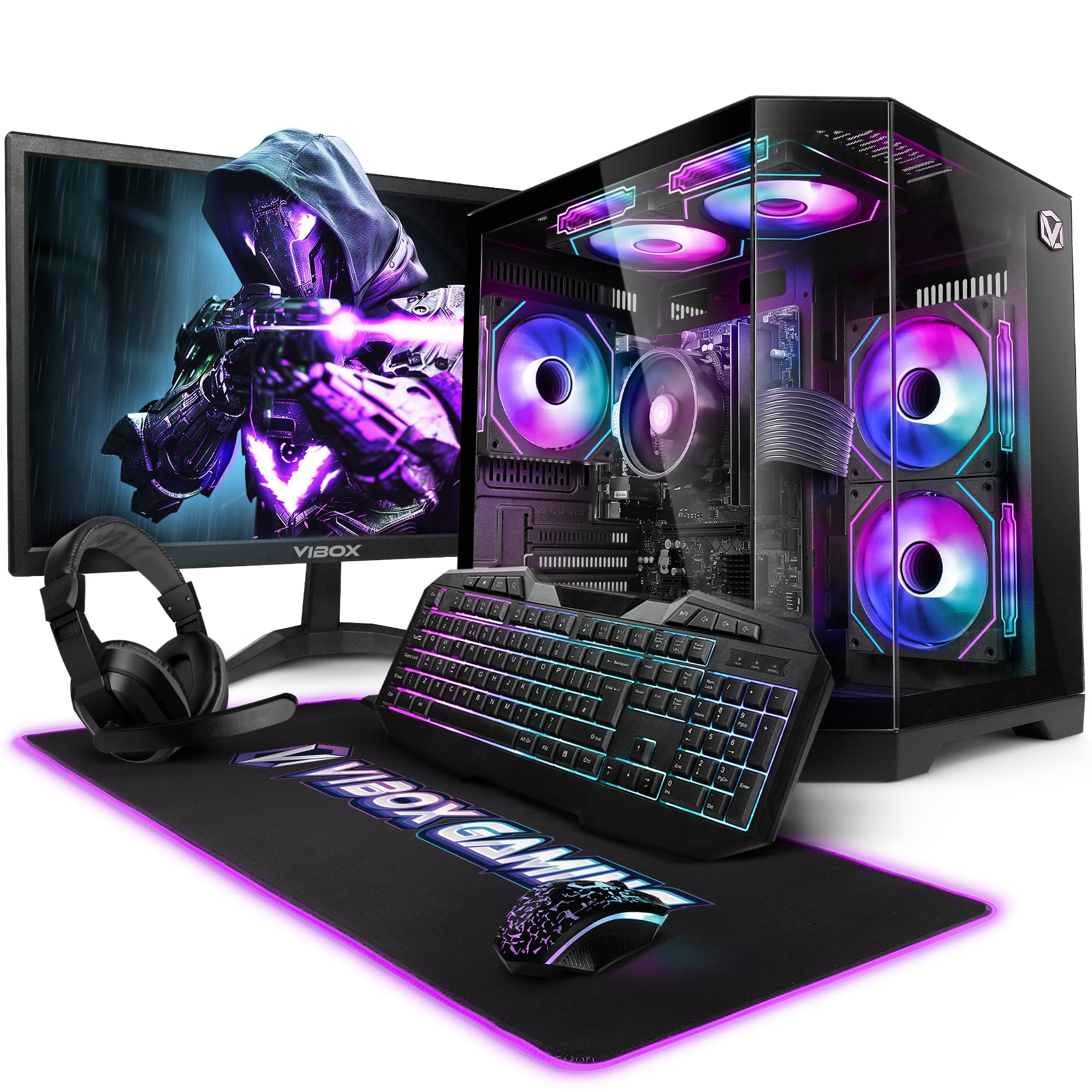
Image 3.1: VIBOX VI-63 PC Gamer Tower with internal RGB lighting.
4. ຄໍາແນະນໍາການຕິດຕັ້ງ
4.1. ການຫຸ້ມຫໍ່ແລະການຈັດວາງ
- ເອົາສ່ວນປະກອບທັງຫມົດອອກຈາກການຫຸ້ມຫໍ່ຢ່າງລະມັດລະວັງ.
- Place the PC tower on a flat, stable surface. Ensure there is sufficient space around the tower for proper airflow.
- Place the monitor on a stable surface at a comfortable viewຄວາມສູງ.
4.2. ເຊື່ອມຕໍ່ອຸປະກອນເສີມ
- ຈໍພາບ: Connect one end of the display cable (HDMI or VGA) to the corresponding port on the back of the PC and the other end to the monitor.
- ແປ້ນພິມແລະຫນູ: Connect the USB cables of the keyboard and mouse to any available USB ports on the PC.
- ຫູຟັງ: Connect the headset to the audio jacks (headphone and microphone) on the front or rear of the PC.
- ອະແດັບເຕີ WiFi: Insert the wireless WiFi network adapter into an available USB port.
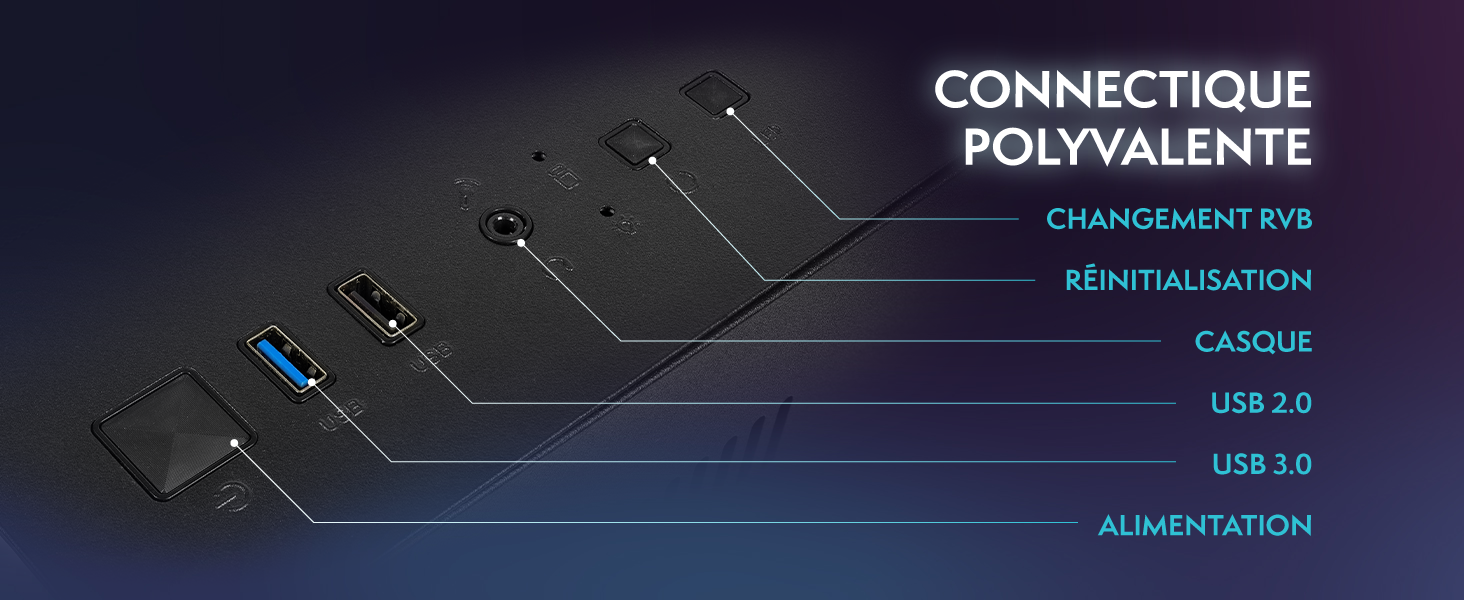
Image 4.1: Front panel connections including USB 2.0, USB 3.0, headset jack, reset button, and RGB change button.
4.3. ການເຊື່ອມຕໍ່ພະລັງງານ
- Connect the power cable to the power supply unit (PSU) at the back of the PC.
- Connect the other end of the power cable to a wall outlet.
- Connect the monitor's power cable to a wall outlet.
4.4. ການ Boot ເບື້ອງຕົ້ນ ແລະການຕິດຕັ້ງ Windows 11
- Press the power button on the front of the PC tower.
- ເປີດຈໍສະແດງຜົນ.
- Follow the on-screen instructions to complete the Windows 11 Home setup. This typically involves selecting your region, language, creating a user account, and connecting to a Wi-Fi network.
5. ຄໍາແນະນໍາການດໍາເນີນງານ
5.1. ການດໍາເນີນງານພື້ນຖານ
- ເປີດ/ປິດ: ກົດປຸ່ມເປີດປິດເພື່ອເປີດຄອມພິວເຕີ. ເພື່ອປິດເຄື່ອງ, ໃຫ້ຄລິກປຸ່ມ Start ໃນ Windows, ຈາກນັ້ນຄລິກປຸ່ມເປີດ/ປິດເຄື່ອງ > ປິດເຄື່ອງ.
- ຣີສະຕາດ: ຈາກເມນູ Start, ເລືອກ Power > Restart.
- ຮູບແບບການນອນ: ຈາກເມນູ Start, ເລືອກ Power > Sleep.
5.2. Windows 11 Features
Your VIBOX VI-63 PC Gamer comes with Windows 11 Home pre-installed, offering features designed to enhance your computing and gaming experience:
- ການເກັບຮັກສາໂດຍກົງ: Enables faster loading times for compatible games.
- AutoHDR: Automatically enhances visuals for a wider range of games.
- ການເຊື່ອມໂຍງ Xbox Game Pass: Seamless access to a library of games (subscription may be required).
- ປະສິດທິພາບ CPU ທີ່ດີທີ່ສຸດ: Windows 11 is designed to optimize CPU usage for gaming and multitasking.
5.3. ປະສິດທິພາບການຫຼິ້ນເກມ
The VIBOX VI-63 is equipped with an AMD Ryzen 3 3200GE processor and integrated Radeon Vega 8 graphics, providing solid performance for everyday computing and gaming at 720p to 1080p resolutions.

ຮູບພາບ 5.1: ຫຼາຍກວ່າview of internal components including CPU, GPU, RAM, and storage.
5.4. ການຄວບຄຸມໄຟ RGB
Your PC features RGB lighting. Use the dedicated RGB change button on the front panel (refer to Image 4.1) to cycle through different lighting modes and colors.
6. ບໍາລຸງຮັກສາ
6.1. Cleaning the PC
- ພາຍນອກ: ໃຊ້ອ່ອນ, ງamp cloth to wipe down the exterior of the PC case and monitor. Avoid abrasive cleaners.
- ຂີ້ຝຸ່ນ: Periodically use compressed air to clear dust from the ventilation openings and fan grilles. Ensure the PC is powered off and unplugged before doing so.
- ອຸປະກອນຕໍ່ພ່ວງ: Clean your keyboard and mouse regularly to prevent dust and debris buildup.
6.2. ການປັບປຸງຊອບແວ
- ກວດສອບ ແລະຕິດຕັ້ງການອັບເດດ Windows ເປັນປະຈຳເພື່ອຮັບປະກັນຄວາມໝັ້ນຄົງ ແລະຄວາມປອດໄພຂອງລະບົບ. ໄປທີ່ Settings > Windows Update.
- Keep your graphics drivers updated for optimal gaming performance. You can usually download the latest drivers from the AMD webເວັບໄຊ.
6.3. System Care
- Avoid installing unnecessary software to keep your system lean and fast.
- Run regular antivirus scans to protect against malware. Windows Defender is pre-installed.
- Ensure proper airflow around the PC to prevent overheating. The inverted airflow design helps with cooling.
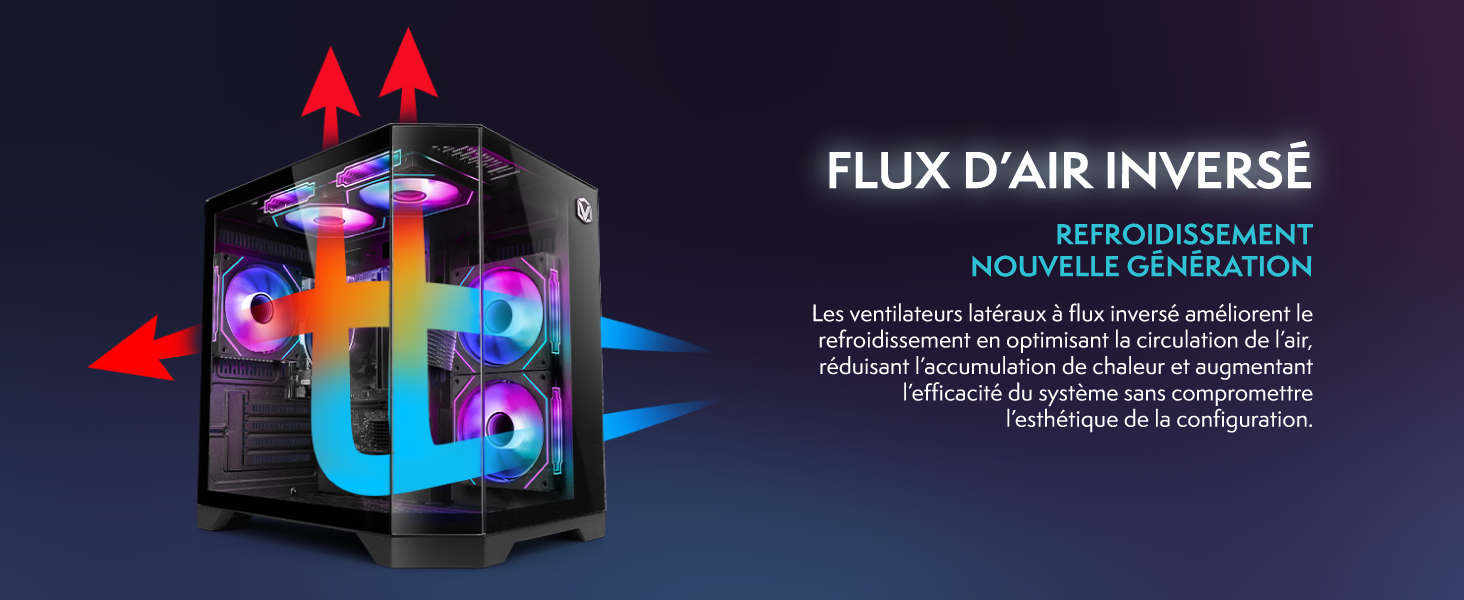
Image 6.1: Inverted airflow design for efficient cooling.
7. ການແກ້ໄຂບັນຫາ
- ບໍ່ມີພະລັງງານ: Check all power cable connections. Ensure the wall outlet is functional.
- ບໍ່ມີການສະແດງຜົນ: Ensure the monitor is powered on and the display cable is securely connected to both the PC and the monitor. Try a different display cable or port if available.
- ບໍ່ມີການເຊື່ອມຕໍ່ອິນເຕີເນັດ: Verify the WiFi adapter is properly installed. Check your router and internet service. In Windows, go to Settings > Network & internet to troubleshoot.
- PC Freezes/Crashes: Restart the PC. Ensure all drivers are updated. Check for overheating (ensure good airflow).
- ອຸປະກອນຕໍ່ພ່ວງບໍ່ເຮັດວຽກ: Try connecting the keyboard, mouse, or headset to different USB/audio ports. Ensure drivers are installed if required.
8. ຂໍ້ມູນຈໍາເພາະ
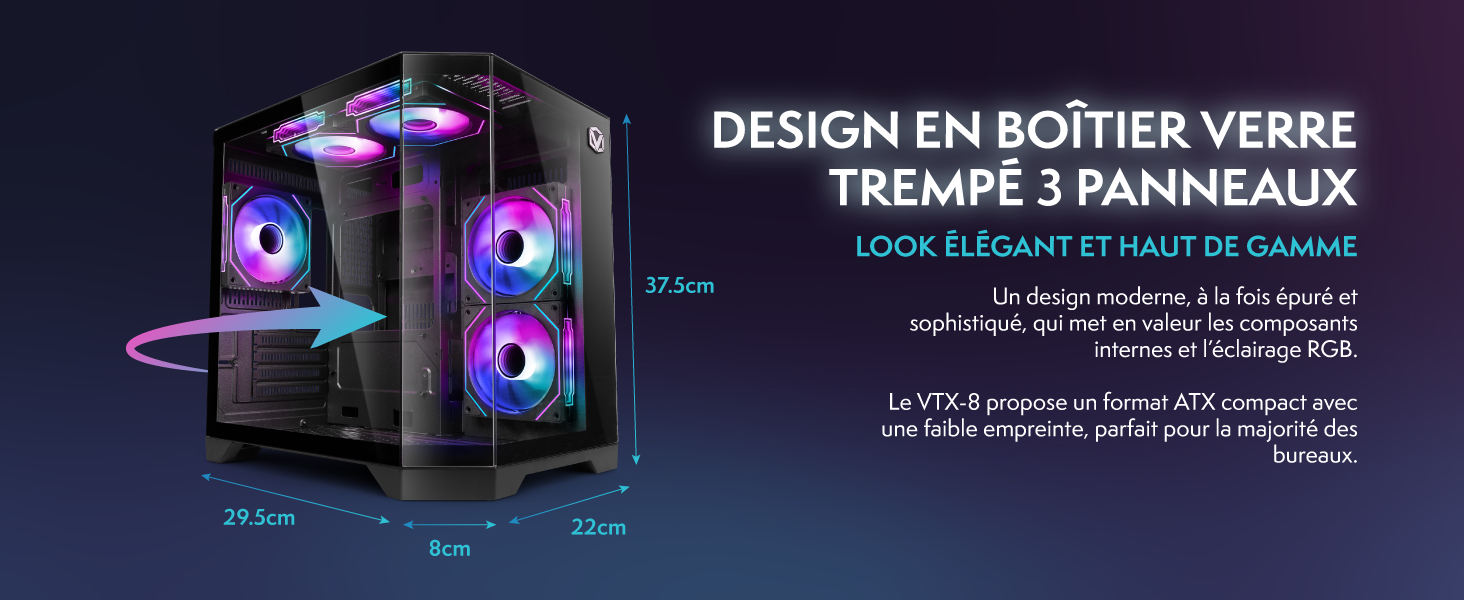
Image 8.1: VIBOX VI-63 PC Gamer case dimensions.
| ຄຸນສົມບັດ | ຂໍ້ມູນຈໍາເພາະ |
|---|---|
| ຍີ່ຫໍ້ | ວິບັອກສ໌ |
| ຊື່ຕົວແບບ | Vibox VI-63 Gaming PC |
| ລະບົບປະຕິບັດການ | ໜ້າຫຼັກ Windows 11 |
| ຕົວແບບ CPU | AMD Ryzen 3 3200G |
| ຄວາມໄວ CPU | 3.6 GHz (4 GHz Turbo) |
| CPU Cores | 4 |
| Graphics Coprocessor | Radeon Vega 8 (Integrated) |
| ແຣມກຣາບຟິກ | 2 GB (Shared) |
| RAM Installed | 16 GB DDR4 |
| ຄວາມໄວ RAM | 2666 MHz |
| ຄວາມອາດສາມາດເກັບຮັກສາ | 1 TB SSD |
| ເທັກໂນໂລຢີຮາດດິດ | SSD |
| ຂະໜາດຈໍພາບ | 22 ນິ້ວ |
| Max Display Resolution | 1920x1080 ພິກເຊລ |
| ການໂຕ້ຕອບຜົນຜະລິດວິດີໂອ | hdmi, vga |
| ເຕັກໂນໂລຊີການເຊື່ອມຕໍ່ | AMD Radeon Vega 8, Ethernet, HDMI, USB, Wi-Fi |
| ຂະໜາດ (L x W x H) | 32.6 x 19.5 x 42 cm |
| ສີ | VTX-1 ສີດຳ |
9. ການຮັບປະກັນແລະການສະຫນັບສະຫນູນ
9.1. ຂໍ້ມູນການຮັບປະກັນ
Your VIBOX VI-63 PC Gamer comes with a ຮັບປະກັນ 2 ປີ on spare parts. This warranty covers manufacturing defects and component failures under normal use. Please retain your proof of purchase for warranty claims.
9.2. ການຊ່ວຍເຫຼືອລູກຄ້າ
For technical assistance, troubleshooting, or warranty inquiries, please contact VIBOX customer support. Refer to the contact information provided with your purchase documentation or visit the official VIBOX webເວັບໄຊສໍາລັບລາຍລະອຽດສະຫນັບສະຫນູນ.
ຊັບພະຍາກອນອອນໄລນ໌: For additional support and FAQs, please visit the VIBOX official webເວັບໄຊ.