
wanwaytech 6000mah Rechargeable Battery GPS Tracker
ຄູ່ມືຜູ້ໃຊ້ເຄື່ອງຕິດຕາມ GPS WANWAYTECH 4G
Model: 6000mah Rechargeable Battery GPS Tracker
ແນະນຳ
Thank you for choosing the WANWAYTECH 4G GPS Tracker. This device provides reliable, real-time positioning and tracking for a wide range of assets, including vehicles, children, pets, and valuable belongings. Equipped with a 6000mAh rechargeable battery and advanced 4G LTE+ technology, it ensures long-lasting performance and accurate location updates every 10 seconds. This manual will guide you through the setup, operation, and maintenance of your GPS tracker to ensure optimal performance.

Image: The WANWAYTECH 4G GPS Tracker, shown alongside a vehicle and a smartphone displaying its real-time tracking application.
ແມ່ນຫຍັງຢູ່ໃນກ່ອງ
ກະລຸນາກວດສອບວ່າລາຍການທັງໝົດມີຢູ່ໃນຊຸດຂອງທ່ານ:
- WANWAYTECH 4G GPS Tracker Unit (with 6000mAh Rechargeable Battery)
- ການສະກົດຈິດ Mount
- SIM Card (pre-installed or included separately)
- ຄູ່ມືຜູ້ໃຊ້ (ເອກະສານນີ້)
ຕັ້ງຄ່າ
1. SIM Card Activation and Subscription
The GPS tracker requires an active subscription plan for real-time tracking. A SIM card is included with your purchase. Please activate your service according to the instructions provided with the SIM card or through the WANWAYTECH platform. Subscription fees are required for continuous service.

ຮູບພາບ: ຫຼາຍກວ່າview of available subscription plans for the GPS tracker, detailing costs for different update frequencies and durations.
2. ການສາກໄຟເບື້ອງຕົ້ນ
Before first use, fully charge the GPS tracker. Connect the device to a standard USB power adapter using the provided charging cable. The charging indicator light will show the charging status and turn off when fully charged. The 6000mAh battery ensures extended operational time.

Image: Visual representation highlighting the 6000mAh long standby battery life and ease of installation.
3. ການຕິດຕັ້ງແອັບ ແລະ ການຜູກມັດອຸປະກອນ
Download the "TrackerOne" application from your device's app store (iOS/Android). Follow the in-app instructions to register an account and bind your GPS tracker using its unique device ID, typically found on the back of the unit or packaging.

Image: Screenshots demonstrating the user interface of the TrackerOne mobile application and a QR code for easy download.
4. Placement of the Tracker
The tracker features a strong magnetic base for easy attachment to metal surfaces. For optimal performance and security, place the tracker in a discreet location with minimal obstruction to GPS signals. Common placement areas include:
- Under the co-pilot seat
- ພາຍໃນກ່ອງທີ່ວາງແຂນ
- ພາຍໃນກ່ອງປະຕູລົດ
- Inside the front or back bumper (ensure it's protected from elements)
- ກ່ອງຖົງມືນັກບິນຮ່ວມ
- ພາຍໃຕ້ກະຈົກຫລັງ
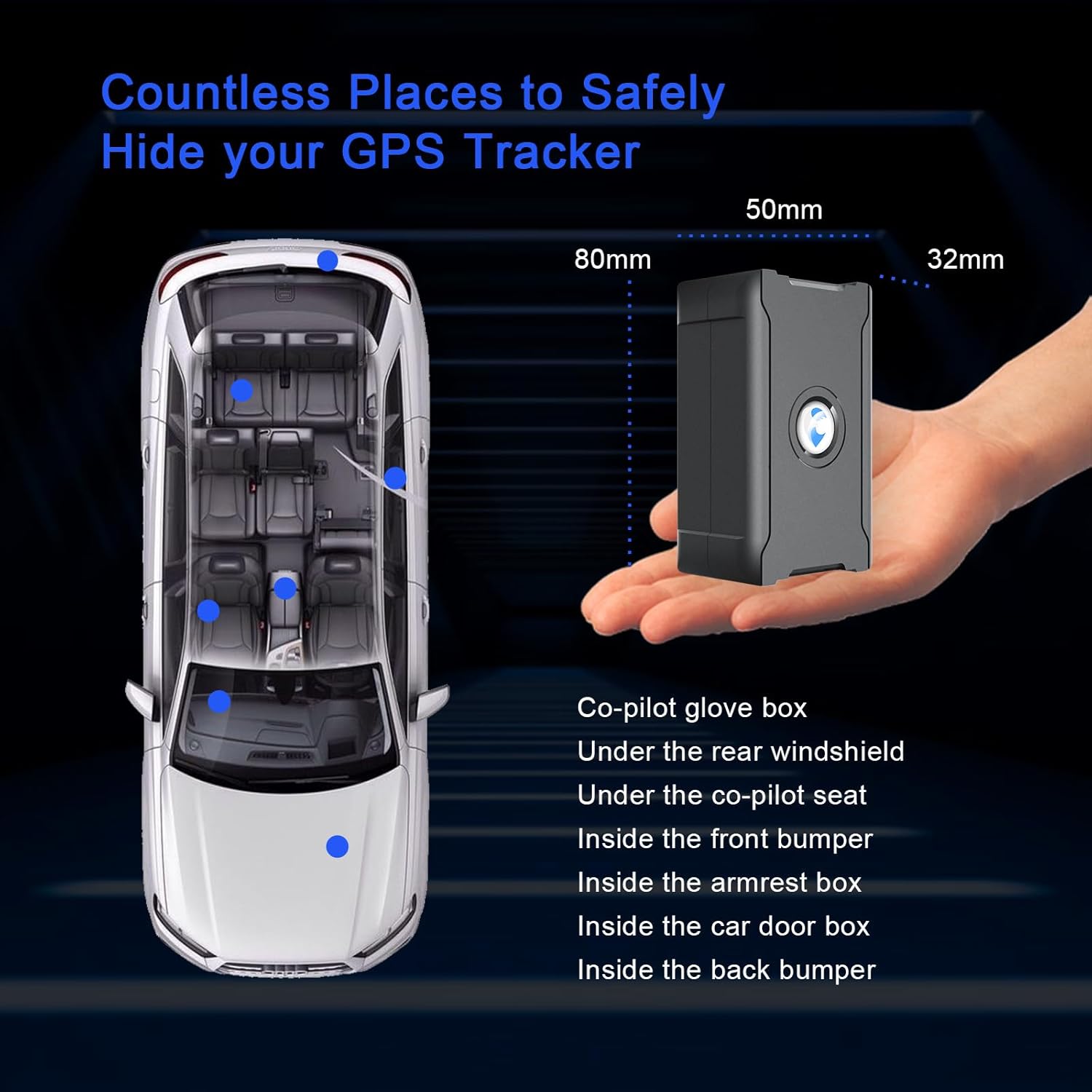
Image: A diagram illustrating various optimal and discreet locations for installing the GPS tracker within a vehicle, along with the device's dimensions.

Image: An illustration demonstrating the strong magnetic capability of the GPS tracker, allowing for easy attachment to metal surfaces.
ຄໍາແນະນໍາການດໍາເນີນງານ
1. ການຕິດຕາມແບບເວລາຈິງ
Once activated and placed, the tracker will begin sending location data to the "TrackerOne" app. You can view the real-time position of your asset on the map within the application. The device provides instant updates every 10 seconds for precise monitoring.

Image: A visual depicting the satellite positioning system that enables accurate location tracking and rapid 10-second updates.

Image: A smartphone screen showing real-time tracking on a map, indicating the current location of the tracker.
2. ການຕິດຕາມການຫຼິ້ນຄືນ
The "TrackerOne" platform stores historical tracking data for up to 270 days. You can review past routes and movements of your asset through the trace playback feature in the app, which can be useful for analyzing travel history or investigating incidents.

Image: The trace playback feature, allowing users to review historical routes and movements of the tracked device for up to 270 days.
3. Geo-Fence Alarm
Set up virtual boundaries (geo-fences) on the map within the app. You will receive an alarm notification via the app or SMS if the tracker enters or exits these predefined areas. This feature is ideal for monitoring specific zones, such as home, work, or school.

Image: The Geo-fence alarm function, which notifies users when the tracker enters or exits a user-defined virtual boundary on the map.
4. Overspeed Alarm
Configure a maximum speed limit in the "TrackerOne" app. If the tracker exceeds this set speed, you will receive an immediate overspeed alarm, helping you monitor driving habits or ensure safety.

Image: The Over-Speed Alarm feature, which sends an alert when the tracked vehicle exceeds a user-defined speed limit.
5. Takedown/Disassemble Alarm (Light Sensor)
The GPS tracker is equipped with a light sensor. If the device is removed from its mounted position, the light sensor will detect the change and send an alarm signal to your app, providing an additional layer of anti-theft security.

Image: The light sensor and dissemble alarm feature, which sends an alert if the tracker is tampered with or removed from its location.
6. ຄໍາຮ້ອງສະຫມັກອະເນກປະສົງ
The WANWAYTECH GPS Tracker is designed for a wide range of tracking needs, including:
- ພາຫະນະ: Cars, trucks, motorcycles, ATVs, boats
- ສ່ວນບຸກຄົນ: Kids, teens, spouses, elderly, seniors, individuals with Alzheimer's or Autism
- ຊັບສິນ: Pets, wallets, luggage, equipment, tools, business assets, fleets, packages

Image: A visual representation of the diverse applications for the GPS tracker, from various types of vehicles to personal items and packages.
ບໍາລຸງຮັກສາ
1. ການຄຸ້ມຄອງຫມໍ້ໄຟ
The tracker features a 6000mAh high-capacity battery designed for long-lasting performance. To maximize battery life, ensure the device is fully charged before extended use. The "TrackerOne" app will provide battery level alerts, prompting you to recharge when power is low.

Image: An illustration of the low power consumption feature, indicating that the device will send a notification when its battery level is low, prompting a recharge.
2. ການທໍາຄວາມສະອາດແລະການເກັບຮັກສາ
Wipe the device with a soft, dry cloth to clean. Avoid using harsh chemicals or abrasive materials. Store the tracker in a cool, dry place when not in use for extended periods.
ການແກ້ໄຂບັນຫາ
- ບໍ່ມີສັນຍານ/ອອບໄລນ໌:
- Ensure the SIM card is properly inserted and activated with a valid subscription.
- Check if the device is in an area with good 4G LTE+ network coverage.
- Relocate the tracker to a position with a clearer view of the sky to improve GPS signal reception.
- Verify the device battery is charged.
- ຕຳແໜ່ງທີ່ບໍ່ຖືກຕ້ອງ:
- Ensure the device is not placed in an area with heavy metal shielding or dense structures that could interfere with GPS signals.
- Allow the device to acquire a stable GPS lock, especially after moving to a new location.
- App Not Updating:
- ກວດເບິ່ງການເຊື່ອມຕໍ່ອິນເຕີເນັດຂອງທ່ານໃນໂທລະສັບສະຫຼາດຂອງທ່ານ.
- Ensure the tracker's subscription is active and not expired.
- Restart the app or the tracker device.
- ແບັດເຕີຣີໝົດໄວ:
- Frequent real-time updates (e.g., 10-second intervals) consume more battery. Consider adjusting the update frequency if longer battery life is desired.
- ກວດໃຫ້ແນ່ໃຈວ່າອຸປະກອນຖືກສາກເຕັມກ່ອນນຳໃຊ້.
- Operating in areas with poor signal can cause the device to work harder, leading to faster battery drain.
ຂໍ້ມູນຈໍາເພາະ
| ຄຸນສົມບັດ | ລາຍລະອຽດ |
|---|---|
| ໝາຍເລກຕົວແບບ | 6000mah Rechargeable Battery GPS Tracker |
| ຂະໜາດ (L x W x H) | 80mm x 50mm x 32mm (3.15 x 1.97 x 1.26 ນິ້ວ) |
| ນ້ໍາຫນັກລາຍການ | 170g (6.0 oz) / 8.1 ounces (from product data) |
| ແບັດເຕີຣີ | 6000mAh Lithium Ion (ສາມາດສາກໄຟໄດ້, ມີໃຫ້) |
| ເຕັກໂນໂລຊີການເຊື່ອມຕໍ່ | 4G LTE+, GPS, LBS, GSM |
| ຄວາມຖືກຕ້ອງຂອງ GPS | <= 5 ແມັດ |
| ອັບເດດຄວາມຖີ່ | 10 seconds (configurable to 120 seconds for extended battery life) |
| ຄໍາຮ້ອງສະຫມັກທີ່ສະຫນັບສະຫນູນ | TrackerOne App (iOS, Android) |
| ສີ | ດຳ |
| ຄຸນນະສົມບັດພິເສດ | Magnet Mount, Geo-fence Alarm, Overspeed Alarm, Battery Level Alert, Light Sensor & Disassemble Alarm, Free SIM Card included, No Contracts Required |

Image: Detailed specifications including device dimensions, weight, and GPS accuracy, highlighting fast positioning capabilities.
ການຊ່ວຍເຫຼືອລູກຄ້າ
WANWAYTECH is committed to providing excellent after-sales support. If you encounter any issues with installation, setup, or equipment failure, please do not hesitate to contact our customer service team. We offer 24-hour support to assist you.
For equipment failure, you may also contact Amazon after-sales customer service for replacement, as applicable.
Image: Icons representing 24-hour customer support and commitment to service excellence.
Ask a question about this manual
Ask about setup, troubleshooting, compatibility, parts, safety, or missing instructions. Manuals+ will review the question and use this page’s manual context to help answer it.