
1. ບົດແນະນຳ
The CALEX Smart Home Indoor Ambiance Aroma Diffuser 590100500 is designed to enhance your indoor environment by improving air quality, diffusing pleasant aromas, and providing ambient lighting. This smart device integrates seamlessly into your smart home ecosystem, offering control through the Calex app, voice commands, and programmable features.
ຄຸນນະສົມບັດທີ່ສໍາຄັນປະກອບມີ:
- Aroma diffusion with essential oils.
- Realistic flame effect for ambiance.
- Adjustable ambient lighting with 16 million color options.
- Smart control via Calex app (timers, programmable scenarios).
- Voice control compatibility with Google Assistant, Siri, and Amazon Alexa.
- 300ml water tank capacity with automatic shut-off.
2. ຂໍ້ມູນຄວາມປອດໄພ
ກະລຸນາອ່ານຄໍາແນະນໍາດ້ານຄວາມປອດໄພທັງໝົດກ່ອນທີ່ຈະໃຊ້ອຸປະກອນເພື່ອປ້ອງກັນການບາດເຈັບ ຫຼື ຄວາມເສຍຫາຍ.
- Always place the diffuser on a stable, flat surface away from direct sunlight, heat sources, and electronic devices.
- Do not exceed the maximum water fill line (300ml) to prevent overflow.
- ໃຊ້ສະເພາະນ້ຳປະປາທີ່ສະອາດ ຫຼື ນ້ຳກັ່ນເທົ່ານັ້ນ. ຫ້າມໃຊ້ນ້ຳຮ້ອນ.
- Only use 100% pure, water-soluble essential oils. Other oils or corrosive liquids may damage the device.
- ຮັກສາອຸປະກອນໃຫ້ໄກຈາກເດັກນ້ອຍ ແລະສັດລ້ຽງ.
- ຢ່າປິດບັງຮູລະບາຍນ້ຳໝອກໃນລະຫວ່າງການປະຕິບັດງານ.
- Unplug the device from the power outlet before cleaning or refilling.
- The device features an automatic shut-off function when the water tank is empty, and sends a notification to your phone.
- A built-in safety configuration will cause the diffuser to flash if the remaining water in the tank needs to cool down after a maximum of 72 hours of continuous operation.
- ຢ່າພະຍາຍາມສ້ອມແປງ ຫຼື ດັດແປງອຸປະກອນດ້ວຍຕົວທ່ານເອງ. ຕິດຕໍ່ຝ່າຍສະໜັບສະໜູນລູກຄ້າເພື່ອຂໍຄວາມຊ່ວຍເຫຼືອ.
3. ເນື້ອໃນຊຸດ
ກວດສອບວ່າລາຍການທັງຫມົດແມ່ນມີຢູ່ໃນຊຸດ:
- CALEX Smart Home Indoor Ambiance Aroma Diffuser (Model 5901000500)
- Power Adapter
- ຄູ່ມືຜູ້ໃຊ້
4. ຜະລິດຕະພັນເກີນview
Familiarize yourself with the components of your aroma diffuser.
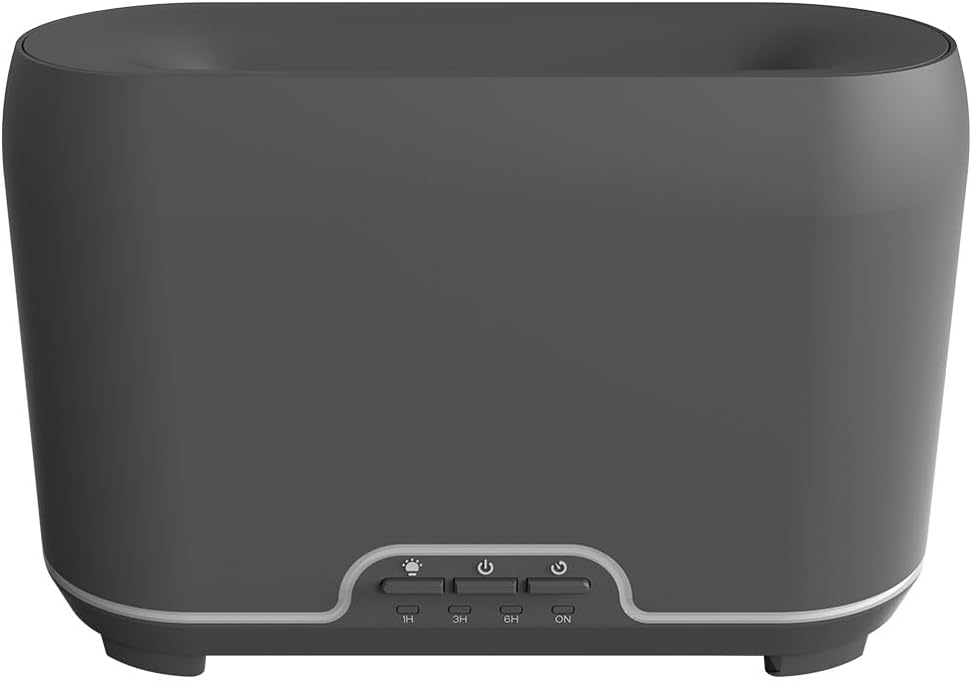
ຮູບພາບ: ທາງຫນ້າ view of the CALEX Smart Home Aroma Diffuser, showing the control panel with buttons for light, power, and timer settings (1H, 3H, 6H, ON).

Image: The CALEX Smart Home Aroma Diffuser operating on a wooden table, displaying its ambient flame effect and mist output.
The diffuser typically consists of a water tank, an ultrasonic plate, a mist outlet, and a control panel with buttons for power, light, and timer functions. The power input port is usually located at the back or bottom of the device.
5. ຕັ້ງຄ່າ
ປະຕິບັດຕາມຂັ້ນຕອນເຫຼົ່ານີ້ສໍາລັບການຕັ້ງຄ່າເບື້ອງຕົ້ນ:
- ການຈັດວາງ: ວາງເຄື່ອງກະຈາຍໃນພື້ນທີ່ຮາບພຽງ, ຄົງທີ່.
- ເປີດຝາ: ຄ່ອຍໆຖອດຝາປິດດ້ານເທິງຂອງຕົວກະຈາຍອາກາດອອກ.
- ຕື່ມຖັງນໍ້າ: Fill the water tank with clean water up to the 300ml maximum fill line. Do not overfill.
- ເພີ່ມນ້ໍາມັນຫອມລະເຫີຍ: ຕື່ມນ້ຳມັນຫອມລະເຫີຍທີ່ທ່ານມັກສອງສາມຢອດລົງໃນຖັງນ້ຳໂດຍກົງ.
- ປິດຝາ: ປ່ຽນຝາເທິງຢ່າງປອດໄພ.
- ເຊື່ອມຕໍ່ພະລັງງານ: Plug the power adapter into the diffuser's power input port, then plug the adapter into a wall outlet.
- Download Calex App: Download the free Calex Smart app from your smartphone's app store (available for iOS and Android).
- ເຊື່ອມຕໍ່ກັບ WiFi: Follow the in-app instructions to connect your diffuser to your home WiFi network. Ensure your WiFi is 2.4GHz.
6. ຄໍາແນະນໍາການດໍາເນີນງານ
The CALEX Smart Home Aroma Diffuser can be operated via the Calex app or its integrated control buttons.
6.1 Using the Calex Smart App
The Calex app provides full control over your diffuser's functions:
- ເປີດ/ປິດ: Turn the diffuser on or off remotely.
- ການຄວບຄຸມໝອກ: Adjust the mist output level.
- ການຄວບຄຸມແສງ: Change the ambient light color from over 16 million options, adjust brightness, and select lighting modes.
- ເອັບເຟັກແປວໄຟ: Activate or deactivate the flame effect.
- ໂມງຈັບເວລາ: Set schedules for the diffuser to turn on or off automatically.
- Programmable Scenarios: Create custom scenarios based on time, weather, or other smart home triggers.
- ການແຈ້ງເຕືອນ: Receive alerts when the water tank is empty.
6.2 ການຄວບຄຸມສຽງ
Integrate your diffuser with voice assistants for hands-free control:
- ຜູ້ຊ່ວຍ Google: Link your Calex account in the Google Home app. Use commands like "Hey Google, turn on the diffuser."
- ສິລິ: Create custom shortcuts in the Apple Home app or through the Calex app for Siri commands.
- Amazon Alexa: Enable the Calex skill in the Alexa app. Use commands like "Alexa, set diffuser light to blue."
6.3 Manual Control Buttons
The control panel on the diffuser allows for basic operation:
- ປຸ່ມເປີດປິດ: Press once to turn on/off the mist and flame effect.
- ປຸ່ມແສງສະຫວ່າງ: Press to cycle through light colors or turn the light on/off.
- Timer Buttons (1H, 3H, 6H, ON): Select a desired operating duration. The diffuser will automatically shut off after the selected time. 'ON' typically means continuous operation until water runs out or manually turned off.
7. ບໍາລຸງຮັກສາ
ການທໍາຄວາມສະອາດເປັນປົກກະຕິຮັບປະກັນປະສິດທິພາບທີ່ດີທີ່ສຸດແລະຍືດອາຍຸການແຜ່ກະຈາຍຂອງທ່ານ.
- ທໍາຄວາມສະອາດປະຈໍາວັນ: After each use, empty any remaining water from the tank. Wipe the inside of the tank with a clean, soft cloth.
- ທໍາຄວາມສະອາດປະຈໍາອາທິດ: For a more thorough clean, unplug the device. Add a small amount of white vinegar (about 10ml) to the water tank and let it sit for 10-15 minutes to dissolve mineral buildup. Gently wipe the ultrasonic plate with a cotton swab or soft brush. Rinse the tank thoroughly with clean water, avoiding the air outlet.
- ທໍາຄວາມສະອາດພາຍນອກ: ເຊັດພາຍນອກຂອງ diffuser ອ່ອນໆ, damp ຜ້າ. ຢ່າໃຊ້ເຄື່ອງເຮັດຄວາມສະອາດຂັດຫຼືສານລະລາຍ.
- Ensure the device is completely dry before refilling or storing.
8. ການແກ້ໄຂບັນຫາ
ຖ້າຫາກທ່ານພົບບັນຫາ, ເບິ່ງບັນຫາທົ່ວໄປດັ່ງຕໍ່ໄປນີ້ແລະການແກ້ໄຂ:
| ບັນຫາ | ສາເຫດທີ່ເປັນໄປໄດ້ | ການແກ້ໄຂ |
|---|---|---|
| ບໍ່ມີໝອກ ຫຼື ໝອກອ່ອນໆ | ລະດັບນໍ້າຕໍ່າ ແຜ່ນ ultrasonic ເປື້ອນ ບລັອກຊ່ອງສຽບໝອກ | ຕື່ມນ້ຳໃຫ້ເຕັມໃນລະດັບທີ່ເໝາະສົມ. ເຮັດຄວາມສະອາດແຜ່ນອັລຕຣາຊາວຕາມຄໍາແນະນໍາການບໍາລຸງຮັກສາ. Ensure the mist outlet is clear. |
| ອຸປະກອນບໍ່ເປີດ | ບໍ່ມີພະລັງງານ ຖັງນ້ໍາເປົ່າ ອຸປະກອນຜິດປົກກະຕິ | ກວດສອບການເຊື່ອມຕໍ່ໄຟຟ້າ ແລະ ປລັກສຽບຝາ. ຕື່ມຂໍ້ມູນໃສ່ຖັງນ້ໍາ. ຕິດຕໍ່ຝ່າຍຊ່ວຍເຫຼືອລູກຄ້າຖ້າບັນຫາຍັງຄົງຢູ່. |
| ບັນຫາການເຊື່ອມຕໍ່ແອັບຯ | ລະຫັດຜ່ານ WiFi ບໍ່ຖືກຕ້ອງ ເຣົາເຕີ້ຢູ່ໄກເກີນໄປ 2.4GHz vs 5GHz WiFi | Verify WiFi password. Move diffuser closer to the router. Ensure your router is broadcasting a 2.4GHz network and connect to it. |
| ຜົນກະທົບຂອງໄຟບໍ່ເຮັດວຽກ | Feature deactivated in app ອຸປະກອນຜິດປົກກະຕິ | Check app settings to ensure flame effect is enabled. ຕິດຕໍ່ຝ່າຍຊ່ວຍເຫຼືອລູກຄ້າ. |
9. ຂໍ້ມູນຈໍາເພາະ
| ຄຸນສົມບັດ | ຂໍ້ມູນຈໍາເພາະ |
|---|---|
| ໝາຍເລກຕົວແບບ | 5901000500 |
| ຍີ່ຫໍ້ | ຄາເລັກ |
| ຄວາມອາດສາມາດ | 300 ມິນລີລິດ |
| ວັດສະດຸ | ພາດສະຕິກ |
| ປິດອັດຕະໂນມັດ | ແມ່ນແລ້ວ |
| ການເຊື່ອມຕໍ່ | WiFi (2.4GHz) |
| ວິທີການຄວບຄຸມ | Calex Smart App, Voice Control (Google Assistant, Siri, Amazon Alexa), Manual Buttons |
| ຕົວເລືອກແສງສະຫວ່າງ | 16 ລ້ານສີ |
| ພື້ນທີ່ການນໍາໃຊ້ທີ່ແນະນໍາ | Medium space |
| ລະຫັດມາດຕາສາກົນ (EAN/UPC) | 08712879157090 |
10. ການຮັບປະກັນແລະການສະຫນັບສະຫນູນ
ສຳລັບຂໍ້ມູນການຮັບປະກັນ ຫຼື ການຊ່ວຍເຫຼືອດ້ານເຕັກນິກ, ກະລຸນາອ້າງອີງເອກະສານທີ່ສະໜອງໃຫ້ພ້ອມກັບການຊື້ຂອງທ່ານ ຫຼື ຕິດຕໍ່ຜູ້ຂາຍຍ່ອຍ/ຜູ້ຜະລິດໂດຍກົງ. ເກັບຫຼັກຖານການຊື້ຂອງທ່ານໄວ້ເພື່ອການຮຽກຮ້ອງການຮັບປະກັນ.