
ແນະນຳ
ຂອບໃຈສໍາລັບການຊື້asing the ESSAGER 2-in-1 Magnetic Detachable Wireless Charging Station. This device is designed to provide a convenient and efficient charging solution for your compatible Apple devices. Please read this manual carefully before use to ensure proper operation and to maximize the lifespan of your product.
ເນື້ອໃນຊຸດ
- 1 x ESSAGER 2-in-1 Magnetic Detachable Wireless Charging Station (consisting of two magnetic units)
- 1 x ສາຍ USB-C ຫາ USB-C
- 1 x ສາຍ USB-A ຫາ USB-C
- 1 x ຄູ່ມືຜູ້ໃຊ້
Note: A power adapter is not included and must be purchased separately. For optimal fast charging, a Quick Charge (QC) 3.0 or Power Delivery (PD) compatible adapter is recommended.
ສິນຄ້າເກີນview

Image: The ESSAGER 2-in-1 charging station with a phone charging pad and an Apple Watch charging pad magnetically connected. The phone pad is connected via a Type-C interface, and both pads show charging indicators. The image highlights 15W for mobile phone/AirPods and 3W for iWatch.
The ESSAGER 2-in-1 Wireless Charging Station features a modular design, allowing two independent charging units to be used separately or combined magnetically. It provides wireless charging for compatible iPhones, Apple Watches, and AirPods.
ຄໍາແນະນໍາການຕິດຕັ້ງ
- ເຊື່ອມຕໍ່ກັບພະລັງງານ: Use the provided USB-C cable to connect the main charging unit (the one with the ESSAGER logo) to a compatible power adapter (not included). Ensure the adapter provides sufficient power for optimal charging (e.g., 15W or higher).
- Assemble the Charging Station:
- To use as a combined station, align the magnetic connectors of the phone charging unit and the Apple Watch charging unit. They will snap together securely.
- For individual use, simply separate the units. Each unit can be powered independently if connected to a separate power source, or the main unit can power the connected secondary unit.
- ການຈັດວາງ: Place the charging station on a flat, stable surface.

Image: The ESSAGER 2-in-1 charging station demonstrating flexible usage. It shows a phone and an Apple Watch charging simultaneously on the connected pads, and another image shows the two pads separated, each charging a device.
ຄໍາແນະນໍາການດໍາເນີນງານ
- Charging an iPhone: Place your compatible iPhone (iPhone 11/12/13/14/15 series) on the flat charging pad with the ESSAGER logo. Ensure the phone is centered on the charging area. The charging indicator light will illuminate (blue for charging) to confirm charging has begun. The charger supports charging through phone cases up to 5mm thick. Remove any magnetic or metal accessories from your phone case before charging.
- ກຳລັງສາກ Apple Watch: Place your compatible Apple Watch (Apple Watch 8/7/6/5/4/3/2/SE) on the dedicated watch charging module. The watch module can be rotated 90 degrees for optimal viewing in Nightstand mode. The charging indicator light will illuminate (blue for charging) to confirm charging has begun.
- ກຳລັງສາກ AirPods: Place your compatible AirPods (AirPods Pro/3/2 with a wireless case) on the flat charging pad. The charging indicator light will illuminate (blue for charging) to confirm charging has begun.

Image: This image illustrates the charging capabilities: 15W for compatible iPhone models (iPhone 14, iPhone 13, iPhone 12 series, and Galaxy series) and 3W for Apple Watch models (Apple Watch Ultra/SE/8/7/6/5/4/3/2).
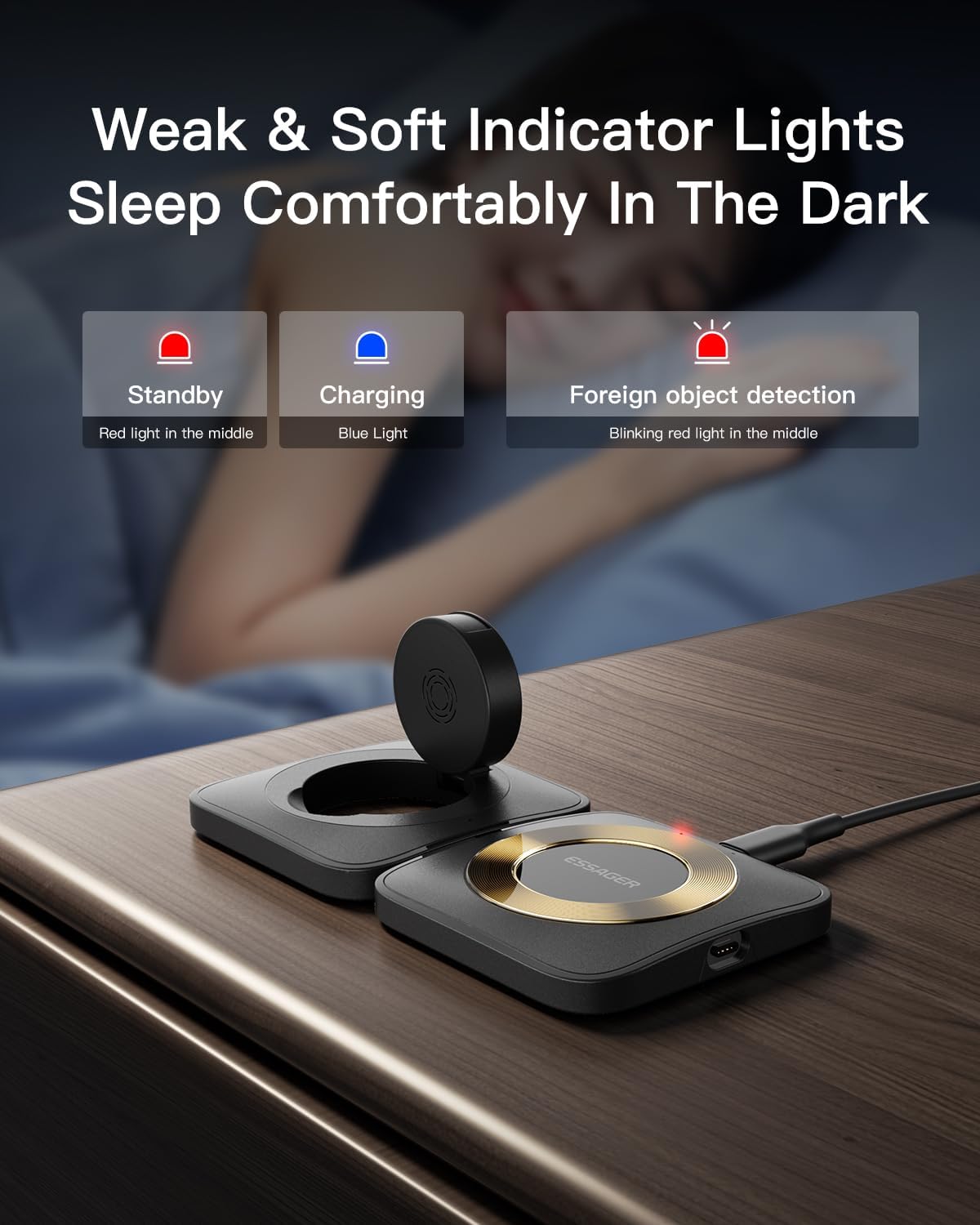
Image: The charging station displays indicator lights: Red light for standby, Blue light for charging, and a blinking red light for foreign object detection. These lights are designed to be soft for comfortable sleep in the dark.
ຄຸນນະສົມບັດຄວາມປອດໄພ
The ESSAGER 2-in-1 Wireless Charging Station is equipped with multiple safety protections to ensure the safety of your devices and yourself:
- ການປົກປ້ອງອຸນຫະພູມເກີນ: Prevents overheating during charging.
- ການປົກປ້ອງເກີນປະຈຸບັນ: ປ້ອງກັນການໄຫຼວຽນຫຼາຍເກີນໄປ.
- ເກີນ-voltage ການປົກປ້ອງ: ປ້ອງກັນ voltage ກະຕຸ້ນ.
- ການປົກປ້ອງວົງຈອນສັ້ນ: ປ້ອງກັນຄວາມເສຍຫາຍຈາກວົງຈອນສັ້ນ.
- ການກວດຫາວັດຖຸຕ່າງປະເທດ (FOD): Detects foreign metal objects on the charging surface and stops charging to prevent damage.

ຮູບພາບ: ລະເບີດ view of the charging station highlighting its internal components and listing safety features such as Overheat Protection, Short Circuit Protection, Overcharge Protection, and Over Current Protection.
ບໍາລຸງຮັກສາ
- Keep the charging station clean and free from dust and debris. Use a soft, dry cloth for cleaning.
- Avoid exposing the device to extreme temperatures, humidity, or liquids.
- ຢ່າຖອດປະກອບ ຫຼື ພະຍາຍາມສ້ອມແປງອຸປະກອນດ້ວຍຕົນເອງ. ນີ້ຈະເຮັດໃຫ້ການຮັບປະກັນເປັນໂມຄະ.
ການແກ້ໄຂບັນຫາ
| ບັນຫາ | ສາເຫດທີ່ເປັນໄປໄດ້ | ການແກ້ໄຂ |
|---|---|---|
| ອຸປະກອນບໍ່ໄດ້ສາກໄຟ. |
|
|
| ການສາກໄຟຊ້າ. |
|
|
| Indicator light blinking red. | ກວດພົບວັດຖຸຕ່າງປະເທດ. | Remove any metal objects or debris from the charging surface. |
ຂໍ້ມູນຈໍາເພາະ
| ຄຸນສົມບັດ | ລາຍລະອຽດ |
|---|---|
| ຂະໜາດສິນຄ້າ | 0.67 x 8.82 x 4.53 ນິ້ວ |
| ນ້ໍາຫນັກລາຍການ | 4.9 ອອນ |
| ຍີ່ຫໍ້ | ESSAGER |
| ປະເພດຕົວເຊື່ອມຕໍ່ | Proprietary (USB-C input) |
| ອຸປະກອນທີ່ເຂົ້າກັນໄດ້ | Smartphones (iPhone 11/12/13/14/15 series), Apple Watch (UItra/8/7/6/SE/SE 2/5/4/3/2), AirPods (Pro/3/2 with wireless case) |
| ຄຸນນະສົມບັດພິເສດ | Magnetic, Detachable |
| ສີ | ດຳ |
| ພອດ USB ທັງໝົດ | 1 (for power input) |
| Max Wireless Output | 15W (Phone), 5W (AirPods), 3W (Apple Watch) |
ວິດີໂອຜະລິດຕະພັນ
Video: This video demonstrates the ESSAGER Magnetic Wireless Charging Station. It shows the modular design, how devices (iPhone, AirPods, Apple Watch) are placed for charging, and the compact, foldable nature of the product for portability. Note: This video may feature a 3-in-1 model, but the core functionality and magnetic detachment principles apply to the 2-in-1 model.
ການຮັບປະກັນແລະການສະຫນັບສະຫນູນ
ESSAGER provides a one-year after-sales service for every customer. If you encounter any malfunctions or issues with the product, please contact ESSAGER customer service for free replacement or professional technical support.
- ໄລຍະເວລາຮັບປະກັນ: 1 ປີ
- ສະຫນັບສະຫນູນ: Contact ESSAGER customer service for any product-related inquiries or issues.
For more information, please visit the official ESSAGER store or contact their customer support channels.