
1. ບົດແນະນຳ
This manual provides essential instructions for the installation, operation, and maintenance of your PureLink Vuelogic VB200 Huddle Space Videobar. Please read this manual thoroughly before using the product to ensure proper functionality and to prevent damage.
The PureLink Vuelogic VB200 is an all-in-one conferencing solution designed for huddle spaces and small to medium meeting rooms. It integrates a 4K camera, multiple microphones, and stereo speakers to provide a comprehensive audio and video experience.
2. ຂໍ້ມູນຄວາມປອດໄພ
ໃຫ້ປະຕິບັດຕາມຂໍ້ຄວນລະວັງດ້ານຄວາມປອດໄພຕໍ່ໄປນີ້ເພື່ອປ້ອງກັນຄວາມເສຍຫາຍຕໍ່ອຸປະກອນ ແລະ ຮັບປະກັນຄວາມປອດໄພຂອງຜູ້ໃຊ້:
- ຢ່າປ່ອຍໃຫ້ອຸປະກອນຖືກນໍ້າ, ຄວາມຊຸ່ມຊື່ນ, ຫຼືອຸນຫະພູມທີ່ຮຸນແຮງ.
- ຫຼີກເວັ້ນການວາງອຸປະກອນຢູ່ໃກ້ກັບແຫຼ່ງຄວາມຮ້ອນ ຫຼືຢູ່ໃນແສງແດດໂດຍກົງ.
- ໃຊ້ພຽງແຕ່ອະແດບເຕີພະລັງງານທີ່ໃຫ້ມາກັບອຸປະກອນ.
- ຢ່າພະຍາຍາມເປີດຫຼືສ້ອມແປງອຸປະກອນດ້ວຍຕົນເອງ. ອ້າງອີງການບໍລິການທັງໝົດໃຫ້ກັບບຸກຄະລາກອນທີ່ມີຄຸນວຸດທິ.
- ຮັບປະກັນການລະບາຍອາກາດທີ່ເຫມາະສົມຮອບອຸປະກອນໃນລະຫວ່າງການປະຕິບັດງານ.
3. ຜະລິດຕະພັນເກີນview
The PureLink Vuelogic VB200 combines a high-quality camera, microphone array, and speakers into a single, compact unit for streamlined video conferencing.
3.1. ເນື້ອໃນຊຸດ
ກວດສອບວ່າລາຍການທັງຫມົດແມ່ນມີຢູ່ໃນຊຸດ:
- PureLink Vuelogic VB200 Videobar
- Power Adapter
- ສາຍ USB
- ຂາຍຶດ (ຖ້າມີ)
- ຄູ່ມືເລີ່ມຕົ້ນດ່ວນ

Figure 3.1: The retail packaging for the PureLink Vuelogic VB200 Videobar, indicating it is an all-in-one conferencing solution.

ຮູບທີ 3.2: ລາຍລະອຽດ view of the product packaging, showing the model number VL-VB200 and UPC 4251364736913.
3.2. ອົງປະກອບອຸປະກອນ
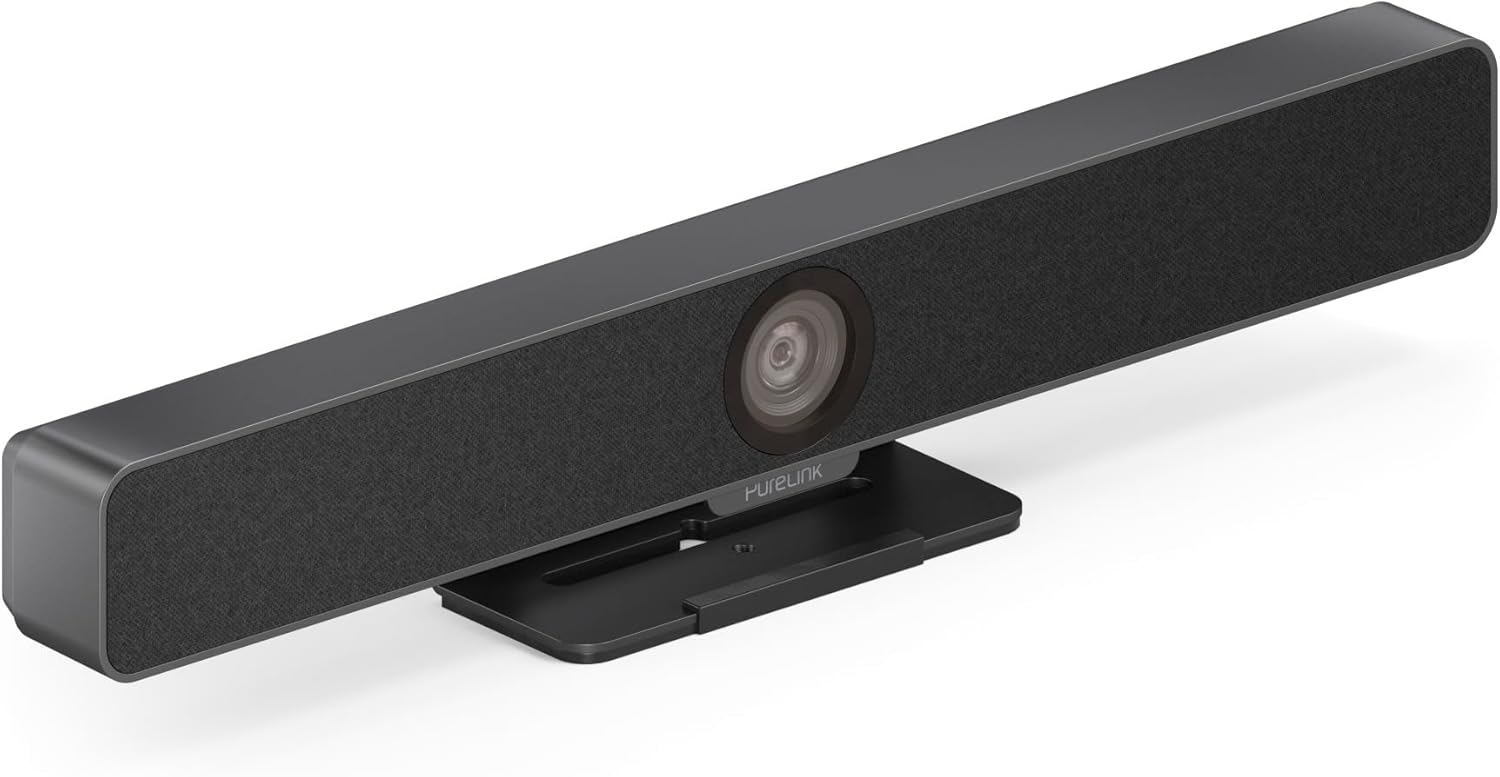
ຮູບ 3.3: ດ້ານຫນ້າ view of the PureLink Vuelogic VB200 Huddle Space Videobar, showcasing the integrated camera and speaker grille.

ຮູບ 3.4: ດ້ານຫນ້າແລະຫລັງ views of the videobar. The rear view displays the power input, USB-C port, and other connectivity options.
- ດ້ານໜ້າ: Integrated 4K camera, speaker grille, PureLink branding.
- ດ້ານຫຼັງ: Power input, USB-C port for data and power, HDMI output (if applicable), mounting points.
4. ຕັ້ງຄ່າ
Follow these steps to set up your PureLink Vuelogic VB200 Videobar:
- ການຈັດວາງ: Position the videobar on a stable surface, such as a table or monitor, ensuring the camera has a clear view of the meeting participants. The integrated stand allows for flexible placement.
- ການເຊື່ອມຕໍ່ພະລັງງານ: Connect the provided power adapter to the videobar's power input and then to a wall outlet.
- ການເຊື່ອມຕໍ່ USB: Connect the videobar to your computer using the supplied USB-C cable. The device is plug-and-play and should be recognized automatically by your operating system.
- ການເຊື່ອມຕໍ່ HDMI ທາງເລືອກ: If your setup requires video output to a display, connect an HDMI cable from the videobar's HDMI output (if available) to your display.
- ການຮັບຮູ້ຊອບແວ: Once connected, your computer's operating system (Windows, macOS, etc.) should detect the device. You may need to select the "PureLink Vuelogic VB200" as your preferred camera, microphone, and speaker in your video conferencing application settings (e.g., Zoom, Microsoft Teams, Webຕົວຢ່າງ).

Figure 4.1: The videobar positioned on a surface, demonstrating its flexible mounting options for various work environments.
5. ຄໍາແນະນໍາການດໍາເນີນງານ
The PureLink Vuelogic VB200 is designed for ease of use with popular video conferencing platforms.
5.1. Starting a Meeting
- Ensure the videobar is connected and powered on.
- Open your preferred video conferencing application (e.g., Zoom, Microsoft Teams, WebEx, Google Meet, Skype, Slack, GoToMeeting).
- In the application's audio and video settings, select "PureLink Vuelogic VB200" as your camera, microphone, and speaker device.
- Start or join your meeting.

Figure 5.1: The videobar is compatible with leading communication platforms such as Zoom, Slack, GoToMeeting, Google Hangouts, Skype, Microsoft Teams, and Google Meet.
5.2. ຄຸນນະສົມບັດທີ່ສໍາຄັນ
- ຄຸນນະພາບວິດີໂອ 4K: The 120° wide-angle lens captures sharp, high-resolution video, suitable for small to medium rooms.
- Intelligent Auto Framing and Tracking: The camera automatically adjusts its frame to keep all participants visible and can track the active speaker, ensuring optimal framing during dynamic meetings.
- High-Quality Audio Capture: Equipped with 4 MEMS digital microphone arrays, offering a 3-5m range and 180° coverage. Features like Acoustic Echo Cancellation (AEC), Automatic Gain Control (AGC), and Automatic Noise Suppression (ANS) ensure clear communication.
- Hi-Fi Stereo Speakers: Two 3W stereo speakers with bass boost provide clear and powerful audio output for an immersive sound experience.
6. ບໍາລຸງຮັກສາ
To ensure the longevity and optimal performance of your videobar:
- ທໍາຄວາມສະອາດ: Use a soft, dry cloth to clean the exterior of the device. For the camera lens, use a lens cleaning cloth and solution specifically designed for optics. Do not use abrasive cleaners or solvents.
- ການເກັບຮັກສາ: ເມື່ອບໍ່ໄດ້ໃຊ້ເປັນເວລາດົນ, ໃຫ້ເກັບຮັກສາອຸປະກອນໄວ້ໃນບ່ອນທີ່ເຢັນ, ແຫ້ງແລ້ງຫ່າງຈາກແສງແດດໂດຍກົງ.
- ການອັບເດດເຟີມແວ: Periodically check the PureLink website for any available firmware updates to ensure your device has the latest features and performance enhancements.
7. ການແກ້ໄຂບັນຫາ
If you encounter issues with your PureLink Vuelogic VB200, refer to the following common problems and solutions:
| ບັນຫາ | ສາເຫດທີ່ເປັນໄປໄດ້ | ການແກ້ໄຂ |
|---|---|---|
| No video output / Camera not detected | ການເຊື່ອມຕໍ່ USB ວ່າງ, ການຕັ້ງຄ່າຊອບແວບໍ່ຖືກຕ້ອງ, ບັນຫາໄດຣເວີ. |
|
| No audio from speakers / Microphone not working | Incorrect audio settings, muted device. |
|
| Auto-framing not functioning correctly | Poor lighting, obstruction, software glitch. |
|
8. ຂໍ້ມູນຈໍາເພາະ
| ຄຸນສົມບັດ | ລາຍລະອຽດ |
|---|---|
| ຍີ່ຫໍ້ | PureLink |
| ໝາຍເລກຕົວແບບ | VL-VB200 |
| ຂະໜາດ | 20.47 x 7.87 x 5.12 ນິ້ວ |
| ນ້ຳໜັກ | 2.2 ປອນ |
| ສີ | ດຳ |
| ຄວາມລະອຽດການຖ່າຍວິດີໂອ | 4K |
| Optical Zoom | 5x |
| ເທັກໂນໂລຍີເຊັນເຊີຮູບພາບ | CMOS |
| ຄຸນນະສົມບັດພິເສດ | Auto Framing and Tracking |
| ປະເພດໄມໂຄຣໂຟນ | 4 MEMS Digital Microphone Arrays |
| ຊ່ວງໄມໂຄຣໂຟນ | 3-5m, 180° coverage |
| ຄຸນສົມບັດສຽງ | AEC, AGC, ANS |
| ລໍາໂພງ | Two 3W Stereo Speakers with Bass Boost |
| ເຕັກໂນໂລຊີການເຊື່ອມຕໍ່ | HDMI, USB |
| ຮູບແບບສຽງທີ່ຮອງຮັບ | AAC, MP3 |
| ຮູບແບບວິດີໂອທີ່ຮອງຮັບ | MP4 |
| ຄວາມເຂົ້າກັນໄດ້ | Windows, macOS, Zoom, WebEx, Tencent Meeting, Teams, etc. |
9. ການຮັບປະກັນແລະການສະຫນັບສະຫນູນ
PureLink products are designed for reliability and performance. For specific warranty information, please refer to the warranty card included with your product or visit the official PureLink webເວັບໄຊ.
For technical support, troubleshooting assistance, or to inquire about service, please contact PureLink customer support through their official channels. Keep your purchase receipt and product model number (VL-VB200) handy when contacting support.
Official PureLink Webເວັບໄຊ: www.purelink.de