
1. ບົດແນະນຳ
This manual provides detailed instructions for the installation, operation, and maintenance of your Tiandy TC-C32XN 2MP Fixed IP Dome Turret Camera. Please read this manual thoroughly before using the product to ensure correct usage and optimal performance. Keep this manual for future reference.
2. ຂໍ້ມູນຄວາມປອດໄພ
- ໃຫ້ແນ່ໃຈວ່າແຫຼ່ງຈ່າຍໄຟກົງກັບຄວາມຕ້ອງການຂອງກ້ອງຖ່າຍຮູບເພື່ອປ້ອງກັນຄວາມເສຍຫາຍ.
- ຢ່າເຮັດໃຫ້ກ້ອງຖ່າຍຮູບຖືກອຸນຫະພູມສູງ, ຄວາມຊຸ່ມຊື່ນ, ຫຼືສະພາບແວດລ້ອມທີ່ກັດກ່ອນ.
- Avoid pointing the camera directly at strong light sources for extended periods, as this may damage the image sensor.
- ຈັບກ້ອງຖ່າຍຮູບດ້ວຍຄວາມລະມັດລະວັງ. ຢ່າເຮັດຕົກ ຫຼື ສັ່ນສະເທືອນແຮງ.
- ການຕິດຕັ້ງແລະການບໍລິການທັງຫມົດຄວນໄດ້ຮັບການປະຕິບັດໂດຍບຸກຄະລາກອນທີ່ມີຄຸນວຸດທິ.
- ຕັດການເຊື່ອມຕໍ່ໄຟຟ້າກ່ອນທີ່ຈະທໍາຄວາມສະອາດຫຼືດໍາເນີນການບໍາລຸງຮັກສາ.
3. ເນື້ອໃນຊຸດ
ກວດສອບວ່າລາຍການທັງຫມົດແມ່ນມີຢູ່ໃນຊຸດຂອງທ່ານ:
- Tiandy TC-C32XN 2MP Fixed IP Dome Turret Camera
- ອະແດັບເຕີ
- screws mounting ແລະ plugs ຝາ
- ຄູ່ມືເລີ່ມຕົ້ນດ່ວນ (ຖ້າລວມ)
4. ຜະລິດຕະພັນເກີນview
The Tiandy TC-C32XN is a 2MP Fixed IP Dome Turret Camera designed for reliable surveillance. It features Smart IR for clear night vision up to 30 meters, a built-in microphone, and an SD card slot for local storage.

ຮູບ 4.1: ດ້ານຫນ້າ view of the Tiandy TC-C32XN camera, showing the lens and IR illuminators.
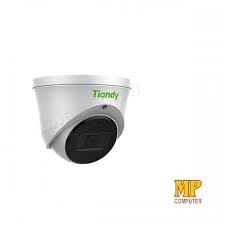
ຮູບ 4.2: ຂ້າງ view of the Tiandy TC-C32XN camera, highlighting its dome turret form factor.
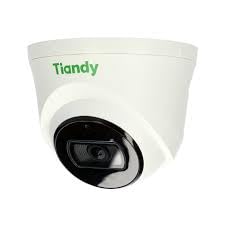
ຮູບທີ 4.3: ມຸມ view of the Tiandy TC-C32XN camera, showcasing ການອອກແບບຫນາແຫນ້ນຂອງມັນ.
5. ການຕິດຕັ້ງແລະການຕິດຕັ້ງ
5.1 ການຕິດຕັ້ງ
- ເລືອກສະຖານທີ່: Choose a suitable outdoor or indoor location (IP67 rated for outdoor use) that provides the desired viewing angle and is within reach of power and network connections. The camera is designed for protruding mounting.
- ຮູເຈາະ: ໃຊ້ແມ່ແບບຕິດຕັ້ງທີ່ໃຫ້ມາ (ຖ້າມີ) ເພື່ອໝາຍ ແລະ ເຈາະຮູສຳລັບສະກູຕິດຕັ້ງ.
- ຮັບປະກັນກ້ອງຖ່າຍຮູບ: Attach the camera base securely to the mounting surface using the provided screws and wall plugs.
5.2 ສາຍໄຟ
- ການເຊື່ອມຕໍ່ພະລັງງານ: Connect the provided adapter to the camera's power input and then to a power outlet. The camera operates on corded electric power.
- ການເຊື່ອມຕໍ່ເຄືອຂ່າຍ: Connect an Ethernet cable from your network router or PoE switch to the camera's Ethernet port. This camera supports Ethernet connectivity for data transmission.
5.3 ການຕັ້ງຄ່າເບື້ອງຕົ້ນ
- ເປີດ: Once wired, power on the camera.
- ການຄົ້ນພົບເຄືອຂ່າຍ: Use the Tiandy client software or a network scanner tool to discover the camera's IP address on your local network.
- ເຂົ້າເຖິງກ້ອງຖ່າຍຮູບ: ເປີດ ກ web ໂປຣແກຣມທ່ອງເວັບ ແລະ ໃສ່ທີ່ຢູ່ IP ຂອງກ້ອງຖ່າຍຮູບເພື່ອເຂົ້າເຖິງ web interface. Log in using the default credentials (refer to the quick start guide for default username/password).
- ປ່ຽນລະຫັດຜ່ານເລີ່ມຕົ້ນ: ເພື່ອຄວາມປອດໄພ, ໃຫ້ປ່ຽນລະຫັດຜ່ານເລີ່ມຕົ້ນທັນທີເມື່ອເຂົ້າສູ່ລະບົບຄັ້ງທຳອິດ.
- ການເຊື່ອມໂຍງ NVR: If using with an NVR, add the camera to your NVR system following the NVR's instructions. This camera is compatible with all brand NVRs.
- ການຕິດຕັ້ງແອັບຯມືຖື: Download the official Tiandy mobile application (available for Android and iOS) and follow the in-app instructions to add your camera for remote viewການຄວບຄຸມແລະ.
6. ຄໍາແນະນໍາການດໍາເນີນງານ
6.1 ດໍາລົງຊີວິດ View ແລະການບັນທຶກ
ເຂົ້າເຖິງການຖ່າຍທອດສົດຂອງກ້ອງ view ຜ່ານ web interface, NVR, or mobile app. Configure recording schedules and methods (continuous, motion-triggered) via the camera's settings.
6.2 Smart IR and Night Vision
The camera features Smart IR technology, which automatically adjusts the intensity of its infrared LEDs to prevent overexposure of objects close to the camera, ensuring clear images in low-light conditions up to 30 meters. It also supports 'Night Color' low light technology for enhanced visibility.
6.3 ກວດຈັບການເຄື່ອນໄຫວ ແລະການແຈ້ງເຕືອນ
Configure motion detection zones and sensitivity in the camera settings. The camera supports 'Motion Only' alert types. When motion is detected, the camera can trigger recordings, send notifications to your mobile device, or activate other configured actions. It also supports advanced features like tripwire and perimeter intrusion detection.
6.4 ໜ້າທີ່ສຽງ
The built-in microphone allows for audio monitoring of the surveillance area. Audio settings can be adjusted in the camera's web ອິນເຕີເຟດ ຫຼື NVR.
6.5 SD Card Storage
Insert a compatible SD card into the camera's SD card slot for local storage of recordings. Ensure the card is formatted correctly via the camera's settings. The camera supports SD flash memory type.
6.6 ປຸ່ມຣີເຊັດ
A reset button is included for restoring the camera to its factory default settings. Consult the quick start guide for the exact location and procedure for your model.
7. ບໍາລຸງຮັກສາ
- ທໍາຄວາມສະອາດ: ເຊັດເລນກ້ອງຖ່າຍຮູບ ແລະ ຮ່າງກາຍດ້ວຍຜ້າອ່ອນ ແລະ ແຫ້ງ. ຢ່າໃຊ້ສານເຄມີທີ່ຮຸນແຮງຫຼືເຄື່ອງເຮັດຄວາມສະອາດຂັດ.
- ການອັບເດດເຟີມແວ: Regularly check the Tiandy official webເວັບໄຊທ໌ສຳລັບການອັບເດດເຟີມແວ. ການຮັກສາເຟີມແວຂອງກ້ອງຖ່າຍຮູບຂອງທ່ານໃຫ້ທັນສະໄໝຢູ່ສະເໝີຮັບປະກັນປະສິດທິພາບ ແລະ ຄວາມປອດໄພທີ່ດີທີ່ສຸດ.
- ການກວດສອບສາຍ: ກວດກາສາຍໄຟທັງໝົດເປັນໄລຍະໆ ເພື່ອໃຫ້ແນ່ໃຈວ່າສາຍໄຟມີຮ່ອງຮອຍຂອງການສວມໃສ່ ຫຼື ຄວາມເສຍຫາຍ, ໂດຍສະເພາະສຳລັບການຕິດຕັ້ງພາຍນອກ.
8. ການແກ້ໄຂບັນຫາ
- ບໍ່ມີພະລັງງານ: ໃຫ້ແນ່ໃຈວ່າອະແດບເຕີໄຟຟ້າໄດ້ເຊື່ອມຕໍ່ຢ່າງແໜ້ນໜາ ແລະ ປລັກໄຟໃຊ້ງານໄດ້.
- ບໍ່ມີວິດີໂອ: Check network cable connections. Verify the camera's IP address and network settings. Ensure the camera is properly added to your NVR or viewໃນຊອບແວ.
- ຄຸນນະພາບຮູບພາບທີ່ບໍ່ດີ: Clean the camera lens. Adjust focus if applicable. Check lighting conditions and camera placement.
- ບັນຫາການເຊື່ອມຕໍ່ເຄືອຂ່າຍ: Verify router and network cable functionality. Restart the camera and network devices.
- ບໍ່ສາມາດເຂົ້າເຖິງໄດ້ Web ການໂຕ້ຕອບ: Ensure your computer is on the same network segment as the camera. Verify the camera's IP address. Try resetting the camera to factory defaults if necessary (this will erase all settings).
9. ຂໍ້ມູນຈໍາເພາະ
| ຄຸນສົມບັດ | ຂໍ້ມູນຈໍາເພາະ |
|---|---|
| ຕົວແບບ | TC-C32XN |
| ການແກ້ໄຂປະສິດທິພາບ | 2 MP (1920x1080) |
| ອັດຕາເຟຣມ | 30 ເຟຣມຕໍ່ວິນາທີ |
| ເທັກໂນໂລຍີເຊັນເຊີຮູບພາບ | CMOS (1/2.8") |
| ຂອບເຂດວິໄສທັດກາງຄືນ | 30 Metres (Smart IR) |
| ເຕັກໂນໂລຊີແສງສະຫວ່າງຕ່ໍາ | ສີກາງຄືນ |
| Optical Zoom | 3 x |
| ໄມໂຄຣໂຟນໃນຕົວ | ແມ່ນແລ້ວ |
| ຊ່ອງໃສ່ບັດ SD | Yes (Flash Memory Type: SD) |
| ປະເພດ Alert | Motion Only (supports tripwire and perimeter) |
| ເຕັກໂນໂລຊີການເຊື່ອມຕໍ່ | Wireless (IR), Ethernet |
| ແຫຼ່ງພະລັງງານ | ໄຟຟ້າສາຍ |
| ການຈັດອັນດັບການປົກປ້ອງສາກົນ | IP67 |
| ປັດໄຈແບບຟອມ | Dome Turret |
| ປະເພດການຕິດຕັ້ງ | ໂພງ |
| ຄວາມເຂົ້າກັນໄດ້ຂອງລະບົບປະຕິບັດການ | Android, iOS |
| ຂະໜາດສິນຄ້າ (L x W x H) | 50 x 50 x 70 ມິນລີແມັດ |
| ນ້ໍາຫນັກລາຍການ | 20 ກຣາມ |
| ອົງປະກອບລວມ | ອະແດັບເຕີ |
| ສີ | ສີຂາວ |
10. ການຮັບປະກັນແລະການສະຫນັບສະຫນູນ
For warranty information and technical support, please refer to the warranty card included with your product or visit the official Tiandy website. Contact the seller or manufacturer directly for assistance with product issues or inquiries.