
1. ບົດແນະນຳ
Welcome to the user manual for your new realme C53 smartphone. This guide provides essential information on setting up, operating, maintaining, and troubleshooting your device. The realme C53 is designed to offer a seamless user experience with its advanced camera system, efficient performance, and long-lasting battery.
2. ເນື້ອໃນຊຸດ
ກະລຸນາກວດເບິ່ງກ່ອງສໍາລັບລາຍການຕໍ່ໄປນີ້:
- realme C53 Handset
- Power Adapter
- ສາຍ USB
- Important Info Booklet with Warranty Card
- ຄູ່ມືດ່ວນ
- ເຄື່ອງມືຊິມກາດ
- ກໍລະນີປ້ອງກັນ
3. ແຜນຜັງອຸປະກອນ
Familiarize yourself with the physical components of your realme C53 smartphone.
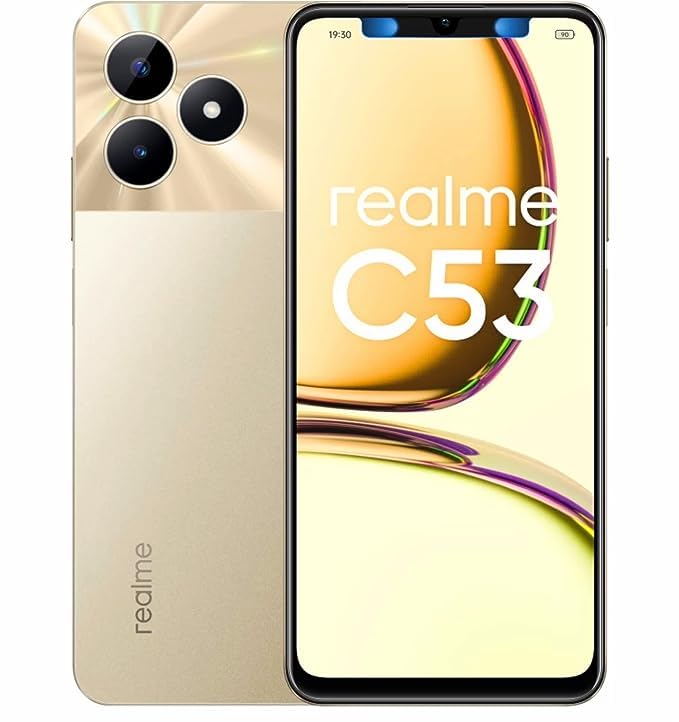
ຮູບພາບ 3.1: ດ້ານໜ້າ ແລະ ດ້ານຫຼັງ view ຂອງໂທລະສັບສະຫຼາດ realme C53 ໃນ Champion Gold. The front features the display, while the back shows the camera module and realme branding.
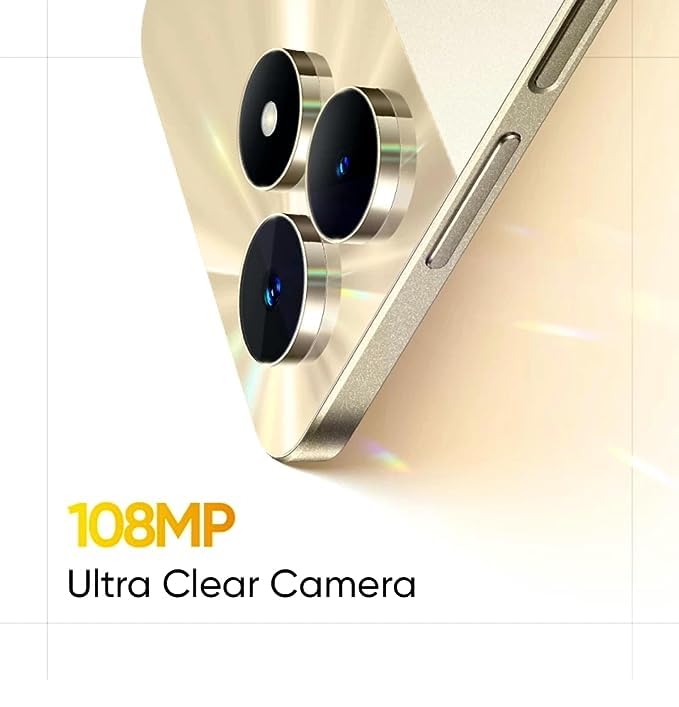
ຮູບພາບ 3.2: ລະອຽດ view of the realme C53, highlighting the display and the slim profile ຂອງອຸປະກອນ.
- ດ້ານໜ້າ: Large touchscreen display, front camera, earpiece.
- ເບື້ອງຂວາ: Power button (integrated with fingerprint sensor), Volume Up/Down buttons.
- ຊ້າຍ: ຖາດຊິມກາດ.
- ລຸ່ມ: USB-C port, microphone, speaker.
- ດ້ານຫຼັງ: Dual camera module (108MP main, 2MP depth), LED flash, realme logo.
4. ຕັ້ງຄ່າ
4.1. ການຕິດຕັ້ງຊິມກາດ
- Locate the SIM card tray on the left side of your device.
- ສຽບເຄື່ອງມືຖອດ SIM ເຂົ້າໄປໃນຮູນ້ອຍໆທີ່ຢູ່ຂ້າງຖາດ ແລະກົດໃຫ້ແໜ້ນຈົນກວ່າຖາດຈະອອກມາ.
- Place your Nano-SIM cards into the designated slots. The realme C53 supports Dual SIM functionality with a dedicated slot for a microSD card.
- ໃສ່ຖາດໃສ່ໂທລະສັບຄືນໃໝ່ຢ່າງລະມັດລະວັງ.
4.2. ເປີດ ແລະ ຕັ້ງຄ່າເບື້ອງຕົ້ນ
- ກົດປຸ່ມເປີດປິດຢູ່ເບື້ອງຂວາຄ້າງໄວ້ຈົນກ່ວາໂລໂກ້ realme ປະກົດຂຶ້ນ.
- ປະຕິບັດຕາມຄໍາແນະນໍາໃນຫນ້າຈໍເພື່ອເລືອກພາສາຂອງທ່ານ, ເຊື່ອມຕໍ່ກັບ Wi-Fi, ແລະຕັ້ງຄ່າບັນຊີ Google ຂອງທ່ານ.
- Configure security features such as fingerprint recognition and a screen lock (PIN, pattern, or password).
5. ປະຕິບັດການອຸປະກອນຂອງທ່ານ
5.1. ການນໍາທາງໃນການໂຕ້ຕອບ
Your realme C53 runs on Android 13, offering an intuitive and customizable user experience.
- ໜ້າຈໍສຳຜັດ: The 6.74-inch HD LCD display with a 90Hz refresh rate provides smooth scrolling and responsiveness. Use gestures like tap, swipe, pinch-to-zoom to interact with apps and content.
- ການຮັບຮູ້ລາຍນິ້ວມື: Unlock your device quickly and securely using the side-mounted fingerprint sensor integrated into the power button.
- ການແຈ້ງເຕືອນ: Swipe down from the top of the screen to access your notifications and quick settings panel.
5.2. ການເຊື່ອມຕໍ່
The realme C53 supports various connectivity options:
- ເຄືອຂ່າຍມືຖື: Supports 2G, 3G, and 4G cellular technologies. Ensure your SIM card is active and has a data plan.
- Wi-Fi: ເຊື່ອມຕໍ່ຫາເຄືອຂ່າຍໄຮ້ສາຍເພື່ອເຂົ້າເຖິງອິນເຕີເນັດ. ໄປທີ່ການຕັ້ງຄ່າ > ເຄືອຂ່າຍ ແລະອິນເຕີເນັດ > Wi-Fi ເພື່ອຈັດການການເຊື່ອມຕໍ່.
- Bluetooth: ຈັບຄູ່ກັບຫູຟັງໄຮ້ສາຍ, ລໍາໂພງ, ແລະອຸປະກອນອື່ນໆທີ່ເປີດໃຊ້ Bluetooth.
- USB: Use the USB-C port for charging and data transfer with a computer.
6. ຄຸນນະສົມບັດກ້ອງຖ່າຍຮູບ
Capture high-quality photos and videos with the realme C53's advanced camera system.
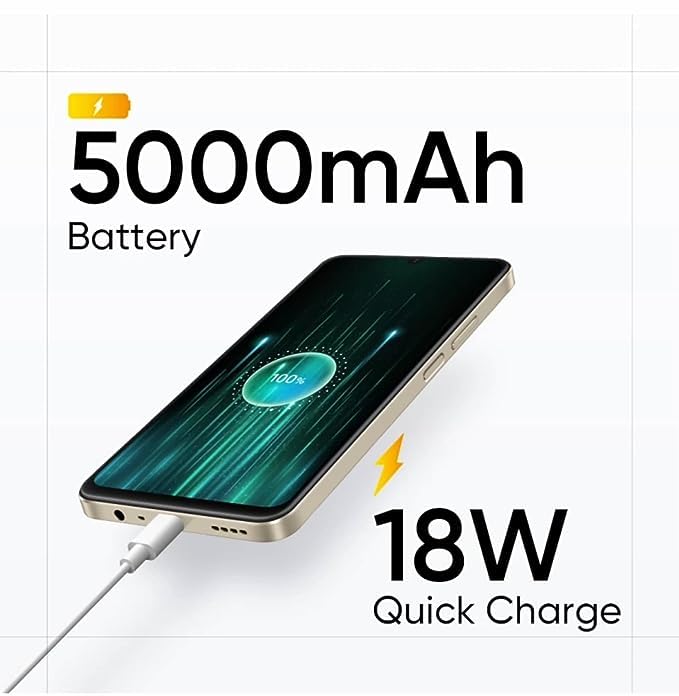
ຮູບພາບ 6.1: The 108MP Ultra Clear Camera module on the realme C53, designed for detailed photography.
- ກ້ອງຫຼັງ: Features a 108MP main sensor and a 2MP depth sensor for detailed photos and portrait effects.
- ກ້ອງໜ້າ: An 8MP front camera for selfies and video calls.
- ໂໝດກ້ອງຖ່າຍຮູບ: Explore various modes including Photo, Portrait, Night, Pro, and Panorama. Utilize the 108MP mode for maximum detail and 3X zoom for distant subjects.
- ການບັນທຶກວິດີໂອ: Supports Full HD (1080p) video recording at 60 FPS.
7. ການຄຸ້ມຄອງຫມໍ້ໄຟ
The realme C53 is equipped with a high-capacity battery and fast charging capabilities.
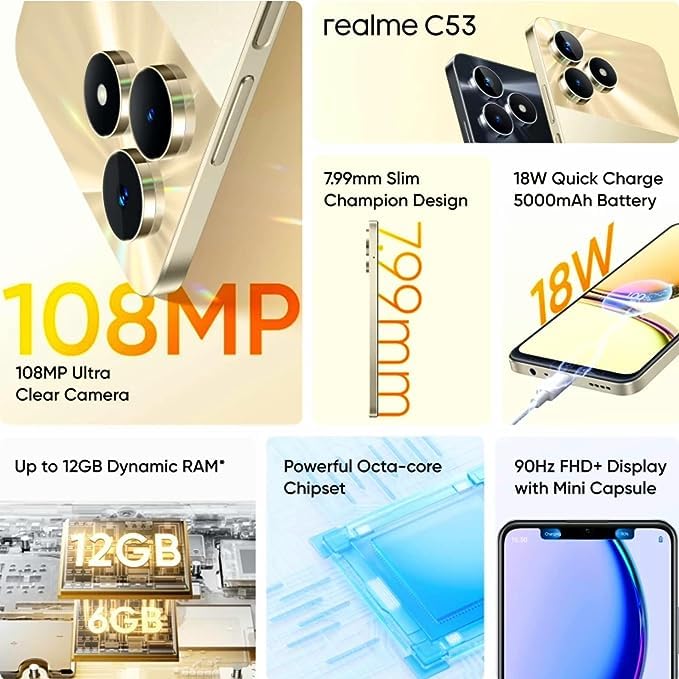
ຮູບພາບ 7.1: The realme C53 connected to an 18W Quick Charge adapter, illustrating its 5000mAh battery capacity.
- ຄວາມອາດສາມາດຫມໍ້ໄຟ: A 5000mAh Lithium-Ion battery provides extended usage time.
- ການສາກໄວ: Supports 18W Quick Charge. Use the provided adapter and USB cable for optimal charging speed.
- ການເພີ່ມປະສິດທິພາບຫມໍ້ໄຟ: To prolong battery life, manage background app usage, reduce screen brightness, and enable power-saving modes when needed.
8. ການເກັບຮັກສາແລະການປະຕິບັດ
Your device is designed for smooth performance and ample ການເກັບຮັກສາ.
- ໜ່ວຍປະມວນຜົນ: Powered by an Octa-core Unisoc T612 processor for efficient multitasking and app performance.
- RAM: Comes with 4GB of RAM, with support for up to 12GB Dynamic RAM for enhanced responsiveness.
- ການເກັບຮັກສາພາຍໃນ: ໜ່ວຍຄວາມຈຳພາຍໃນ 128GB ສຳລັບແອັບ, ຮູບພາບ ແລະ files.
- ການເກັບຮັກສາທີ່ຂະຫຍາຍໄດ້: A dedicated microSD card slot allows storage expansion up to 2TB.
9. ບໍາລຸງຮັກສາ
Proper care ensures the longevity and optimal performance of your realme C53.
- ທໍາຄວາມສະອາດ: ໃຊ້ຜ້າທີ່ອ່ອນໆ, ບໍ່ມີສານດ່າງເພື່ອເຮັດຄວາມສະອາດຫນ້າຈໍແລະຮ່າງກາຍ. ຫຼີກເວັ້ນການສານເຄມີທີ່ຮຸນແຮງຫຼືວັດສະດຸຂັດ.
- ຄວາມຕ້ານທານນ້ໍາ: The device has a water-resistant rating. Avoid submerging it in water or exposing it to high-pressure water jets.
- ອັບເດດຊອບແວ: Regularly check for and install system updates to ensure your device has the latest features and security patches. Go to Settings > About phone > Software update.
- ອຸນຫະພູມ: ຫຼີກລ້ຽງການເປີດອຸປະກອນກັບອຸນຫະພູມທີ່ຮ້າຍແຮງ (ຮ້ອນຫຼືເຢັນ) ເພື່ອປ້ອງກັນຄວາມເສຍຫາຍຂອງຫມໍ້ໄຟແລະອົງປະກອບພາຍໃນ.
10. ການແກ້ໄຂບັນຫາ
If you encounter issues with your device, try these common troubleshooting steps.
- ອຸປະກອນບໍ່ຕອບສະໜອງ: ກົດປຸ່ມເປີດປິດຄ້າງໄວ້ປະມານ 10-15 ວິນາທີເພື່ອບັງຄັບໃຫ້ຣີສະຕາດ.
- ແອັບຂັດຂ້ອງ: ລຶບລ້າງແຄສຂອງແອັບທີ່ມີບັນຫາ (ການຕັ້ງຄ່າ > ແອັບ > [ຊື່ແອັບ] > ບ່ອນເກັບຂໍ້ມູນ ແລະ ແຄສ > ລຶບລ້າງແຄສ). ຖ້າບັນຫາຍັງຄົງຢູ່, ລອງຕິດຕັ້ງແອັບຄືນໃໝ່.
- ການລະບາຍຫມໍ້ໄຟຢ່າງໄວວາ: Check battery usage in Settings > Battery to identify apps consuming excessive power. Reduce screen brightness and disable unnecessary features like GPS or Bluetooth when not in use.
- ບັນຫາການເຊື່ອມຕໍ່ເຄືອຂ່າຍ: Toggle Airplane Mode on and off. Restart your device. Check your SIM card insertion. Reset network settings (Settings > System > Reset options > Reset Wi-Fi, mobile & Bluetooth).
- ບ່ອນຈັດເກັບຂໍ້ມູນເຕັມ: ລຶບທີ່ບໍ່ຈໍາເປັນ files, photos, and videos. Uninstall unused apps. Consider moving media to the expandable microSD card.
11. ຂໍ້ມູນຈໍາເພາະ
Detailed technical specifications for the realme C53 smartphone.
| ຄຸນສົມບັດ | ຂໍ້ມູນຈໍາເພາະ |
|---|---|
| ຊື່ຕົວແບບ | C53 (RMX3762) |
| ຂະຫນາດຈໍສະແດງຜົນ | 17.12 ຊມ (6.74 ນິ້ວ) |
| ປະເພດການສະແດງ | ຈໍ LCD HD |
| ຄວາມລະອຽດ | 1600 x 720 ພິກເຊລ |
| ອັດຕາການໂຫຼດຂໍ້ມູນຄືນໃໝ່ | 90 Hz |
| ລະບົບປະຕິບັດການ | Android 13 |
| ໂຮງງານຜະລິດ | Unisoc T612 Octa Core (1.82 GHz Primary, 1.8 GHz Secondary) |
| RAM | 4 GB (Up to 12GB Dynamic RAM) |
| ການເກັບຮັກສາພາຍໃນ | 128 GB |
| ການເກັບຮັກສາທີ່ຂະຫຍາຍໄດ້ | Up to 2 TB (Dedicated Slot) |
| ກ້ອງຫຼັງ | 108MP + 2MP |
| ກ້ອງໜ້າ | 8MP |
| ຄວາມອາດສາມາດຫມໍ້ໄຟ | 5000 mAh |
| ກຳລັງສາກໄຟ | ສາກໄວ 18W |
| ປະເພດ SIM | Dual Nano SIM (Dedicated Slot) |
| ປະເພດເຄືອຂ່າຍ | 2G, 3G, 4G |
| ຄວາມປອດໄພທາງຊີວະມິຕິ | Fingerprint Recognition (Side-mounted) |
| ຂະໜາດ (H x W x D) | 167.16 mm x 76.67 mm x 7.99 mm |
| ນ້ຳໜັກ | 186 g |
| ວັດສະດຸ | ພາດສະຕິກ |
| ລະດັບຄວາມຕ້ານທານນ້ໍາ | ກັນນ້ຳ |
12. ການຮັບປະກັນແລະການສະຫນັບສະຫນູນ
Your realme C53 smartphone comes with a manufacturer's warranty.
- Phone Warranty: 1 Year Manufacturer Warranty from the date of purchase.
- ການຮັບປະກັນອຸປະກອນເສີມ: 6 Months Warranty for in-box accessories (e.g., adapter, USB cable).
- ການຮຽກຮ້ອງການຮັບປະກັນ: For warranty service, please retain your proof of purchase and contact realme customer support. Refer to the "Important Info Booklet with Warranty Card" included in your package for detailed terms and conditions.
- ຕິດຕໍ່ຜູ້ຜະລິດ: Oppo Mobiles India Private Limited, 5th Floor, Tower-B, Building No. 8, DLF Cyber City, Gurugram, Haryana-122002, India.
For further assistance, visit the official realme support webເວັບໄຊ ຫຼືຕິດຕໍ່ບໍລິການລູກຄ້າຂອງເຂົາເຈົ້າ.


