
CelsusSound S800C
CelsusSound S800C Bone Conduction Headphones User Manual
Model: S800C | Brand: CelsusSound
ແນະນຳ
Thank you for choosing CelsusSound S800C Bone Conduction Headphones. These open-ear Bluetooth headphones are designed to provide high-fidelity audio while maintaining situational awareness, making them ideal for sports and daily activities. This manual provides detailed instructions for setup, operation, and maintenance to ensure optimal performance and longevity of your device.

Image: CelsusSound S800C Bone Conduction Headphones, orange and black design.
ແມ່ນຫຍັງຢູ່ໃນກ່ອງ
- 1 x Bone Conduction Headphones (S800C)
- 1 x ສາຍສາກແມ່ເຫຼັກ
- 1 x ຄູ່ມືຜູ້ໃຊ້

Image: The contents of the product packaging, including the headphones, charging cable, and user manual.
ສິນຄ້າເກີນview
The CelsusSound S800C headphones feature an ergonomic design for comfortable wear and intuitive controls for easy operation.

Image: A diagram illustrating the location and function of the three independent control buttons on the headphone unit: Magnetic charging port, Volume up/Next song, Power on/off/Play/Pause, and Volume down/Previous song.
ຄຸນນະສົມບັດທີ່ສໍາຄັນ:
- ການອອກແບບເປີດຫູ: ອະນຸຍາດໃຫ້ຮັບຮູ້ສິ່ງອ້ອມຂ້າງ.
- Bluetooth 5.3: Stable and fast connection.
- IPX7 ກັນນໍ້າ: Suitable for workouts and light rain.
- ຊີວິດຫມໍ້ໄຟຍາວ: Up to 8-10 hours of playback.
- Flexible Titanium Frame: Durable and comfortable fit.
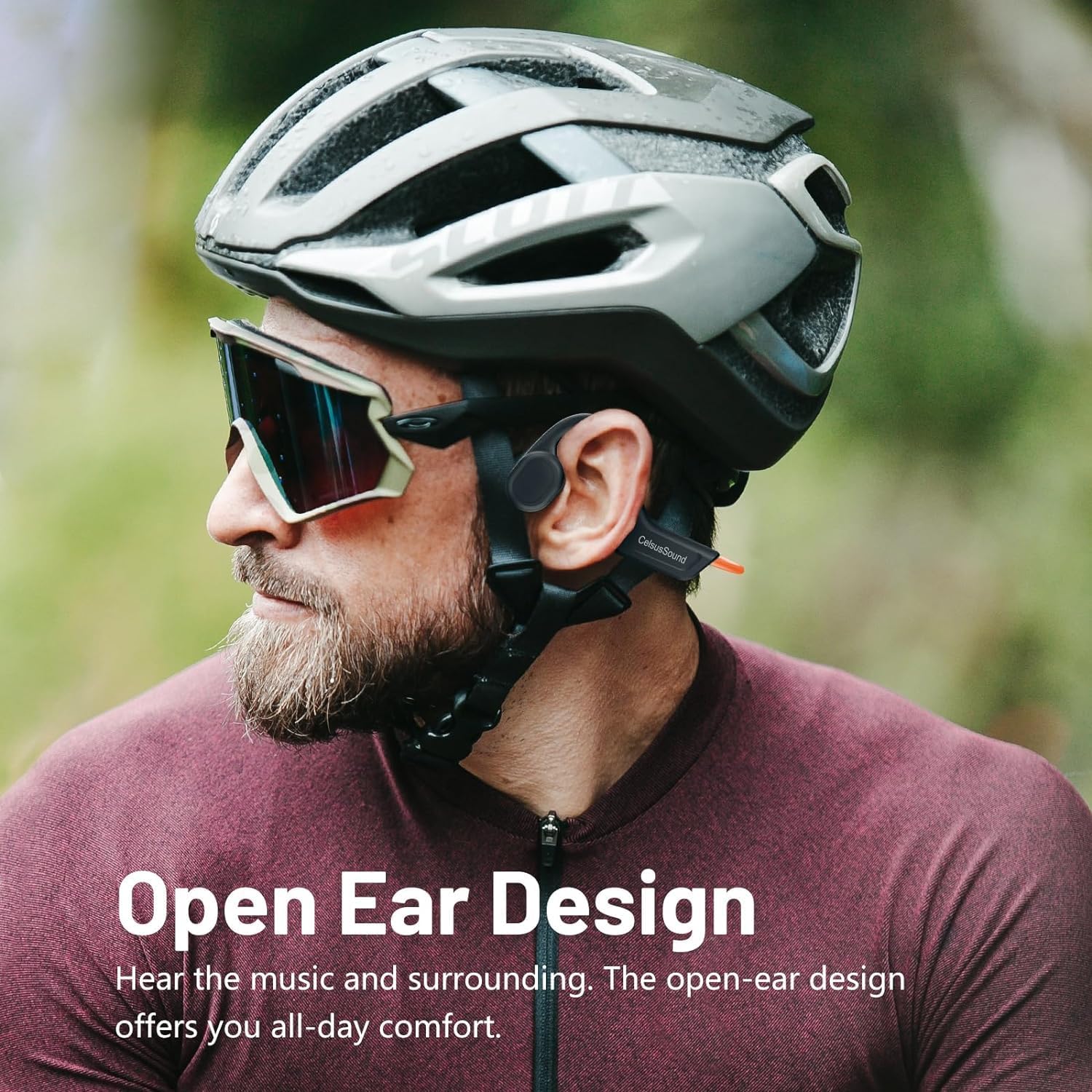
Image: A person wearing the CelsusSound S800C headphones, highlighting the open-ear design that allows ambient sound awareness.
ຕັ້ງຄ່າ
1. ການສາກຫູຟັງ
ກ່ອນການນຳໃຊ້ຄັ້ງທຳອິດ, ໃຫ້ສາກຫູຟັງຂອງທ່ານໃຫ້ເຕັມ. ໃຊ້ສາຍສາກໄຟແມ່ເຫຼັກທີ່ໃຫ້ມາ. ເຊື່ອມຕໍ່ປາຍແມ່ເຫຼັກເຂົ້າກັບພອດສາກໄຟຂອງຫູຟັງ ແລະ ປາຍ USB ເຂົ້າກັບແຫຼ່ງພະລັງງານທີ່ເຂົ້າກັນໄດ້ (ເຊັ່ນ: ພອດ USB ຂອງຄອມພິວເຕີ, ອະແດບເຕີຕິດຝາ USB).
- ເວລາສາກໄຟ: ປະມານ 1.5 ຊົ່ວໂມງສຳລັບການສາກເຕັມ.
- ຕົວຊີ້ວັດຫມໍ້ໄຟ: Refer to the LED indicator on the headphones for charging status.

ຮູບພາບ: A close-up view of the magnetic charging connection point on the headphones.
2. ເປີດ / ປິດພະລັງງານ
- ເປີດ: Long press the Power button for 3 seconds until the LED indicator lights up and you hear a power-on prompt.
- ປິດພະລັງງານ: Long press the Power button for 3 seconds until the LED indicator turns off and you hear a power-off prompt.
3. ການຈັບຄູ່ Bluetooth
ເພື່ອເຊື່ອມຕໍ່ຫູຟັງຂອງທ່ານກັບອຸປະກອນ:
- ກວດໃຫ້ແນ່ໃຈວ່າປິດຫູຟັງແລ້ວ.
- ກົດປຸ່ມເປີດ/ປິດຄ້າງໄວ້ 3 ວິນາທີເພື່ອເປີດເຄື່ອງ. ຫູຟັງຈະເຂົ້າສູ່ໂໝດຈັບຄູ່ໂດຍອັດຕະໂນມັດ, ໂດຍມີໄຟ LED ກະພິບສະແດງຢູ່.
- ໃນອຸປະກອນຂອງທ່ານ (ໂທລະສັບສະຫຼາດ, ແທັບເລັດ, ຄອມພິວເຕີ), ເປີດ Bluetooth ແລະຊອກຫາອຸປະກອນທີ່ມີຢູ່.
- Select "S800C" from the list of found devices to connect.
- Once connected, the LED indicator will stop flashing, and you will hear a connection confirmation.
Your headphones are now ready for use.
Video: A demonstration on how to operate the CelsusSound S800C Bluetooth Headphones, including powering on, connecting via Bluetooth, and basic music controls.
ຄໍາແນະນໍາການດໍາເນີນງານ
ເພັງ Playback
- ຫຼິ້ນ/ຢຸດ: ກົດປຸ່ມເປີດປິດຄັ້ງດຽວ.
- ປະລິມານຂຶ້ນ: Click the "+" button once.
- ປະລິມານລົງ: Click the "-" button once.
- ເພງຕໍ່ໄປ: ກົດປຸ່ມ "+" ຄ້າງໄວ້ 2 ວິນາທີ.
- ເພງກ່ອນໜ້າ: ກົດປຸ່ມ "-" ຄ້າງໄວ້ 2 ວິນາທີ.

Image: A visual guide detailing the functions of each button for music playback and call management, including single clicks and long presses.
ການຄຸ້ມຄອງການໂທ
- ຕອບ/ວາງສາຍ: ກົດປຸ່ມເປີດປິດຄັ້ງດຽວ.
- ປະຕິເສດການໂທ: ກົດປຸ່ມເປີດປິດຄ້າງໄວ້ 2 ວິນາທີ.
ບໍາລຸງຮັກສາ
- ທໍາຄວາມສະອາດ: ເຊັດຫູຟັງແບບອ່ອນໆ, ງamp cloth. Do not use abrasive cleaners or immerse in water for cleaning.
- ຄວາມຕ້ານທານນ້ໍາ: The headphones are IPX7 water-resistant, meaning they can withstand splashes, rain, and sweat. They are not suitable for swimming or prolonged submersion. Ensure the charging port is dry before charging.
- ການເກັບຮັກສາ: Store the headphones in a cool, dry place away from direct sunlight and extreme temperatures. The flexible design allows for easy storage.

Image: A person holding the CelsusSound S800C headphones with water splashing, demonstrating their IPX7 waterproof and sweatproof capabilities.
ການແກ້ໄຂບັນຫາ
| ບັນຫາ | ສາເຫດທີ່ເປັນໄປໄດ້ | ການແກ້ໄຂ |
|---|---|---|
| ບໍ່ສາມາດເປີດໄດ້ | Low battery; Not pressing button long enough. | Charge the headphones fully. Long press the Power button for 3 seconds. |
| ບໍ່ສາມາດຈັບຄູ່ກັບອຸປະກອນໄດ້ | Bluetooth is off; Headphones not in pairing mode; Device too far. | Ensure Bluetooth is enabled on your device. Power on headphones to enter pairing mode. Keep devices within 10 meters. |
| ບໍ່ມີສຽງຫລືປະລິມານຕ່ ຳ | Volume too low; Not connected; Audio source issue. | ເພີ່ມລະດັບສຽງໃນຫູຟັງ ແລະ ອຸປະກອນ. ສ້ອມແປງຫູຟັງຄືນໃໝ່. ກວດສອບການຕັ້ງຄ່າສຽງອອກໃນອຸປະກອນຂອງທ່ານ. |
| ບັນຫາຄຸນນະພາບສຽງ | ການແຊກແຊງ; ອຸປະກອນໄກເກີນໄປ; ແບັດເຕີຣີຕໍ່າ. | Move closer to the device. Charge headphones. Avoid strong electromagnetic interference. |
ຂໍ້ມູນຈໍາເພາະ
- ຕົວແບບ: S800C
- ເຕັກໂນໂລຍີການເຊື່ອມຕໍ່: Bluetooth 5.3
- ລະດັບ Bluetooth: 15 ແມັດ
- ປະເພດໄດເວີສຽງ: ຂັບຖ່າຍກະດູກ
- ຄວາມອາດສາມາດຫມໍ້ໄຟ: 230mAh
- ເວລາສາກໄຟ: 1.5 ຊົ່ວໂມງ
- ເວລາຫຼິ້ນ: 8-10 ຊົ່ວໂມງ
- ເວລາສະແຕນບາຍ: 150 ຊົ່ວໂມງ
- ລະດັບຄວາມຕ້ານທານນ້ໍາ: ກັນນໍ້າ IPX7
- ວັດສະດຸ: ໂລຫະປະສົມ Titanium
- ນ້ໍາຫນັກລາຍການ: 1 Ounce (approx. 33g)
- ຂະໜາດຜະລິດຕະພັນ: 6.1 x 2.17 x 5.39 ນິ້ວ
- ຊ່ວງຄວາມຖີ່: 20 Hz - 20,000 Hz
- ວິທີການຄວບຄຸມ: ແຕະ/ປຸ່ມ
ການຮັບປະກັນແລະການສະຫນັບສະຫນູນ
CelsusSound is committed to the quality of its products. We offer:
- ສະຫນັບສະຫນູນດ້ານວິຊາການຕະຫຼອດຊີວິດ.
- A 12-month worry-free warranty.
- 24-hour customer service.
For any questions or assistance, please contact CelsusSound customer service.
Ask a question about this manual
Ask about setup, troubleshooting, compatibility, parts, safety, or missing instructions. Manuals+ will review the question and use this page’s manual context to help answer it.