
1. ບົດແນະນຳ
ຂອບໃຈສໍາລັບການຊື້asing the Dpofirs LMD-750 Portable DVD Player. This device is designed to provide versatile entertainment on the go, at home, or in the office. Featuring a 270° rotating HD LCD screen, multi-format disc support, USB/SD card playback, analog TV function, FM radio, and game capabilities, it offers a comprehensive multimedia experience. Please read this manual carefully to ensure proper use and to maximize the performance and longevity of your device.
2. ຂໍ້ມູນຄວາມປອດໄພ
- ຢ່າເຮັດໃຫ້ອຸປະກອນຖືກຝົນ, ຄວາມຊຸ່ມຊື່ນ, ຫຼືອຸນຫະພູມທີ່ຮຸນແຮງ.
- ຫຼີກເວັ້ນການວາງອຸປະກອນຢູ່ໃກ້ກັບແຫຼ່ງຄວາມຮ້ອນ ຫຼືຢູ່ໃນແສງແດດໂດຍກົງ.
- Use only the provided power adapter and car adapter.
- ຢ່າພະຍາຍາມຖອດປະກອບ ຫຼືສ້ອມແປງອຸປະກອນດ້ວຍຕົນເອງ. ຕິດຕໍ່ພະນັກງານບໍລິການທີ່ມີຄຸນວຸດທິ.
- ຮັກສາອຸປະກອນໃຫ້ຫ່າງຈາກສະຫນາມແມ່ເຫຼັກທີ່ເຂັ້ມແຂງ.
- ຮັບປະກັນການລະບາຍອາກາດທີ່ເຫມາະສົມໃນເວລາປະຕິບັດງານອຸປະກອນ.
- Remove discs when transporting the player to prevent damage.
3. ເນື້ອໃນຊຸດ
ກະລຸນາກວດເບິ່ງຊຸດສຳລັບລາຍການຕໍ່ໄປນີ້:
- 1 x Dpofirs LMD-750 Portable DVD Player
- 1 x ການຄວບຄຸມໄລຍະໄກ
- 1 x ອະແດບເຕີໄຟຟ້າ (EU Plug)
- 1 x ຕົວແປງລົດ
- ສາຍ 1 x AV
- ເສົາອາກາດ 1 x
- ແຜ່ນເກມ 1 x
- 1 x Game Disc
- 1 x ຄູ່ມືຜູ້ໃຊ້
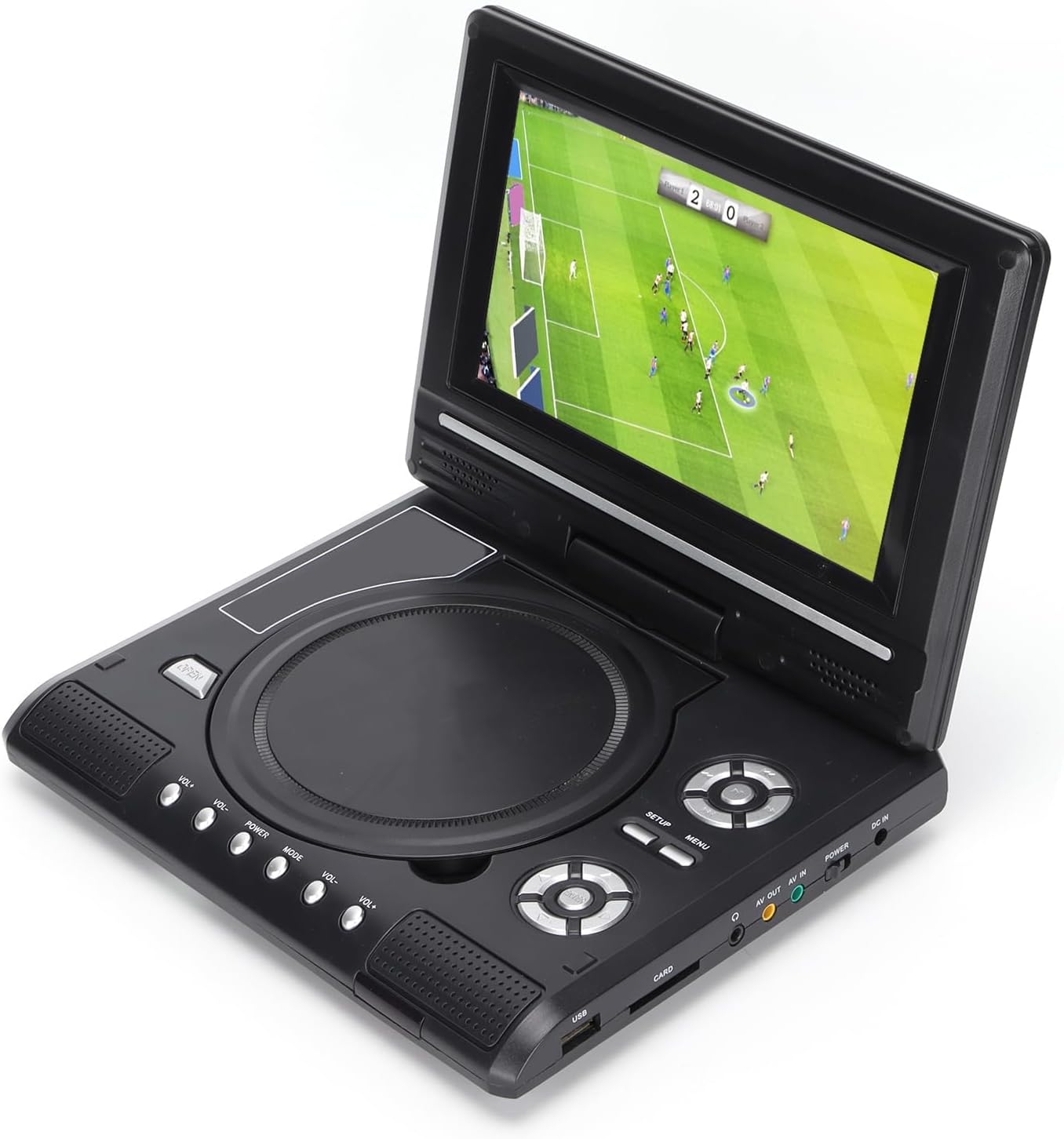
Image: All accessories included with the Dpofirs LMD-750 Portable DVD Player.
4. ຜະລິດຕະພັນເກີນview
The Dpofirs LMD-750 features a compact design with intuitive controls and multiple connectivity options.

ຮູບພາບ: ທາງຫນ້າ view of the Dpofirs LMD-750 Portable DVD Player with the screen open.

ຮູບພາບ: ຂ້າງ view detailing the input/output ports.

ຮູບພາບ: ເທິງ view of the player when closed.
ການຄວບຄຸມ ແລະພອດ:
- ໜ້າຈໍ: 6.8"/8.5" HD LCD, 270° rotatable.
- ຖາດແຜ່ນ: For DVD/CD media.
- ປຸ່ມຄວບຄຸມ: Play/Pause, Stop, Fast Forward/Rewind, Next/Previous, Setup, Menu, Volume +/-.
- ພອດ USB: ສໍາລັບການເຊື່ອມຕໍ່ USB flash drive.
- CARD Slot: For inserting memory cards (e.g., SD card).
- ຫູຟັງ Jack: ສໍາລັບການຟັງສ່ວນຕົວ.
- AV ອອກ: Audio/Video output to external display.
- AV ໃນ: Audio/Video input from external source.
- ສະຫວິດໄຟຟ້າ: To turn the device On/Off.
- DC ໃນ: Power input for adapter.
5. ຕັ້ງຄ່າ
5.1 ການສາກແບັດເຕີຣີ
Before first use, fully charge the built-in 1500mAh lithium battery. Connect the power adapter to the DC IN port on the player and plug it into a wall outlet (110-240V 50/60Hz). The charging indicator will illuminate. Once fully charged, the indicator may change color or turn off. A full charge provides approximately 30-60 minutes of continuous playback, depending on usage.
5.2 ການເຊື່ອມຕໍ່ພະລັງງານ
- ການນໍາໃຊ້ເຮືອນ: Connect the AC power adapter to the DC IN port and a wall socket.
- ການນໍາໃຊ້ລົດ: Connect the car adapter to the DC IN port and your vehicle's cigarette lighter socket.
5.3 Connecting to an External Display (AV OUT)
ເຖິງ view ເນື້ອຫາໃນໜ້າຈໍຂະໜາດໃຫຍ່ກວ່າ:
- ເຊື່ອມຕໍ່ປາຍດ້ານໜຶ່ງຂອງສາຍ AV ເຂົ້າກັບພອດ AV OUT ໃນເຄື່ອງຫຼິ້ນ DVD.
- Connect the other end of the AV cable to the corresponding AV IN ports (Yellow for Video, White/Red for Audio) on your TV or monitor.
- ເລືອກແຫຼ່ງສັນຍານ AV ທີ່ຖືກຕ້ອງໃນຈໍສະແດງຜົນພາຍນອກຂອງທ່ານ.
5.4 Connecting External Devices (AV IN)
To display content from an external source on the DVD player's screen:
- Connect one end of the AV cable to the AV IN port on the DVD player.
- Connect the other end of the AV cable to the AV OUT ports of your external device (e.g., another DVD player, game console).
- Switch the DVD player to AV IN mode (refer to Operating Instructions).
6. ຄໍາແນະນໍາການດໍາເນີນງານ
6.1 ເປີດ/ປິດ
ເລື່ອນໄດ້ ພະລັງງານ switch to the "ON" position to turn on the player. Slide it to "OFF" to power down.
6.2 ການໝຸນໜ້າຈໍ
The LCD screen can rotate up to 270 degrees. Gently adjust the screen to your desired viewing angle. This allows for flexible viewຢູ່ໃນສະພາບແວດລ້ອມຕ່າງໆ.
6.3 ການຄວບຄຸມປະລິມານ
ໃຊ້ VOL+ ແລະ VOL- buttons on the player or remote control to adjust the audio volume.
6.4 ການ ນຳ ທາງເມນູ
ກົດ ເມນູ button to access the main menu. Use the directional buttons (up, down, left, right) to navigate and the OK ເພື່ອຢືນຢັນການເລືອກ. ກົດ ຕັ້ງຄ່າ ເພື່ອເຂົ້າເຖິງການຕັ້ງຄ່າລະບົບ.
7. ການຫຼິ້ນສື່
7.1 Disc Playback (DVD/CD)
- ເປີດຝາປິດແຜ່ນ.
- Carefully place a compatible disc (DVD, DVD±R, DVD±RW, VCD, CD, CD±R, CD±RW) onto the spindle with the label side facing up.
- ປິດຝາປິດແຜ່ນໃຫ້ແໜ້ນ.
- The player will automatically detect and begin playback. If not, press the ຫຼິ້ນ ປຸ່ມ.

Image: Player displaying video content.

Image: Player displaying a sports event.
7.2 ການຫຼິ້ນບັດ USB/SD
- ໃສ່ USB flash drive ເຂົ້າໄປໃນ USB port or a memory card into the ບັດ ຊ່ອງສຽບ.
- The player will automatically switch to USB/Card mode or prompt you to select the source.
- ທ່ອງໄປຫາຂອງທ່ານ files using the directional buttons and press OK ຫຼິ້ນ.
ຮູບແບບທີ່ຮອງຮັບ: DIVX, AV/VOB, MPG, MP3, MP4, WMA, JPEG, TXT, RMVB.
The player features an intelligent power-off memory function, resuming playback from where it stopped after a power interruption.
8. TV Function
The Dpofirs LMD-750 includes an analog TV tuner.
- Connect the included antenna to the antenna port on the player.
- Switch the player to TV mode (usually via the ໂໝດ button or menu selection).
- Perform an automatic channel scan in the TV settings menu to find available analog channels.
- Channel reception quality depends on local signal strength.
Supported TV Standards: PAL, NTSC, SECAM (optional).
9. Game Function
Enjoy gaming with the included gamepad and game disc.
- Connect the gamepad to the designated game port on the player.
- Insert the game disc into the disc tray.
- Select the game function from the main menu.
- Choose from the available games on the disc (up to 300 games).
10. ບໍາລຸງຮັກສາ
10.1 ການທໍາຄວາມສະອາດອຸປະກອນ
- ເຊັດດ້ານນອກຂອງເຄື່ອງຫຼິ້ນດ້ວຍຜ້າອ່ອນ, ແຫ້ງ.
- ຢ່າໃຊ້ນໍ້າຢາທໍາຄວາມສະອາດ ຫຼື ວັດສະດຸທີ່ມີສີຂັດ.
- For the screen, use a soft, lint-free cloth specifically designed for LCD screens.
10.2 ການດູແລແຜ່ນ
- ຈັບແຜ່ນດ້ວຍຂອບຂອງເຂົາເຈົ້າເພື່ອຫຼີກເວັ້ນການລາຍນິ້ວມື.
- ລ້າງແຜ່ນດິສດ້ວຍຜ້າອ່ອນໆ, ບໍ່ມີເສັ້ນດ່າງ, ເຊັດຈາກກາງອອກໄປຂ້າງນອກ.
- Store discs in their cases to prevent scratches.

Image: Internal disc mechanism.
11. ການແກ້ໄຂບັນຫາ
| ບັນຫາ | ສາເຫດທີ່ເປັນໄປໄດ້ | ການແກ້ໄຂ |
|---|---|---|
| ບໍ່ມີພະລັງງານ | Battery drained; Power adapter not connected; Power switch OFF. | Charge the battery; Connect power adapter; Slide POWER switch to ON. |
| ບໍ່ມີການຫຼິ້ນແຜ່ນ | Disc inserted incorrectly; Disc dirty or scratched; Incompatible disc format. | Insert disc correctly (label up); Clean or replace disc; Use supported disc format. |
| ບໍ່ມີສຽງ | Volume too low; Mute function active; Headphone connected. | Increase volume; Deactivate mute; Disconnect headphones if using speakers. |
| ການຮັບໂທລະພາບທີ່ບໍ່ດີ | Weak signal; Antenna not positioned correctly. | Adjust antenna position; Rescan channels; Check local signal strength. |
| ການຄວບຄຸມໄລຍະໄກບໍ່ເຮັດວຽກ | Batteries drained or inserted incorrectly; Obstruction between remote and player. | Replace batteries (2x AAA); Ensure correct polarity; Remove obstructions. |
12. ຂໍ້ມູນຈໍາເພາະ
| ໝາຍເລກຕົວແບບ | LMD-750 (Dpofirsrgi5bmonx0-13) |
| ວັດສະດຸ | ABS |
| ສີ | ດຳ |
| ຂະໜາດໜ້າຈໍ | 6.8" / 8.5" (diagonal, depending on variant) |
| ປະເພດການສະແດງ | ຈໍ LCD |
| ຄວາມລະອຽດການສະແດງ | 234 x 480 x RGB (native), supports up to 1280 x 720, 1366 x 768 |
| ການປ້ອນຂໍ້ມູນ Voltage | 110-240V 50/60Hz |
| ຜົນໄດ້ຮັບ Voltage | 12V |
| ຄວາມອາດສາມາດຫມໍ້ໄຟ | 1500mAh Lithium Battery (built-in) |
| ຫມໍ້ໄຟຄວບຄຸມໄລຍະໄກ | 2 x ຫມໍ້ໄຟ AAA (ບໍ່ລວມ) |
| ຮູບແບບແຜ່ນທີ່ຮອງຮັບ | DVD, DVD±R, DVD±RW, VCD, MP3, MP4, CD±R, CD±RW |
| Supported Media Formats (USB/Card) | DIVX, AV/VOB, MPG, MP3, MP4, WMA, JPEG, TXT, RMVB |
| ລະບົບໂທລະທັດ | PAL, NTSC, SECAM (full system) |
| ຊ່ອງທາງການຮັບ | LHF1-5, VHF6-12, UHF13-69, ATV |
| ເທັກໂນໂລຢີການເຂົ້າລະຫັດສຽງ | 96kHz/24bit |
| ຊ່ວງໄດນາມິກ | ≥ 80dB |
| ອັດຕາສ່ວນສັນຍານເຖິງສຽງດັງ | ≥ 70dB |
| ການແຍກຊ່ອງ | ≥ 70dB |
| ເຕັກໂນໂລຊີການເຊື່ອມຕໍ່ | USB, Composite Video |
| ຜູ້ຜະລິດ | Dpofirs |
| ປະເທດຕົ້ນກໍາເນີດ | ຈີນ |
13. ການຮັບປະກັນແລະການສະຫນັບສະຫນູນ
ສຳລັບຂໍ້ມູນການຮັບປະກັນ ແລະ ການສະໜັບສະໜູນລູກຄ້າ, ກະລຸນາອ້າງອີງເອກະສານທີ່ມາພ້ອມກັບການຊື້ຂອງທ່ານ ຫຼື ຕິດຕໍ່ຮ້ານຄ້າປີກຂອງທ່ານ. ເກັບຫຼັກຖານການຊື້ຂອງທ່ານໄວ້ສຳລັບການຮຽກຮ້ອງການຮັບປະກັນໃດໆ.