
ແນະນຳ
This manual provides comprehensive instructions for the HOCO Y1 Pro Smart Sports Watch. Please read this manual carefully before using the device to ensure proper operation and to maximize its features. Keep this manual for future reference.
ເນື້ອໃນຊຸດ
ເມື່ອເປີດແພັກເກັດ, ກວດເບິ່ງວ່າສິນຄ້າທັງໝົດມີຢູ່:
- HOCO Y1 Pro Smart Sports Watch
- ສາຍສາກ
- ຄູ່ມືຜູ້ໃຊ້
ສິນຄ້າເກີນview
The HOCO Y1 Pro Smart Sports Watch features a 1.91-inch TFT display and a durable design suitable for sports and daily wear.

ຮູບທີ 1: ດ້ານໜ້າ view of the HOCO Y1 Pro Smart Watch, showing the main watch face with time, date, battery level, and activity data.

ຮູບທີ 2: ຂ້າງ view illustrating the digital crown and the side button for navigation and control.
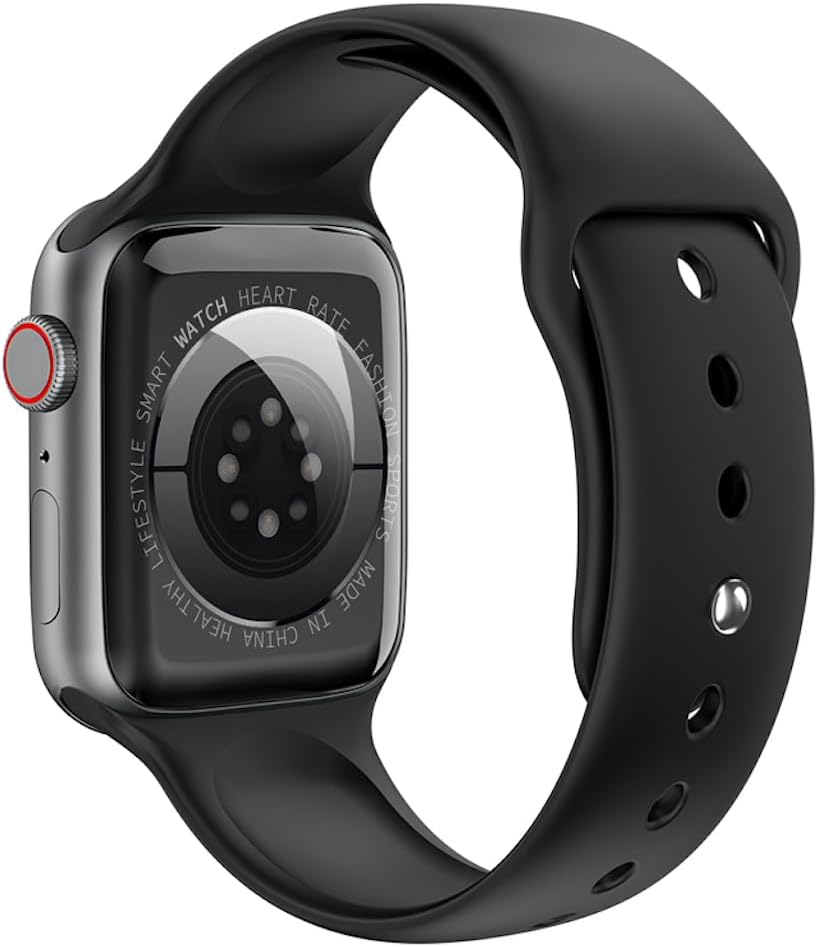
ຮູບທີ 3: ຫລັງ view of the watch, highlighting the optical heart rate sensors and charging contacts.
ອົງປະກອບ:
- ຈໍສະແດງຜົນ: 1.91-inch TFT color touchscreen.
- ເຮືອນຍອດດິຈິຕອນ: ໃຊ້ສໍາລັບການນໍາທາງເມນູແລະປັບການຕັ້ງຄ່າ.
- ປຸ່ມຂ້າງ: Typically used for power on/off, returning to the home screen, or accessing specific functions.
- ເຊັນເຊີອັດຕາການເຕັ້ນຫົວໃຈ: Located on the back for continuous heart rate monitoring.
- ຕິດຕໍ່ພົວພັນການສາກໄຟ: ປຸ່ມຕິດຕໍ່ແມ່ເຫຼັກຢູ່ດ້ານຫຼັງສຳລັບເຊື່ອມຕໍ່ສາຍສາກໄຟ.
ຕັ້ງຄ່າ
1. ການສາກອຸປະກອນ
Before initial use, fully charge your HOCO Y1 Pro Smart Watch. Connect the magnetic charging cable to the charging contacts on the back of the watch and plug the USB end into a power adapter (not included) or a computer's USB port.
- ໂດຍປົກກະຕິການສາກເຕັມຈະໃຊ້ເວລາປະມານ 2 ຊົ່ວໂມງ.
- ຄວາມຈຸຂອງຫມໍ້ໄຟແມ່ນ 280mAh.
- Expected battery life: 3 days with dual Bluetooth enabled, 5-7 days with calls turned off.
2. ເປີດ/ປິດ
- ເປີດ: Press and hold the side button until the HOCO logo appears.
- ປິດພະລັງງານ: ກົດປຸ່ມດ້ານຂ້າງຄ້າງໄວ້, ຈາກນັ້ນເລືອກ "ປິດເຄື່ອງ" ໃນໜ້າຈໍ.
3. ການຕິດຕັ້ງແອັບ ແລະ ການຈັບຄູ່
To unlock the full functionality of your HOCO Y1 Pro, download and install the companion application on your smartphone. ຊອກຫາ the official HOCO smartwatch app in your device's app store (e.g., Google Play Store or Apple App Store).
- Ensure your watch is powered on and fully charged.
- ເປີດໃຊ້ Bluetooth ໃນໂທລະສັບສະຫຼາດຂອງທ່ານ.
- Open the HOCO companion app and follow the on-screen instructions to create an account or log in.
- Within the app, select "Add Device" or "Pair New Device" and choose "HOCO Y1 Pro" from the list of available devices.
- ຢືນຢັນຄຳຮ້ອງຂໍການຈັບຄູ່ໃນສະມາດໂຟນ ແລະໂມງຂອງທ່ານ.
- The watch supports dual Bluetooth for calls and data synchronization.
ຄໍາແນະນໍາການດໍາເນີນງານ
ການນໍາທາງພື້ນຖານ
- ປັດຂຶ້ນ/ລົງ: ເລື່ອນຜ່ານເມນູຫຼືການແຈ້ງເຕືອນ.
- ປັດຊ້າຍ/ຂວາ: ເຂົ້າເຖິງຟັງຊັນໄວ ຫຼື ໜ້າປັດໂມງທີ່ແຕກຕ່າງກັນ.
- ແຕະ: ເລືອກລາຍການ ຫຼືຢືນຢັນການກະທຳໃດໜຶ່ງ.
- ເຮືອນຍອດດິຈິຕອນ: Rotate to scroll, press to return to the home screen or open the app list.
- ປຸ່ມຂ້າງ: Short press to return to the previous screen or home screen. Long press for power options.
ຟັງຊັນການໂທ
With dual Bluetooth enabled and paired to your smartphone, the HOCO Y1 Pro supports making and receiving calls directly from your wrist.
- ໂທອອກ: Access the dialer or contacts list on the watch to initiate a call.
- ຮັບສາຍ: When a call comes in, you can answer or reject it from the watch screen.
ການຕິດຕາມສຸຂະພາບ
- ການກວດຫາອັດຕາການເຕັ້ນຂອງຫົວໃຈ: ໂມງຕິດຕາມອັດຕາການເຕັ້ນຫົວໃຈຂອງທ່ານຢ່າງຕໍ່ເນື່ອງ. View ຂໍ້ມູນແບບສົດໆຢູ່ໃນໂມງ ຫຼືທ່າອ່ຽງລະອຽດໃນແອັບ.
- ການຕິດຕາມການນອນ: Wear the watch to bed to track your sleep patterns, including deep sleep, light sleep, and wake times.
- Exercise Pedometer: ຕິດຕາມຂັ້ນຕອນປະຈໍາວັນ, ໄລຍະທາງ, ແລະແຄລໍຣີທີ່ຖືກເຜົາໄຫມ້.
Sports Modes and GPS Track
The watch offers various sports modes to track your workouts. When connected to your phone's GPS, it can record your outdoor activity routes.
- Select a sports mode (e.g., running, walking) from the watch menu.
- Ensure GPS tracking is enabled in the app for outdoor activities.
ການແຈ້ງເຕືອນ
Receive notifications for calls, messages, and app alerts directly on your watch. Configure notification settings within the companion app.
ຟັງຊັນເພີ່ມເຕີມ
- Remote Music: Control music playback on your smartphone from the watch.
- Real-time Weather: View current weather conditions and forecasts (requires app connection).
- Mobile Phone Search: ໃຊ້ໂມງເພື່ອຊອກຫາສະມາດໂຟນທີ່ຈັບຄູ່ຂອງເຈົ້າໂດຍການເຮັດໃຫ້ມັນດັງ.
ບໍາລຸງຮັກສາ
ທໍາຄວາມສະອາດ
ອະນາໄມໂມງຂອງເຈົ້າເປັນປະຈຳເພື່ອຮັບປະກັນປະສິດທິພາບ ແລະສຸຂະອະນາໄມທີ່ດີທີ່ສຸດ.
- ເຊັດຫນ້າຈໍແລະສາຍດ້ວຍຜ້າອ່ອນ, damp ຜ້າ.
- ຫຼີກເວັ້ນການນໍາໃຊ້ສານເຄມີທີ່ຮຸນແຮງຫຼືວັດສະດຸຂັດ.
- ໃຫ້ແນ່ໃຈວ່າຕິດຕໍ່ພົວພັນການສາກໄຟສະອາດ ແລະແຫ້ງກ່ອນການສາກໄຟ.
ກັນນ້ຳ (IP68)
The HOCO Y1 Pro is IP68 waterproof, meaning it is resistant to dust and can withstand immersion in water up to 1.5 meters for up to 30 minutes. While it is suitable for daily use and light water activities, it is not recommended for diving, hot showers, or prolonged submersion.
- ຢ່າປະຕິບັດປຸ່ມພາຍໃຕ້ນ້ໍາ.
- ເຊັດໂມງໃຫ້ແຫ້ງຢ່າງລະອຽດຫຼັງຈາກຖືກນໍ້າ.
ການແກ້ໄຂບັນຫາ
| ສະບັບ | ການແກ້ໄຂທີ່ເປັນໄປໄດ້ |
|---|---|
| ໂມງບໍ່ເປີດ. | ກວດໃຫ້ແນ່ໃຈວ່າໂມງຖືກສາກເຕັມແລ້ວ. ເຊື່ອມຕໍ່ມັນກັບເຄື່ອງສາກຢ່າງໜ້ອຍ 30 ນາທີ. |
| ບໍ່ສາມາດຈັບຄູ່ກັບສະມາດໂຟນໄດ້. |
|
| Inaccurate heart rate or activity data. |
|
| ບໍ່ໄດ້ຮັບການແຈ້ງເຕືອນ. |
|
| ໜ້າຈໍບໍ່ຕອບສະໜອງ. | ລອງເປີດໂມງຄືນໃໝ່ໂດຍການກົດປຸ່ມດ້ານຂ້າງຄ້າງໄວ້. ຖ້າບໍ່ມີການຕອບສະໜອງ, ໃຫ້ປ່ອຍໃຫ້ແບັດເຕີຣີໝົດກ່ອນແລ້ວຈຶ່ງສາກໄຟຄືນໃໝ່. |
ຂໍ້ມູນຈໍາເພາະ
| ຄຸນສົມບັດ | ລາຍລະອຽດ |
|---|---|
| ຊື່ຕົວແບບ | Y1 ໂປຣ |
| ໜ້າຈໍຫຼັກ | TFT 1.91 inches; Resolution: 240*285 pixel |
| CPU | Realtek 8762CW |
| ຄວາມຊົງຈໍາ | RAM 192KB + ROM 64MB |
| ການເຊື່ອມຕໍ່ | Dual Bluetooth (supports calls) |
| ການຕໍ່ຕ້ານນ້ໍາ | ກັນນໍ້າ IP68 |
| ຄວາມອາດສາມາດຫມໍ້ໄຟ | 280mAh Lithium Ion |
| ຊີວິດຫມໍ້ໄຟ | 3 days (dual Bluetooth on), 5-7 days (calls off) |
| ຫນ້າທີ່ພິເສດ | GPS track support, Information push, Heart rate detection, Sleep monitoring, Exercise pedometer, Remote music, Real-time weather, Mobile phone search |
| ພາສາທີ່ຮອງຮັບ | 22 language packs including Chinese, English, Russian, Arabic, Vietnamese, Danish, Thai, Polish, Persian, Spanish, Malay, Greek, French, Italian, German, Portuguese, Turkish, Latin, Romanian, Hebrew, Burmese, Ukrainian. |
| ຂະໜາດແພັກເກັດ | 21.9 x 6.9 x 3.2 cm |
| ນ້ໍາຫນັກລາຍການ | 176 g |
ຂໍ້ມູນຄວາມປອດໄພ
- ຢ່າພະຍາຍາມຖອດປະກອບ ຫຼືດັດແປງອຸປະກອນ.
- ຮັກສາອຸປະກອນໃຫ້ຫ່າງຈາກອຸນຫະພູມທີ່ຮຸນແຮງ, ແສງແດດໂດຍກົງ, ແລະເປີດແປວໄຟ.
- ຫຼີກເວັ້ນການເປີດເຜີຍອຸປະກອນກັບສະຫນາມແມ່ເຫຼັກທີ່ເຂັ້ມແຂງ.
- ໃຊ້ພຽງແຕ່ສາຍສາກທີ່ໃຫ້ມາ.
- Consult a medical professional before starting any new exercise regimen, especially if you have pre-existing health conditions. The heart rate data is for reference only and should not be used for medical diagnosis.
- ຖິ້ມອຸປະກອນ ແລະ ແບັດເຕີຣີຂອງຕົນຢ່າງມີຄວາມຮັບຜິດຊອບຕາມລະບຽບການທ້ອງຖິ່ນ.
ການຮັບປະກັນແລະການສະຫນັບສະຫນູນ
For warranty information and technical support, please refer to the documentation included with your purchase or visit the official HOCO webເວັບໄຊ. ຮັກສາຫຼັກຖານການຊື້ຂອງທ່ານສໍາລັບການຮ້ອງຂໍການຮັບປະກັນ.
ຜູ້ຜະລິດ: ໂຮໂຄ
ASIN: B0CBVTSX1V
UPC/EAN: 6931474766106