
ແນະນຳ
This manual provides essential information for the safe and effective operation, maintenance, and troubleshooting of your DEWALT DCD794 20V Cordless 1/2" Drill Driver. The DCD794 is a compact and lightweight tool designed for drilling and fastening applications, delivering up to 1,650 RPMs with a 1/2" ratcheting chuck and an integrated LED work light.

ຮູບພາບ: ທາງຫນ້າ view of the DEWALT DCD794 20V Cordless 1/2" Drill Driver.
ຂໍ້ມູນຄວາມປອດໄພທົ່ວໄປ
Always observe basic safety precautions to reduce the risk of fire, electric shock, and personal injury. Keep your work area clean and well-lit. Do not operate power tools in explosive atmospheres, such as in the presence of flammable liquids, gases, or dust. Keep children and bystanders away while operating a power tool. Wear appropriate personal protective equipment, including eye protection, hearing protection, and gloves. Ensure the tool is switched off before making any adjustments, changing accessories, or storing it.
ສິນຄ້າເກີນview
The DEWALT DCD794 Drill Driver is engineered for performance and durability. Key features include:
- 1/2" Ratcheting Chuck: Provides high bit retention for secure accessory gripping.
- ລະບົບສາຍສົ່ງ 2 ຄວາມໄວ: Allows for versatile drilling and fastening applications.
- 15 ການຕັ້ງຄ່າຄລັດຊ໌: Offers precise control for various torque requirements.
- ໄຟ LED ເຮັດວຽກ: ເຮັດໃຫ້ມີແສງພື້ນທີ່ເຮັດວຽກເພື່ອການປັບປຸງການເບິ່ງເຫັນ.
- ການອອກແບບກະທັດຮັດ ແລະນ້ຳໜັກເບົາ: Enhances user comfort and maneuverability.
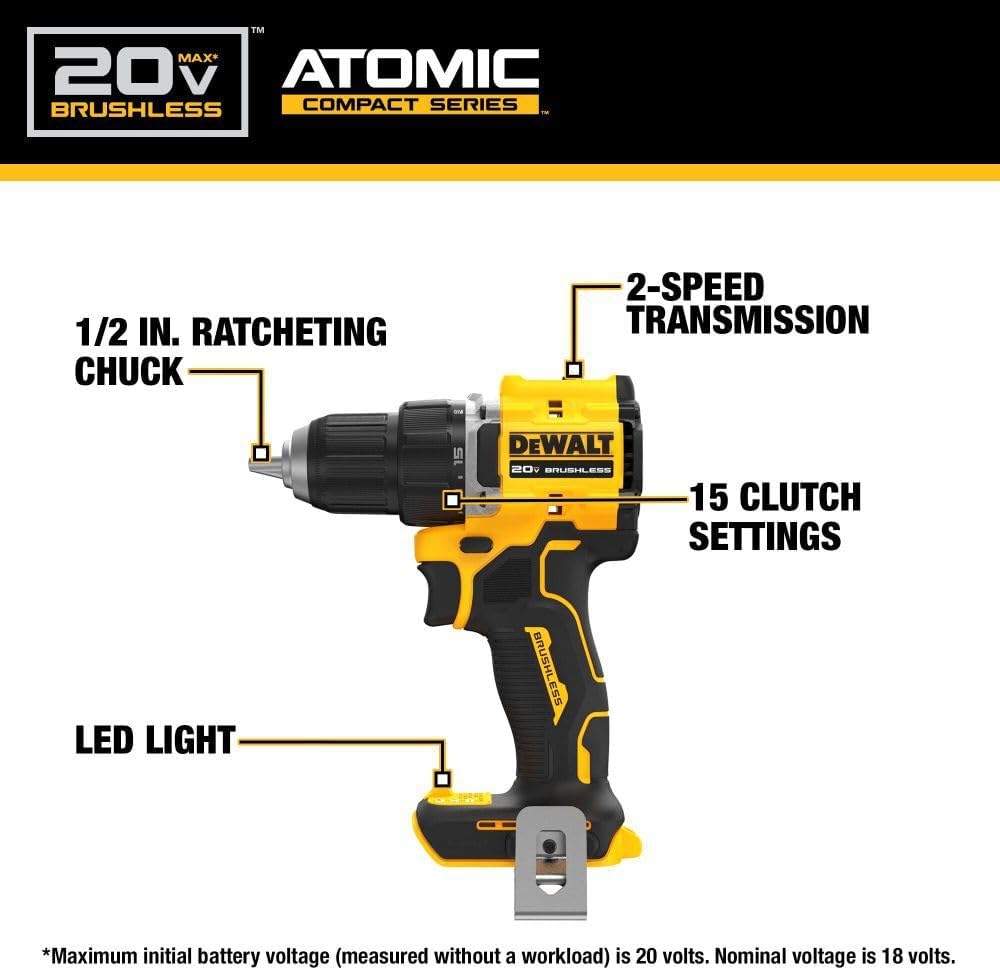
Image: Diagram highlighting the 1/2 inch ratcheting chuck, 2-speed transmission, 15 clutch settings, and LED light on the DEWALT DCD794 Drill Driver.
ຕັ້ງຄ່າ
ການຕິດຕັ້ງແລະການກໍາຈັດຫມໍ້ໄຟ
- To install the battery, align the battery pack with the rails inside the tool's handle. Slide the pack firmly into the tool until it locks into place.
- To remove the battery, press the release button on the battery pack and pull the pack out of the handle.

Image: The DEWALT DCD794 Drill Driver with a 20V battery pack attached to the base.
ການຕິດຕັ້ງບິດແລະການໂຍກຍ້າຍ
- To install a drill bit or driver accessory, grasp the rear half of the chuck and rotate the front half counter-clockwise until the chuck jaws open wide enough to accept the accessory.
- Insert the accessory fully into the chuck.
- Grasp the rear half of the chuck and rotate the front half clockwise until the accessory is firmly clamped.
- ເພື່ອເອົາອອກ, ໃຫ້ກັບຄືນຂະບວນການ.
ຄໍາແນະນໍາການດໍາເນີນງານ
ການເລືອກຄວາມໄວ
The drill driver features a 2-speed transmission for optimal performance across different applications. Use the speed selector switch located on top of the tool:
- ຕຳແໜ່ງ 1 (ຄວາມໄວຕ່ຳ): For high torque applications, such as driving screws or drilling large diameter holes.
- ຕຳແໜ່ງ 2 (ຄວາມໄວສູງ): For faster drilling with smaller bits.

Image: The DEWALT DCD794 Drill Driver being used to drill into wood, illustrating its 2-speed transmission capability.
ການຕັ້ງຄ່າ Clutch
The adjustable clutch ring allows you to select the appropriate torque setting for your task. Rotate the ring to align the desired number with the indicator mark. Lower numbers are for driving small screws or into soft materials, while higher numbers are for driving larger screws or into harder materials. The drill symbol setting provides maximum torque for drilling applications.
Trigger Switch and LED Light
The variable speed trigger switch controls the tool's speed. Press the trigger to start the tool and vary the pressure to adjust the speed. The integrated LED work light activates when the trigger is pressed, illuminating the work surface. The light remains on for a short period after the trigger is released.
ບໍາລຸງຮັກສາ
ການບໍາລຸງຮັກສາເປັນປົກກະຕິຮັບປະກັນການປະຕິບັດທີ່ດີທີ່ສຸດແລະຍືດອາຍຸຂອງເຄື່ອງມືຂອງທ່ານ.
- ທໍາຄວາມສະອາດ: ໃຊ້ອ່ອນ, ງamp cloth to clean the exterior of the tool. Do not use harsh chemicals or abrasive cleaners. Keep the ventilation slots clear of dust and debris.
- ການບໍາລຸງຮັກສາ Chuck: Periodically clean the chuck jaws to ensure proper gripping.
- ການດູແລຫມໍ້ໄຟ: ເກັບຮັກສາຫມໍ້ໄຟໃນບ່ອນທີ່ເຢັນ, ແຫ້ງ, ຫ່າງຈາກແສງແດດໂດຍກົງ. ຢ່າເກັບແບັດເຕີລີຢູ່ໃນສະພາບທີ່ປ່ອຍປະໄວ້ເປັນເວລາດົນ.
- ການກວດກາ: ກວດກາເຄື່ອງມືເປັນປົກກະຕິສໍາລັບພາກສ່ວນທີ່ເສຍຫາຍ, screws ວ່າງ, ຫຼືອົງປະກອບທີ່ສວມໃສ່. ມີການສ້ອມແປງຊິ້ນສ່ວນທີ່ເສຍຫາຍໂດຍຜູ້ຊ່ຽວຊານດ້ານການບໍລິການທີ່ມີຄຸນວຸດທິ.
ການແກ້ໄຂບັນຫາ
| ບັນຫາ | ສາເຫດທີ່ເປັນໄປໄດ້ | ການແກ້ໄຂ |
|---|---|---|
| ເຄື່ອງມືບໍ່ເລີ່ມຕົ້ນ | ແບັດເຕີຣີບໍ່ໄດ້ສາກ ຫຼືຕິດຕັ້ງບໍ່ຖືກຕ້ອງ | Charge battery fully; ensure battery is securely inserted. |
| ການສູນເສຍພະລັງງານໃນລະຫວ່າງການປະຕິບັດງານ | ແບັດເຕີຣີເຫຼືອ ໜ້ອຍ | ສາກແບັດເຕີຣີ. |
| ບິດບ້ຽວໃນ chuck | Chuck not tightened sufficiently or jaws are dirty | Tighten chuck firmly; clean chuck jaws. |
| ການສັ່ນສະເທືອນຫຼາຍເກີນໄປ | Bent drill bit or accessory | Replace with a straight, undamaged accessory. |
ຂໍ້ມູນຈໍາເພາະ
| ຄຸນສົມບັດ | ຂໍ້ມູນຈໍາເພາະ |
|---|---|
| ຍີ່ຫໍ້ | DEWALT |
| ໝາຍເລກຕົວແບບ | DCD794B-NBX |
| ແຫຼ່ງພະລັງງານ | ສາກແບັດເຕີຣີ (20 ໂວນ) |
| ຄວາມໄວການຫມຸນສູງສຸດ | 1650 RPM |
| ຂະໜາດ Chuck ສູງສຸດ | 0.5 ນິ້ວ |
| ແຮງບິດສູງສຸດ | 1.5 ນິວຕັນແມັດ |
| ພະລັງງານສູງສຸດ | 300 ວັດ |
| ປະເພດວັດສະດຸ | ພາດສະຕິກ |
| ຂະໜາດລາຍການ (L x W x H) | 6"L x 3"W x 8"H |
| ນ້ໍາຫນັກລາຍການ | 2.54 ປອນ |
ຂໍ້ມູນການຮັບປະກັນ
DEWALT provides a limited warranty for its products. For specific details regarding the warranty period, coverage, and terms for your DCD794 Drill Driver, please refer to the warranty card included with your purchase or visit the official DEWALT webເວັບໄຊ. ຮັກສາຫຼັກຖານການຊື້ຂອງທ່ານສໍາລັບການຮ້ອງຂໍການຮັບປະກັນ.
ສະຫນັບສະຫນູນ
ສໍາລັບການຊ່ວຍເຫຼືອເພີ່ມເຕີມ, ສະຫນັບສະຫນູນດ້ານວິຊາການ, ຫຼືເພື່ອຊອກຫາສູນບໍລິການອະນຸຍາດ, ກະລຸນາໄປຢ້ຽມຢາມ DEWALT ຢ່າງເປັນທາງການ webເວັບໄຊ ຫຼືຕິດຕໍ່ບໍລິການລູກຄ້າຂອງເຂົາເຈົ້າ. ທ່ານສາມາດຊອກຫາຂໍ້ມູນເພີ່ມເຕີມແລະຊັບພະຍາກອນທີ່ DEWALT Store ໃນ Amazon ຫຼືບໍລິສັດ DEWALT ຕົ້ນຕໍ webເວັບໄຊ.