
ແນະນຳ
This manual provides detailed instructions for the installation, operation, and maintenance of your DB Drive WDX200.4 4-Channel Speaker Ampຕົວຊີ້ບອກ. ກະລຸນາອ່ານຄູ່ມືນີ້ຢ່າງລະອຽດກ່ອນທີ່ຈະພະຍາຍາມຕິດຕັ້ງ ຫຼືດໍາເນີນການ amplifier to ensure proper function and safety. The WDX200.4 is a versatile 4-channel amplifier designed to deliver high-quality audio performance for various applications.
ການຕິດຕັ້ງແລະການຕິດຕັ້ງ
ການຕິດຕັ້ງທີ່ເຫມາະສົມແມ່ນສໍາຄັນສໍາລັບການປະຕິບັດທີ່ດີທີ່ສຸດແລະຄວາມຍາວນານຂອງທ່ານ ampເຄື່ອງຂະຫຍາຍສຽງ. ແນະນຳໃຫ້ຕິດຕັ້ງໂດຍຜູ້ຊ່ຽວຊານທີ່ມີຄຸນວຸດທິ.
ການຕິດຕັ້ງ
ໄດ້ amplifier features a surface mount design. Ensure the mounting location provides adequate ventilation to prevent overheating. Avoid mounting in direct sunlight or near heat sources.
ການເຊື່ອມຕໍ່ພະລັງງານ
The WDX200.4 operates within a voltage range of 9V to 16V DC. Connect the power and ground cables securely to the robust power and output connectors. Ensure proper gauge wiring is used for power and ground connections to handle the amplifier's current draw.
ການເຊື່ອມຕໍ່ຂາເຂົ້າ
ໄດ້ amplifier supports both RCA (low-level) and high-level inputs. This allows for compatibility with both aftermarket and factory head units without the need for additional adapters.
- ການປ້ອນຂໍ້ມູນ RCA: Use RCA cables to connect your head unit's pre-amp ຜົນໄດ້ຮັບກັບ ampວັດສະດຸປ້ອນ RCA ຂອງ lifier.
- ການປ້ອນຂໍ້ມູນລະດັບສູງ: If your head unit does not have RCA outputs, use the high-level input. This input typically connects directly to your head unit's speaker outputs.
ການເຊື່ອມຕໍ່ລໍາໂພງ
The WDX200.4 is a 4-channel amplifier, providing 200 Watts RMS per channel at 2 ohms. It also supports bridging, allowing for 2 channels of 400 Watts RMS at 4 ohms. Connect your speakers to the appropriate output terminals, ensuring correct polarity.

ຮູບພາບ: ເທິງແລະລຸ່ມ view of the DB Drive WDX200.4 4-Channel Speaker Amplifier, illustrating the various input and output terminals for connection.
ການປັບຕົວແບບ Crossover
ໄດ້ amplifier features integrated crossovers with High-Pass Filter (HPF), Low-Pass Filter (LPF), and Full-Range adjustments. These allow you to tailor the frequency response for your specific speaker setup (subwoofers, woofers, midranges, tweeters).
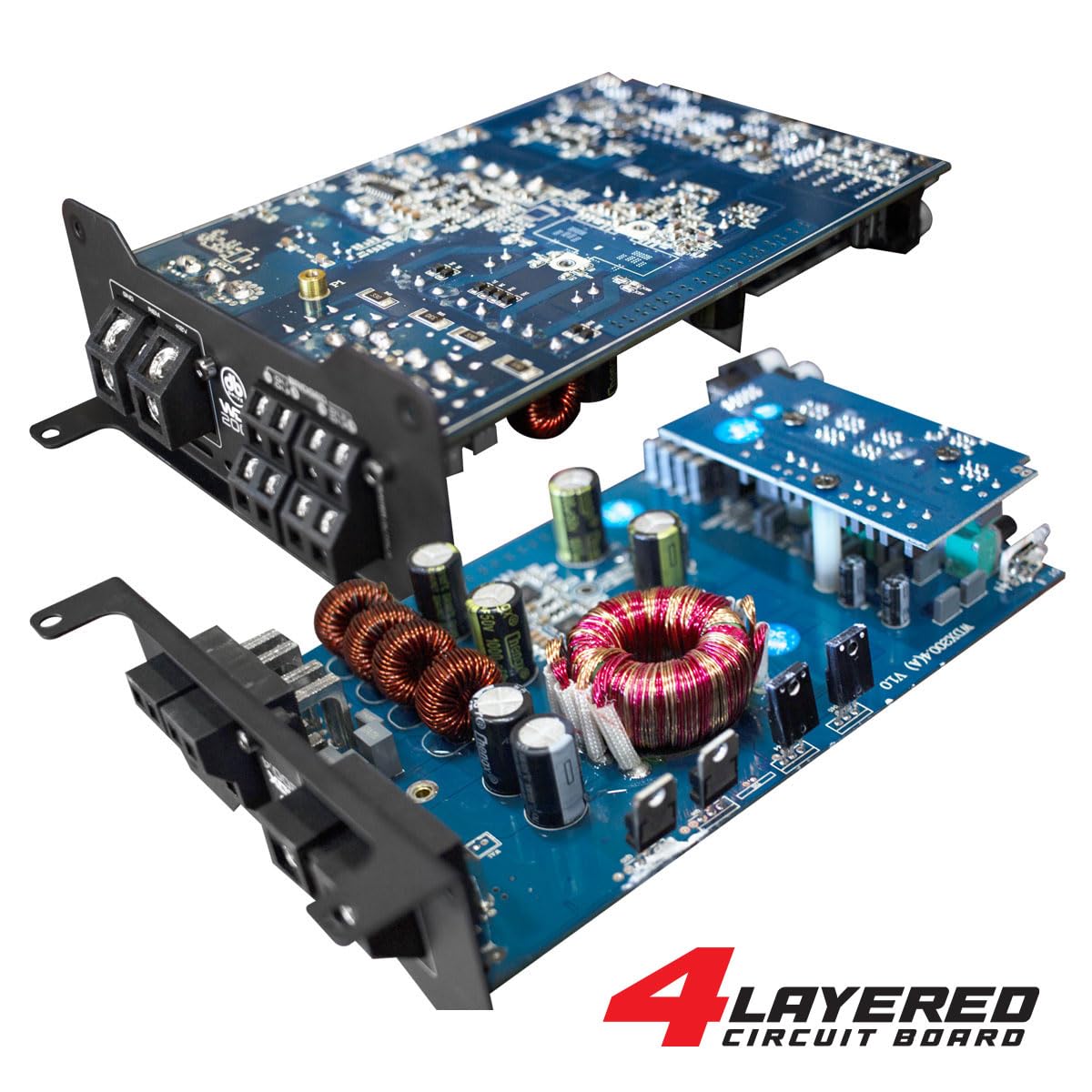
ຮູບພາບ: ພາຍໃນ view of the DB Drive WDX200.4 amplifier, highlighting its 4-layered circuit board design for enhanced performance and durability.
ຄໍາແນະນໍາການດໍາເນີນງານ
ເມື່ອຕິດຕັ້ງ, ໄດ້ amplifier requires minimal user interaction for daily operation. The primary adjustments are for input level and crossover settings.
ການປັບລະດັບ
Adjust the input level controls to match the output voltage of your head unit. Start with the amplifier's level control at minimum and slowly increase it until the desired volume is achieved without distortion.
ການຕັ້ງຄ່າ Crossover
- HPF (High-Pass Filter): Use this setting for speakers that should only reproduce high frequencies (e.g., tweeters, mid-range speakers). This filters out low bass frequencies.
- LPF (ຕົວກອງຕໍ່າຜ່ານ): Use this setting for speakers that should only reproduce low frequencies (e.g., subwoofers). This filters out high frequencies.
- FULL (Full-Range): Use this setting for speakers that should reproduce the entire frequency spectrum.
Adjust these settings according to the specifications of your speakers and your desired audio output.
ບໍາລຸງຮັກສາ
To ensure the longevity and optimal performance of your DB Drive WDX200.4 amplifier, ປະຕິບັດຕາມຄໍາແນະນໍາການບໍາລຸງຮັກສາເຫຼົ່ານີ້:
- ທໍາຄວາມສະອາດ: Periodically clean the exterior of the amplifier with a soft, dry cloth. Do not use harsh chemicals or abrasive cleaners. Ensure all ventilation openings are free from dust and debris.
- ການເຊື່ອມຕໍ່: Regularly check all power, ground, and speaker connections to ensure they are secure and free from corrosion. Loose connections can lead to poor performance or damage.
- ການລະບາຍອາກາດ: ຮັບປະກັນ amplifier always has adequate airflow around it. Blocked vents can lead to overheating and thermal shutdown.
ການແກ້ໄຂບັນຫາ
ຖ້າເຈົ້າປະສົບບັນຫາກັບເຈົ້າ amplifier, ອ້າງເຖິງບັນຫາທົ່ວໄປຕໍ່ໄປນີ້ແລະວິທີແກ້ໄຂ:
- ບໍ່ມີພະລັງງານ: Check the main fuse, power and ground connections, and the remote turn-on wire. Ensure the vehicle's battery has sufficient charge.
- ບໍ່ມີສຽງ: Verify all input and output connections. Check speaker wires for shorts or open circuits. Ensure the head unit is functioning correctly and sending an audio signal. Check crossover settings.
- ສຽງບິດເບືອນ: Reduce the input level (gain) on the amplifier. Check for proper crossover settings. Ensure speakers are not overdriven or damaged.
- Ampຄວາມຮ້ອນເກີນຂອງເຄື່ອງສົ່ງ: ຮັບປະກັນການລະບາຍອາກາດທີ່ພຽງພໍອ້ອມຮອບ ampກວດສອບຄວາມຕ້ານທານຂອງລຳໂພງເພື່ອຮັບປະກັນວ່າມັນກົງກັບ amplifier's capabilities. Reduce the volume or gain settings.
- ໂໝດປ້ອງກັນ: ຖ້າ amplifier enters protection mode (indicated by a specific LED), it usually signifies an issue such as overheating, a short circuit in the speaker wiring, or an impedance mismatch. Disconnect power, inspect all connections and speaker wiring, and allow the amplifier to cool before reconnecting.
If problems persist after attempting these solutions, consult a qualified car audio technician.
ຂໍ້ມູນຈໍາເພາະ
| ຄຸນສົມບັດ | ຂໍ້ມູນຈໍາເພາະ |
|---|---|
| ໝາຍເລກຕົວແບບ | WDX200.4 |
| ຍີ່ຫໍ້ | DB Drive |
| ຈໍານວນຊ່ອງ | 4 |
| ພະລັງງານອອກ (ສະເຕຣິໂອ) | 200 Watts RMS per channel at 2 Ohms |
| Output Power (Bridged) | 400 Watts RMS per channel at 4 Ohms (2 channels) |
| ສະບັບtage | 9 - 16 Volts (DC) |
| ປະເພດການຕິດຕັ້ງ | Surface Mount |
| ຂ້າມ | Integrated HPF, LPF, Full-Range |
| ວັດສະດຸປ້ອນ | RCA (Low-Level), High-Level with Automatic Turn-On |
| ການຢັ້ງຢືນ | FCC |
ການຮັບປະກັນແລະການສະຫນັບສະຫນູນ
For warranty information and technical support, please refer to the documentation included with your purchase or visit the official DB Drive webເວັບໄຊ. ຮັກສາຫຼັກຖານການຊື້ຂອງທ່ານສໍາລັບການຮຽກຮ້ອງການຮັບປະກັນໃດໆ.