
1. ບົດແນະນຳ
Thank you for choosing the SILENTWARE Air 1000 Black ATX Midi Tower PC Case. This manual provides essential information for the proper installation, operation, and maintenance of your new PC case. Please read this manual thoroughly before beginning the assembly process to ensure a smooth and successful build.
2. ຂໍ້ມູນຄວາມປອດໄພ
- Always disconnect the power supply from the wall outlet before installing or removing any components inside the PC case.
- ຈັດການອົງປະກອບຕ່າງໆດ້ວຍຄວາມລະມັດລະວັງເພື່ອຫຼີກເວັ້ນຄວາມເສຍຫາຍຈາກການປ່ອຍໄຟຟ້າສະຖິດ (ESD). ພິຈາລະນາໃຊ້ສາຍຮັດຂໍ້ມືຕ້ານໄຟຟ້າສະຖິດ.
- Be cautious of sharp edges inside the case.
- ຢ່າພະຍາຍາມດັດແປງເຄສ ຫຼື ອົງປະກອບຕ່າງໆຂອງມັນ, ເພາະວ່າສິ່ງນີ້ອາດເຮັດໃຫ້ການຮັບປະກັນຂອງທ່ານເປັນໂມຄະ ແລະ ມີຄວາມສ່ຽງດ້ານຄວາມປອດໄພ.
- Keep the case away from water, moisture, and extreme temperatures.
3. ເນື້ອໃນຊຸດ
ກະລຸນາກວດສອບວ່າລາຍການທັງໝົດມີຢູ່ໃນຊຸດຂອງທ່ານ:
- SILENTWARE Air 1000 Black ATX Midi Tower PC Case
- Pre-installed 4x 120mm ARGB Fans
- Accessory box (screws, cable ties, standoffs, etc.)
- ຄູ່ມືຜູ້ໃຊ້ (ເອກະສານນີ້)
4. ຜະລິດຕະພັນເກີນview
The SILENTWARE Air 1000 is an ATX Midi Tower PC case designed for optimal airflow and component compatibility. It features a mesh front panel for maximum ventilation and a tempered glass side panel to showcase your build.


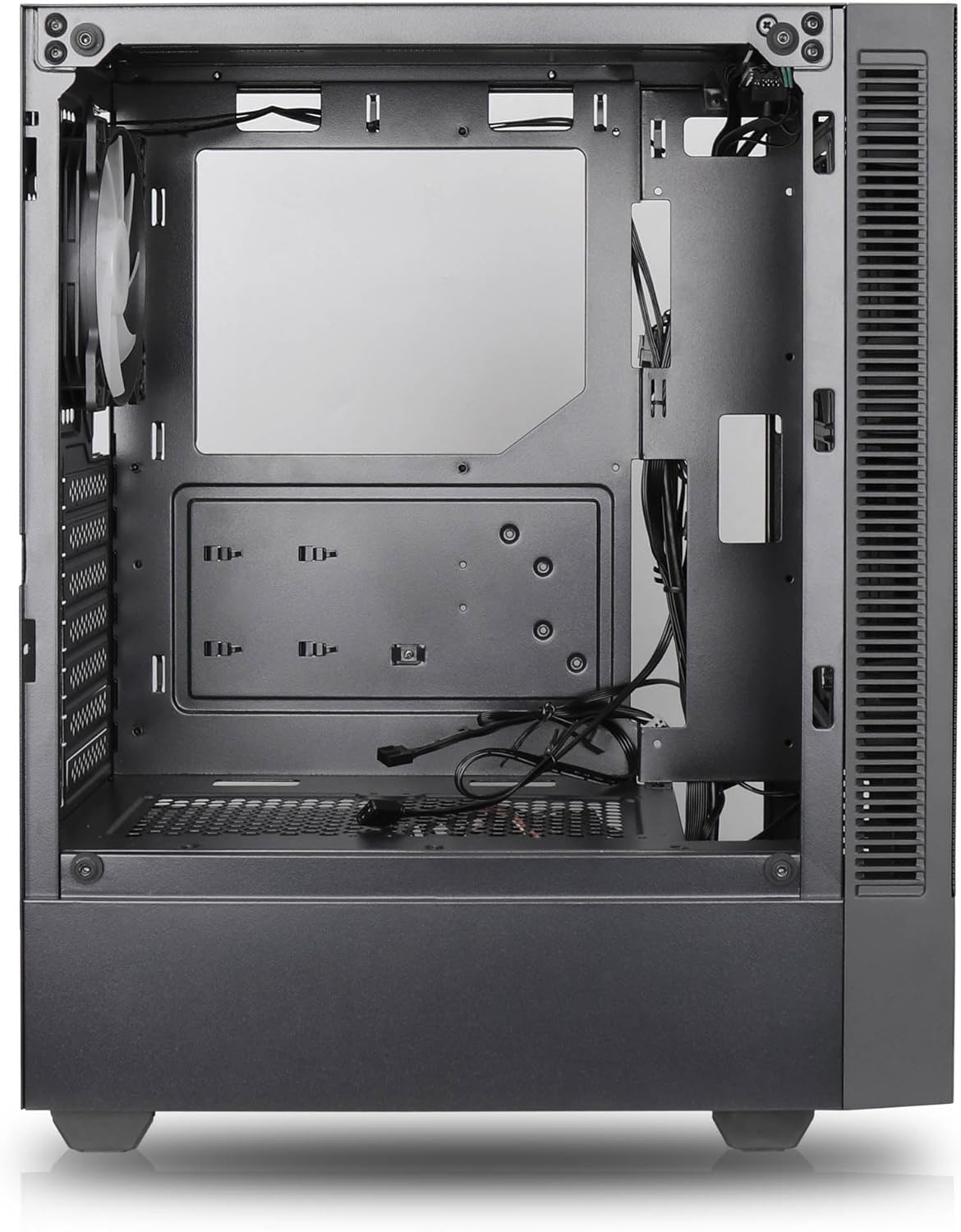

ຄຸນນະສົມບັດທີ່ສໍາຄັນ:
- ການໄຫລວຽນທາງອາກາດສູງສຸດ: Large mesh front panel and four pre-installed 140mm A-RGB fans with hydraulic bearings ensure excellent ventilation.
- Easy PC Building: Thoughtful design with daisy-chain connections simplifies installation, eliminating the need for additional adapters or controllers.
- ການອອກແບບຄຸນນະພາບສູງ: Genuine tempered glass side panel showcases installed components and provides a minimalist, premium aesthetic.
- Flexible Lighting and Control: 3-pin A-RGB fans and 4-pin fan control allow for impressive lighting effects and easy adjustment of fan speed and curves directly from the motherboard.
- Powerful Component Compatibility: Supports GPUs up to 400mm long, radiators up to 360mm (front and top) and 140mm (rear), and space for up to 4 fans.
- Compact Case with Ample Space: Midi tower format accommodates E-ATX, ATX, mATX, and ITX motherboards, up to two 2.5" SSDs, two 3.5" HDDs, and ATX power supplies.
5. ຄູ່ມືການຕິດຕັ້ງ
Follow these steps for component installation. Refer to your individual component manuals for specific instructions.
5.1. ການກະກຽມກໍລະນີ
- ວາງກະເປົ໋າໄວ້ເທິງພື້ນຜິວທີ່ຮາບພຽງ ແລະ ໝັ້ນຄົງ.
- Carefully remove the tempered glass side panel by unscrewing the thumb screws and gently pulling it away. Set it aside on a soft, non-abrasive surface.
- Remove the solid right side panel by unscrewing the thumb screws and sliding it backward.
5.2. ການຕິດຕັ້ງເມນບອດ
- ຕິດຕັ້ງ I/O ໄສ້ເຂົ້າໄປໃນຊ່ອງເປີດດ້ານຫລັງຂອງກໍລະນີ.
- Ensure the correct standoffs are installed for your motherboard form factor (E-ATX, ATX, mATX, ITX). Adjust or add standoffs as needed.
- ລະມັດລະວັງວາງເມນບອດຂອງທ່ານໃສ່ຈຸດຢືນ, ວາງຮູສະກູ.
- ຍຶດແຜງວົງຈອນຫຼັກດ້ວຍສະກູທີ່ໃຫ້ມາ. ຢ່າໝຸນແໜ້ນເກີນໄປ.
5.3. ການຕິດຕັ້ງຫນ່ວຍບໍລິການສະຫນອງພະລັງງານ (PSU).
- ວາງ PSU ໄວ້ໃນຊ່ອງທີ່ອຸທິດຕົນຢູ່ທາງລຸ່ມດ້ານຫຼັງຂອງເຄສ.
- Ensure the PSU fan faces downwards (if the case has a bottom vent) or upwards, depending on your cooling preference.
- Secure the PSU to the case with the provided screws from the rear.
5.4. ການຕິດຕັ້ງໄດຣຟ໌ເກັບຂໍ້ມູນ
2.5" SSDs:
- Locate the 2.5" drive mounts (typically behind the motherboard tray).
- Secure the SSDs using the provided screws.
ຮາດດິດ 3.5":
- Locate the 3.5" drive cages (usually near the PSU shroud).
- Slide the HDDs into the drive trays and secure them with screws or tool-less mechanisms if available.
5.5. ການຕິດຕັ້ງບັດກາຟິກ (GPU).
- ເອົາຊ່ອງສຽບ PCIe ທີ່ຈໍາເປັນອອກຈາກດ້ານຫລັງຂອງກໍລະນີ.
- Align your GPU with the PCIe slot on the motherboard and press firmly until it clicks into place.
- ຍຶດ GPU ໃສ່ກັບເຄສດ້ວຍສະກູ.
5.6. ການຄຸ້ມຄອງສາຍໄຟ
ນຳໃຊ້ແຜ່ນຕັດເສັ້ນທາງສາຍເຄເບິນ ແລະຈຸດຜູກລົງທາງຫຼັງຖາດເມນບອດເພື່ອຈັດການສາຍ. ນີ້ປັບປຸງການໄຫຼຂອງອາກາດແລະຄວາມງາມ.
6. ການດໍາເນີນງານ
6.1. ເປີດເຄື່ອງ
After all components are installed and cables are connected, reattach the side panels. Connect the power cable to the PSU and a wall outlet, then press the power button on the top I/O panel of the case.
6.2. ການຄວບຄຸມພັດລົມ ARGB
The pre-installed ARGB fans feature 3-pin ARGB connectors for lighting control and 4-pin connectors for fan speed control. These can be connected directly to compatible headers on your motherboard. Use your motherboard's software or BIOS settings to customize lighting effects and fan curves.
7. ບໍາລຸງຮັກສາ
7.1. ທໍາຄວາມສະອາດ
- Regularly clean dust filters (if present) to maintain optimal airflow.
- Use a can of compressed air to remove dust from inside the case and components.
- ເຊັດພື້ນຜິວພາຍນອກດ້ວຍຜ້າອ່ອນ, ງamp ຜ້າ. ຫຼີກເວັ້ນການສານເຄມີທີ່ຮຸນແຮງ.
- For the tempered glass panel, use a glass cleaner and a microfiber cloth.
8. ການແກ້ໄຂບັນຫາ
- PC not powering on: Check all power connections, including the 24-pin motherboard power, 8-pin CPU power, and GPU power cables. Ensure the PSU switch is in the 'ON' position.
- Fans not spinning/RGB not working: Verify that fan and ARGB headers are correctly connected to the motherboard. Check motherboard software for fan speed and lighting control settings.
- ຄວາມຮ້ອນເກີນ: Ensure proper airflow by checking fan orientation and cleaning dust filters. Verify CPU cooler and GPU cooler are properly seated.
- ບໍ່ມີການສະແດງຜົນ: Confirm the monitor cable is connected to the graphics card (not the motherboard integrated graphics, unless you are using integrated graphics). Reseat the graphics card and RAM modules.
9. ຂໍ້ມູນຈໍາເພາະ
| ຄຸນສົມບັດ | ຂໍ້ມູນຈໍາເພາະ |
|---|---|
| ຍີ່ຫໍ້ | SILENTWARE |
| ຊື່ຕົວແບບ | Silentware Flow 100 ARGB |
| ໝາຍເລກຕົວແບບ | FLOW100 |
| ASIN | B0CB8CZ5GF |
| ສີ | ດຳ |
| ປະເພດກໍລະນີ | ຫໍກາງ |
| ວັດສະດຸ | ແກ້ວ Tempered |
| ຄວາມເຂົ້າກັນໄດ້ຂອງເມນບອດ | ATX, ໄມໂຄຣ ATX, ມິນິ ITX |
| ອຸປະກອນທີ່ເຂົ້າກັນໄດ້ | ATX, mATX, ITX motherboards, GPUs up to 325mm, radiators up to 360mm, 2.5" and 3.5" storage drives |
| ການນໍາໃຊ້ທີ່ແນະນໍາ | ເກມ |
| ວິທີການເຮັດຄວາມເຢັນ | ອາກາດ |
| ພັດລົມທີ່ຕິດຕັ້ງໄວ້ລ່ວງໜ້າ | ພັດລົມ ARGB ຂະໜາດ 120 ມມ 4 ອັນ |
| ຂະໜາດພັດລົມ | 140 Millimeters (Note: Product description mentions 140mm fans, while pre-installed are 120mm. Please verify with product packaging.) |
| ປະເພດການຕິດຕັ້ງການສະຫນອງພະລັງງານ | ພູລຸ່ມ |
| ຄວາມຍາວສູງສຸດຂອງ GPU | 400ມມ |
| Radiator Support (Front/Top) | ເຖິງ 360 ມມ |
| ຮອງຮັບໝໍ້ນ້ຳ (ດ້ານຫຼັງ) | ເຖິງ 140 ມມ |
| ຊ່ອງຂັບ 2.5" | ເຖິງ 2 |
| ຊ່ອງຂັບ 3.5" | ເຖິງ 2 |
10. ການຮັບປະກັນແລະການສະຫນັບສະຫນູນ
For warranty information and technical support, please refer to the official SILENTWARE website or contact your retailer. Specific details regarding spare parts availability and software updates are not available in the provided product information.