
1. ບົດແນະນຳ
This manual provides detailed instructions for the installation, operation, and maintenance of your Junsun XT892C 9-inch Car Stereo. Please read this manual thoroughly before using the product to ensure proper function and safety. Keep this manual for future reference.
2. ຄວາມເຂົ້າກັນໄດ້ຂອງຍານພາຫະນະ
The Junsun XT892C car stereo is designed for a perfect fit in the following vehicles:
- Chevrolet Colorado RG: 2015, 2016, 2017, 2018, 2019 (Base Mode/Low-end)
- GMC Canyon: 2015, 2016, 2017, 2018, 2019 (Base Mode/Low-end)
ຫມາຍເຫດຄວາມເຂົ້າກັນໄດ້ທີ່ສໍາຄັນ:
- This unit is not compatible with vehicles equipped with a high-configuration system, specifically those with an optical fiber port or a Bose sound system.
- If your original car radio is 4-inch or 8-inch and has a Bose sound system, a separate decode box is required.
- Do not purchase if your vehicle is subscribed to OnStar.

ລາຍລະອຽດຮູບພາບ: This image illustrates important compatibility details. The top section shows a warning against purchasing if the vehicle has an OnStar subscription, with an image of the OnStar button. The bottom section explains that if the original car radio has a Bose sound system (indicated by a Bose logo), a separate decode box is needed, showing wiring diagrams and the decode box itself. It also provides a solution for static audio by unplugging a red/orange wire.

ລາຍລະອຽດຮູບພາບ: This image displays a comparison of car dashboards. The top part shows a "Before" and "After" view of a low-configuration Chevrolet Colorado/GMC Canyon dashboard, illustrating the successful installation of the Junsun car stereo. The bottom part shows a "High configuration" dashboard with a red cross, indicating that the unit cannot fit cars with an optical fiber port or Boss sound system.
3. ເນື້ອໃນຊຸດ
ເມື່ອເປີດຊຸດດັ່ງກ່າວ, ກະລຸນາກວດສອບວ່າລາຍການທັງໝົດຕໍ່ໄປນີ້ແມ່ນລວມຢູ່ແລ້ວ:
- Junsun 9-inch Car Stereo Unit
- ຕົວເຊື່ອມຕໍ່ພະລັງງານ
- Original USB Adapter
- ຕົວຖອດລະຫັດ CANBUS
- Crowbar (for trim removal)
- ໄຂຄວງ
- ຊຸດສາຍ RCA
- Reversing Cable
- ໄມໂຄຣໂຟນ
- GPS Antenna
- Reversing Radar (if included in specific package)
- ສາຍ USB 1
- ສາຍ USB 2

ລາຍລະອຽດຮູບພາບ: This image displays a grid of all components included in the Junsun car stereo package. It shows the main head unit, power connector, original USB adapter, CANBUS, crowbar, screwdriver, RCA cable, reversing cable, microphone, GPS antenna, reversing radar, and two USB cables.

ລາຍລະອຽດຮູບພາບ: This image provides a detailed layout of the Junsun car stereo unit and its accompanying accessories, including various cables, tools, and modules, clearly labeling each item for easy identification.
4. ຄຸນນະສົມບັດທີ່ສໍາຄັນ
- ລະບົບປະຕິບັດການ: Android 13
- ຈໍສະແດງຜົນ: 9-inch HD Touch Screen (1280x720P resolution)
- ໜ່ວຍຄວາມຈຳ: RAM 2GB + ROM 32GB
- ການເຊື່ອມຕໍ່: 5G Wi-Fi, ບູທູດ 4.0
- ການເຊື່ອມໂຍງໂທລະສັບສະຫຼາດ: Built-in Wireless CarPlay and Android Auto, Mirror Link
- ສຽງ: DSP (Digital Sound Processor) for high-quality audio, personalized sound adjustments, auto-enhanced soundstage, 48-band custom EQ, multiple ASP options, sound balance adjustment.
- ການນໍາທາງ: GPS with precise location, real-time traffic data, smart voice guidance, multiple map choices.
- ວິທະຍຸ: FM/AM Radio with RDS support, long-distance switching, search station function.
- ຄຸນນະສົມບັດຄວາມປອດໄພ: ຫລັງview camera support (camera not included), effortless reversing.
- ການຄວບຄຸມ: Steering Wheel Control (SWC) function for one-touch operation, safe driving, quick response, and multi-function integration.
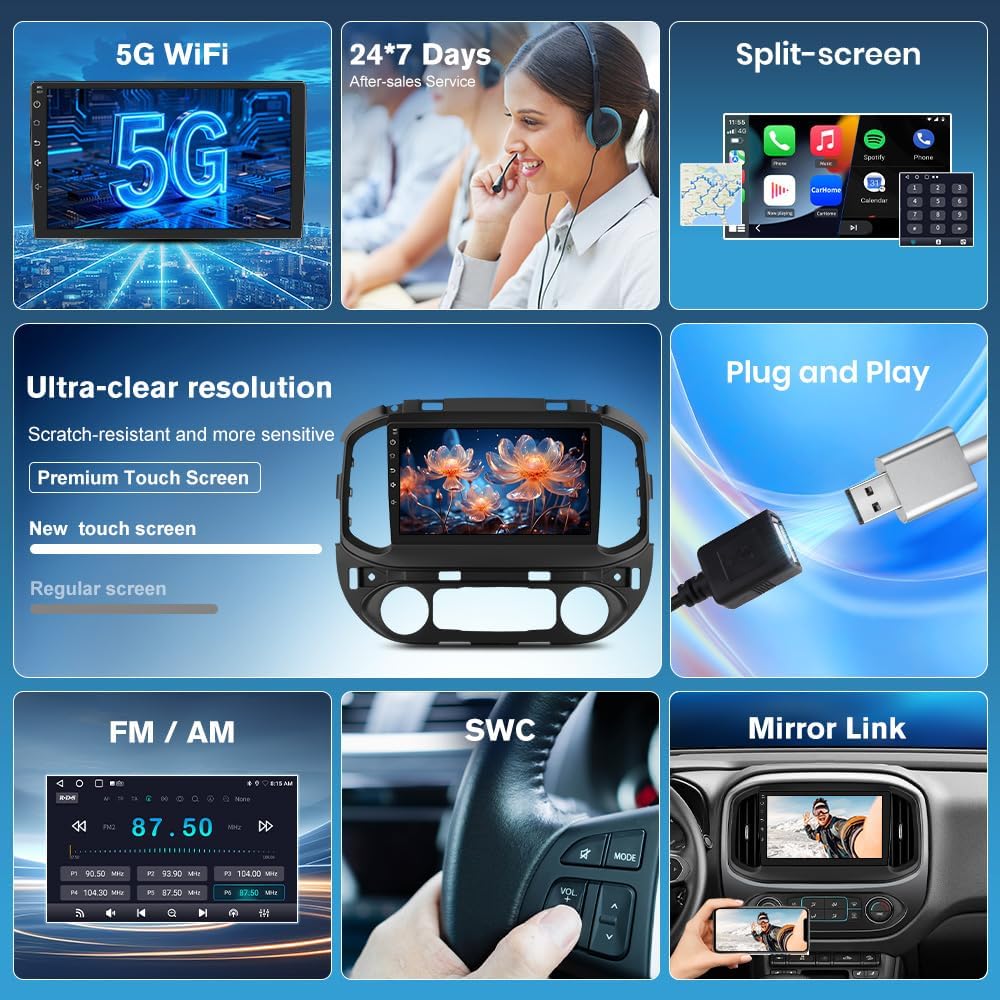
ລາຍລະອຽດຮູບພາບ: ຮູບພາບນີ້ສະແດງໃຫ້ເຫັນພາບລວມview of the Junsun car stereo's key features, including 5G WiFi, 24/7 customer service, split-screen capability, ultra-clear resolution with a premium touch screen, plug-and-play installation, FM/AM radio, steering wheel control (SWC), and mirror link functionality.

ລາຍລະອຽດຮູບພາບ: This image highlights the wireless CarPlay, Android Auto, and Mirror Link features of the Junsun car stereo. It shows smartphone screens displaying various apps integrated with the car stereo interface, demonstrating seamless connectivity.

ລາຍລະອຽດຮູບພາບ: This image showcases the stunning 1280x720P resolution supported by the Junsun car stereo, emphasizing crisp and vivid details on the large screen through a visually appealing butterfly image.

ລາຍລະອຽດຮູບພາບ: This image presents key technical specifications of the Junsun car stereo, including Bluetooth 4.0, HD 1280*720P resolution, 5G WiFi, and 2GB RAM with 32GB ROM.

ລາຍລະອຽດຮູບພາບ: This image illustrates the endless entertainment possibilities with the Junsun car stereo, showcasing various apps like Netflix, YouTube, and social media platforms, emphasizing seamless 5G WiFi streaming and downloadable apps.

ລາຍລະອຽດຮູບພາບ: This image details the DSP (Digital Sound Processor) powerful customization system, highlighting features like a 48-band custom EQ, multiple ASP options, and easy sound balance adjustment for an exceptional audio experience.

ລາຍລະອຽດຮູບພາບ: This image emphasizes the HD 1280x720P touch screen of the Junsun car stereo, showcasing its large size, touch functionality, and 9-inch display for an impressive visual experience.
5. ຄູ່ມືການຕິດຕັ້ງ
Proper installation is crucial for the optimal performance of your Junsun car stereo. It is recommended that installation be performed by a qualified professional. Refer to the following steps and diagrams for guidance:
- ການກະກຽມ: Ensure the vehicle's power is off before beginning installation. Gather all necessary tools, including the provided crowbar and screwdriver.
- ຖອດໜ່ວຍເດີມອອກ: Carefully remove the original car radio unit from the dashboard. Use the crowbar to gently pry off trim panels as needed.
- ເຊື່ອມຕໍ່ສາຍສາຍໄຟ: Connect the main wiring harness from the Junsun stereo to the vehicle's corresponding connectors. Ensure all connections are secure.
- ການເຊື່ອມຕໍ່ CANBUS: Connect the CANBUS decoder as per the wiring diagram. This is essential for integrating with vehicle controls.
- ການເຊື່ອມຕໍ່ເສົາອາກາດ: Connect the GPS antenna and any other relevant antennas (e.g., radio antenna).
- ການເຊື່ອມຕໍ່ອຸປະກອນເສີມ: Connect the reversing cable, microphone, and USB cables to their respective ports on the stereo unit.
- ການທໍາງານຂອງການທົດສອບ: Before fully reassembling the dashboard, temporarily power on the vehicle and test basic functions of the stereo (power, audio, touch screen, steering wheel controls, etc.).
- ໜ່ວຍຄວາມໝັ້ນຄົງ: Once tested, carefully mount the Junsun stereo unit into the dashboard opening.
- ປະກອບຄືນໃໝ່: Reattach all trim panels and secure them properly.

ລາຍລະອຽດຮູບພາບ: This image provides a visual guide for installing the Junsun car stereo. It shows the internal structure of the original factory-made main unit and step-by-step connections for the main harness, CANBUS, and horn, illustrating how to connect the corresponding plug interfaces.
6. ຄໍາແນະນໍາການດໍາເນີນງານ
6.1. ການເຊື່ອມຕໍ່ Wi-Fi
To connect your Junsun car stereo to Wi-Fi, typically via a mobile hotspot:
- Enable the Wi-Fi feature on the car stereo.
- On your mobile phone, go to Settings and turn on "Personal Hotspot".
- Ensure the "Maximize Compatibility" option is enabled in your phone's hotspot settings; otherwise, the car stereo may not detect the hotspot.
- On the car stereo, select your phone's hotspot from the list of available Wi-Fi networks.
- Enter your phone's hotspot password when prompted and connect.
ລາຍລະອຽດວິດີໂອ: This video demonstrates the step-by-step process of connecting the Junsun car stereo to a mobile Wi-Fi hotspot. It shows how to enable Wi-Fi on the stereo, activate the personal hotspot on an iPhone, ensure "Maximize Compatibility" is on, and then connect the stereo to the phone's hotspot by entering the password.

ລາຍລະອຽດຮູບພາບ: This image displays the WiFi connection interface and GPS navigation screen on the Junsun car stereo. It shows available Wi-Fi networks and a map with navigation details, along with icons for various apps like Instagram, Twitter, TikTok, and Netflix.
6.2. ການເຊື່ອມຕໍ່ Bluetooth
To pair your phone with the car stereo via Bluetooth:
- On the car stereo, open the Bluetooth application.
- On your mobile phone, go to Settings and enable Bluetooth.
- On the car stereo, search for available Bluetooth devices.
- Select your phone's Bluetooth name from the list on the car stereo.
- ຢືນຢັນຄຳຮ້ອງຂໍການຈັບຄູ່ໃນອຸປະກອນທັງສອງ.
- ອະນຸຍາດໃຫ້ຕິດຕໍ່ພົວພັນແລະ favorites sync ຖ້າຫາກວ່າໄດ້ຮັບການເຕືອນ.
ລາຍລະອຽດວິດີໂອ: This video demonstrates how to correctly pair a Bluetooth device with the Junsun car stereo. It shows enabling Bluetooth on both the phone and the stereo, searching for devices, and confirming the pairing request to establish a connection.

ລາຍລະອຽດຮູບພາບ: This image illustrates the Bluetooth 4.0 features of the Junsun car stereo, including wireless CarPlay/Android Auto, Bluetooth music streaming, and hands-free phone calls, with visuals of a phone dialer and music playback interface.
6.3. Wireless CarPlay / Android Auto
To connect to Wireless CarPlay or Android Auto:
- Ensure both Wi-Fi and Bluetooth are enabled on your phone.
- Pair your phone with the car stereo via Bluetooth (refer to section 6.2).
- Once paired, the car stereo will prompt you to connect to CarPlay or Android Auto. Confirm the connection.
- For automatic connection, navigate to the Zlink app settings on the stereo and set the "Default Connection Type" to "Last Mode" or "Link Mode First" as preferred.
- To switch between wireless and wired connections, access the Zlink app settings and select the desired mirroring mode.
ລາຍລະອຽດວິດີໂອ: This video demonstrates how to connect to wireless CarPlay. It shows the process of enabling Wi-Fi and Bluetooth on the phone, pairing the phone with the car stereo via Bluetooth, and then initiating the CarPlay connection. It also briefly touches on settings for automatic connection and switching between wired/wireless modes.
6.4. GPS ນໍາທາງ
The built-in GPS provides accurate navigation. Ensure the GPS antenna is properly installed for optimal signal reception.
- ເຂົ້າເຖິງແອັບ Navigation ຈາກເມນູຫຼັກ.
- Enter your destination to receive real-time traffic data and smart voice guidance.
- Multiple map choices are available.
6.5. ວິທະຍຸ FM/AM
ເພື່ອປະຕິບັດຫນ້າຂອງວິທະຍຸ:
- Open the Radio app from the main menu.
- Use the search function to find stations or manually tune to a frequency.
- Long-press a frequency to save it as a preset.
- Switch between FM1/FM2 bands as needed.

ລາຍລະອຽດຮູບພາບ: This image displays the AM/FM Radio interface of the Junsun car stereo, showing frequency display, search station buttons, long-press to save function, and options for switching between FM1/FM2 bands and DSP settings.
6.6. ການຄວບຄຸມພວງມາໄລ (SWC)
The SWC function allows you to control the stereo directly from your steering wheel buttons. This enhances driving safety by keeping your hands on the wheel.
- Access the SWC settings in the stereo's menu to configure button assignments.
- Follow the on-screen instructions to program each button (e.g., volume up/down, track skip, mode change).

ລາຍລະອຽດຮູບພາບ: This image illustrates the effortless driving and control experience provided by the Junsun car stereo's steering wheel control feature. It shows a driver maintaining focus while controlling audio functions, with icons representing various controls like track skip and volume adjustment.
6.7. ຫລັງview ຮອງຮັບກ້ອງຖ່າຍຮູບ
ຫນ່ວຍບໍລິການສະຫນັບສະຫນູນດ້ານຫລັງview camera (not included) for enhanced safety during reversing. Ensure the reversing cable is correctly connected during installation.
- When the vehicle is put into reverse gear, the stereo will automatically display the rearview ຟີດກ້ອງຖ່າຍຮູບ.
- This provides clear images and real-time display to assist with parking.

ລາຍລະອຽດຮູບພາບ: This image demonstrates the rearview support feature of the Junsun car stereo, showing a car successfully parking with the aid of a rearview camera (represented by green checkmark) versus a car struggling without it (represented by red cross), highlighting the safety benefits.
7. ຂໍ້ກໍານົດດ້ານວິຊາການ
| ຄຸນສົມບັດ | ຂໍ້ມູນຈໍາເພາະ |
|---|---|
| ຍີ່ຫໍ້ | ຈູນຊຸນ |
| ຊື່ຕົວແບບ | XT892C |
| ລະບົບປະຕິບັດການ | Android 13 |
| ຂະໜາດໜ້າຈໍ | 9 ນິ້ວ |
| ປະເພດການສະແດງ | ຈໍ LCD |
| ປະເພດຫນ້າຈໍສໍາຜັດ | Capacitive |
| ຄວາມລະອຽດ | 1280x720P |
| ໜ່ວຍຄວາມຈຳ (RAM) | 2 GB |
| ບ່ອນຈັດເກັບຂໍ້ມູນ (ROM) | 32 GB |
| ເຕັກໂນໂລຊີການເຊື່ອມຕໍ່ | Bluetooth, 5G WiFi |
| ລຸ້ນ Bluetooth | 4.0 |
| Supported Navigation System | GPS |
| ປະເພດແຜນທີ່ | ອາເມລິກາເຫນືອ |
| ອິນເຕີເຟດມະນຸດ | ໜ້າຈໍສຳຜັດ |
| ວິທີການຄວບຄຸມ | ແຕະ |
| ປະເພດການຕິດຕັ້ງ | Dashboard Mount |
| ປະເພດການບໍລິການພາຫະນະ | Truck (Chevrolet Colorado RG, GMC Canyon) |
| ແບດເຕີລີ່ລວມ | ບໍ່ |
8. ການແກ້ໄຂບັນຫາ
This section addresses common issues you might encounter with your Junsun car stereo.
8.1. ບໍ່ມີພະລັງງານ / ເຄື່ອງບໍ່ເປີດ
- ກວດເບິ່ງການເຊື່ອມຕໍ່ພະລັງງານທັງຫມົດເພື່ອຮັບປະກັນວ່າພວກມັນຖືກສຽບຢ່າງປອດໄພ.
- Verify the vehicle's fuse related to the car stereo is not blown.
- ກວດໃຫ້ແນ່ໃຈວ່າລົດຄັນໄຟເປີດຢູ່.
8.2. No Audio / Static Sound
- ກວດເບິ່ງການເຊື່ອມຕໍ່ສາຍຂອງລໍາໂພງ.
- ກວດໃຫ້ແນ່ໃຈວ່າບໍ່ໄດ້ປິດສຽງ ຫຼືຕັ້ງໜ້ອຍເກີນໄປ.
- If experiencing static, especially in compatible vehicles, try unplugging the red/orange wire as indicated in the compatibility notes.
- Verify the DSP settings are configured correctly.
8.3. ບັນຫາການເຊື່ອມຕໍ່ Wi-Fi
- Ensure your mobile hotspot is active and broadcasting.
- Verify the "Maximize Compatibility" option is enabled on your phone's hotspot settings.
- Double-check the Wi-Fi password entered on the stereo.
- Restart both your phone's hotspot and the car stereo.
8.4. Bluetooth Pairing Problems
- Ensure Bluetooth is enabled on both your phone and the car stereo.
- Make sure both devices are in pairing mode and discoverable.
- ລຶບການຈັບຄູ່ກ່ອນໜ້າຢູ່ທັງສອງອຸປະກອນ ແລະລອງຈັບຄູ່ອີກຄັ້ງ.
- Ensure your phone is not connected to other Bluetooth devices.
8.5. CarPlay / Android Auto Not Connecting
- Confirm that your phone is successfully paired via Bluetooth and connected to Wi-Fi (if using wireless).
- Ensure the Zlink application is open on the car stereo.
- Check your phone's settings for any permissions required by CarPlay or Android Auto.
- Try restarting both your phone and the car stereo.
9. ການຮັບປະກັນແລະການສະ ໜັບ ສະ ໜູນ
Junsun offers comprehensive support for your product:
- Free Returns & Exchanges: Within one month of purchase.
- ສ້ອມແປງຟຣີ: Within one year of purchase.
- ບໍລິການລູກຄ້າ: 24/7 professional customer service is available online.
For installation assistance, technical support, or warranty claims, please contact Junsun Car Electronics directly.

ລາຍລະອຽດຮູບພາບ: This image provides contact information for Junsun Car Electronics customer support, including an email address (Junsun-US@outlook.com) and highlights 24-hour customer support availability.