
ແນະນຳ
Thank you for choosing the NOKLEAD Indoor Digital Hygrometer Thermometer. This device is designed to provide accurate and reliable measurements of indoor temperature and humidity, helping you maintain a comfortable and healthy living environment. Please read this manual carefully before use to ensure proper operation and to maximize the product's lifespan.
ເນື້ອໃນຊຸດ
- 1 x NOKLEAD Digital Hygrometer Thermometer (Model NK5275)
- 2 x ຫມໍ້ໄຟ AAA
- 1 x ຄູ່ມືຜູ້ໃຊ້
ສິນຄ້າເກີນview
The NOKLEAD Digital Hygrometer Thermometer features a large, easy-to-read LCD display and intuitive controls. It provides real-time temperature and humidity readings, along with MAX/MIN records, time, and date.

ຮູບພາບ: Diagram illustrating key features of the NOKLEAD digital monitor: Temperature, Humidity, Switchable °C/°F, Backlight, Comfort Indicator, MAX/MIN Record, 10s Update, AAA Batteries, Large Digits.

ຮູບພາບ: Close-up of the large, easy-to-read digits on the thermometer's LCD screen, highlighting its clarity.
ຕັ້ງຄ່າ
1. ການຕິດຕັ້ງຫມໍ້ໄຟ
- ເປີດຝາປິດຊ່ອງໃສ່ຫມໍ້ໄຟຢູ່ດ້ານຫຼັງຂອງອຸປະກອນ.
- ໃສ່ໝໍ້ໄຟ AAA ສອງໜ່ວຍ, ຮັບປະກັນການຂົ້ວທີ່ຖືກຕ້ອງ (+/-).
- Close the battery compartment cover. The device will power on automatically.
2. ກໍານົດເວລາແລະວັນທີ
- Press the 'SET' button (usually located on the side or back) to enter time/date setting mode.
- Use the '+' or '-' buttons to adjust the values (e.g., hour, minute, year, month, day).
- ກົດ 'SET' ອີກເທື່ອຫນຶ່ງເພື່ອຢືນຢັນແຕ່ລະການຕັ້ງຄ່າແລະຍ້າຍໄປຕໍ່ໄປ.
- The device supports 12-hour and 24-hour time formats.
3. ຫົວໜ່ວຍອຸນຫະພູມສະຫຼັບ (°C/°F)
Press the '°C/°F' button (usually located on the side or back) to toggle between Celsius and Fahrenheit temperature displays.
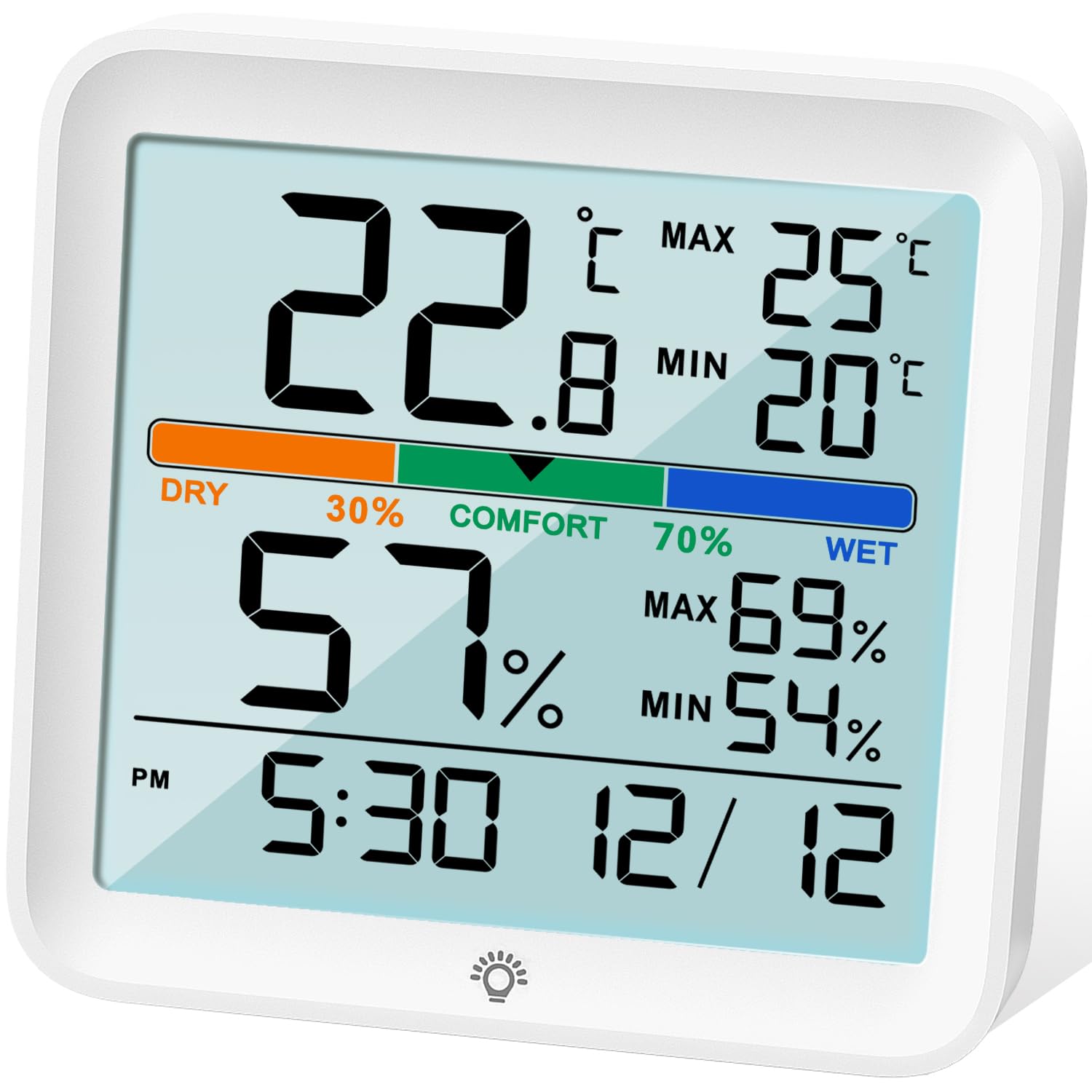
ຮູບພາບ: ດ້ານໜ້າ view of the NOKLEAD Indoor Digital Hygrometer Thermometer, showing the backlit LCD display and touch button for illumination.
ຄໍາແນະນໍາການດໍາເນີນງານ
1. Real-time Readings
The device continuously displays the current indoor temperature and humidity. Readings are updated approximately every 10 seconds for accurate monitoring.
2. ບັນທຶກສູງສຸດ/ຕໍ່າສຸດ
The thermometer automatically records the maximum and minimum temperature and humidity values over the last 24 hours. These values are displayed on the screen.
- To reset the MAX/MIN records, long press the '°F/°C' button.

ຮູບພາບ: Diagram illustrating the MAX/MIN temperature and humidity records displayed on the screen and how to reset them using the °F/°C button.
3. ຕົວຊີ້ບອກລະດັບຄວາມສະດວກສະບາຍ
The device features a comfort level indicator with three levels: DRY, COMFORT, and WET. This indicator helps you understand the current air quality based on humidity levels.
- ແຫ້ງ: ຄວາມຊຸ່ມຊື່ນຕໍ່າກວ່າ 30%
- ຄວາມສະດວກສະບາຍ: ຄວາມຊຸ່ມຊື່ນລະຫວ່າງ 30% ຫາ 70%
- ຊຸ່ມ: ຄວາມຊຸ່ມຊື່ນສູງກວ່າ 70%

ຮູບພາບ: The display showing the comfort level indicator (DRY, COMFORT, WET) with associated humidity ranges, and visual cues for potential health impacts of extreme conditions.
4. ຟັງຊັນ Backlight
The LCD screen has a white backlight for easy reading in low-light conditions. Touch the backlight icon on the screen once to activate it. The backlight will automatically turn off after 15 seconds.
ການປັບທຽບ
The device includes an enhanced calibration function to ensure accuracy. If you suspect the readings are inaccurate due to placement or environmental factors, you can calibrate the sensors.
- ການປັບອຸນຫະພູມ: Adjusts temperature readings by up to ±5°C (±41°F).
- ການປັບຄວາມຊຸ່ມຊື່ນ: Adjusts humidity readings by up to ±10% RH.
Refer to the detailed instructions in the included paper manual for the specific steps to perform calibration, as this process typically involves a sequence of button presses.
ຕົວເລືອກການຕິດຕັ້ງ
The NOKLEAD Hygrometer Thermometer offers versatile placement options:
- ຂາຕັ້ງທີ່ທົນທານ: Use the integrated foldable stand to place the device on any flat surface, such as a desk, shelf, or countertop.
- ຮູຫ້ອຍ: Utilize the hanging hole on the back to mount the device on a wall or hook.

ຮູບພາບ: The thermometer displayed with its two mounting options: a durable stand for tabletop use and a hanging hole for wall mounting.
ບໍາລຸງຮັກສາ
- ເຮັດຄວາມສະອາດອຸປະກອນດ້ວຍຜ້າອ່ອນແລະແຫ້ງ. ຢ່າໃຊ້ນໍ້າຢາທໍາຄວາມສະອາດທີ່ມີສີຂັດ ຫຼື ແຊ່ນໍ້າ.
- ຫຼີກເວັ້ນການເປີດເຜີຍອຸປະກອນກັບອຸນຫະພູມທີ່ຮຸນແຮງ, ແສງແດດໂດຍກົງ, ຫຼືຄວາມຊຸ່ມຊື່ນສູງ.
- ຖອດແບດເຕີຣີອອກຖ້າອຸປະກອນຈະບໍ່ຖືກໃຊ້ເປັນໄລຍະເວລາເພີ່ມເຕີມເພື່ອປ້ອງກັນການຮົ່ວໄຫຼ.
- ປ່ຽນແບັດເຕີລີ ເມື່ອຕົວຊີ້ບອກແບດເຕີລີ່ຕ່ຳປະກົດຂຶ້ນເທິງຈໍສະແດງຜົນ.
ການແກ້ໄຂບັນຫາ
| ບັນຫາ | ສາເຫດທີ່ເປັນໄປໄດ້ | ການແກ້ໄຂ |
|---|---|---|
| ບໍ່ມີຈໍສະແດງຜົນ ຫຼື ຈໍສະແດງຜົນຈາງລົງ | ແບັດເຕີຣີຕໍ່າ ຫຼື ການຕິດຕັ້ງແບັດເຕີຣີບໍ່ຖືກຕ້ອງ. | ປ່ຽນແບດເຕີຣີດ້ວຍແບດເຕີຣີ້ AAA ໃໝ່, ຮັບປະກັນການຂົ້ວທີ່ຖືກຕ້ອງ. |
| ການອ່ານບໍ່ຖືກຕ້ອງ | Device placed near heat/cold sources, or sensor needs calibration. | Relocate the device to a stable environment. Perform calibration as per the manual. |
| Backlight ບໍ່ເຮັດວຽກ | Low batteries or touch sensor issue. | Replace batteries. Ensure the touch area is clean and dry. |
ຂໍ້ມູນຈໍາເພາະ
| ຄຸນສົມບັດ | ລາຍລະອຽດ |
|---|---|
| ຕົວແບບ | NK5275 |
| ຍີ່ຫໍ້ | ໂນກລີດ |
| ສີ | ສີຂາວ |
| ຂະໜາດສິນຄ້າ | 9.1L x 8.6H cm (3.6L x 3.4H inches) |
| ຊ່ວງອຸນຫະພູມ | -9.9°C ຫາ 60°C (14.18°F ຫາ 140°F) |
| ຄວາມຖືກຕ້ອງຂອງອຸນຫະພູມ | ±1°C |
| ຊ່ວງຄວາມຊຸ່ມຊື່ນ | 10% RH ຫາ 95% RH |
| ຄວາມຖືກຕ້ອງຂອງຄວາມຊຸ່ມຊື່ນ | ±3% RH |
| ອັດຕາການປັບປຸງ | ທຸກໆ 10 ວິນາທີ |
| ແຫຼ່ງພະລັງງານ | 2 x AAA Batteries (3 Volts) |
| ປະເພດການຕິດຕັ້ງ | Tabletop (stand) or Wall-mount (hanging hole) |
ການຮັບປະກັນແລະການສະຫນັບສະຫນູນ
NOKLEAD provides a ການຮັບປະກັນ 24 ເດືອນທີ່ບໍ່ມີຄວາມກັງວົນ for this product, covering manufacturing defects and malfunctions under normal use. For technical support, warranty claims, or any questions regarding your device, please contact NOKLEAD customer service through the retailer where you purchased the product or visit the official NOKLEAD webເວັບໄຊສໍາລັບຂໍ້ມູນຕິດຕໍ່.
ກະລຸນາຮັກສາຫຼັກຖານການຊື້ຂອງທ່ານໄວ້ເພື່ອຈຸດປະສົງການຮັບປະກັນ.
ສະຖານະການນຳໃຊ້
The NOKLEAD Indoor Digital Hygrometer Thermometer is suitable for a variety of indoor environments to help you monitor and maintain optimal conditions.

ຮູບພາບ: A collage of images demonstrating the thermometer's versatility in different indoor settings, including an office, bedroom, baby room, greenhouse, warehouse, and wine cellar.