
ແນະນຳ
This manual provides essential information for the safe and effective operation and maintenance of your CRAFTSMAN CMMT25166 Rechargeable Aluminum Pen Light. Please read this manual thoroughly before using the product and retain it for future reference. This pen light features a durable aluminum body, USB-C charging, and dual LED brightness modes for versatile illumination.
ຂໍ້ມູນຄວາມປອດໄພ
- ຄວາມປອດໄພຕາ: Do not stare directly into the LED light. The high intensity light can cause temporary vision impairment or eye damage.
- ຄວາມປອດໄພຫມໍ້ໄຟ: This product contains a Lithium-Ion battery. Do not expose the battery to extreme temperatures, fire, or water. Do not attempt to disassemble or replace the internal battery.
- ການສາກໄຟ: Use only the provided USB-C cable or a certified USB-C cable with a compatible power adapter for charging.
- ຄວາມຕ້ານທານນ້ໍາ: ອຸປະກອນນີ້ແມ່ນ ບໍ່ທົນທານຕໍ່ນ້ໍາຫຼີກລ່ຽງການສຳຜັດກັບນ້ຳ ຫຼື ຄວາມຊຸ່ມຊື່ນສູງເພື່ອປ້ອງກັນຄວາມເສຍຫາຍ.
- ການຖິ້ມຂີ້ເຫຍື້ອ: Dispose of the product and its battery responsibly according to local regulations. Do not dispose of in household waste.
ເນື້ອໃນຊຸດ
ກວດສອບວ່າມີລາຍການທັງຫມົດ:
- CRAFTSMAN CMMT25166 Rechargeable Aluminum Pen Light
- USB-C Charging Cable (included with the product)
ສິນຄ້າເກີນview
Familiarize yourself with the components of your pen light:

Figure 1: CRAFTSMAN CMMT25166 Pen Light
- ເລນ LED: Emits light in either flood or pen mode.
- ປຸ່ມເປີດປິດ: Controls power and switches between light modes.
- ພອດສາກໄຟ USB-C: Located under a protective cover, used for recharging the internal battery.
- Pocket Clip: For secure attachment to clothing or gear.
- ຮ່າງກາຍອາລູມິນຽມ: Durable, tri-sided design to prevent rolling.
ຕັ້ງຄ່າ
ການສາກໄຟເບື້ອງຕົ້ນ
Before first use, fully charge the pen light.
- Locate the USB-C charging port, usually covered by a rubber flap for protection.
- Connect the provided USB-C cable to the pen light's charging port.
- ເຊື່ອມຕໍ່ອີກສົ້ນຂອງສາຍ USB-C ກັບແຫຼ່ງພະລັງງານ USB ທີ່ເຂົ້າກັນໄດ້ (ເຊັ່ນ: ອະແດັບເຕີຝາ, ພອດ USB ຂອງຄອມພິວເຕີ).
- The charging indicator light (if present) will show the charging status. Refer to the product packaging for specific indicator light behavior.
- Charging typically takes a few hours. A full charge provides approximately 2-3 hours of runtime.
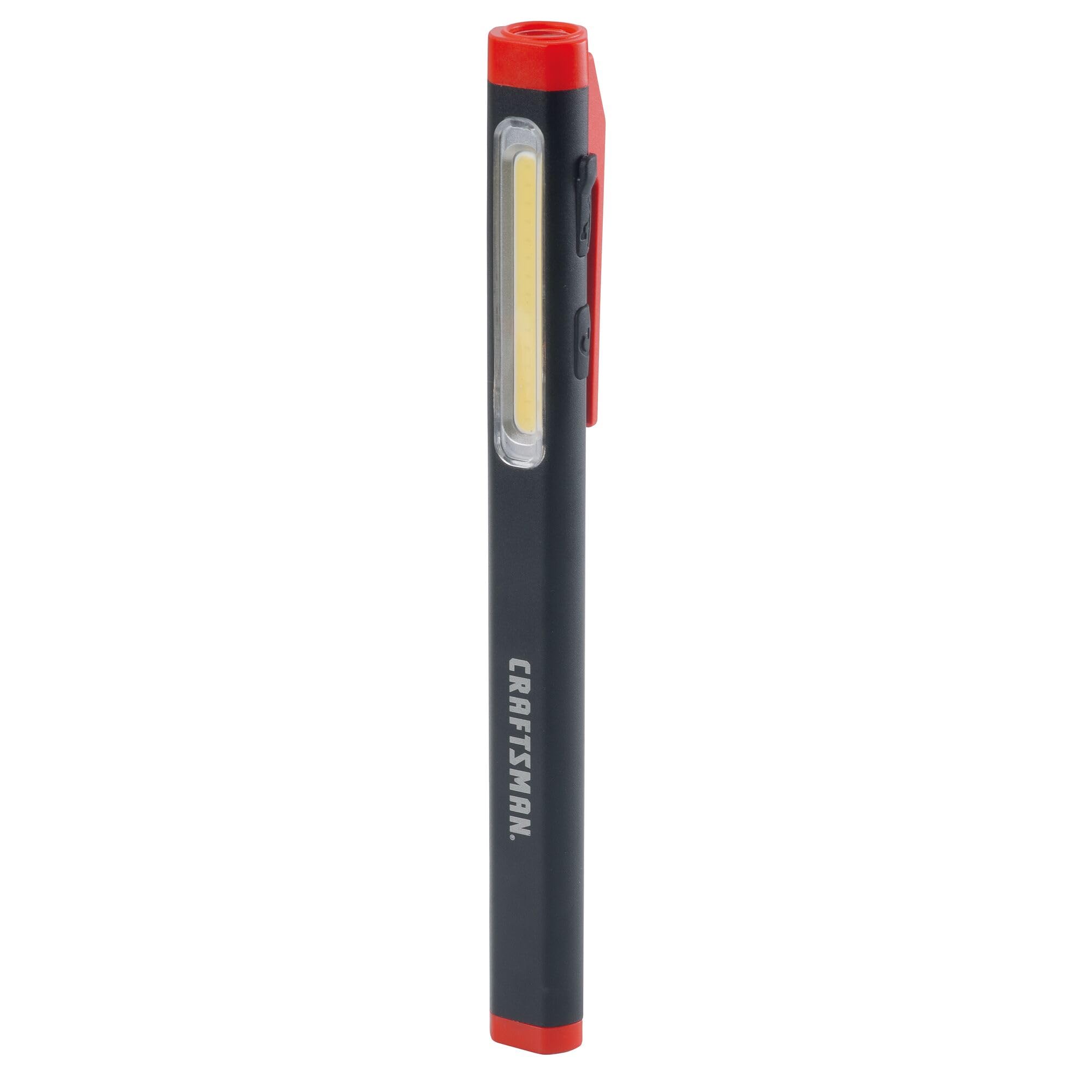
Figure 2: Charging the Pen Light via USB-C
ຄໍາແນະນໍາການດໍາເນີນງານ
ເປີດ/ປິດ ແລະເລືອກໂໝດ
The pen light features a single power button for all operations.
- ເພື່ອເປີດ: Press the power button once. The light will typically turn on in its last used mode or a default mode.
- ເພື່ອປ່ຽນແບບ: While the light is on, press the power button repeatedly to cycle through the available modes: Flood Mode (300 Lumens) and Pen Mode (180 Lumens).
- ປິດ: Press and hold the power button for approximately 1-2 seconds, or cycle through all modes until the light turns off.
ບໍາລຸງຮັກສາ
ການເຮັດຄວາມສະອາດແລະການເກັບຮັກສາ
- ທໍາຄວາມສະອາດ: Wipe the pen light with a soft, damp cloth. Do not use abrasive cleaners or solvents. Ensure the USB-C port cover is closed before cleaning.
- ການເກັບຮັກສາ: Store the pen light in a cool, dry place away from direct sunlight and extreme temperatures. For long-term storage, ensure the battery is partially charged (around 50%) to maintain battery health.
- ການດູແລຫມໍ້ໄຟ: Recharge the battery regularly, even if not frequently used, to prevent deep discharge and prolong its lifespan.
ການແກ້ໄຂບັນຫາ
| ບັນຫາ | ສາເຫດທີ່ເປັນໄປໄດ້ | ການແກ້ໄຂ |
|---|---|---|
| ແສງບໍ່ໄດ້ເປີດ. | ແບັດເຕີຣີໝົດ. | Charge the pen light using the USB-C cable. |
| ແສງສະຫວ່າງອ່ອນໆ. | ສາກແບັດເຕີຣີເຫຼືອ ໜ້ອຍ. | Recharge the pen light. |
| Pen light not charging. | Faulty USB-C cable or power source. | Try a different USB-C cable or power adapter. Ensure the cable is fully inserted. |
| Cannot switch between modes. | ການກົດປຸ່ມບໍ່ຖືກຕ້ອງ. | Ensure you are pressing the power button briefly to cycle modes. |
ຂໍ້ມູນຈໍາເພາະ
| ຄຸນສົມບັດ | ລາຍລະອຽດ |
|---|---|
| ໝາຍເລກຕົວແບບ | CMMT25166 |
| ແຫຼ່ງພະລັງງານ | ພະລັງງານຫມໍ້ໄຟ (Lithium Ion) |
| ປະເພດແຫຼ່ງແສງ | LED |
| ວັດສະດຸ | ອາລູມີນຽມ |
| White Brightness (Flood Mode) | 300 Lumens |
| White Brightness (Pen Mode) | 180 Lumens |
| ເວລາແລ່ນ | ສູງສຸດ 3 ຊົ່ວໂມງ |
| ພອດສາກໄຟ | USB-C |
| ລະດັບຄວາມຕ້ານທານນ້ໍາ | ບໍ່ທົນທານຕໍ່ນ້ໍາ |
| ນ້ໍາຫນັກລາຍການ | 3.68 ອອນ |
| ຂະໜາດລາຍການ (L x W x H) | 2.7"L x 8.9"W x 1.5"H |
ຮັບປະກັນ
This CRAFTSMAN product is backed by a ຮັບປະກັນຕະຫຼອດຊີວິດເຕັມ. If the product fails to perform for any reason, it will be replaced. No proof of purchase is required for warranty claims.
To initiate a warranty claim, return the damaged product to a stocking Retail Partner or call CRAFTSMAN customer service at 1-888-331-4569 for details and assistance.
ສະຫນັບສະຫນູນ
For further assistance, technical support, or to inquire about other CRAFTSMAN products, please visit the official CRAFTSMAN webເວັບໄຊ ຫຼືຕິດຕໍ່ບໍລິການລູກຄ້າ.
CRAFTSMAN Customer Service: 1-888-331-4569
ທ່ານຍັງສາມາດຊອກຫາຂໍ້ມູນເພີ່ມເຕີມ ແລະ ຜະລິດຕະພັນໄດ້ທີ່ ຮ້ານ CRAFTSMAN ໃນ Amazon.
