
1. ຂໍ້ມູນຄວາມປອດໄພທີ່ສໍາຄັນ
ກະລຸນາອ່ານຄໍາແນະນໍາທັງໝົດຢ່າງລະອຽດກ່ອນທີ່ຈະໃຊ້ເຄື່ອງບົດ. ເກັບຄູ່ມືນີ້ໄວ້ເພື່ອອ້າງອີງໃນອະນາຄົດ.
- ຮັກສາເດັກນ້ອຍ ແລະສັດລ້ຽງຢູ່ຫ່າງຈາກເຄື່ອງຕັດ.
- Keep loose clothing, jewelry, hair, and fingers away from the paper and media entry slots.
- Do not spray or keep aerosol products in or near the shredder.
- Do not shred metal credit cards or any other metal objects.
- Do not shred adhesive labels or materials that are not paper, CDs, DVDs, or plastic credit cards.
- Ensure the shredder is placed on a stable, flat surface.
- ຖອດປລັກເຄື່ອງບົດເມື່ອບໍ່ໄດ້ໃຊ້ງານ ຫຼື ກ່ອນການທຳຄວາມສະອາດ.
- Do not attempt to repair the shredder yourself. Contact qualified service personnel.
2. ຜະລິດຕະພັນເກີນview
The Amazon Basics 8-Sheet Strip-Cut Shredder is designed for secure destruction of documents, CDs, DVDs, and plastic credit cards. It features a strip-cut mechanism for P-2 security level shredding.
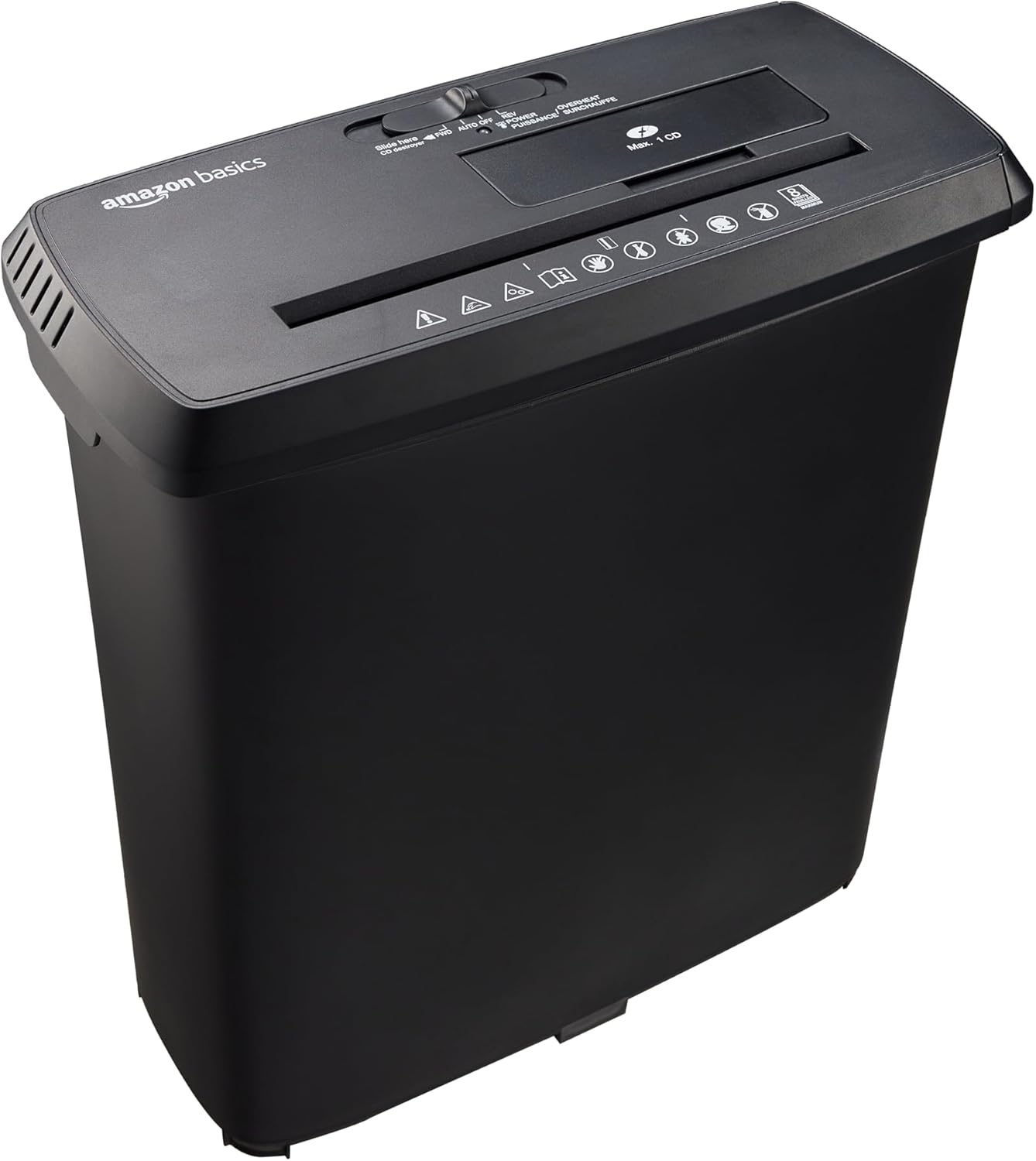
Figure 1: Amazon Basics 8-Sheet Strip-Cut Shredder. This image shows the complete shredder unit, consisting of the black shredder head placed on top of its matching black wastebasket.
ຄຸນນະສົມບັດທີ່ສໍາຄັນ:
- Strip-Cut Shredding: Cuts material into approximately 0.6 cm wide strips, meeting P-2 security standards.
- ຄວາມອາດສາມາດ: Shreds up to 8 sheets of 75 gsm paper simultaneously. Staples and small paper clips do not need to be removed.
- Media Shredding: Dedicated slots for shredding CDs, DVDs, and plastic credit cards (one at a time).
- ຮອບວຽນຫນ້າທີ່: 2.5 minutes of continuous operation, followed by a 15-minute cool-down period.
- ການປ້ອງກັນຄວາມຮ້ອນເກີນ: Automatic shutdown to protect the motor from overheating if the duty cycle is exceeded.
- ສະວິດການຄວບຄຸມ: 4-mode switch for Auto/On, Off, Reverse, and Forward operations.
- ຕົວຊີ້ວັດ LED: Power (blue) and Overheat (red) status indicators.
- ກະຕ່າຂີ້ເຫຍື້ອ: Easy-to-empty 12.8 L (3.4 Gallons) capacity wastebasket.
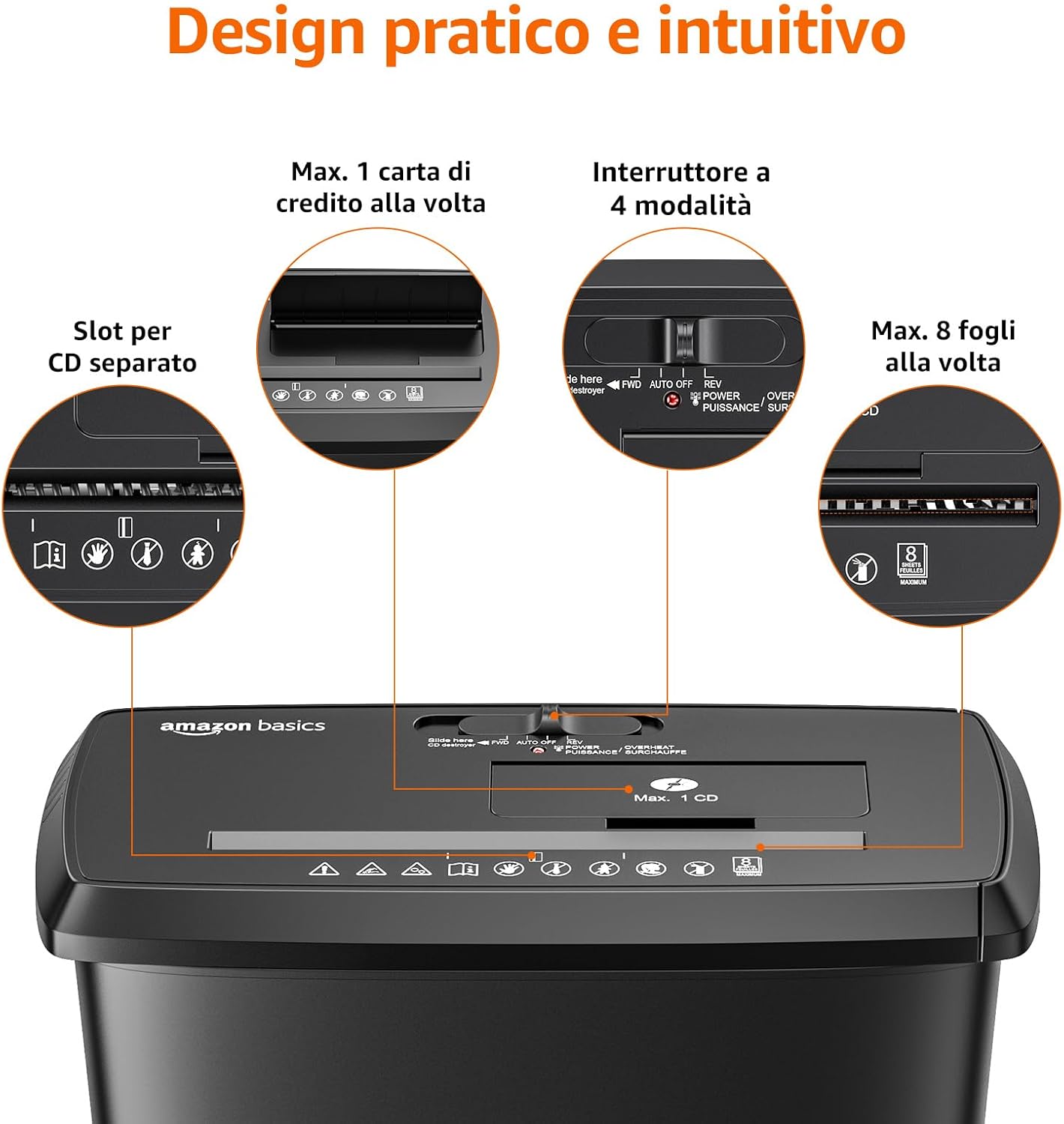
ຮູບທີ 2: ລາຍລະອຽດ view of the shredder's intuitive design, highlighting the separate slots for CDs/credit cards, the 4-mode control switch, and the 8-sheet paper capacity.

Figure 3: Close-up of the control panel, displaying the 4-mode switch (FWD/AUTO/OFF/REV) and LED indicators for power (blue) and overheat (red).
3. ຕັ້ງຄ່າ
- ແກະເຄື່ອງຕັດເອກະສານອອກ: ເອົາສ່ວນປະກອບທັງຫມົດອອກຈາກການຫຸ້ມຫໍ່ຢ່າງລະມັດລະວັງ. ຮັກສາການຫຸ້ມຫໍ່ສໍາລັບການຂົນສົ່ງຫຼືການເກັບຮັກສາໃນອະນາຄົດ.
- Position the Wastebasket: Place the wastebasket on a stable, flat surface. Ensure there is enough space around the shredder for proper ventilation and operation.
- Mount the Shredder Head: Carefully align the shredder head with the top of the wastebasket and lower it into place. Ensure it sits securely.
- ເຊື່ອມຕໍ່ພະລັງງານ: ສຽບສາຍໄຟເຂົ້າໄປໃນປ່ຽງໄຟຟ້າມາດຕະຖານ.
4. ຄໍາແນະນໍາການດໍາເນີນງານ
Control Switch Functions:
- AUTO/ON: The shredder is ready for operation. It will automatically start when paper or media is inserted and stop when shredding is complete.
- ປິດ: The shredder is powered off.
- REV (ປີ້ນກັບ): Moves the shredder blades backward to help clear paper jams.
- FWD (Forward): Moves the shredder blades forward continuously, useful for clearing minor jams or for manual operation.
Shredding Paper:
- ຕັ້ງສະວິດຄວບຄຸມໄປທີ່ ອັດຕະໂນມັດ/ເປີດ. The blue Power LED will illuminate.
- Insert up to 8 sheets of paper (75 gsm) into the paper entry slot. The shredder will automatically start and stop once the paper is shredded.
- Do not exceed the maximum sheet capacity to prevent jams and motor strain.

Figure 4: Illustration of the shredder's P-2 security level, showing paper being cut into approximately 0.6 cm strips.

Figure 5: A person feeding paper into the Amazon Basics 8-Sheet Strip-Cut Shredder, demonstrating its use in an office setting.
Shredding CDs, DVDs, and Credit Cards:
- ຕັ້ງສະວິດຄວບຄຸມໄປທີ່ ອັດຕະໂນມັດ/ເປີດ.
- Insert one CD, DVD, or plastic credit card into the dedicated media entry slot. The shredder will automatically start and stop.
- Do not insert more than one item at a time. Do not shred metal credit cards.

Figure 6: The shredder's capability to destroy CDs, DVDs, and credit cards through dedicated slots.
Duty Cycle and Overheat Protection:
The shredder is designed for intermittent use. It can operate continuously for 2.5 minutes. After this period, it requires a 15-minute cool-down period. If the shredder is used beyond its maximum duty cycle, the Overheat LED (red) will illuminate, and the unit will automatically shut down to prevent motor damage. Allow the shredder to cool down completely before resuming operation.
5. ບໍາລຸງຮັກສາ
Emptying the Wastebasket:
When the wastebasket is full, the shredder will stop operating. To empty, ensure the shredder is turned ປິດ and unplugged. Carefully lift the shredder head off the wastebasket and dispose of the shredded material. Replace the shredder head securely before plugging the unit back in.
ການລະບາຍສີ:
Regular lubrication of the shredder blades is recommended to maintain optimal performance and extend the life of the shredder. While shredder oil is not included, it can be purchased separately. Apply shredder oil as per the oil manufacturer's instructions, typically by applying a small amount across the paper entry slot and then running the shredder in forward mode for a few seconds.
ທໍາຄວາມສະອາດ:
Always unplug the shredder before cleaning. Wipe the exterior of the shredder with a soft, dry cloth. Do not use abrasive cleaners or solvents.
6. ການແກ້ໄຂບັນຫາ
| ບັນຫາ | ສາເຫດທີ່ເປັນໄປໄດ້ | ການແກ້ໄຂ |
|---|---|---|
| ເຄື່ອງຕັດເຄື່ອງບໍ່ເປີດ. | Not plugged in; power switch off; shredder head not seated correctly; wastebasket full. | Ensure power cord is securely plugged in. Set control switch to AUTO/ON. Re-seat the shredder head. Empty the wastebasket. |
| ເຈ້ຍຕິດ. | Too many sheets inserted; paper inserted incorrectly. | Set control switch to REV to clear the jam. If unsuccessful, unplug, carefully remove paper, then plug in and try FWD. Reduce sheet count for future shredding. |
| Shredder stops during operation, Overheat LED is red. | Exceeded duty cycle; motor overheated. | Turn off and unplug the shredder. Allow it to cool down for at least 15 minutes before resuming operation. |
| ເຄື່ອງຮື້ມີສຽງດັງ ຫຼື ປະສິດທິພາບຫຼຸດລົງ. | Blades require lubrication; wastebasket is too full. | Lubricate the shredder blades as per maintenance instructions. Empty the wastebasket. |
7. ຂໍ້ມູນຈໍາເພາະ
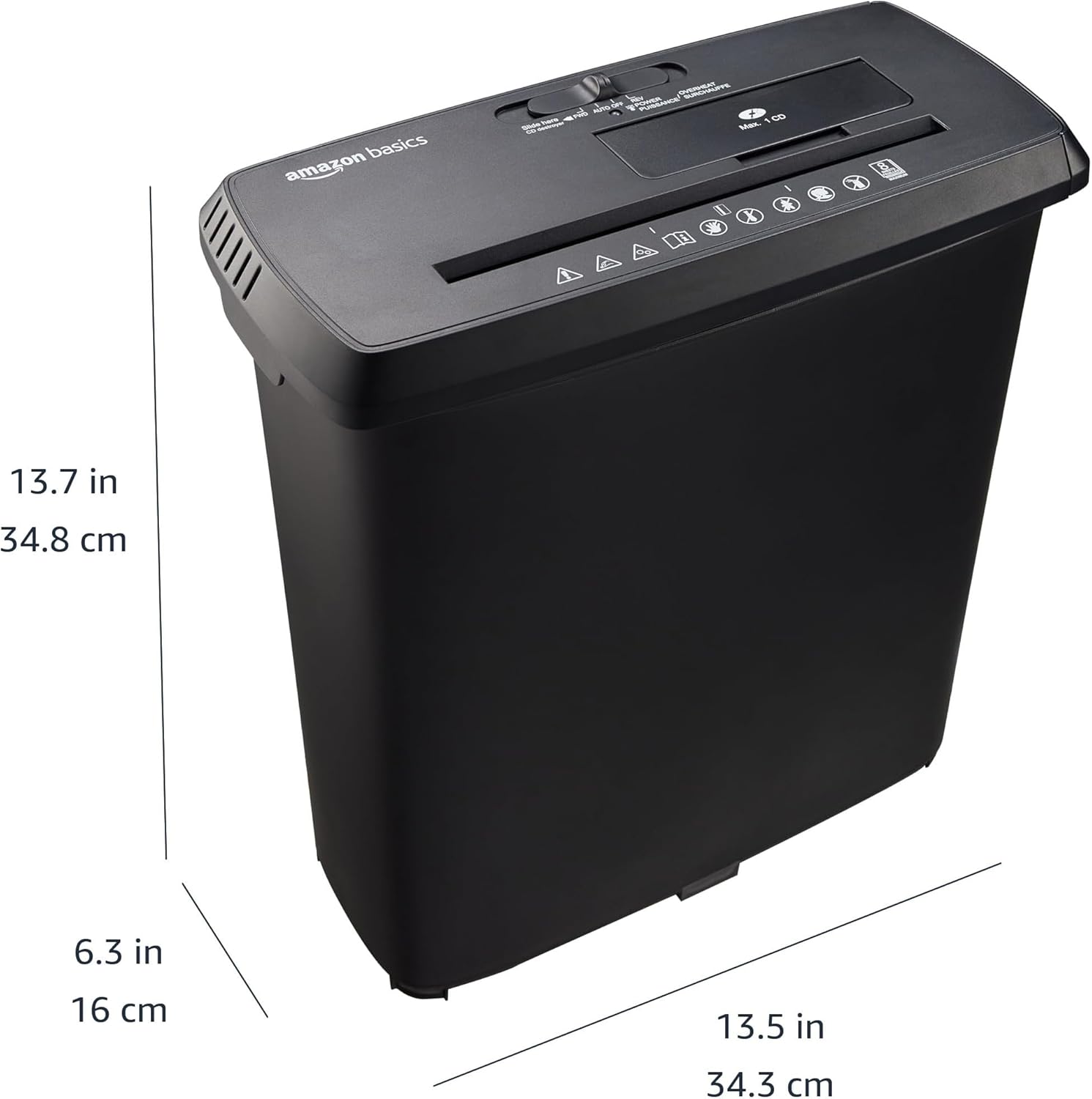
Figure 7: Diagram illustrating the physical dimensions of the Amazon Basics 8-Sheet Strip-Cut Shredder: 34.3 cm (13.5 in) width, 16 cm (6.3 in) depth, and 34.8 cm (13.7 in) height.
| ຄຸນສົມບັດ | ລາຍລະອຽດ |
|---|---|
| ໝາຍເລກຕົວແບບ | S120-D |
| ປະເພດ shred | Strip-Cut |
| ຂະຫນາດ Shred | Approx. 0.6 cm strips |
| ລະດັບຄວາມປອດໄພ | P-2 |
| ຄວາມອາດສາມາດຂອງເຈ້ຍ | 8 ແຜ່ນ (75 gsm) |
| Media Shredding | CDs, DVDs, Plastic Credit Cards (1 at a time) |
| ຄວາມອາດສາມາດຂອງກະຕ່າຂີ້ເຫຍື້ອ | 12.8 ລິດ (3.4 ກາລອນ) |
| ວົງຈອນຫນ້າທີ່ | 2.5 ນາທີ ON / 15 ນາທີ OFF |
| ຂະໜາດ (ກວ້າງ x ສູງ) | 34.3 x 34.3 x 34.8 ຊມ (13.5 x 13.5 x 13.7 ນິ້ວ) |
| ວັດສະດຸ | ໂລຫະ, ພາດສະຕິກ |
| ສີ | ດຳ |
8. ການຮັບປະກັນແລະການສະຫນັບສະຫນູນ
Warranty information for this product is typically provided with the product packaging or can be found on the Amazon Basics website. For customer support, troubleshooting assistance, or to inquire about warranty details, please refer to the Amazon Basics customer service channels available in your region.