
1. ບົດແນະນຳ
The IMALENT SR32 is a high-performance LED flashlight designed for various applications requiring powerful and long-range illumination. Featuring 32 upgraded Cree XHP50.3 HI LED chips, it delivers an impressive 120,000 lumens and a maximum beam distance of 2080 meters. Constructed from durable hard-anodized aluminum alloy, the SR32 is built to withstand challenging environments, offering IP56 water resistance and impact resistance up to a 20-inch drop. This manual provides essential information for the safe and effective use of your SR32 flashlight.
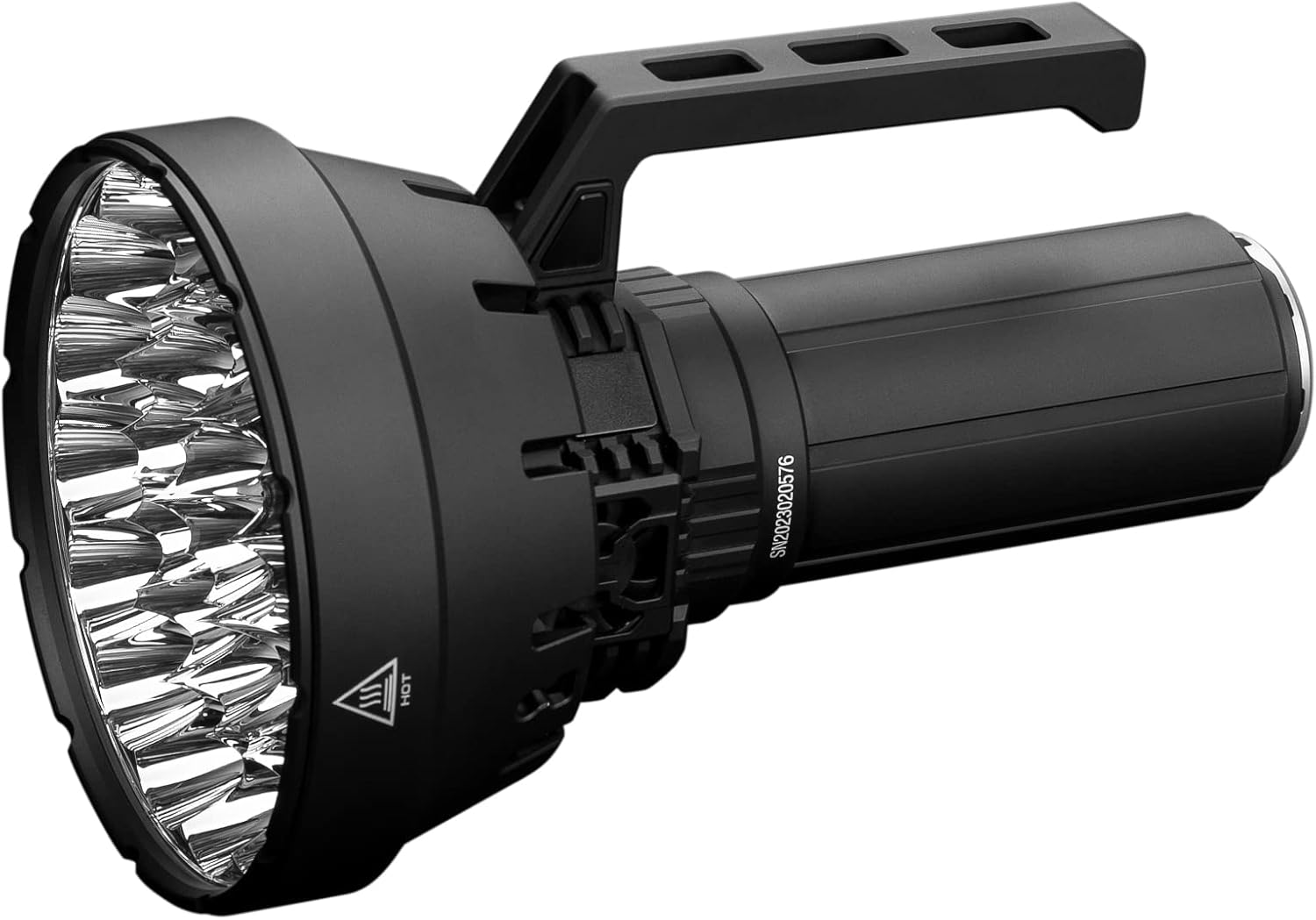
Image 1: The IMALENT SR32 120000 Lumens Flashlight, showcasing its robust design and powerful reflector head.
2. ເນື້ອໃນຊຸດ
Please inspect the package contents upon receipt. The following items should be included:
- IMALENT SR32 Flashlight
- Rechargeable Battery Pack (pre-installed)
- USB Type-C PD100W Charging Block
- ສາຍສາກ USB-C
- ສາຍບ່າ
- Hexagonal Spanner (for handle removal/attachment)
- ອະໄຫລ່ O-rings
- ຄູ່ມືຜູ້ໃຊ້
3. ຜະລິດຕະພັນເກີນview
The IMALENT SR32 features an advanced design for optimal performance and user experience.
ຄຸນນະສົມບັດທີ່ສໍາຄັນ:
- ຜົນຜະລິດ Lumens ສູງ: Up to 120,000 lumens with 32 Cree XHP50.3 HI LEDs.
- ໄລຍະທາງຍາວ Beam: Reaches up to 2080 meters.
- ລະບົບເຮັດຄວາມເຢັນແບບປະສົມປະສານ: Three high-efficiency cooling fans (10,500 rpm, 4.5V/0.18A) for effective heat dissipation and noise reduction.
- ຈໍສະແດງຜົນ OLED: Provides real-time information on battery voltage, brightness mode, and lockout status.
- ການອອກແບບສະຫຼັບຄູ່: Control via a side switch on the body and an additional switch on the detachable handle.
- USB Type-C PD100W Fast Charging: Rapid charging capability for the integrated battery pack.
- ຟັງຊັນ Power Bank: The detachable battery pack can be used to charge other devices via USB-C.
- ການກໍ່ສ້າງທົນທານ: Made from aerospace-grade aluminum alloy with IP56 water resistance.
- ການອອກແບບ Ergonomic: Detachable handle with heat insulation for comfortable use at high outputs.

ຮູບພາບທີ 2: ໄລຍະໃກ້ view of the SR32's three high-efficiency cooling fans, designed to manage heat during high-lumen operation.

Image 3: The OLED display on the IMALENT SR32, showing battery level and operational status.
4. ຕັ້ງຄ່າ
4.1 ການສາກໄຟເບື້ອງຕົ້ນ
Before first use, fully charge the SR32 flashlight. Connect the provided USB-C cable to the flashlight's charging port and to the PD100W charging block. Plug the charging block into a power outlet. The OLED display will indicate charging status. A full charge typically takes approximately 1.5 hours.
4.2 ການຕິດສາຍບ່າ
For enhanced portability and hands-free operation, attach the included shoulder strap to the designated attachment points on the flashlight body. Ensure the strap is securely fastened before use.

Image 4: The IMALENT SR32 equipped with its shoulder strap, demonstrating enhanced portability.
4.3 Handle Attachment/Removal
The SR32 features a detachable handle. To remove or attach the handle, use the provided hexagonal spanner to loosen or tighten the screws securing it to the flashlight body. Ensure the handle is firmly attached before operating the flashlight.

Image 5: Illustration of how to remove the handle from the IMALENT SR32 using a hexagonal spanner.
5. ຄໍາແນະນໍາການດໍາເນີນງານ
5.1 ເປີດ/ປິດ
Press and hold either the side switch or the handle switch for approximately 1 second to turn the flashlight on or off.
5.2 Brightness Level Adjustment
With the flashlight on, press and hold either switch to cycle through the brightness levels (Moonlight, Low, Middle Low, Middle I, Middle II, High, Turbo). Release the switch at your desired brightness. The flashlight features memory function, recalling the last used brightness level when turned on again.
5.3 Turbo Mode Activation
From any mode, double-click either switch to instantly activate Turbo mode (120,000 lumens). Double-click again to return to the previous brightness level.
5.4 Strobe Mode Activation
From Turbo mode, double-click either switch to activate Strobe mode. Double-click again to return to Turbo mode.
5.5 Lockout Function
To prevent accidental activation, the SR32 features a lockout function:
- ລັອກ: With the flashlight off, quickly press either power switch button 4 times. The indicator light will flash 3 times to confirm the flashlight is locked.
- ເພື່ອປົດລັອກ: Quickly press either switch button 4 times again. The flashlight will unlock and can be operated normally.
6. ຫນ້າທີ່ສາກໄຟ ແລະ Power Bank
6.1 Charging the Flashlight
The SR32 utilizes a USB Type-C PD100W fast charging system. Connect the flashlight to the provided charger and cable. The OLED display will show charging progress. The charging port is designed for durability and efficient power transfer.
6.2 ຄຸນສົມບັດ Power Bank
The integrated 32,000 mAh battery pack (comprising 8x21700 batteries) can function as a power bank. Connect your external device (e.g., smartphone, tablet) to the flashlight's USB-C port using a compatible cable to initiate charging. This feature is useful for charging devices in remote locations.

Image 6: The IMALENT SR32 demonstrating its power bank functionality, charging a smartphone via its USB-C port.
7. ບໍາລຸງຮັກສາ
Proper maintenance ensures the longevity and optimal performance of your IMALENT SR32 flashlight.
- ທໍາຄວາມສະອາດ: ທຳຄວາມສະອາດຕົວໄຟສາຍເປັນປະຈຳດ້ວຍຜ້າທີ່ອ່ອນນຸ້ມ, ຖູ.amp cloth. For the lens, use a microfiber cloth to avoid scratches.
- O-ring Lubrication: Periodically lubricate the O-rings with silicone grease to maintain water resistance. Replace worn O-rings with the provided spares.
- ການດູແລຫມໍ້ໄຟ: ຖ້າບໍ່ໄດ້ໃຊ້ເປັນເວລາດົນ, ໃຫ້ເກັບຮັກສາໄຟສາຍໄວ້ກັບແບັດເຕີຣີທີ່ສາກໄຟແລ້ວບາງສ່ວນ. ຫຼີກລ່ຽງການສາກແບັດເຕີຣີຈົນໝົດເລື້ອຍໆ.
- ຫຼີກເວັ້ນການ Disassembly: Do not attempt to disassemble the sealed head or battery pack, as this may damage the flashlight and void the warranty.
8. ການແກ້ໄຂບັນຫາ
If you encounter issues with your SR32 flashlight, refer to the following common problems and solutions:
| ບັນຫາ | ສາເຫດທີ່ເປັນໄປໄດ້ | ການແກ້ໄຂ |
|---|---|---|
| ໄຟສາຍບໍ່ເປີດ. | ແບັດເຕີຣີໝົດ ຫຼື ຢູ່ໃນໂໝດລັອກເອົ້າ. | Charge the battery. Unlock the flashlight by pressing the switch 4 times. |
| Brightness levels are inconsistent or lower than expected. | Low battery, or flashlight is overheating. | Recharge the battery. Allow the flashlight to cool down; the cooling fans should activate automatically at higher outputs. The OLED display will show temperature warnings. |
| ໄຟສາຍຮ້ອນເກີນໄປ. | Operating at high lumen levels for extended periods. | This is normal for high-output flashlights. The internal cooling fans are designed to manage this. If the temperature becomes critical, the flashlight will automatically reduce output. Use the insulated handle for comfort. |
| ນ້ຳເຂົ້າ. | ວົງແຫວນ O ທີ່ເສຍຫາຍ ຫຼື ຕິດຕັ້ງບໍ່ຖືກຕ້ອງ. | Inspect O-rings for damage or misalignment. Replace if necessary and ensure they are properly seated and lubricated. |
If the problem persists, please contact IMALENT customer support.
9. ຂໍ້ມູນຈໍາເພາະ
| ຄຸນສົມບັດ | ຂໍ້ມູນຈໍາເພາະ |
|---|---|
| ຕົວແບບ | SR32 |
| ແຫຼ່ງແສງ | 32 x Cree XHP50.3 HI LEDs |
| ຄວາມສະຫວ່າງສູງສຸດ | 120,000 Lumens |
| ໄລຍະຫ່າງສູງສຸດຂອງລຳແສງ | 2080 ແມັດ (6824 ຟຸດ) |
| ສຸມ Peam Beam | 1,090,000 cd |
| ອຸນຫະພູມສີ | 6500K (Cold Light) |
| ແບັດເຕີຣີ | Integrated 32,000 mAh (8x21700 Lithium Ion) |
| ກຳລັງສາກໄຟ | USB Type-C PD100W Fast Charge |
| ເວລາແລ່ນສູງສຸດ | 360 ຊົ່ວໂມງ (ໂໝດແສງຈັນ) |
| ວັດສະດຸ | Aerospace-grade Aluminum Alloy |
| ການຕໍ່ຕ້ານນ້ໍາ | ມາດຕະຖານ IP56 |
| ຄວາມຕ້ານທານຜົນກະທົບ | 0.5 ແມັດ (20 ນິ້ວ) |
| ຂະໜາດ | 5.4"ເລິກ x 8.6"ກວ້າງ x 2.2"ສູງ (ປະມານ 13.7 ຊມ x 21.8 ຊມ x 5.6 ຊມ) |
| ນ້ຳໜັກ | 8.91 ປອນ (ປະມານ 4.04 ກິໂລ) |

Image 7: Detailed output specifications for the IMALENT SR32 across various modes, including lumens, runtime, and beam distance.
10. ຂໍ້ມູນການຮັບປະກັນ
The IMALENT SR32 Flashlight comes with a limited warranty. Please refer to the warranty card included in your package or visit the official IMALENT webສະຖານທີ່ສໍາລັບຂໍ້ກໍານົດແລະເງື່ອນໄຂລະອຽດກ່ຽວກັບການຄຸ້ມຄອງແລະໄລຍະເວລາ.
11. ສະຫນັບສະຫນູນ
For technical assistance, product inquiries, or warranty claims, please contact IMALENT customer support through their official website or the contact information provided with your product documentation. Ensure you have your product model (SR32) and purchase details available when contacting support.