
1. ບົດແນະນຳ
This manual provides detailed instructions for the setup, operation, and maintenance of your Creative Sound Blaster Katana SE Multi-Channel Gaming Soundbar. Designed for an immersive audio experience, this soundbar features 180W peak power, a bi-amplified 4-driver design, Super X-Fi technology, and customizable RGB lighting. Please read this manual thoroughly before using your device to ensure optimal performance and safety.

Figure 1: Creative Sound Blaster Katana SE Gaming Soundbar
2. ຂໍ້ມູນຄວາມປອດໄພທີ່ສໍາຄັນ
- ອ່ານຄໍາແນະນໍາເຫຼົ່ານີ້.
- ຮັກສາຄໍາແນະນໍາເຫຼົ່ານີ້.
- ຟັງຄຳເຕືອນທັງໝົດ.
- ປະຕິບັດຕາມຄໍາແນະນໍາທັງຫມົດ.
- ຢ່າໃຊ້ອຸປະກອນນີ້ຢູ່ໃກ້ກັບນ້ໍາ.
- ເຮັດຄວາມສະອາດດ້ວຍຜ້າແຫ້ງເທົ່ານັ້ນ.
- ຫ້າມປິດຊ່ອງລະບາຍອາກາດໃດໆ. ຕິດຕັ້ງຕາມຄໍາແນະນໍາຂອງຜູ້ຜະລິດ.
- ຫ້າມຕິດຕັ້ງໃກ້ກັບແຫຼ່ງຄວາມຮ້ອນເຊັ່ນລັງສີ, ເຄື່ອງບັນທຶກຄວາມຮ້ອນ, ເຕົາຫຼືອຸປະກອນອື່ນໆ (ລວມທັງ. amplifiers) ທີ່ຜະລິດຄວາມຮ້ອນ.
- ປົກປ້ອງສາຍໄຟຈາກການຖືກສຽບ ຫຼື ສຽບ, ໂດຍສະເພາະຢູ່ປລັກສຽບ, ກ່ອງຮັບສະດວກ, ແລະຈຸດທີ່ພວກມັນອອກຈາກອຸປະກອນ.
- ໃຊ້ໄຟລ໌ແນບ/ອຸປະກອນເສີມທີ່ຜູ້ຜະລິດລະບຸໄວ້ເທົ່ານັ້ນ.
- ຖອດອຸປະກອນນີ້ອອກໃນລະຫວ່າງການມີພາຍຸຟ້າຜ່າ ຫຼືເມື່ອບໍ່ໄດ້ໃຊ້ເປັນເວລາດົນນານ.
3. ເນື້ອໃນຊຸດ
ກວດສອບວ່າລາຍການທັງຫມົດແມ່ນມີຢູ່ໃນຊຸດຂອງທ່ານ:
- Creative Sound Blaster Katana SE Soundbar
- Subwoofer (wired)
- ການຄວບຄຸມໄລຍະໄກ
- Power Adapter
- ສາຍ USB-C
- ສາຍໄຟ optical
4. ຜະລິດຕະພັນເກີນview
The Sound Blaster Katana SE is an all-in-one soundbar designed for powerful and immersive audio. It features a sleek design with integrated controls and a front-facing display.
4.1. Soundbar Components
- ການຄວບຄຸມແຜງເທິງ: Power, Volume Up/Down, Source, Mode, SXFI.
- ຈໍສະແດງຜົນດ້ານຫນ້າ: Shows current source (USB, AUX, OPTICAL, BT, TV), volume level, and selected sound mode.
- Front Headphone Jack: For connecting headphones directly.
- ໄມໂຄຣໂຟນໃນຕົວ: ສໍາລັບການສື່ສານສຽງ.
- RGB Lighting Strip: Customizable lighting effects located at the bottom of the soundbar.
- ຄົນຂັບລົດ: ສອງ -amplified 4-driver design for clear and precise audio.

ຮູບ 2: ດ້ານຫນ້າ view of the Sound Blaster Katana SE with RGB lighting
4.2. ການເຊື່ອມຕໍ່ແຜງດ້ານຫລັງ
The rear panel provides various ports for connecting to your devices:
- HDMI Out (ARC): For connecting to a TV with Audio Return Channel support.
- SXFI Out: Dedicated port for Super X-Fi enabled headphones.
- ສຽງ USB ໃນ: For digital audio connection to PC/Mac.
- Aux In: ຂາເຂົ້າສຽງອະນາລັອກ 3.5 ມມ.
- Optical ໃນ: ການປ້ອນຂໍ້ມູນດ້ວຍສຽງ optical ດິຈິຕອນ.
- ຍ່ອຍອອກ: For connecting the wired subwoofer.
- ການປ້ອນຂໍ້ມູນພະລັງງານ: ສໍາລັບຕົວແປງໄຟ.

Figure 3: Rear panel with HDMI ARC, SXFI Out, USB Audio In, Aux In, Optical In, Sub Out, and Power Input.
4.3. Subwoofer
The included wired subwoofer enhances bass response for a more dynamic audio experience.

ຮູບທີ 4: ພາຍໃນ view showing the soundbar's bi-amplified drivers and the subwoofer's design.
5. ຕັ້ງຄ່າ
Follow these steps to set up your Sound Blaster Katana SE:
- ການຈັດວາງ: Place the soundbar on a stable surface below your TV or monitor. Position the subwoofer on the floor near the soundbar for optimal bass.
- ເຊື່ອມຕໍ່ Subwoofer: Connect the wired subwoofer cable to the 'Sub Out' port on the soundbar's rear panel.
- ເຊື່ອມຕໍ່ພະລັງງານ: ເຊື່ອມຕໍ່ອະແດບເຕີໄຟເຂົ້າກັບຊ່ອງສຽບໄຟຂອງແຖບສຽງ ແລະ ຈາກນັ້ນສຽບມັນເຂົ້າກັບປລັກສຽບຝາ.
- ເຊື່ອມຕໍ່ແຫຼ່ງສຽງ: Choose your preferred audio connection method (HDMI ARC, Optical, USB, Aux, or Bluetooth) and connect the appropriate cable.
Video 1: Official product video demonstrating the Sound Blaster Katana SE's features and connectivity options.
6. ຕົວເລືອກການເຊື່ອມຕໍ່
The Sound Blaster Katana SE offers a wide range of connectivity to suit various devices:
- HDMI Out (ARC): Connect to your TV's HDMI ARC port for high-quality audio and control.
- ສຽງ USB ໃນ: Ideal for connecting to PCs, Macs, or gaming consoles that support USB audio.
- Aux In: Use a 3.5mm audio cable to connect to devices with an analog audio output.
- Optical ໃນ: For digital audio connection from TVs, game consoles, or other media players.
- Bluetooth 5.0: Pair wirelessly with your mobile devices, tablets, or computers for convenient audio streaming.
- SXFI Out: Connect Super X-Fi certified headphones for a personalized holographic audio experience.

Figure 5: Soundbar showcasing versatile connectivity with gaming consoles and mobile devices.
7. ຄໍາແນະນໍາການດໍາເນີນງານ
7.1. ເປີດ/ປິດ
Press the Power button on the soundbar's top panel or the remote control to turn the device on or off.
7.2. ການຄວບຄຸມປະລິມານ
Use the Volume Up (+) and Volume Down (-) buttons on the soundbar or remote to adjust the audio level. The current volume will be displayed on the front panel.
7.3. ການຄັດເລືອກແຫຼ່ງ
Press the 'Source' button on the soundbar or remote to cycle through available input sources (HDMI ARC, USB, Aux, Optical, Bluetooth).
7.4. ໂໝດສຽງ
The soundbar features optimized sound modes for different content types. Press the 'Mode' button on the soundbar or remote to switch between:
- ດົນຕີ: ປັບປຸງໃຫ້ດີຂຶ້ນສຳລັບການຫຼິ້ນເພງ.
- ຮູບເງົາ: ເຫມາະສໍາລັບສຽງ cinematic.
- ເກມ: Tailored for immersive gaming soundscapes.
- Effects Off: Neutral audio profile.
7.5. ການນໍາໃຊ້ການຄວບຄຸມໄລຍະໄກ
The included remote control provides full functionality for the soundbar, including power, volume, source, mode, SXFI, RGB lighting, and custom buttons.
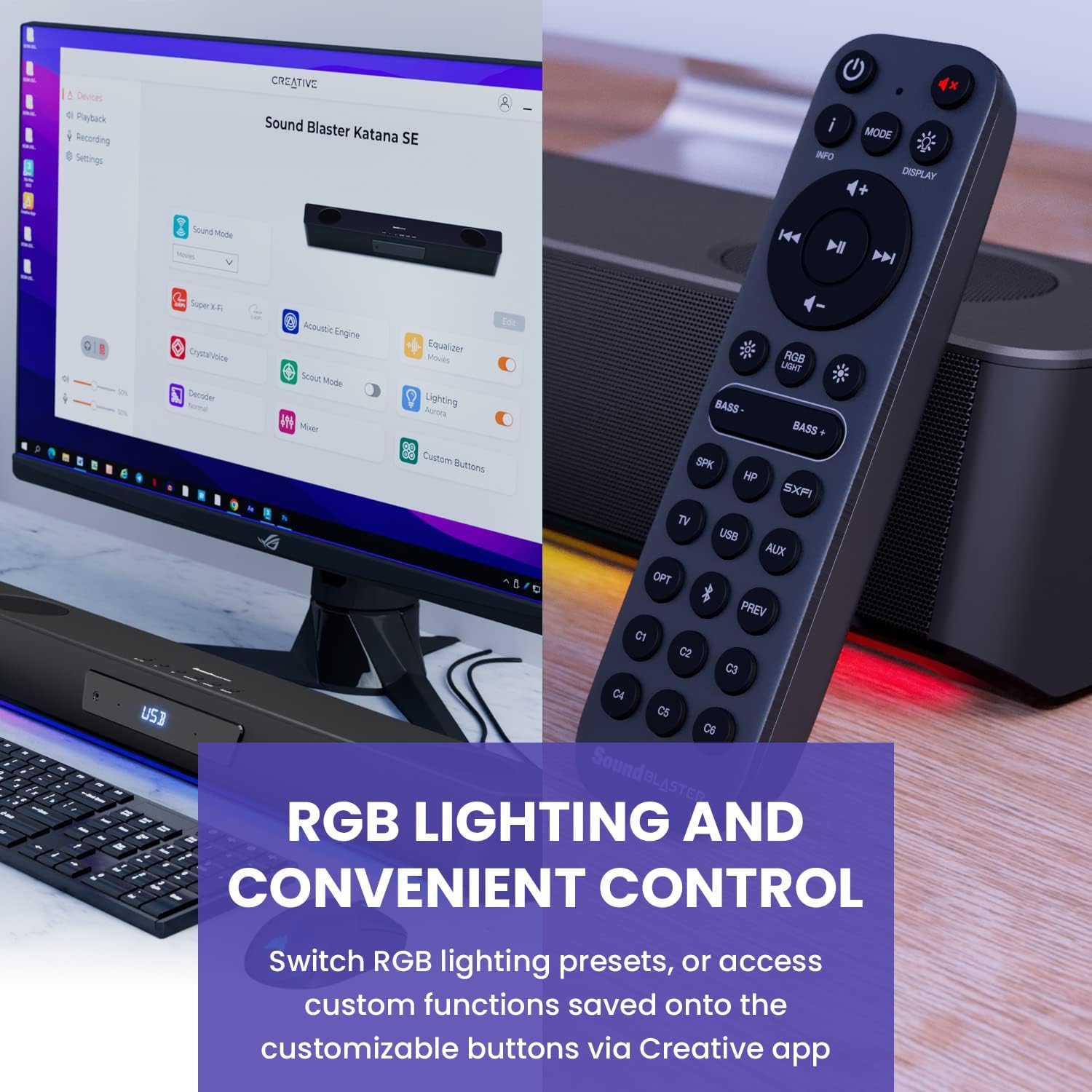
Figure 6: Remote control for the Sound Blaster Katana SE.
7.6. Creative App Customization
For advanced customization, download the Creative app on your PC or Mac. The app allows you to:
- Tune Audio Performance: Adjust EQ settings and activate Sound Blaster processing technologies.
- ປັບແຕ່ງແສງ RGB: Select from various RGB presets or create your own custom lighting effects.
- Map Custom Functions: Assign specific commands to the six customizable buttons on the remote control.

Figure 7: Creative app interface showing sound mode, Super X-Fi, Acoustic Engine, Equalizer, CrystalVoice, Scout Mode, Lighting, Decoder, Mixer, and Custom Buttons.
8. Super X-Fi Technology
Super X-Fi technology personalizes your headphone audio experience for optimized and realistic listening. It recreates the soundstage of a multi-speaker system in your headphones.
- SXFI Battle Mode: ໄດ້ຮັບ advan ການແຂ່ງຂັນtage in FPS games by accurately pinpointing enemy locations through enhanced audio cues.

Figure 8: Super X-Fi and SXFI Battle Mode for enhanced gaming audio.
9. ໄມໂຄຣໂຟນໃນຕົວ
The Sound Blaster Katana SE includes a built-in beamforming microphone, allowing you to participate in calls or in-game voice chat directly through the soundbar.
10. ໄຟ RGB
The integrated RGB lighting strip can be customized to match your setup or mood. Use the remote control to cycle through presets or the Creative app for advanced color and effect adjustments.
11. ບໍາລຸງຮັກສາ
To ensure the longevity and performance of your Sound Blaster Katana SE:
- ຮັກສາອຸປະກອນໃຫ້ສະອາດໂດຍການເຊັດດ້ວຍຜ້າອ່ອນ, ແຫ້ງ.
- Avoid using liquid cleaners or aerosols.
- ໃຫ້ແນ່ໃຈວ່າຊ່ອງລະບາຍອາກາດບໍ່ຖືກກີດຂວາງ.
- ຢ່າເຮັດໃຫ້ອຸປະກອນຢູ່ໃນອຸນຫະພູມ ຫຼືຄວາມຊຸ່ມຊື່ນທີ່ສຸດ.
12. ການແກ້ໄຂບັນຫາ
If you encounter issues with your soundbar, refer to the following common solutions:
- ບໍ່ມີສຽງ: Check all cable connections (power, audio source, subwoofer). Ensure the correct input source is selected on the soundbar. Verify the volume is not muted or too low.
- ສຽງບິດເບືອນ: Try reducing the volume. Check audio cable integrity. Ensure the audio source is providing a clean signal.
- ບັນຫາການເຊື່ອມຕໍ່ Bluetooth: Ensure the soundbar is in Bluetooth pairing mode. Delete the soundbar from your device's Bluetooth list and re-pair. Move closer to the soundbar to reduce interference.
- ການຄວບຄຸມໄລຍະໄກບໍ່ເຮັດວຽກ: Check battery levels and replace if necessary. Ensure there are no obstructions between the remote and the soundbar.
- ໄຟ RGB ບໍ່ເຮັດວຽກ: Check settings in the Creative app. Ensure RGB lighting is enabled via the remote or app.
13. ຂໍ້ມູນຈໍາເພາະ
| ຄຸນສົມບັດ | ຂໍ້ມູນຈໍາເພາະ |
|---|---|
| ຊື່ຕົວແບບ | 51MF8415AA000 27585486 |
| ປະເພດລຳໂພງ | ແຖບສຽງ |
| ປະເພດການຕິດຕັ້ງ | ພູຕັ້ງໂຕະ |
| ຄຸນນະສົມບັດພິເສດ | Bass Boost, Built In Microphone, Radio, Stereo Pairing, USB Port |
| ການນໍາໃຊ້ທີ່ແນະນໍາສໍາລັບຜະລິດຕະພັນ | For Gaming Consoles, For Computers |
| ອຸປະກອນທີ່ເຂົ້າກັນໄດ້ | ຄອມພິວເຕີຕັ້ງໂຕະ, ຄອມພິວເຕີໂນດບຸກ, ເຄື່ອງຫຼິ້ນ MP3, ໂປເຈັກເຕີ, ໂທລະສັບສະຫຼາດ, ແທັບເລັດ, ໂທລະພາບ |
| ຈຳນວນຫົວໜ່ວຍ | 1.0 ນັບ |
| ການຕັ້ງຄ່າຊ່ອງສຽງອ້ອມຮອບ | 5.1 |
| ສີ | 180W Peak Power with Bluetooth 5.0 |
| ອົງປະກອບລວມ | ໄລຍະໄກ |
| ຂະໜາດສິນຄ້າ | 25.6"D x 4.3"W x 3.1"H |
| ນ້ໍາຫນັກລາຍການ | 5.9 ປອນ |
| ແມ່ນກັນນ້ໍາ | ຜິດ |
| ປະເພດການຮັບປະກັນ | ຈຳກັດ |
| ຈໍານວນລາຍການ | 1 |
| ວິທີການຄວບຄຸມ | ໄລຍະໄກ |
| ເຕັກໂນໂລຊີການສື່ສານໄຮ້ສາຍ | Bluetooth |
| ຂະຫນາດລໍາໂພງ | 1 ນິ້ວ |
| ແຫຼ່ງພະລັງງານ | ໄຟຟ້າສາຍ |
| Tweeter ເສັ້ນຜ່າສູນກາງ | 1 ນິ້ວ |
| ລະດັບຄວາມຕ້ານທານນ້ໍາ | ບໍ່ທົນທານຕໍ່ນ້ໍາ |
| ປະເພດແພັກເກດລູກຄ້າ | FFP |
| ປະເພດໄດເວີສຽງ | ໄດນາມິກໄດເວີ |
| ເທກໂນໂລຍີການເຊື່ອມຕໍ່ Subwoofer | ໄຮ້ສາຍ |
| ຈໍານວນລະດັບພະລັງງານ | 1 |
| ການນໍາໃຊ້ສະເພາະສໍາລັບຜະລິດຕະພັນ | Gaming Consoles, Computers |
| UPC | 054651195639 |
| ຜູ້ຜະລິດ | ຫ້ອງທົດລອງສ້າງສັນ |
| ຮູບຮ່າງ | rectangular prism |
| ນ້ໍາຫນັກລາຍການ | 5.9 ປອນ |
| ASIN | B0C5DFMB93 |
| ໝາຍເລກຕົວແບບ | MF8415 |
| ວັນທີທໍາອິດທີ່ມີ | ວັນທີ 16 ພຶດສະພາ 2023 |
| ຍີ່ຫໍ້ | ສ້າງສັນ |
| ລຳໂພງກຳລັງຜົນຜະລິດສູງສຸດ | 100 ວັດ |
| ການຕອບສະໜອງຄວາມຖີ່ | 20000 Hz |
| ເຕັກໂນໂລຊີການເຊື່ອມຕໍ່ | Bluetooth |
| ຮູບແບບການອອກສຽງ | ອ້ອມຮອບ, ສະເຕຣິໂອ |
14. ການຮັບປະກັນແລະການສະຫນັບສະຫນູນ
Your Creative Sound Blaster Katana SE comes with a Limited Warranty. For detailed warranty information, product registration, technical support, and customer service, please visit the official Creative webເວັບໄຊ ຫຼືອ້າງອີງໃສ່ບັດຮັບປະກັນລວມຢູ່ໃນຊຸດຂອງທ່ານ.