
Firecore F95T-PRO-WT 3x360 Green Laser Level with 60-inch Tripod User Manual
Model: F95T-PRO-WT | Brand: Firecore
ແນະນຳ
This manual provides detailed instructions for the safe and effective operation of your Firecore F95T-PRO-WT 3x360 Green Laser Level. This precision tool is designed for various leveling and alignment tasks in construction, renovation, and DIY projects. Please read this manual thoroughly before use and retain it for future reference.
ຂໍ້ມູນຄວາມປອດໄພ
ຄຳເຕືອນ: ລັງສີເລເຊີ
Do not stare directly into the laser beam. Direct exposure to the laser beam can cause eye injury. Always wear appropriate laser safety glasses when operating the device. Ensure the laser is not aimed at people or reflective surfaces.
- ຫຼີກເວັ້ນການສໍາຜັດກັບຕາໂດຍກົງກັບ beam laser.
- Do not disassemble the laser level. Repairs should only be performed by authorized service personnel.
- ຮັກສາອຸປະກອນໃຫ້ໄກຈາກເດັກນ້ອຍ.
- Use only specified batteries and charging accessories.
- Operate the device in a stable environment to prevent accidental movement.
ເນື້ອໃນຊຸດ
ກວດສອບວ່າລາຍການທັງຫມົດທີ່ລະບຸໄວ້ຂ້າງລຸ່ມນີ້ແມ່ນລວມຢູ່ໃນຊຸດຂອງທ່ານ:
- 1x Firecore F95T-XG Laser Level with Integrated Magnetic Bracket
- 1x 60-Inch Tripod
- 2x 4000mAh Rechargeable Li-ion Batteries
- 1x ການຄວບຄຸມໄລຍະໄກ
- 1x Type-C Power Cord
- 1x ຕົວແປງໄຟ
- 1x Laser Target Plate
- 1x ຄູ່ມືຜູ້ໃຊ້ (ເອກະສານນີ້)
- ຖົງໃສ່ກະເປົ໋າ 1x
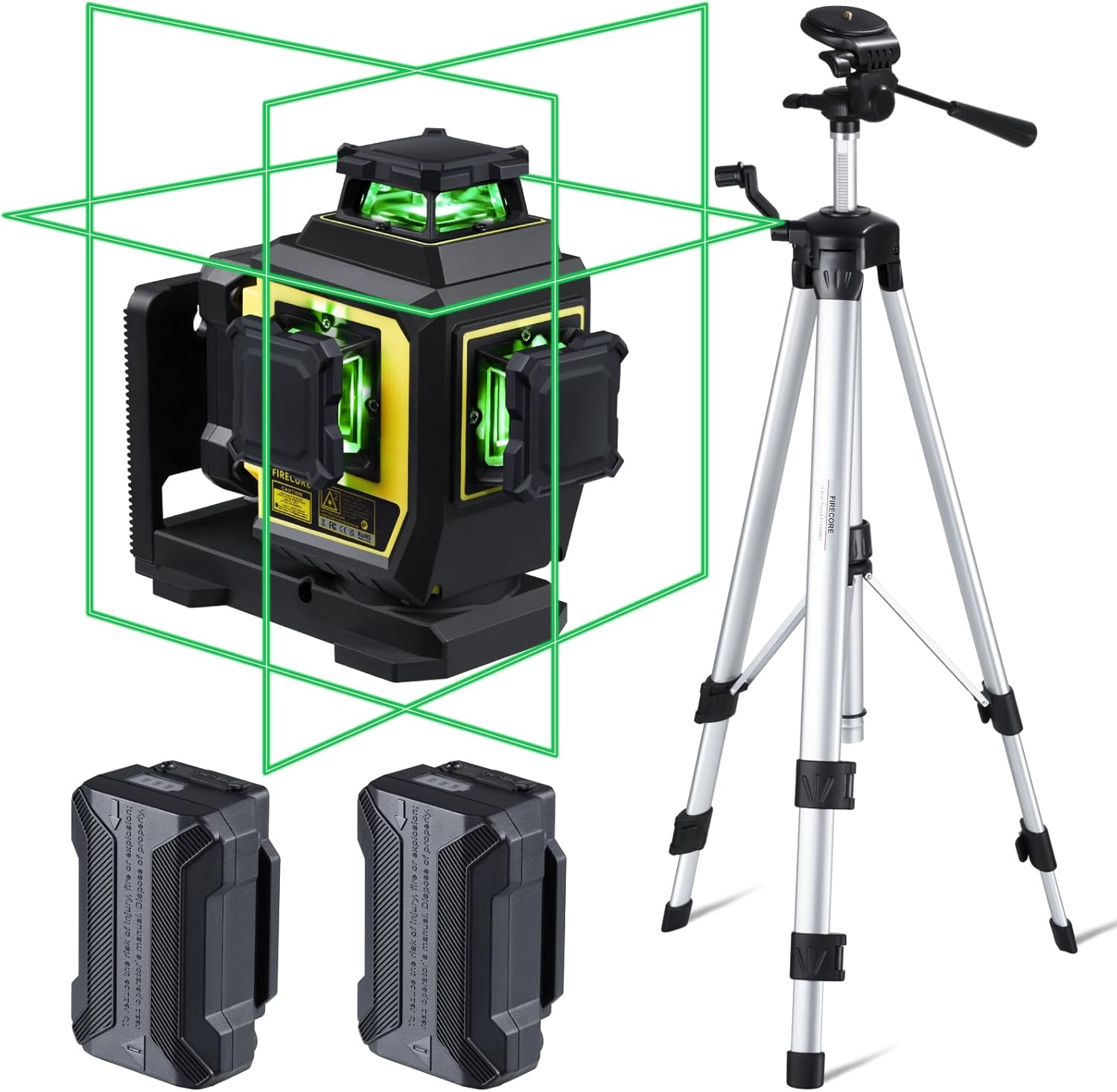
Figure 1: Complete package contents of the Firecore F95T-PRO-WT Laser Level system.
ຄຸນສົມບັດຜະລິດຕະພັນ
- ເລເຊີສີຂຽວສົດໃສ: Up to 4X brighter than standard red beams, offering a working range of up to 98 ft with ±1/13" accuracy at 33 ft.
- 3 x 360° Line Laser: Projects one 360° horizontal and two 360° vertical planes for comprehensive room layout.
- ໂໝດການປັບລະດັບຕົນເອງ: Automatically levels within ±4°. The laser blinks as an alarm when out of range.
- ໂໝດຄູ່ມື: Allows the laser tool to be placed at any angle when the pendulum is locked.
- Outdoor Pulse Mode: Extends the working range up to 197 ft with a Firecore Line Laser Receiver (sold separately).
- ແບດເຕີຣີທີ່ສາມາດສາກໄຟໄດ້ຄູ່: Two 4000mAh Li-ion batteries provide up to 16 hours of continuous runtime.
- ການຄວບຄຸມໄລຍະໄກ: Adjust laser lines, brightness, and modes without direct interaction with the unit.
- ການອອກແບບທີ່ເຂັ້ມແຂງ: IP54 dust/water resistance with over-molded construction.
- ການຕິດຕັ້ງແບບອະເນກປະສົງ: Integrated magnetic bracket, 360° rotating base with micro-adjustment, and 1/4-20 & 5/8-11 threads for tripod mounting.
- 60-Inch Tripod: Lightweight aluminum construction, adjustable from 26 to 60 inches, with a quick-release plate and built-in bullseye level.
ຕັ້ງຄ່າ
- ການຕິດຕັ້ງຫມໍ້ໄຟ:
Insert one of the provided 4000mAh Li-ion batteries into the battery compartment of the laser level. Ensure it clicks securely into place. The device can also be powered by the second battery or charged via the Type-C port.
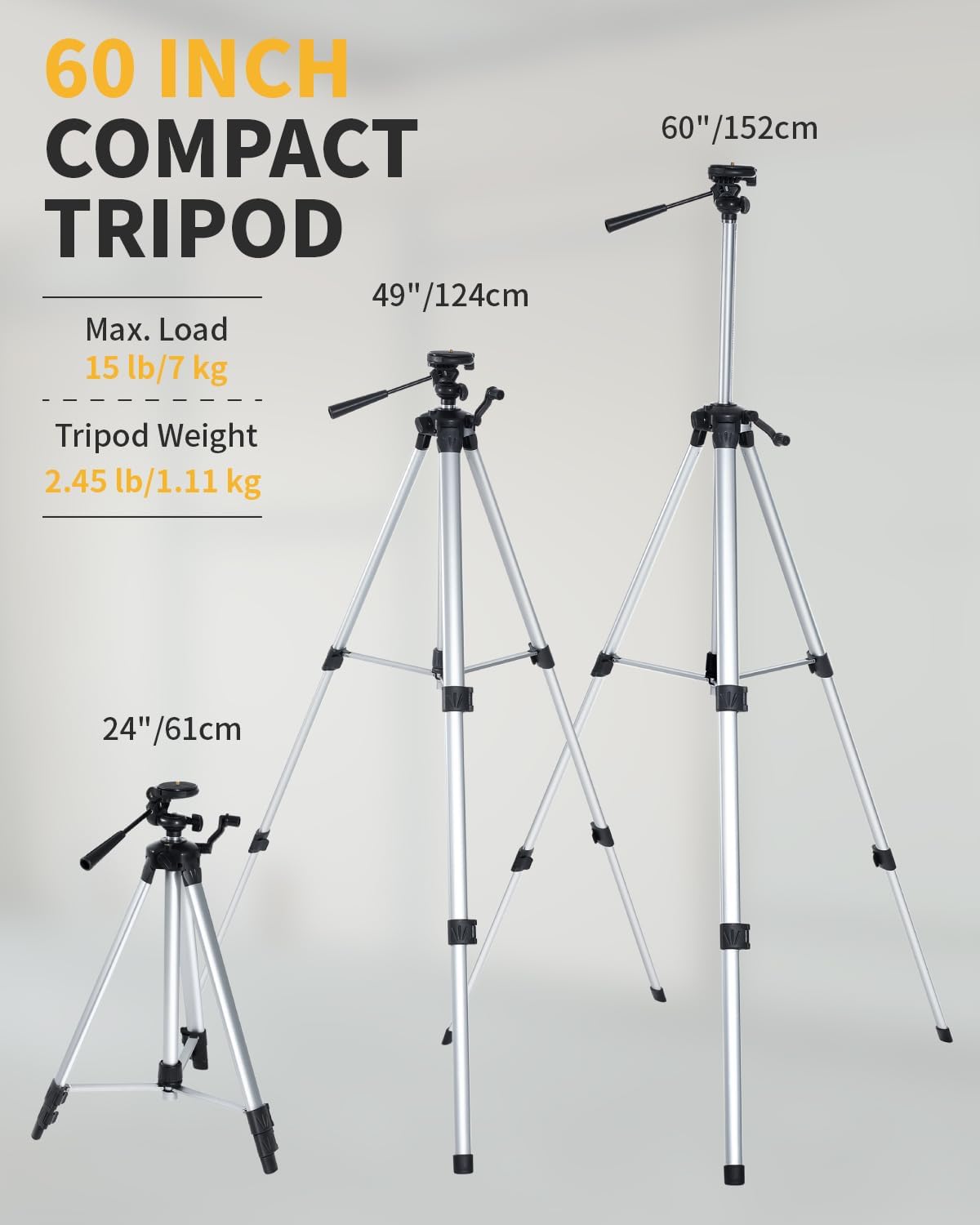
Figure 2: Battery installation and Type-C charging port.
- Mounting the Laser Level:
The laser level offers multiple mounting options:
- On the Tripod: Attach the laser level to the 60-inch tripod using the 1/4-20 or 5/8-11 mounting threads. Extend the tripod legs and adjust the height as needed. Use the built-in bullseye level on the tripod to ensure a stable and level base.
- ວົງເລັບແມ່ເຫຼັກ: Utilize the integrated magnetic bracket to attach the laser level to metal surfaces, such as steel studs.
- ພື້ນຖານການຫມຸນ: The 360° rotating base allows for fine adjustment of horizontal lines.

Figure 3: Laser level mounted on the tripod.
ຮູບແບບການເຮັດວຽກ
The Firecore F95T-PRO-WT laser level features several operating modes to suit different applications.
1. Self-Leveling Mode
This mode is ideal for applications requiring precise horizontal and vertical alignment. The device automatically levels itself within a range of ±4°.
- Unlock the pendulum by sliding the lock switch to the unlocked position.
- Place the laser level on a stable surface or tripod.
- The laser will automatically self-level. If the device is outside its ±4° self-leveling range, the laser lines will blink as an alarm. Adjust the device's position until the lines become steady.

Figure 4: Self-Leveling Mode in operation.
2. Manual Mode (Locked Mode)
Manual mode allows you to project laser lines at any desired angle, useful for tasks like installing handrails or decorative patterns.
- Lock the pendulum by sliding the lock switch to the locked position.
- Press and hold the Manual button for 3 seconds to activate manual mode.
- The laser lines will be projected at the angle the device is positioned, without self-leveling.

Figure 5: Manual Mode for angled projections.
3. Pulse Mode (Outdoor Mode)
Pulse mode extends the working range of the laser level, especially useful for outdoor applications or in bright conditions when paired with a compatible Firecore Line Laser Receiver.
- Activate the pulse mode by pressing the Receiver Button on the laser level or the remote control.
- The laser lines will emit a pulsed signal, allowing detection by a Firecore Line Laser Receiver up to 197 ft away.

Figure 6: Pulse Mode for extended range with a receiver.
4. Switching Line Modes and Brightness
The laser level can project various combinations of horizontal and vertical lines, and the brightness can be adjusted.
- Use the H/V buttons on the device or the remote control to cycle through different line combinations (e.g., one horizontal, two vertical, all three 360° planes).
- The remote control also allows adjustment of laser brightness.

Figure 7: Using the remote control to switch line modes.
ຂໍ້ມູນຫມໍ້ໄຟ
The Firecore F95T-PRO-WT laser level is powered by two 4000mAh Li-ion batteries, providing extended operation.
- ການສາກໄຟ: Connect the Type-C power cord to the laser level and the power adapter. Plug the adapter into a standard electrical outlet. The battery indicator will show charging status.
- ເວລາແລ່ນ: A fully charged battery provides up to 16 hours of continuous runtime.
- ການປ່ຽນແບັດເຕີຣີ: The two included batteries allow for easy hot-swapping to minimize downtime.

Figure 8: Charging the laser level and spare batteries.
Tripod Usage
The included 60-inch tripod provides a stable and adjustable platform for the laser level.
- ການປັບຄວາມສູງ: The tripod can be adjusted from 26 inches (61 cm) to 60 inches (152 cm) to suit various working heights.
- ແຜ່ນປ່ອຍດ່ວນ: Use the quick-release plate for fast attachment and detachment of the laser level.
- ການປັບລະດັບ: Ensure the tripod is on a level plane using its built-in bullseye level before mounting the laser level.
- ຄວາມໝັ້ນຄົງ: Always ensure the tripod legs are fully extended and locked for maximum stability.
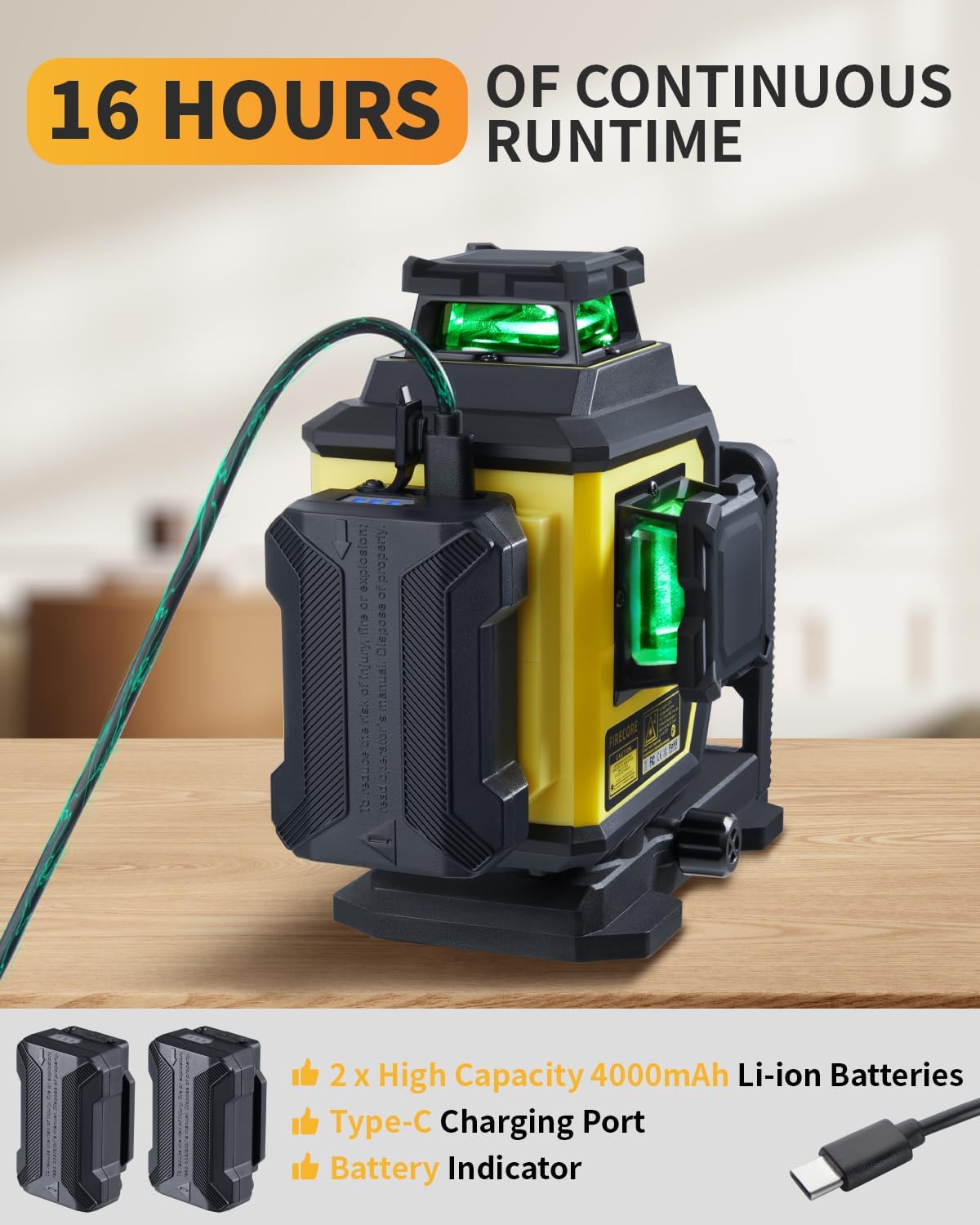
Figure 9: Tripod height adjustments and features.
ບໍາລຸງຮັກສາ
- ທໍາຄວາມສະອາດ: ເຊັດອຸປະກອນດ້ວຍຄວາມອ່ອນ, ງamp ຜ້າ. ຢ່າໃຊ້ສານເຄມີທີ່ຮຸນແຮງຫຼືເຄື່ອງເຮັດຄວາມສະອາດຂັດ.
- ການເກັບຮັກສາ: Store the laser level and accessories in the provided carry pouch in a dry, cool place when not in use.
- ການດູແລຫມໍ້ໄຟ: ສາກແບັດເຕີຣີເປັນປະຈຳ, ເຖິງແມ່ນວ່າຈະບໍ່ໄດ້ໃຊ້ງານກໍຕາມ, ເພື່ອຮັກສາອາຍຸການໃຊ້ງານຂອງມັນໄວ້.
- ການກວດກາ: ກວດກາອຸປະກອນເປັນໄລຍະສໍາລັບອາການຂອງຄວາມເສຍຫາຍຫຼືການສວມໃສ່.
Figure 10: Store the laser level and accessories in the provided carry pouch.
ການແກ້ໄຂບັນຫາ
| ບັນຫາ | ສາເຫດທີ່ເປັນໄປໄດ້ | ການແກ້ໄຂ |
|---|---|---|
| Laser lines are blinking. | Device is out of self-leveling range (±4°). | Adjust the device's position until it is within the self-leveling range. Ensure the pendulum is unlocked. |
| Laser lines are not visible or dim. | Low battery; Bright ambient light; Brightness setting is low. | Charge the battery; Use pulse mode with a receiver in bright conditions; Adjust brightness using the remote control. |
| ອຸປະກອນບໍ່ເປີດ. | ແບັດເຕີຣີບໍ່ໄດ້ຖືກຕິດຕັ້ງຢ່າງຖືກຕ້ອງ ຫຼື ໝົດແລ້ວ. | Ensure the battery is properly inserted and charged. Try using the second battery. |
| ການຄວບຄຸມໄລຍະໄກບໍ່ເຮັດວຽກ. | Remote battery depleted; Obstruction between remote and device. | Replace remote battery; Ensure clear line of sight. |
ຂໍ້ມູນຈໍາເພາະ
| ຄຸນສົມບັດ | ລາຍລະອຽດ |
|---|---|
| ຍີ່ຫໍ້ | Firecore |
| ໝາຍເລກຕົວແບບ | F95T-PRO-WT (F95T-XG Laser Level) |
| ສີເລເຊີ | Beam ສີຂຽວ |
| ຄວາມຖືກຕ້ອງ | ±1/13" at 33 ft (±2mm at 10m) |
| ລະດັບການປັບລະດັບດ້ວຍຕົນເອງ | ±4° |
| ຊ່ວງການເຮັດວຽກ | Up to 98 ft (197 ft with receiver in Pulse Mode) |
| Laser Planes | One 360° Horizontal, Two 360° Vertical |
| ຮູບແບບການໃຊ້ງານ | Self-Leveling Mode / Manual Mode / Pulse Mode |
| ແຫຼ່ງພະລັງງານ | Battery Powered (2x 4000mAh Li-ion batteries included) |
| ເວລາແລ່ນຫມໍ້ໄຟ | Up to 16 hours (continuous with all beams on) |
| ພອດສາກໄຟ | ປະເພດ-C |
| ການຈັດອັນດັບ IP | IP54 (Dust/Water Resistant) |
| ການຕິດຕັ້ງກະທູ້ | 1/4-20 & 5/8-11 |
| Tripod Height | 26 ນິ້ວ (61 ຊຕມ) ຫາ 60 ນິ້ວ (152 ຊຕມ) |
| ວັດສະດຸ | Thermoplastic Elastomers, Acrylonitrile Butadiene Styrene, Aluminum |
| ນ້ໍາຫນັກລາຍການ | 7.05 ປອນ (ປະມານ 3.2 ກິໂລ) |
ການຮັບປະກັນແລະການສະຫນັບສະຫນູນ
Firecore provides a ບໍລິການຫລັງການຂາຍ 24 ເດືອນ ແລະ ສະຫນັບສະຫນູນດ້ານວິຊາການຕະຫຼອດຊີວິດ for the F95T-PRO-WT laser level.
For any concerns, questions, or technical assistance, please contact Firecore customer support through the official channels or refer to the contact information provided with your purchase documentation.
ສໍາລັບຂໍ້ມູນເພີ່ມເຕີມ, ໄປຢ້ຽມຢາມ Firecore Store on Amazon.