
bopmen STAR 10
Star10 Wireless Bluetooth Karaoke Microphone User Manual
Model: STAR 10 | Brand: bopmen
ແນະນຳ
The bopmen Star10 Wireless Bluetooth Karaoke Microphone is a versatile 4-in-1 device designed for singing, acting as a portable handheld microphone, speaker, and featuring an integrated disco light. It offers high-resolution audio quality and extensive compatibility, making it suitable for various entertainment settings including car travel, home parties, and general use for adults and children.

Image: The Star10 Wireless Bluetooth Karaoke Microphone in Rose Gold, showcasing its sleek design and integrated disco ball.
ຂໍ້ມູນຄວາມປອດໄພ
- ຢ່າເຮັດໃຫ້ອຸປະກອນຢູ່ໃນອຸນຫະພູມ ຫຼືຄວາມຊຸ່ມຊື່ນທີ່ສຸດ.
- ຫຼີກລ້ຽງການຫຼຸດລົງຫຼືການອຸປະກອນທີ່ມີຜົນກະທົບທີ່ເຂັ້ມແຂງ.
- ເກັບຮັກສາໃຫ້ໄກຈາກເດັກນ້ອຍເພື່ອປ້ອງກັນອັນຕະລາຍຈາກການສຳຜັດຈາກຊິ້ນສ່ວນນ້ອຍໆ.
- Use only the provided USB C-A cable for charging.
- ຢ່າພະຍາຍາມຖອດປະກອບ ຫຼືດັດແປງອຸປະກອນ.
- ເຮັດຄວາມສະອາດອຸປະກອນດ້ວຍຜ້າອ່ອນໆ, ແຫ້ງ. ຫຼີກເວັ້ນການນໍາໃຊ້ສານເຄມີທີ່ຮຸນແຮງຫຼືເຄື່ອງເຮັດຄວາມສະອາດຂັດ.
ເນື້ອໃນຊຸດ
ກະລຸນາກວດເບິ່ງກ່ອງສໍາລັບລາຍການຕໍ່ໄປນີ້:
- 1 x Karaoke microphone (Star10)
- 1 x USB C-A charging cable
- 1 x ຄູ່ມືຜູ້ໃຊ້
ສິນຄ້າເກີນview
Familiarize yourself with the main controls and ports of your Star10 microphone.

Image: Detailed diagram illustrating the main control panel and bottom ports of the Star10 microphone, including Microphone Volume, On/Off/Play/Pause, Reverb On/Off, Volume Up/Down, Next/Previous Song, Tone Mode, Disco Light Control, USB Port, 3.5mm Earphone Jack, and TF Card slot.
ການຄວບຄຸມຕົ້ນຕໍ:
- Microphone Volume / Accompaniment Mode On/Off: Adjusts microphone volume or toggles accompaniment.
- On/Off, Play/Pause: Powers the device on/off and controls music playback.
- Reverb On/Off / Bluetooth & TF Card Mode: Toggles reverb effect and switches between input modes.
- ປະລິມານຂຶ້ນ/ລົງ: Adjusts overall speaker volume.
- ເພງກ່ອນໜ້າ/ຕໍ່ໄປ: ນຳທາງຜ່ານທາງ.
- ໂໝດສຽງ: Cycles through different voice effects.
- Disco Light Control / Twins Pairing: Controls the disco light and initiates Twins Mode pairing.
Bottom Ports:
- ແສງຕົວຊີ້ວັດ: Shows device status (e.g., charging, connected).
- 3.5 mm Earphone Jack / Re-Set button inside: For private listening or resetting the device.
- ພອດ USB: For charging the microphone.
- ສະລັອດຕິງບັດ TF: For playing music directly from a micro TF card (up to 32GB, not included).
ຕັ້ງຄ່າ
ກຳລັງສາກໄມໂຄຣໂຟນ:
- Connect the provided USB C-A cable to the USB port on the bottom of the microphone.
- ເຊື່ອມຕໍ່ປາຍອີກດ້ານໜຶ່ງຂອງສາຍເຂົ້າກັບອະແດບເຕີໄຟ USB ທີ່ເຂົ້າກັນໄດ້ (ບໍ່ໄດ້ໃຫ້ມາ) ຫຼື ພອດ USB ຂອງຄອມພິວເຕີ.
- The indicator light will show charging status. A full charge provides up to 10 hours of use (minimum 5 hours).
ເປີດ/ປິດ:
- ກົດຄ້າງໄວ້ ເປີດ/ປິດ/ຫຼິ້ນ/ຢຸດຊົ່ວຄາວ button for a few seconds to power on the microphone. You will hear an audible prompt.
- To power off, press and hold the same button until you hear the power-off prompt.
ຄໍາແນະນໍາການດໍາເນີນງານ
ການເຊື່ອມຕໍ່ບູທູດ:
The Star10 microphone uses Bluetooth 5.2 for seamless connection to your devices.
- Power on the microphone. It will automatically enter Bluetooth pairing mode.
- On your smartphone, tablet, or other Bluetooth-enabled device, open the Bluetooth settings.
- ຊອກຫາ "STAR 10" in the list of available devices and select it to pair.
- Once connected, you will hear a confirmation prompt. You can now play music from your device through the microphone's speaker and sing along.

Image: The Star10 microphone demonstrating its wide compatibility, connecting wirelessly to smartphones, tablets, and laptops via Bluetooth.
ຮູບແບບບັດ TF:
Play music directly from a micro TF card.
- Insert a micro TF card (up to 32GB, not included) with your music files into the TF Card slot on the bottom of the microphone.
- The microphone will automatically switch to TF Card mode. If not, press the Reverb On/Off / Bluetooth & TF Card Mode button to cycle modes.
- ໃຊ້ ເພງກ່ອນ ໜ້າ / ຕໍ່ໄປ ປຸ່ມເພື່ອນຳທາງເສັ້ນທາງ ແລະ ຫຼິ້ນ/ຢຸດຊົ່ວຄາວ for playback control.
Disco Light Control:
Enhance your karaoke experience with the built-in disco light.
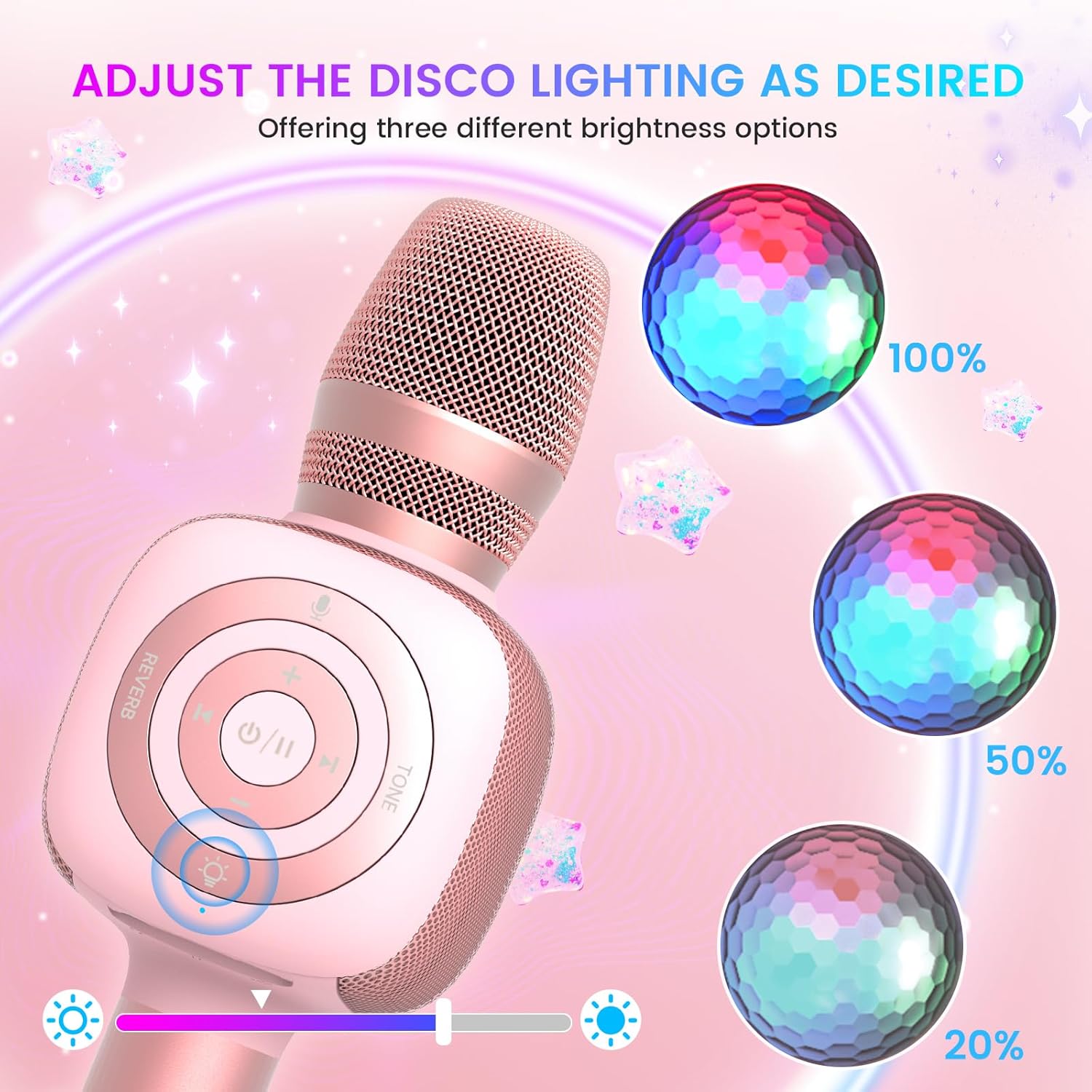
Image: The Star10 microphone's disco light feature, illustrating three adjustable brightness levels (100%, 50%, 20%) to suit different ambiance needs.
- ກົດ Disco Light Control button (light bulb icon) to cycle through three RGB color modes and brightness levels.
- Press again to turn the disco light off.
Tone Modes (Magic Mode):
Experiment with different voice effects for added fun.

Image: The Star10 microphone's "Magic Mode" feature, depicting icons for Male Voice, Female Voice, Cartoon Voice, and Monster Sound effects.
- ກົດ ໂໝດສຽງ button to cycle through various voice effects such as Male Voice, Female Voice, Cartoon Voice, and Monster Sound.
- Continue pressing to return to the original tone.
Twins Mode (Duet Mode):
Pair two Star10 microphones for a duet experience.

Image: Two individuals enjoying a duet, each holding a Star10 microphone, illustrating the "Twins Mode" functionality for shared singing experiences.
- Ensure both Star10 microphones are powered on.
- On one microphone, press and hold the Disco Light Control button for 2 seconds until a prompt tone "LINK CONNECTED" is heard. This microphone is now in Twins Mode pairing.
- On your cellphone/device, perform Bluetooth pairing selection and choose either of the two microphones. Both microphones will now be connected and output audio.
- To exit Twins Mode, press and hold the Disco Light Control button on the paired microphone for 2 seconds.
ບໍາລຸງຮັກສາ
- ທໍາຄວາມສະອາດ: Wipe the microphone with a soft, dry cloth. Do not use liquid cleaners or aerosols.
- ການເກັບຮັກສາ: ເກັບຮັກສາໄມໂຄຣໂຟນໄວ້ໃນບ່ອນທີ່ເຢັນ, ແຫ້ງ, ຫ່າງຈາກແສງແດດໂດຍກົງ ແລະ ອຸນຫະພູມສູງສຸດ.
- ການດູແລຫມໍ້ໄຟ: For optimal battery life, charge the microphone regularly, even if not in frequent use. Avoid fully discharging the battery for extended periods.
ການແກ້ໄຂບັນຫາ
| ບັນຫາ | ສາເຫດທີ່ເປັນໄປໄດ້ | ການແກ້ໄຂ |
|---|---|---|
| ໄມໂຄຣໂຟນບໍ່ເປີດ. | ຫມໍ້ໄຟຕ່ໍາ; ປຸ່ມເປີດປິດບໍ່ດົນພໍ. | Charge the microphone fully; Press and hold the power button for 3-5 seconds. |
| ບໍ່ສາມາດເຊື່ອມຕໍ່ຜ່ານ Bluetooth ໄດ້. | Microphone not in pairing mode; Device Bluetooth off; Interference. | Ensure microphone is on and in pairing mode; Enable Bluetooth on your device; Move closer to the microphone; Restart both devices. |
| ບໍ່ມີສຽງຈາກລຳໂພງ. | Volume too low; Device volume too low; Incorrect mode. | Increase microphone volume; Increase device volume; Ensure correct mode (Bluetooth/TF Card). |
| Voice effects not working. | ການກົດປຸ່ມບໍ່ຖືກຕ້ອງ. | Press the 'Tone Mode' button repeatedly to cycle through effects. |
| ແສງ Disco ບໍ່ເຮັດວຽກ. | Light turned off. | Press the 'Disco Light Control' button to turn on/cycle modes. |
ຂໍ້ມູນຈໍາເພາະ
- ຕົວແບບ: ດາວ 10
- ຍີ່ຫໍ້: bopmen
- ປັດໄຈແບບຟອມໄມໂຄຣໂຟນ: ມືຖື
- ເຕັກໂນໂລຍີການເຊື່ອມຕໍ່: Bluetooth 5.2
- ແຫຼ່ງພະລັງງານ: ແບດເຕີຣີ້ໃຊ້ພະລັງງານ (ມີຫມໍ້ໄຟ Lithium Ion 2 ອັນ)
- ຊີວິດຫມໍ້ໄຟ: Up to 10 hours (minimum 5 hours)
- ຂະໜາດຜະລິດຕະພັນ: 18.7 x 16.54 x 12.2 ນິ້ວ
- ນ້ໍາຫນັກລາຍການ: 1.19 ປອນ (540 ກຣາມ)
- ອັດຕາສ່ວນສັນຍານເຖິງສິ່ງລົບກວນ: 52 dB
- ການຕອບສະໜອງຄວາມຖີ່: 10 KHz
- ອຸປະກອນທີ່ເຂົ້າກັນໄດ້: Personal Computer, Smartphone, Karaoke Machine
- ຄຸນນະສົມບັດພິເສດ: Mute Function, Disco Light, Voice Changer, Twins Mode
- ສີ: Rose Gold
- ການນໍາໃຊ້ທີ່ແນະນໍາ: ພາຍໃນ/ນອກ
ການຮັບປະກັນແລະການສະຫນັບສະຫນູນ
Your bopmen Star10 Karaoke Microphone comes with a standard manufacturer's warranty. For detailed warranty information, please refer to the warranty card included in your package or visit the official bopmen webເວັບໄຊ.
If you encounter any issues or have questions regarding your product, please do not hesitate to contact our professional customer service team. We are committed to providing support and assistance within 24 hours to ensure your satisfaction.
ຂໍ້ມູນຕິດຕໍ່: Please refer to the contact details provided in your product packaging or on the official bopmen support page for the most up-to-date information.