
1. ບົດແນະນຳ
ຂອບໃຈສໍາລັບການຊື້asing the Hoco BS55 Wireless Outdoor Speaker. This manual provides important information regarding the setup, operation, and maintenance of your speaker. Please read it carefully before using the product to ensure proper function and to extend its lifespan. Keep this manual for future reference.
2. ຜະລິດຕະພັນເກີນview
2.1 ເນື້ອໃນຊຸດ
- Hoco BS55 Wireless Outdoor Speaker
- ສາຍສາກ
- ສາຍສຽງ (AUX)
- Wired Microphone (may vary by package)
- ຄູ່ມືການສອນ
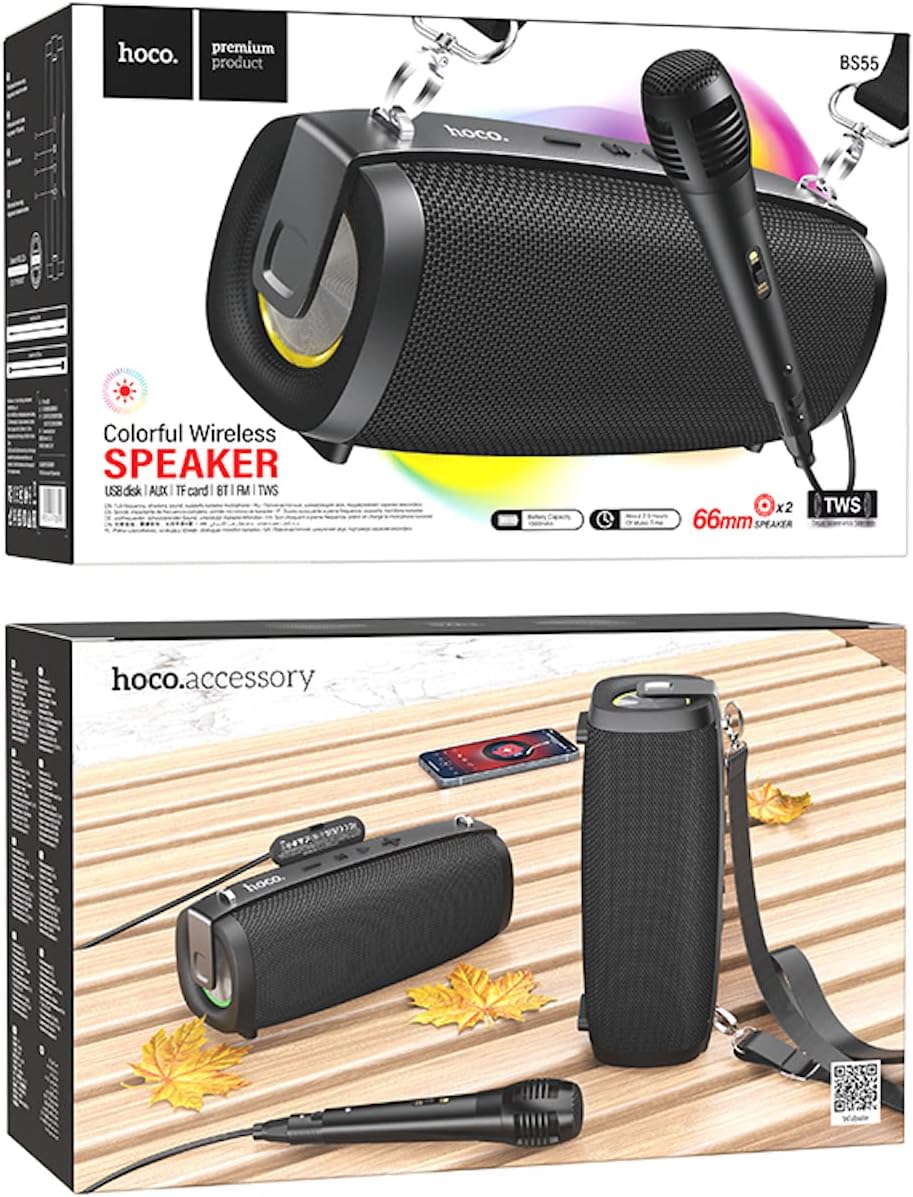
Image: Hoco BS55 Speaker packaging, illustrating the speaker, a wired microphone, and connecting cables.
2.2 ອົງປະກອບ ແລະ ການຄວບຄຸມລຳໂພງ

Image: The Hoco BS55 speaker, highlighting its control panel with buttons and various input ports.
- ປຸ່ມເປີດປິດ: Press and hold to turn the speaker ON/OFF. Short press to switch between modes.
- '-' ປຸ່ມ: ກົດສັ້ນສຳລັບເພງກ່ອນໜ້ານີ້. ກົດຄ້າງໄວ້ເພື່ອຫຼຸດສຽງ.
- ປຸ່ມ 'M' (ໂໝດ): Short press to cycle through input modes (Bluetooth, FM Radio, TF Card, AUX, USB).
- '>' (Play/Pause) Button: ກົດສັ້ນເພື່ອຫຼິ້ນ ຫຼືຢຸດເພງ.
- ປຸ່ມ '+': ກົດສັ້ນສຳລັບເພງຕໍ່ໄປ. ກົດຄ້າງໄວ້ເພື່ອເພີ່ມລະດັບສຽງ.
- ພອດ USB: For USB flash disk playback.
- ສະລັອດຕິງບັດ TF: ສໍາລັບການຫຼິ້ນບັດ TF (MicroSD).
- AUX Input: ສຳລັບການເຊື່ອມຕໍ່ອຸປະກອນສຽງພາຍນອກຜ່ານສາຍສຽງ 3.5 ມມ.
- ການປ້ອນຂໍ້ມູນໄມໂຄຣໂຟນ: ສຳລັບເຊື່ອມຕໍ່ໄມໂຄຣໂຟນແບບມີສາຍ.
- ຊ່ອງສາກໄຟ: ສໍາລັບການສາກໄຟຫມໍ້ໄຟພາຍໃນຂອງລໍາໂພງ.
3. ຕັ້ງຄ່າ
3.1 ກຳລັງສາກລຳໂພງ
Before first use, fully charge the speaker. Connect the charging cable to the speaker's charging port and the other end to a USB power adapter (not included) or a computer's USB port. The charging indicator light will illuminate during charging and turn off when fully charged. Charging time is approximately 2 hours.
3.2 ການເປີດ/ປິດ
ກົດຄ້າງໄວ້ ປຸ່ມເປີດປິດ for a few seconds to turn the speaker ON. You will hear an audible prompt. To turn OFF, press and hold the ປຸ່ມເປີດປິດ ອີກເທື່ອຫນຶ່ງ.
4. ຄໍາແນະນໍາການດໍາເນີນງານ
4.1 ແບບບູທູດ
- Turn on the speaker. It will automatically enter Bluetooth pairing mode, indicated by a flashing light and an audible prompt.
- ເປີດໃຊ້ Bluetooth ໃນອຸປະກອນມືຖືຂອງທ່ານ (ໂທລະສັບສະຫຼາດ, ແທັບເລັດ, ແລະອື່ນໆ).
- ຊອກຫາ "Hoco BS55" in the list of available Bluetooth devices and select it to pair.
- ເມື່ອຈັບຄູ່ສຳເລັດແລ້ວ, ທ່ານຈະໄດ້ຍິນສຽງຢືນຢັນ. ດຽວນີ້ທ່ານສາມາດຫຼິ້ນສຽງຈາກອຸປະກອນຂອງທ່ານຜ່ານລຳໂພງໄດ້ແລ້ວ.
- ໃຊ້ '+' ແລະ '-' buttons for volume control, and the '>' button for play/pause. Short press '+' or '-' for next/previous track.
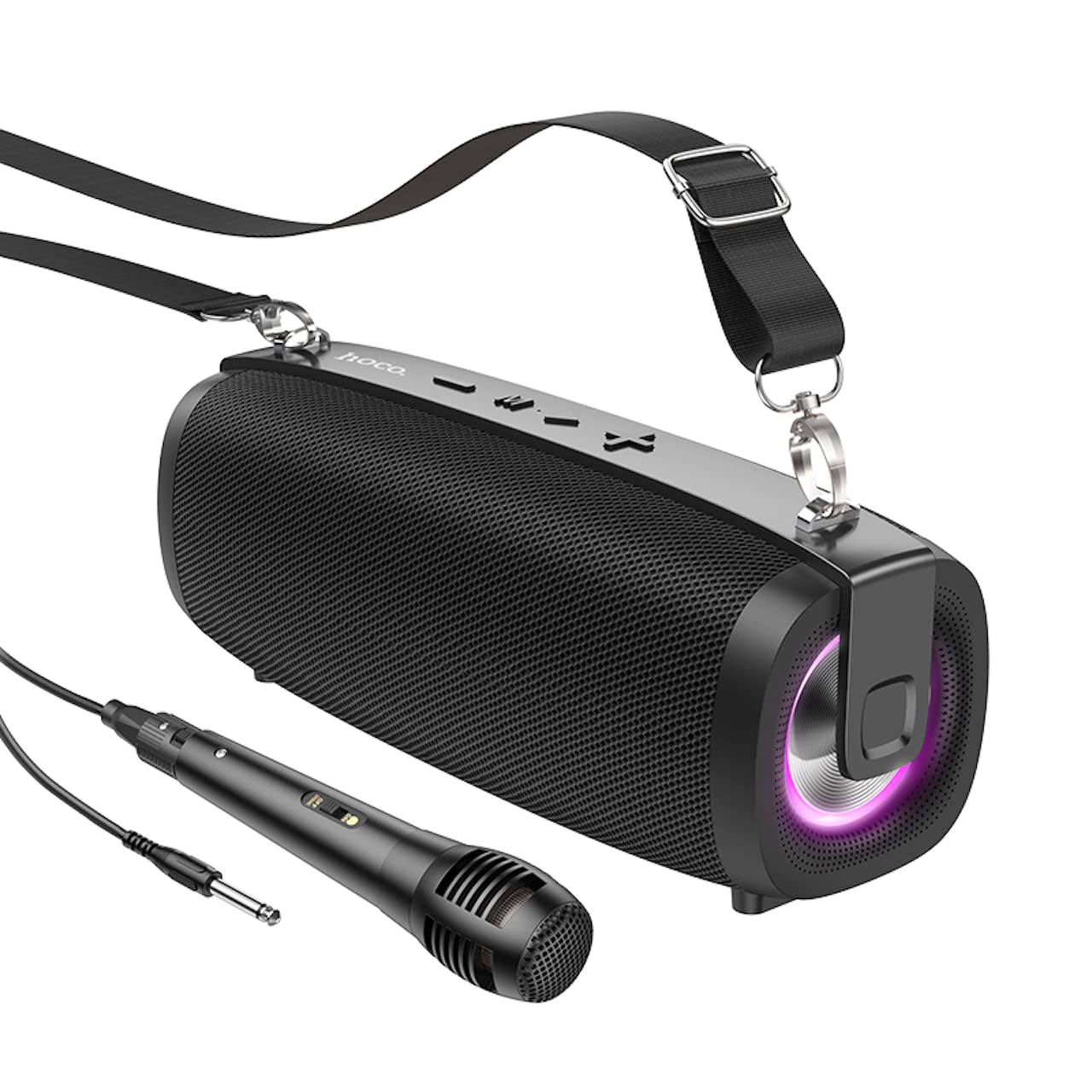
Image: The Hoco BS55 Wireless Outdoor Speaker, ready for use.
ໂໝດວິທະຍຸ 4.2 FM
- ກົດສັ້ນ 'M' (Mode) Button until you hear the FM radio prompt.
- ເພື່ອສະແກນອັດຕະໂນມັດ ແລະ ບັນທຶກສະຖານີທີ່ມີຢູ່, ໃຫ້ກົດປຸ່ມຄ້າງໄວ້ '>' (Play/Pause) Buttonລຳໂພງຈະສະແກນ ແລະ ເກັບຮັກສາສະຖານີໂດຍອັດຕະໂນມັດ.
- ກົດສັ້ນ '+' or '-' ເພື່ອສະຫຼັບລະຫວ່າງສະຖານີ FM ທີ່ບັນທຶກໄວ້.
4.3 TF Card / USB Flash Disk Mode
- Insert a TF (MicroSD) card or a USB flash disk into the corresponding slot.
- ລຳໂພງຈະປ່ຽນເປັນໂໝດ TF Card ຫຼື USB ໂດຍອັດຕະໂນມັດ ແລະ ເລີ່ມຫຼິ້ນສຽງ files. If it doesn't, short press the 'M' (Mode) Button ເພື່ອເລືອກຮູບແບບທີ່ຖືກຕ້ອງ.
- ໃຊ້ '+' ແລະ '-' buttons for volume control, and short press them for next/previous track. Use the '>' ປຸ່ມສຳລັບຫຼິ້ນ/ຢຸດຊົ່ວຄາວ.
4.4 ໂໝດປ້ອນຂໍ້ມູນ AUX
- Connect one end of the 3.5mm audio cable to the speaker's AUX input port and the other end to the audio output of your external device (e.g., MP3 player, computer).
- ກົດສັ້ນ 'M' (Mode) Button until you hear the AUX mode prompt.
- Control playback and volume primarily from your external device. The speaker's volume buttons will also function.
ຟັງຊັນ 4.5 TWS (True Wireless Stereo).
The TWS function allows you to pair two Hoco BS55 speakers together for a stereo sound experience.
- Ensure both BS55 speakers are turned ON and are not connected to any Bluetooth device.
- ໃນລຳໂພງໜຶ່ງໃນລຳໂພງ (ນີ້ຈະເປັນລຳໂພງຫຼັກ), ກົດປຸ່ມຄ້າງໄວ້ 'M' (Mode) Button until you hear a pairing tone.
- ລຳໂພງສອງຕົວຈະຄົ້ນຫາ ແລະ ຈັບຄູ່ກັນໂດຍອັດຕະໂນມັດ. ເມື່ອເຊື່ອມຕໍ່ແລ້ວ, ທ່ານຈະໄດ້ຍິນສຽງຢືນຢັນ.
- ຕອນນີ້, ເຊື່ອມຕໍ່ອຸປະກອນມືຖືຂອງທ່ານກັບລຳໂພງຫຼັກຜ່ານ Bluetooth ຕາມທີ່ໄດ້ອະທິບາຍໄວ້ໃນພາກ 4.1. ລຳໂພງທັງສອງຈະຫຼິ້ນສຽງໃນຮູບແບບສະເຕີລິໂອ.
4.6 Wired Microphone Usage
If your package includes a wired microphone, connect it to the speaker's dedicated microphone input port. The speaker will automatically detect the microphone. Adjust the volume as needed using the speaker's volume controls or your connected device.
5. ບໍາລຸງຮັກສາ
- ທໍາຄວາມສະອາດ: ໃຊ້ຜ້າອ່ອນ, ແຫ້ງເພື່ອເຮັດຄວາມສະອາດລໍາໂພງ. ຢ່າໃຊ້ເຄື່ອງເຮັດຄວາມສະອາດຂັດຫຼືສານລະລາຍ.
- ການເກັບຮັກສາ: ເກັບຮັກສາລຳໂພງໄວ້ໃນບ່ອນທີ່ເຢັນ, ແຫ້ງ, ຫ່າງຈາກແສງແດດໂດຍກົງ ແລະ ອຸນຫະພູມທີ່ຮ້າຍກາດ.
- ການດູແລຫມໍ້ໄຟ: ເພື່ອຍືດອາຍຸການໃຊ້ງານຂອງແບັດເຕີຣີ, ໃຫ້ສາກໄຟລຳໂພງເປັນປະຈຳ, ເຖິງແມ່ນວ່າຈະບໍ່ໄດ້ໃຊ້ງານກໍຕາມ. ຫຼີກລ່ຽງການສາກແບັດເຕີຣີຈົນໝົດເລື້ອຍໆ.
- ຄວາມຕ້ານທານນ້ໍາ: The Hoco BS55 speaker is ບໍ່ທົນທານຕໍ່ນ້ໍາ. Avoid exposing it to water, rain, or excessive moisture to prevent damage.
- ຫຼີກເວັ້ນຜົນກະທົບ: Do not drop or subject the speaker to strong impacts.
6. ການແກ້ໄຂບັນຫາ
| ບັນຫາ | ການແກ້ໄຂ |
|---|---|
| ລຳໂພງບໍ່ເປີດ. | ໃຫ້ແນ່ໃຈວ່າລຳໂພງສາກໄຟແລ້ວ. ເຊື່ອມຕໍ່ມັນກັບແຫຼ່ງພະລັງງານ ແລະ ລອງອີກຄັ້ງ. |
| ບໍ່ມີສຽງ. | ກວດສອບລະດັບສຽງໃນທັງລຳໂພງ ແລະ ອຸປະກອນທີ່ເຊື່ອມຕໍ່ຂອງທ່ານ. ໃຫ້ແນ່ໃຈວ່າໄດ້ເລືອກໂໝດປ້ອນຂໍ້ມູນທີ່ຖືກຕ້ອງແລ້ວ. |
| ບໍ່ສາມາດຈັບຄູ່ຜ່ານ Bluetooth ໄດ້. | Make sure the speaker is in Bluetooth pairing mode. Disable and re-enable Bluetooth on your device. Move the speaker closer to your device. Ensure no other devices are connected to the speaker. |
| ການຮັບວິທະຍຸ FM ແມ່ນບໍ່ດີ. | Try repositioning the speaker. Perform an auto-scan again. |
| ການຈັບຄູ່ TWS ລົ້ມເຫລວ. | Ensure both speakers are not connected to any other Bluetooth device. Try restarting both speakers and repeating the TWS pairing process. |
7. ຂໍ້ມູນຈໍາເພາະ
| ຄຸນສົມບັດ | ຂໍ້ມູນຈໍາເພາະ |
|---|---|
| ຕົວແບບ | BS55 |
| ຂະໜາດ (L x W x H) | 202 x 89.5 x 71.4 ມມ (20.2 x 7.1 x 9 ຊຕມ) |
| ນ້ຳໜັກ | 810 g |
| ລຸ້ນ Bluetooth | 5.3 |
| ຊິບ Bluetooth | JLAC6965E |
| ຄວາມອາດສາມາດຫມໍ້ໄຟ | 1500mAh |
| ເວລາສາກໄຟ | ປະມານ 2 ຊົ່ວໂມງ |
| ເວລາການຫຼີ້ນດົນຕີ | ສູງສຸດ 2.5 ຊົ່ວໂມງ |
| ຂະໜາດຫົວໜ່ວຍລຳໂພງ | 66mm*2 |
| ພະລັງງານຜົນຜະລິດ | 5W * 2 (ລວມ 10W) |
| ຕົວເລືອກການເຊື່ອມຕໍ່ | Bluetooth, FM Radio, TF Card, AUX, USB Flash Disk, TWS |
| ຮອງຮັບໄມໂຄຣໂຟນ | ການປ້ອນໄມໂຄຣໂຟນແບບມີສາຍ |
| ການຕໍ່ຕ້ານນ້ໍາ | ບໍ່ທົນທານຕໍ່ນ້ໍາ |
| ສີ | ດຳ |
8. ການຮັບປະກັນແລະການສະຫນັບສະຫນູນ
Hoco products are designed and manufactured to the highest quality standards. For warranty information and customer support, please refer to the warranty card included with your purchase or contact your local Hoco distributor or retailer. Keep your proof of purchase for any warranty claims.