
1. ບົດແນະນຳ
Thank you for choosing the Woputne LED Desk Lamp with Dual Heads, Model JB510. This manual provides essential information for the safe and efficient operation of your new desk lampກະລຸນາອ່ານຢ່າງລະອຽດກ່ອນການນຳໃຊ້ ແລະ ເກັບຮັກສາໄວ້ເພື່ອອ້າງອີງໃນອະນາຄົດ.
ນີ້ lamp features a dual-head design, offering versatile lighting with 5 color modes and 10 brightness levels. It is designed for various environments including home offices, bedrooms, study areas, and craft spaces.

Figure 1: Woputne LED Desk Lamp with Dual Heads in use, demonstrating phone charging capability.
2. ເນື້ອໃນຊຸດ
ກະລຸນາກວດສອບວ່າລາຍການທັງຫມົດທີ່ລະບຸໄວ້ຂ້າງລຸ່ມນີ້ແມ່ນລວມຢູ່ໃນຊຸດຂອງທ່ານ:
- 1 x Woputne LED Desk Lamp (Model JB510)
- 1 x 5V 2A Mains Plug
- 1 x ສາຍ USB
- 1 x ຄູ່ມືຜູ້ໃຊ້ (ເອກະສານນີ້)
3. ຄໍາແນະນໍາຄວາມປອດໄພ
- ຮັບປະກັນການສະຫນອງພະລັງງານ voltage ກົງກັບ lamp's requirements (5V).
- ຫ້າມຖອດຫຼືດັດແປງ lamp.
- ຫຼີກເວັ້ນການເປີດເຜີຍ lamp to water or high humidity. This product is not waterproof.
- ຮັກສາ lamp ຫ່າງຈາກແຫຼ່ງຄວາມຮ້ອນ ແລະແສງແດດໂດຍກົງ.
- ຖອດປລັກ lamp from the power outlet before cleaning or if it will not be used for an extended period.
- ຢ່າໃຊ້ຖ້າສາຍໄຟຫຼືປລັກສຽບເສຍຫາຍ.
4. ຕັ້ງຄ່າ
- ແກະກ່ອງ: ເອົາສ່ວນປະກອບທັງຫມົດອອກຈາກການຫຸ້ມຫໍ່ຢ່າງລະມັດລະວັງ.
- ຕຳແໜ່ງ: ວາງ lamp ພື້ນຖານຢູ່ເທິງໜ້າດິນທີ່ໝັ້ນຄົງ ແລະ ຮາບພຽງ.
- ເຊື່ອມຕໍ່ພະລັງງານ: ສຽບສາຍ USB ເຂົ້າໄປໃນ lamp's 5V 2A USB Charging input-port (labeled 'IN' on the back of the base). Connect the other end of the USB cable to the provided mains plug, then plug the mains plug into a suitable wall outlet.
- ສະຫຼັບພະລັງງານດ້ວຍມື: Locate the manual 'ON/OFF' sliding button on the back of the lamp base. Ensure this switch is in the 'ON' position for the lamp to function. If the button is 'OFF', the desk lamp ຈະບໍ່ສະຫວ່າງ.

ຮູບທີ 2: ລາຍລະອຽດຂອງ lamp base, highlighting the USB input port and the manual ON/OFF switch.
5. ຄໍາແນະນໍາການດໍາເນີນງານ
The Woputne LED Desk Lamp features intuitive touch controls located on the base.

Figure 3: Touch control panel and visual representation of light modes and brightness levels.
5.1 ເປີດ/ປິດ
- Ensure the manual switch on the back is 'ON'.
- ແຕະທີ່ ປຸ່ມເປີດປິດ (ສັນຍາລັກ: ວົງມົນກັບເສັ້ນຕັ້ງ) ຢູ່ເທິງຖານເພື່ອໝຸນ lamp ເປີດຫຼືປິດ.
5.2 Adjusting Color Modes
- ແຕະທີ່ ປຸ່ມໂໝດ (symbol: book) to cycle through 5 different color temperatures (3000K to 6000K).
5.3 Adjusting Brightness Levels
- ແຕະທີ່ ປຸ່ມຄວາມສະຫວ່າງ (symbol: gear) to cycle through 10 brightness levels.
5.4 ຟັງຊັນ ໜ່ວຍ ຄວາມ ຈຳ
- ທamp will remember your last used brightness and color mode settings when turned off and on again, provided the main power is not disconnected.
- ໝາຍເຫດ: ຖ້າ lamp is unplugged or experiences a power outage, it will reset to factory default settings.
5.5 ເວລາປິດອັດຕະໂນມັດ
- ແຕະທີ່ ປຸ່ມຈັບເວລາ (ສັນຍາລັກ: ໂມງ) to activate the 45-minute auto-off timer. This is useful for nighttime reading.
6. ຄຸນສົມບັດ
6.1 Dual Head Design
ທamp features a unique dual-head design, allowing for flexible lighting. The two light bars can be adjusted independently or together to concentrate light for specific tasks or disperse it for broader illumination. The total length of the lamp head is 56cm, with each single head measuring 25cm.
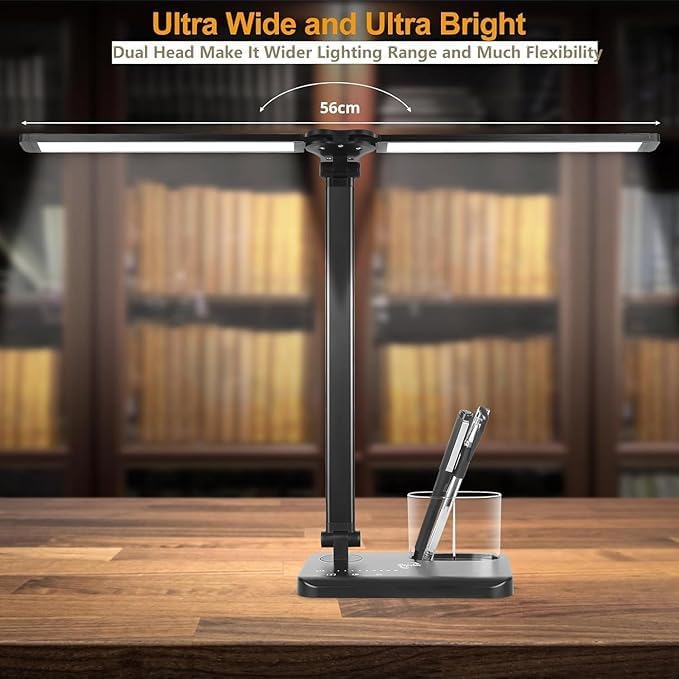
Figure 4: Dual head design for wide and flexible lighting.
6.2 Adjustable Arm and Base
ທamp offers extensive adjustability for optimal positioning:
- ທamp arm is 180° flexible.
- The base can be adjusted up to 135°.
- The foldable design enhances portability and storage.

Figure 5: Adjustable arm and base for flexible positioning.
6.3 ພອດສາກໄຟ USB
ທamp includes a 5V 1A USB output port on the base, allowing you to charge compatible devices such as smartphones while using the lamp.
Figure 6: USB charging port on the lamp ພື້ນຖານ.
7. ບໍາລຸງຮັກສາ
- ທໍາຄວາມສະອາດ: ຮັບປະກັນ lamp ຖືກຖອດປລັກອອກກ່ອນທຳຄວາມສະອາດ. ໃຊ້ຜ້າອ່ອນໆແລະແຫ້ງເຊັດພື້ນຜິວ. ຢ່າໃຊ້ນ້ຳຢາທຳຄວາມສະອາດທີ່ມີສີຂັດ ຫຼື ຕົວລະລາຍ.
- ການເກັບຮັກສາ: ເມື່ອບໍ່ໃຊ້, ໃຫ້ເກັບຮັກສາ lamp in a cool, dry place, away from direct sunlight and moisture.
8. ການແກ້ໄຂບັນຫາ
| ບັນຫາ | ສາເຫດທີ່ເປັນໄປໄດ້ | ການແກ້ໄຂ |
|---|---|---|
| Lamp ບໍ່ເປີດ | 1. Manual ON/OFF switch is in 'OFF' position. 2. Power cable is not properly connected. 3. ພະລັງງານ outagອີ ຫຼື ລamp ຕັ້ງຄ່າ ໃໝ່. | 1. Ensure the manual switch on the back of the base is 'ON'. 2. Check all power connections, including the mains plug and USB cable. 3. If unplugged or power was lost, the lamp may need to be turned on via the touch control. |
| Lamp settings (mode/brightness) reset. | Power was disconnected or there was a power outage. | This is normal behavior. Re-adjust your preferred settings. The memory function only works when the lamp is turned off via touch control and remains plugged in. |
| Lamp head/arm does not stay in position. | Joints may be loose or the weight distribution is uneven. | ປັບ lamp head and arm to a balanced position. Ensure the joints are not excessively loose. |
| ພອດສາກໄຟ USB ບໍ່ເຮັດວຽກ. | 1. Device not compatible. 2. ລamp ບໍ່ໄດ້ເປີດເຄື່ອງ. 3. Cable issue. | 1. Ensure your device is compatible with 5V 1A USB charging. 2. ລamp must be powered on for the USB charging port to function. 3. Try a different USB cable. |
9. ຂໍ້ມູນຈໍາເພາະ
ຮູບທີ 7: ຂະໜາດຜະລິດຕະພັນ.
| ຂໍ້ມູນຈໍາເພາະ | ລາຍລະອຽດ |
|---|---|
| ຊື່ຕົວແບບ | JB510 |
| ຍີ່ຫໍ້ | Woputne |
| ປະເພດແຫຼ່ງແສງ | LED |
| ວັດtage | 5 ວັດ |
| ສະບັບtage | 5 ໂວນ |
| ຄວາມສະຫວ່າງ | 270 Lumen |
| ອຸນຫະພູມສີ | 5 modes (3000K to 6000K) |
| ລະດັບຄວາມສະຫວ່າງ | 10 ລະດັບ |
| ວິທີການຄວບຄຸມ | ແຕະ |
| ຄຸນນະສົມບັດພິເສດ | Manual ON/OFF Switch, Memory Function, 45-minute Auto-Off Timer, USB Charging Port (5V 1A output) |
| ວັດສະດຸ | ອາລູມິນຽມ, ພາດສະຕິກ |
| ຂະໜາດສິນຄ້າ | 5.2"D x 1.81"W x 15.35"H (ປະມານ 13.2cm D x 4.6cm W x 39cm H) |
| ນ້ໍາຫນັກລາຍການ | 1.47 ປອນ (ປະມານ 665 ກຣາມ) |
| ຄວາມຍາວສາຍ | 39.37 Inches (approx. 100cm) |
| UPC | 715377635471 |
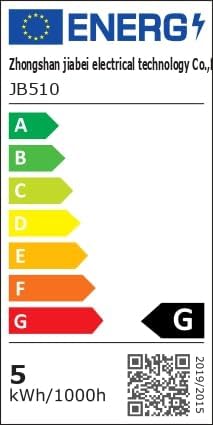
Figure 8: Energy Efficiency Label. For more details, visit eprel.ec.europa.eu/qr/1481462.
10. ການຮັບປະກັນແລະການສະຫນັບສະຫນູນ
Woputne is committed to providing quality products. For any questions, concerns, or support needs regarding your LED Desk Lamp, please contact our customer service. Specific warranty details may vary; please refer to your purchase documentation or contact the seller for more information.
We aim to ensure customer satisfaction and are available to assist with product inquiries or operational guidance.