
1. ຂໍ້ມູນຄວາມປອດໄພທີ່ສໍາຄັນ
ກະລຸນາອ່ານຄໍາແນະນໍາທັງໝົດຢ່າງລະອຽດກ່ອນການນໍາໃຊ້ເຄື່ອງດູດຄວາມຊຸ່ມ. ເກັບຄູ່ມືນີ້ໄວ້ເພື່ອອ້າງອີງໃນອະນາຄົດ.
- ໃຫ້ແນ່ໃຈວ່າເຄື່ອງຖືກວາງໄວ້ເທິງພື້ນຜິວທີ່ຮາບພຽງ ແລະ ໝັ້ນຄົງເພື່ອປ້ອງກັນການຮົ່ວໄຫຼຂອງນໍ້າ.
- Maintain adequate clearance (at least 20 cm) around the unit for proper airflow.
- Do not operate the unit with a damaged power cord. Contact customer support for replacement.
- ຖອດເຄື່ອງລະບາຍຄວາມຊຸ່ມຊື້ນອອກກ່ອນທີ່ຈະທໍາຄວາມສະອາດຫຼືດໍາເນີນການບໍາລຸງຮັກສາໃດໆ.
- ຫ້າມເອົາສິ່ງຂອງເຂົ້າໄປໃນຊ່ອງສຽບ ຫຼືທາງອອກຂອງອາກາດ.
- ຮັກສາອຸປະກອນໃຫ້ຫ່າງຈາກແຫຼ່ງຄວາມຮ້ອນແລະແສງແດດໂດຍກົງ.
- ເຄື່ອງໃຊ້ນີ້ບໍ່ໄດ້ມີຈຸດປະສົງເພື່ອໃຊ້ໂດຍບຸກຄົນ (ລວມທັງເດັກນ້ອຍ) ທີ່ມີຄວາມສາມາດທາງຮ່າງກາຍ, ຄວາມຮູ້ສຶກ ຫຼືຈິດໃຈທີ່ຫຼຸດລົງ, ຫຼືຂາດປະສົບການ ແລະຄວາມຮູ້, ເວັ້ນເສຍແຕ່ວ່າພວກເຂົາໄດ້ຮັບການຊີ້ນໍາ ຫຼືຄໍາແນະນໍາກ່ຽວກັບການນໍາໃຊ້ເຄື່ອງໃຊ້ໂດຍບຸກຄົນທີ່ຮັບຜິດຊອບຄວາມປອດໄພຂອງເຂົາເຈົ້າ.
2. ຜະລິດຕະພັນເກີນview
The Waykar 80 Pints Dehumidifier is designed to efficiently remove excess moisture from your environment, improving air quality and comfort. It is suitable for spaces up to 5,000 square feet.

ຮູບ 2.1: ດ້ານຫນ້າ view of the Waykar 80 Pints Dehumidifier.

Figure 2.2: Dehumidifier operating in a room, illustrating its coverage capability and adjustable humidity range (30-80% RH).
ຄຸນນະສົມບັດທີ່ສໍາຄັນປະກອບມີ:
- ຄວາມອາດສາມາດ 80 Pint: ກໍາຈັດຄວາມຊຸ່ມຊື່ນໄດ້ເຖິງ 80 pints ຕໍ່ມື້.
- Energy Star ຮັບການຮັບຮອງ: Designed for high energy efficiency.
- Wide-Angle Swing: Automatic 30°-90° swing function for improved air circulation.
- ການດໍາເນີນງານງຽບ: ເຮັດວຽກຕໍ່າສຸດ 42 dB.
- ການຄວບຄຸມ Smart Touch: Intuitive panel for easy settings adjustment.
- ໂມງຈັບເວລາ 24 ຊົ່ວໂມງ: Schedule operations for convenience.
- Auto Defrost & Memory Restart: Ensures stable performance and resumes settings after power interruption.
- Flexible Drainage: Options for manual tank emptying or continuous drainage.
- ການກັ່ນຕອງອາກາດທີ່ລ້າງອອກໄດ້: ງ່າຍທີ່ຈະເຮັດຄວາມສະອາດແລະຮັກສາ.
- 360° Swivel Wheels & Integrated Handle: ສໍາລັບການເຄື່ອນທີ່ງ່າຍ.
3. ການຕິດຕັ້ງແລະການຕິດຕັ້ງ
3.1 ການຫຸ້ມຫໍ່
Carefully remove the dehumidifier from its packaging. Inspect the unit for any signs of damage. If any damage is found, do not operate the unit and contact customer support.
3.2 ການຈັດວາງ
Place the dehumidifier on a firm, level surface in a location where the ambient temperature will not fall below 5°C (41°F). Ensure there is at least 20 cm (8 inches) of space around the unit for proper air circulation. Avoid placing the unit near heat-generating appliances or in direct sunlight.

Figure 3.1: The dehumidifier features 360° swivel wheels and an integrated handle for easy movement, along with tidy cable storage.
3.3 ການເຊື່ອມຕໍ່ພະລັງງານ
ສຽບສາຍໄຟໃສ່ບ່ອນສຽບໄຟຟ້າທີ່ມີສາຍດິນ. ຮັບປະກັນ voltage and frequency of the power supply match the specifications on the unit's rating label.
4. ຄໍາແນະນໍາການດໍາເນີນງານ
ແຜງຄວບຄຸມຊ່ວຍໃຫ້ທ່ານສາມາດຈັດການໜ້າທີ່ທັງໝົດຂອງເຄື່ອງດູດຄວາມຊຸ່ມ.
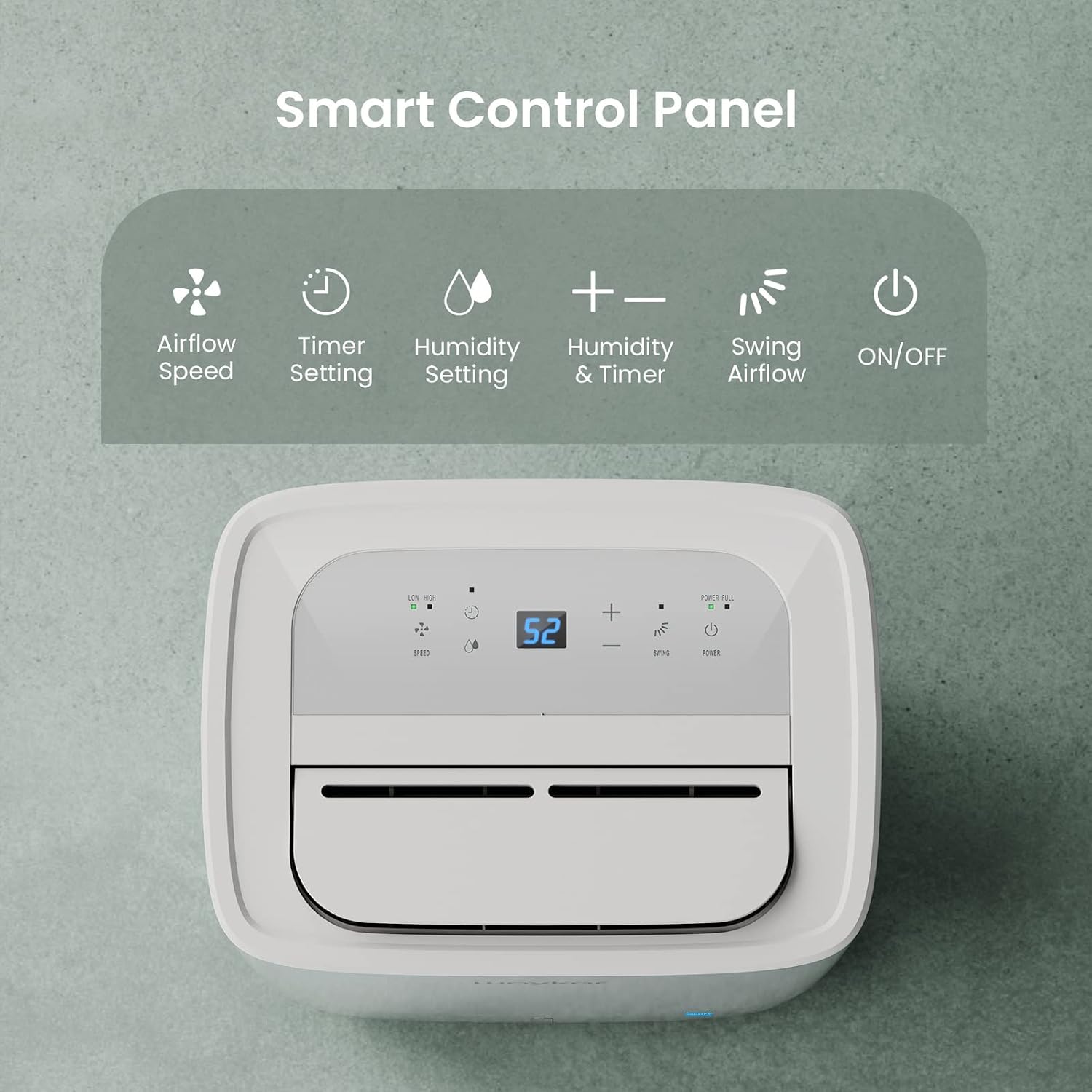
Figure 4.1: Smart Control Panel with buttons for Airflow Speed, Timer Setting, Humidity Setting, Swing Airflow, and ON/OFF.
4.1 ເປີດ/ປິດ
- ກົດ ພະລັງງານ ປຸ່ມເພື່ອເປີດ ຫຼືປິດເຄື່ອງ.
4.2 ການຕັ້ງຄ່າລະດັບຄວາມຊຸ່ມຊື່ນ
- ກົດ + or - buttons to adjust the desired humidity level between 30% and 80% Relative Humidity (RH). The unit will operate until the set humidity level is reached, then cycle ON/OFF to maintain it.
4.3 ຄວາມໄວພັດລົມ
- ກົດ ຄວາມໄວ button to toggle between Low and High fan speeds.
4.4 ຟັງຊັນຈັບເວລາ
- ກົດ ໂມງຈັບເວລາ button to set a delay for the unit to turn ON or OFF. The timer can be set from 0.5 to 24 hours.
4.5 Swing Airflow
- ກົດ ແກວ່ງ button to activate the automatic 30°-90° airflow oscillation. This helps distribute dehumidified air more evenly.
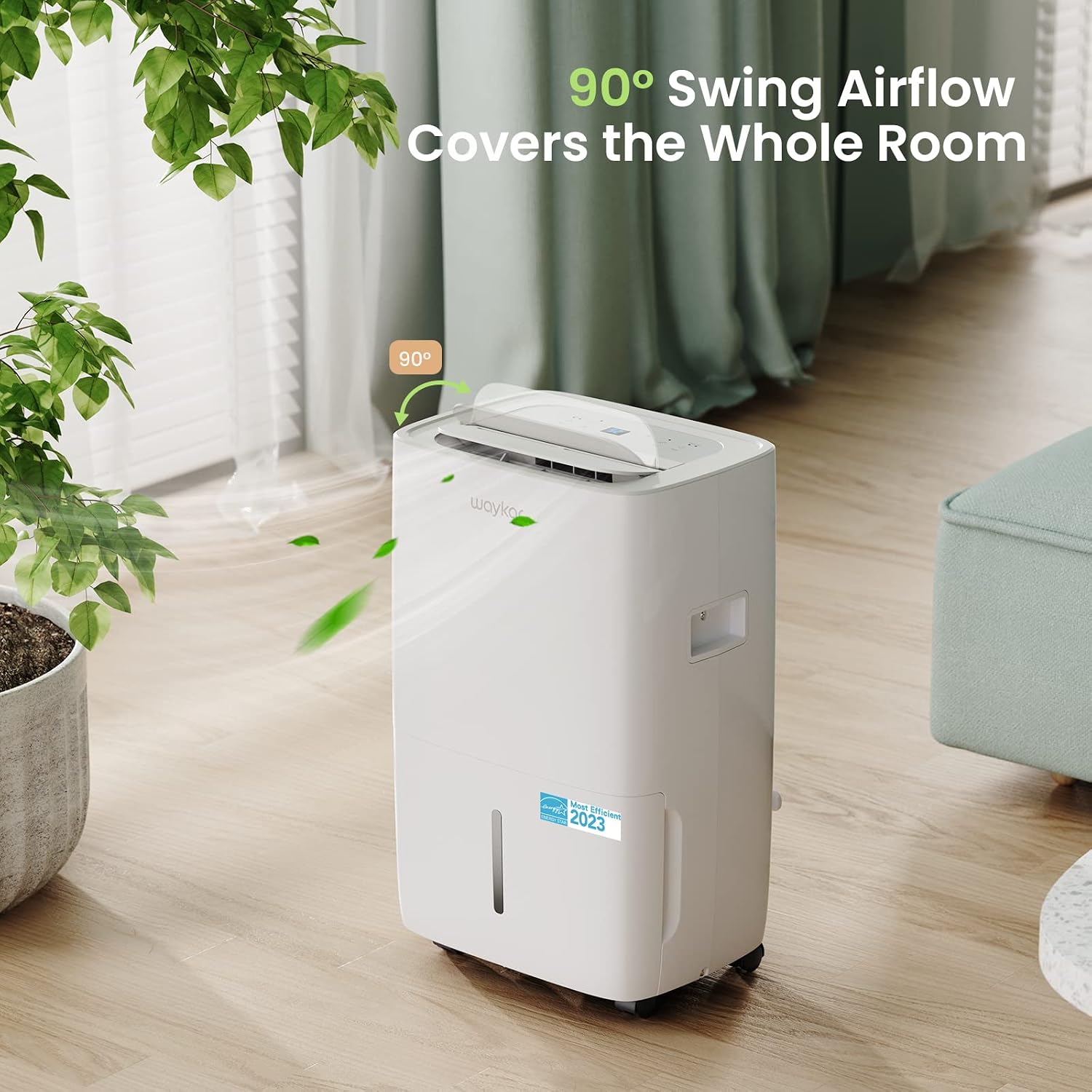
Figure 4.2: The 90° swing airflow feature helps cover the entire room for efficient dehumidification.
4.6 ລັອກເດັກ
- ເພື່ອເປີດໃຊ້ການລັອກເດັກ, ໃຫ້ກົດຄ້າງໄວ້ ໂມງຈັບເວລາ button for 3 seconds. The control panel will be locked to prevent accidental changes. Repeat to unlock.
4.7 Auto Defrost and Memory Restart
- ເຄື່ອງນີ້ມີຟັງຊັນລະລາຍນ້ຳກ້ອນອັດຕະໂນມັດເຊິ່ງຈະເປີດໃຊ້ງານເມື່ອນ້ຳຄ້າງສະສົມຢູ່ເທິງຂົດລວດລະເຫີຍ, ຮັບປະກັນການເຮັດວຽກທີ່ມີປະສິດທິພາບໃນສະພາບແວດລ້ອມທີ່ເຢັນກວ່າ.
- ໃນກໍລະນີຂອງພະລັງງານ outage, the Memory Restart function will automatically resume the previous settings once power is restored.
5. ທາງເລືອກໃນການລະບາຍນ້ໍາ
The Waykar dehumidifier offers two convenient drainage methods:
5.1 ການລະບາຍນໍ້າດ້ວຍມື (ຖັງນໍ້າ)
- When the 1.14-gallon (4.3L) water tank is full, the unit will automatically shut off and an indicator light will illuminate on the control panel.
- ດຶງຖັງນ້ໍາອອກຈາກດ້ານຫນ້າຂອງຫນ່ວຍງານຢ່າງລະມັດລະວັງ.
- ຖອກນ້ຳທີ່ເກັບໄວ້ອອກ.
- Slide the empty tank back into the unit until it clicks into place. The unit will then resume operation.
5.2 ການລະບາຍນ້ຳຢ່າງຕໍ່ເນື່ອງ (ທໍ່ລະບາຍນ້ຳ)
- For continuous operation without needing to empty the tank, attach the included 3.3 ft (1 m) drain hose to the drainage outlet at the back of the unit.
- ຮັບປະກັນວ່າທໍ່ໄດ້ຖືກຮັດແໜ້ນຢ່າງແໜ້ນໜາເພື່ອປ້ອງກັນການຮົ່ວໄຫຼ.
- Direct the other end of the hose to a suitable drain (e.g., floor drain, sink). Ensure the hose is sloped downwards to allow gravity drainage.

Figure 5.1: Illustration of both manual drainage (left) and continuous drainage (right) options.
6. ບໍາລຸງຮັກສາ
ການບໍາລຸງຮັກສາເປັນປົກກະຕິຮັບປະກັນການປະຕິບັດທີ່ດີທີ່ສຸດແລະອາຍຸຍືນຂອງເຄື່ອງດູດຝຸ່ນຂອງທ່ານ.
6.1 ການທໍາຄວາມສະອາດເຄື່ອງກອງອາກາດ
The washable air filter should be cleaned regularly (approximately every 250 hours of operation or when the filter indicator light illuminates) to maintain efficiency.
- ປິດເຄື່ອງ ແລະຖອດປລັກອອກຈາກປລັກສຽບໄຟ.
- ເອົາການກັ່ນຕອງອາກາດອອກຈາກດ້ານຫລັງຂອງຫນ່ວຍງານ.
- ລ້າງການກັ່ນຕອງດ້ວຍນ້ໍາສະບູທີ່ອົບອຸ່ນ. ລ້າງໃຫ້ສະອາດ.
- ປ່ອຍໃຫ້ການກັ່ນຕອງອາກາດແຫ້ງຫມົດກ່ອນທີ່ຈະໃສ່ມັນເຂົ້າໄປໃນຫນ່ວຍບໍລິການ.
- Once the filter is reinstalled, press and hold the ການກັ່ນຕອງ button for 3 seconds to reset the filter indicator.

Figure 6.1: The detachable and washable water tank, featuring a visible water level indicator.
6.2 ການທໍາຄວາມສະອາດຖັງນໍ້າ
Clean the water tank periodically to prevent mold and bacteria growth.
- ເອົາຖັງນ້ໍາອອກຈາກຫນ່ວຍ.
- ລ້າງຖັງດ້ວຍນ້ຳອຸ່ນ ແລະ ຜົງຊັກຟອກອ່ອນໆ.
- ລ້າງໃຫ້ສະອາດ ແລະ ຕາກໃຫ້ແຫ້ງ ກ່ອນທີ່ຈະເອົາມັນກັບຄືນສູ່ເຄື່ອງດູດຄວາມຊຸ່ມຊື່ນ.
6.3 ການທໍາຄວາມສະອາດພາຍນອກ
- ເຊັດດ້ານນອກຂອງຫນ່ວຍງານດ້ວຍຄວາມອ່ອນໂຍນ, ງamp ຜ້າ. ຢ່າໃຊ້ສານເຄມີທີ່ຮຸນແຮງຫຼືເຄື່ອງເຮັດຄວາມສະອາດຂັດ.
7. ຄູ່ມືການແກ້ໄຂບັນຫາ
ກ່ອນທີ່ຈະຕິດຕໍ່ຫາສະຫນັບສະຫນູນລູກຄ້າ, ກະລຸນາເບິ່ງບັນຫາທົ່ວໄປດັ່ງຕໍ່ໄປນີ້ແລະການແກ້ໄຂ:
| ບັນຫາ | ສາເຫດທີ່ເປັນໄປໄດ້ | ການແກ້ໄຂ | ||||||||||
|---|---|---|---|---|---|---|---|---|---|---|---|---|
| Dehumidifier does not turn ON | No power supply; Power cord not plugged in; Water tank full or incorrectly installed. | Check power outlet; Plug in power cord securely; Empty and correctly reinstall water tank. | ||||||||||
| Unit is running but not dehumidifying | ຕົວກອງອາກາດອຸດຕັນ; ອຸນຫະພູມຫ້ອງຕໍ່າເກີນໄປ; ຄວາມຊຸ່ມຊື່ນສູງເກີນໄປ. | Clean air filter; Ensure room temperature is above 5°C (41°F); Lower desired humidity setting. | ||||||||||
| ໜ່ວຍ ງານມີສຽງລົບກວນ | ຫນ່ວຍງານບໍ່ຢູ່ໃນລະດັບ; ການກັ່ນຕອງອາກາດອຸດຕັນ. | ວາງເຄື່ອງໄວ້ເທິງພື້ນຜິວທີ່ຮາບພຽງ ແລະ ໝັ້ນຄົງ; ທຳຄວາມສະອາດຕົວກອງອາກາດ. | ||||||||||
| ນ້ໍາຮົ່ວອອກຈາກຫນ່ວຍ | Water tank incorrectly installed; Drain hose not securely attached (continuous drainage). | Reinstall water tank correctly; Securely tighten drain hose connection. | ||||||||||
ລະຫັດຂໍ້ຜິດພາດ
ເອກະສານທີ່ກ່ຽວຂ້ອງ - JD025CE-80-CA
Ask a question about this manualAsk about setup, troubleshooting, compatibility, parts, safety, or missing instructions. Manuals+ will review the question and use this page’s manual context to help answer it. |


