
1. ບົດແນະນຳ
This manual provides essential information for the installation, operation, and maintenance of the Cisco Catalyst 9800-L Copper Uplink Wireless LAN Controller (Model C9800-L-C-K9). Please read this manual thoroughly before using the device to ensure proper functionality and safety.
2. ຂໍ້ມູນຄວາມປອດໄພທີ່ສໍາຄັນ
ໃຫ້ປະຕິບັດຕາມຂໍ້ຄວນລະວັງດ້ານຄວາມປອດໄພຕໍ່ໄປນີ້ເພື່ອປ້ອງກັນການບາດເຈັບ ແລະ ຄວາມເສຍຫາຍຕໍ່ອຸປະກອນ:
- ໃຫ້ແນ່ໃຈວ່າອຸປະກອນຖືກຕິດຕັ້ງຢູ່ໃນພື້ນທີ່ທີ່ມີລະບາຍອາກາດດີເພື່ອປ້ອງກັນຄວາມຮ້ອນເກີນໄປ.
- ໃຊ້ສະເພາະແຫຼ່ງພະລັງງານທີ່ລະບຸໄວ້ສຳລັບອຸປະກອນນີ້ເທົ່ານັ້ນ.
- ຢ່າເຮັດໃຫ້ອຸປະກອນມີຄວາມຊຸ່ມຊື່ນ ຫຼືອຸນຫະພູມສູງສຸດ.
- ຕັດການເຊື່ອມຕໍ່ໄຟຟ້າກ່ອນທີ່ຈະດໍາເນີນການບໍາລຸງຮັກສາຫຼືທໍາຄວາມສະອາດ.
- ອ້າງອີງການບໍລິການທັງໝົດໃຫ້ກັບພະນັກງານບໍລິການທີ່ມີຄຸນວຸດທິ.
3. ເນື້ອໃນຊຸດ
ກວດສອບວ່າລາຍການທັງຫມົດແມ່ນມີຢູ່ໃນຊຸດ:
- Cisco Catalyst 9800-L Wireless LAN Controller
- ຊີດີ (ມີເອກະສານ ຫຼື ຊອບແວ)
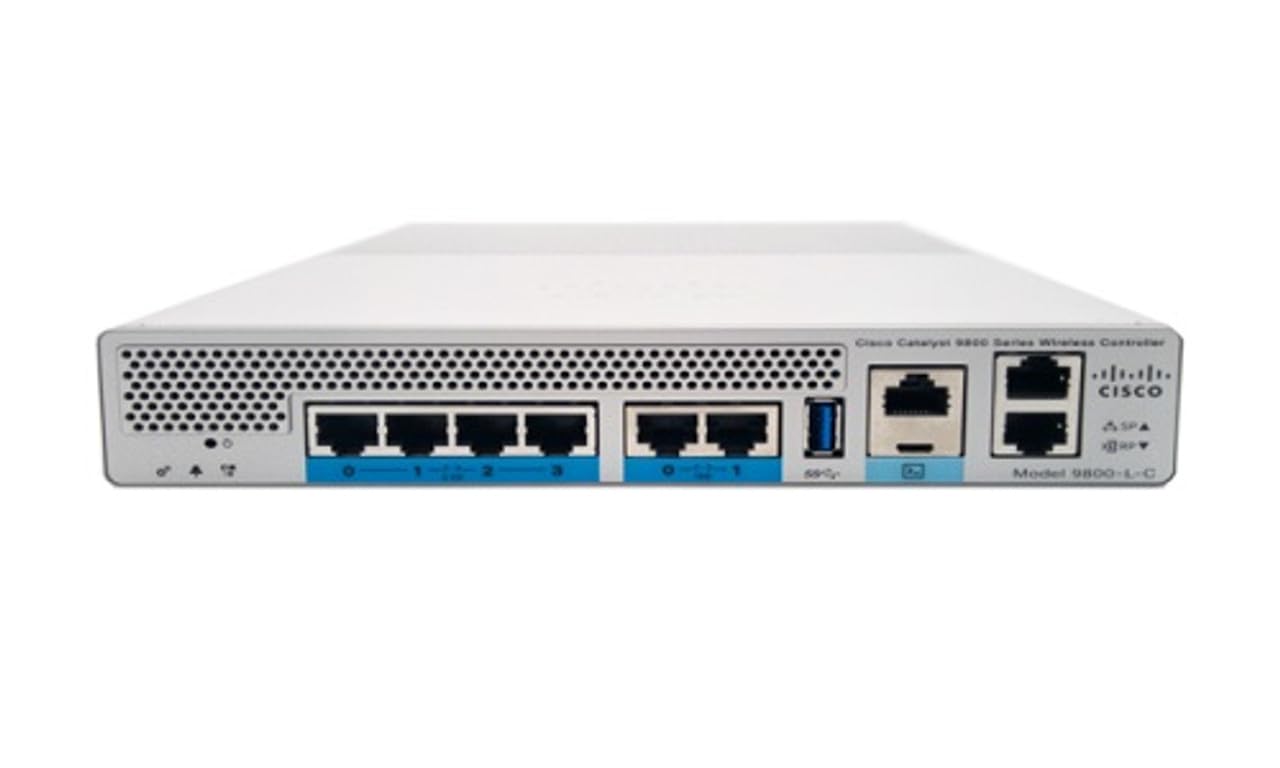
ຮູບ 1: ດ້ານຫນ້າ view of the Cisco Catalyst 9800-L Wireless LAN Controller. This image shows the compact design and port layout of the device.
4. ຜະລິດຕະພັນເກີນview
The Cisco Catalyst 9800-L is a compact, fixed-configuration wireless LAN controller designed for small to medium-sized deployments. It provides centralized control for Cisco Aironet access points, offering robust wireless network management capabilities.
ຄຸນນະສົມບັດທີ່ສໍາຄັນ:
- Managed, Layer 2.5 (Wireless Controller) functionality
- Copper uplink interfaces
- RJ45 interface type
- 11 ports for connectivity
- Designed for desktop environments
5. ຕັ້ງຄ່າ
5.1 ການຫຸ້ມຫໍ່ແລະການກວດກາ
- Carefully remove the controller from its packaging.
- Inspect the device for any signs of physical damage. If damage is found, contact your supplier immediately.
5.2 ການຕິດຕັ້ງທາງດ້ານຮ່າງກາຍ
- Place the controller on a stable, flat surface, such as a desktop.
- Ensure adequate clearance around the device for proper airflow and ventilation.
5.3 ການເຊື່ອມຕໍ່ພະລັງງານ
- Connect the power cord to the power input on the rear of the controller.
- Plug the other end of the power cord into a grounded electrical outlet (220 Volts).
5.4 ການເຊື່ອມຕໍ່ເຄືອຂ່າຍ
- Connect Ethernet cables from your network infrastructure to the RJ45 uplink ports on the controller.
- Connect access points to the appropriate downlink ports as required by your network design.
5.5 ການເຂົ້າເຖິງການຕັ້ງຄ່າເບື້ອງຕົ້ນ
- Refer to the included CD or Cisco's official documentation for detailed instructions on initial console access and software configuration.
- Typically, this involves connecting a console cable to the device and using a terminal emulator.
6. ການດໍາເນີນງານຂອງຕົວຄວບຄຸມ
6.1 ການດໍາເນີນງານພື້ນຖານ
Once powered on and initially configured, the controller will begin managing connected access points. Monitor the status indicators on the device for operational status.
6.2 ການຄຸ້ມຄອງຈຸດເຂົ້າເຖິງ
The Cisco Catalyst 9800-L automatically discovers and provisions Cisco Aironet access points. Use the controller's management interface (CLI or GUI) to configure wireless networks, security policies, and guest access.
6.3 ການຕັ້ງຄ່າເຄືອຂ່າຍ
Detailed network configuration, including VLANs, QoS, and routing, is performed through the controller's operating system. Consult Cisco's official documentation for advanced configuration guides.
7. ຄໍາແນະນໍາກ່ຽວກັບການບໍາລຸງຮັກສາ
- ການອັບເດດເຟີມແວ: Regularly check for and apply the latest firmware updates from Cisco to ensure optimal performance and security.
- ທໍາຄວາມສະອາດ: Keep the device clean and free of dust. Use a soft, dry cloth for cleaning. Do not use liquid or aerosol cleaners.
- ເງື່ອນໄຂສິ່ງແວດລ້ອມ: Ensure the operating environment remains within specified temperature and humidity ranges to prevent hardware failure.
- ການຕັ້ງຄ່າສໍາຮອງຂໍ້ມູນ: Periodically back up your controller's configuration to prevent data loss.
8. ການແກ້ໄຂບັນຫາ
ພາກສ່ວນນີ້ແກ້ໄຂບັນຫາທົ່ວໄປທີ່ທ່ານອາດຈະພົບ:
| ບັນຫາ | ສາເຫດທີ່ເປັນໄປໄດ້ | ການແກ້ໄຂ |
|---|---|---|
| ການຄວບຄຸມບໍ່ໄດ້ເປີດ | Power cable disconnected; Power outlet failure | Check power cable connections; Test power outlet with another device. |
| Access points not connecting | Incorrect network configuration; APs not discovered | Verify network settings on the controller; Ensure APs are on the same network segment or reachable via IP. |
| Slow wireless performance | Interference; Overloaded channels; Outdated firmware | Perform a site survey to identify interference; Optimize channel selection; Update controller and AP firmware. |
9. ຂໍ້ກໍານົດດ້ານວິຊາການ
| ຂໍ້ມູນຈໍາເພາະ | ລາຍລະອຽດ |
|---|---|
| ຍີ່ຫໍ້ | ຊິສໂກ |
| ໝາຍເລກຕົວແບບ | C9800-L-C-K9 |
| ຈໍານວນພອດ | 11 |
| ການໂຕ້ຕອບ | RJ45 |
| ປະເພດສະຫຼັບ | Managed, Layer 2.5 (Wireless Controller) |
| ເວທີ | ເຊຕາ |
| Case Material Type | ທອງແດງ |
| ສະບັບtage | 220 ໂວນ |
| ອຸປະກອນທີ່ເຂົ້າກັນໄດ້ | ເດັສທັອບ |
| ສີ | ສີຟ້າ |
| ນ້ໍາຫນັກລາຍການ | 3.09 ກິໂລກຣາມ |
| UPC | 657768416101 |
| ASIN | B0C3FQPCY4 |
10. ຂໍ້ມູນການຮັບປະກັນ
This Cisco Catalyst 9800-L Wireless LAN Controller (Renewed) comes with a ຮັບປະກັນ 90 ມື້ຈໍາກັດ. For specific terms and conditions, please refer to the warranty documentation provided with your purchase or contact your reseller.
11. ການຊ່ວຍເຫຼືອລູກຄ້າ
For technical assistance, troubleshooting, or further inquiries regarding your Cisco Catalyst 9800-L Wireless LAN Controller, please visit the official Cisco support website or contact your authorized Cisco reseller. Ensure you have your model number (C9800-L-C-K9) and serial number available when seeking support.