
1. ຜະລິດຕະພັນເກີນview
The Cudy GS108D is an 8-port Gigabit Ethernet Network Switch designed for expanding your network connectivity. It offers high-speed data transfer for devices such as computers, IPTVs, printers, NAS, game consoles, and routers. Featuring a plug-and-play design, fanless operation, and energy-efficient technology, this switch provides a reliable and quiet solution for both home and office networks.

ຮູບພາບ: ທາງຫນ້າ view of the Cudy GS108D switch, highlighting its 8 Gigabit Ethernet ports and LED indicators.
ຄຸນນະສົມບັດທີ່ສໍາຄັນ:
- 8 ພອດ Gigabit Ethernet: ສະໜອງການເຊື່ອມຕໍ່ແບບມີສາຍຄວາມໄວສູງສຳລັບຫຼາຍອຸປະກອນ.
- ສຽບ ແລະ ຫຼິ້ນ: Requires no software installation or configuration for immediate use.
- ການອອກແບບທີ່ບໍ່ມີພັດລົມ: Ensures quiet operation, suitable for any environment.
- ປະສິດທິພາບພະລັງງານ: Compliant with IEEE802.3az standard, saving power when ports are idle.
- ການຕິດຕັ້ງແບບອະເນກປະສົງ: ຮອງຮັບທັງການຈັດວາງ desktop ແລະການຕິດຕັ້ງຝາ.
2. ເນື້ອໃນຊຸດ
ກວດສອບວ່າຊຸດຂອງທ່ານມີລາຍການດັ່ງຕໍ່ໄປນີ້:
- Cudy GS108D 8-Port Gigabit Ethernet Network Switch
- Power Adapter
- ຄູ່ມືແນະ ນຳ (ເອກະສານນີ້)
- ສາຍອີເທີເນັດ (ອາດຈະແຕກຕ່າງກັນໄປຕາມພາກພື້ນ/ແພັກເກັດ)

Image: Contents of the Cudy GS108D package, showing the switch, power adapter, and an Ethernet cable.
3. ລາຍລະອຽດທາງດ້ານຮ່າງກາຍ
ແຜງໜ້າ:
The front panel features eight 10/100/1000 Mbps RJ45 ports. Each port has an associated LED indicator to show link/activity status.
- ໄຟ LED: ຊີ້ບອກສະຖານະພະລັງງານຂອງສະວິດ.
- ໄຟ LED ເຊື່ອມຕໍ່/ປະຕິບັດ (1-8):
- ສີຂຽວແຂງ: A device is connected and the link is active.
- ກະພິບສີຂຽວ: Data is being transmitted or received on the port.
- ປິດ: No device is connected or the link is inactive.

ຮູບພາບ: ລາຍລະອຽດ view of the Cudy GS108D's front panel, showing the 8 RJ45 ports and their corresponding LED indicators.
ກະດານດ້ານຫລັງ:
The rear panel typically contains the power input port.
ຂະໜາດ:
The compact design of the GS108D allows for flexible placement. Approximate dimensions are 138mm (5.43") L x 61.5mm (2.42") W x 24mm (0.94") H.
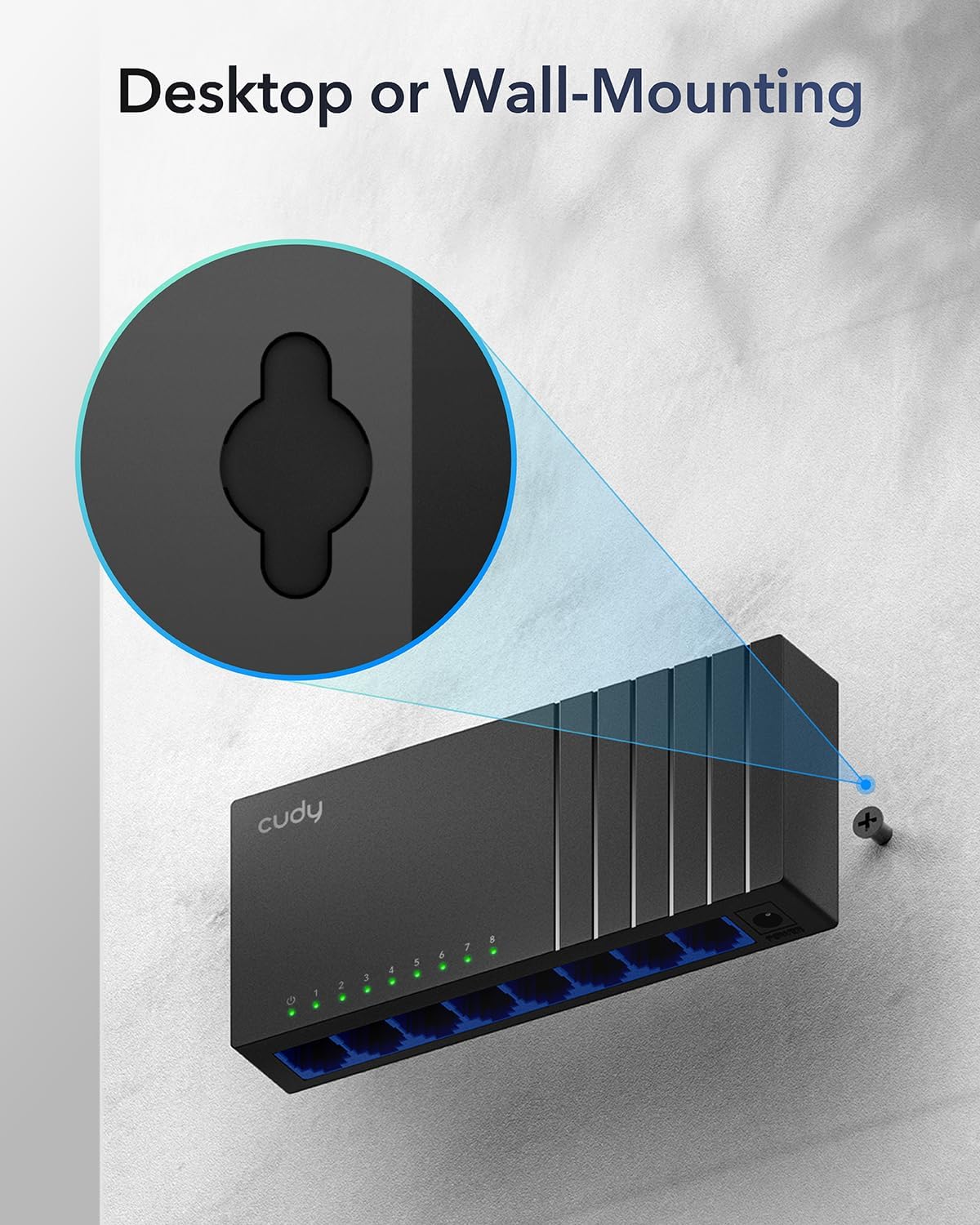
Image: The Cudy GS108D switch with its compact dimensions clearly indicated.
4. ຄໍາແນະນໍາການຕິດຕັ້ງ
The Cudy GS108D switch is designed for simple plug-and-play installation. No complex configuration is required.
ຂັ້ນຕອນທີ 1: ການເຊື່ອມຕໍ່ພະລັງງານ
- Connect one end of the provided power adapter to the power port on the rear panel of the GS108D switch.
- ສຽບປາຍອື່ນຂອງອະແດບເຕີໄຟເຂົ້າໄປໃນປລັກໄຟຟ້າມາດຕະຖານ.
- ກວດສອບວ່າໄຟ LED ເປີດເຄື່ອງຢູ່ເທິງແຜງດ້ານໜ້າສະຫວ່າງຂຶ້ນ, ຊີ້ບອກວ່າສະວິດກຳລັງຮັບພະລັງງານ.

Image: The Cudy GS108D switch with its power adapter connected and ready for use.
ຂັ້ນຕອນທີ 2: ການເຊື່ອມຕໍ່ອຸປະກອນ
- Connect your network devices (e.g., computer, router, NAS, game console) to any of the 8 RJ45 ports on the front panel using standard Ethernet cables (Cat5e or higher recommended for Gigabit speeds).
- Ensure the Link/Act LED for each connected port illuminates, indicating a successful connection. If the LED is flashing, data is being transmitted.

Image: A laptop being connected to the Cudy GS108D switch with an Ethernet cable, demonstrating a typical setup.
ຂັ້ນຕອນທີ 3: ຕົວເລືອກການຕິດຕັ້ງ
The GS108D supports both desktop placement and wall mounting.
- ການຈັດວາງ Desktop: Simply place the switch on a flat, stable surface.
- ຕິດຝາ: The switch features mounting slots on its underside. Use appropriate screws (not included) to secure the switch to a wall.

Image: The Cudy GS108D switch shown with its wall-mounting slots, illustrating how it can be securely attached to a wall.
5. ຄໍາແນະນໍາການດໍາເນີນງານ
Once connected, the Cudy GS108D operates automatically without further user intervention.
ການເຈລະຈາອັດຕະໂນມັດ
Each port on the switch automatically detects the network speed (10/100/1000 Mbps) and duplex mode (Half/Full Duplex) of the connected device and adjusts accordingly for optimal performance.
ການເພີ່ມປະສິດທິພາບການຈະລາຈອນ
The switch features a 4 Mbit packet buffer to ensure stable and efficient data forwarding, reducing packet loss and improving overall network performance, especially during high traffic loads.
Energy Efficiency (IEEE 802.3az)
The GS108D incorporates energy-efficient Ethernet technology. It automatically adjusts power consumption based on cable length and network traffic, reducing energy usage when ports are idle or when connected devices are turned off.

Image: Visual representation of the power-saving feature, showing reduced energy consumption when ports are idle.
ການສົ່ງທາງໄກ
The switch supports long-distance Ethernet cable runs, allowing for reliable data transmission up to 170 meters (557 feet) with Cat5e or higher Ethernet cables.

Image: Illustration of the Cudy GS108D's capability for long-distance transmission, up to 170 meters, requiring Cat5e or higher cables.
6. ບໍາລຸງຮັກສາ
To ensure optimal performance and longevity of your Cudy GS108D switch, follow these maintenance guidelines:
- ການຈັດວາງ: Place the switch in a cool, dry location away from direct sunlight, heat sources, and excessive moisture. Ensure adequate ventilation around the device.
- ທໍາຄວາມສະອາດ: ໃຊ້ຜ້າປຽກແຫ້ງເພື່ອເຮັດຄວາມສະອາດດ້ານນອກຂອງສະວິດ. ຫ້າມໃຊ້ນໍ້າສະອາດ ຫຼື ແອໂຣໂຊລ.
- ພະລັງງານ: Use only the provided power adapter. Disconnect the power adapter during electrical storms or when unused for long periods.
- ສາຍໄຟ: Ensure all Ethernet cables are securely connected and free from damage.
7. ການແກ້ໄຂບັນຫາ
If you encounter issues with your Cudy GS108D switch, refer to the following common troubleshooting steps:
ບໍ່ມີພະລັງງານ
- Ensure the power adapter is securely connected to both the switch and a working electrical outlet.
- ກວດເບິ່ງວ່າປລັກສຽບໄຟເຮັດວຽກຫຼືບໍ່ໂດຍການສຽບອຸປະກອນອື່ນ.
- Verify that the Power LED on the switch is illuminated. If not, try a different power outlet.
ບໍ່ມີການເຊື່ອມຕໍ່/ກິດຈະກຳໃນທ່າເຮືອ
- Ensure the Ethernet cable is securely plugged into both the switch port and the connected device.
- Try using a different Ethernet cable to rule out cable damage.
- ເຊື່ອມຕໍ່ອຸປະກອນກັບພອດອື່ນໃນສະວິດ.
- Verify that the connected device (e.g., computer, router) is powered on and its network adapter is enabled.
- If connecting to a router, ensure the router's port is active.
ຄວາມໄວເຄືອຂ່າຍຊ້າ
- Ensure you are using Cat5e or higher Ethernet cables for Gigabit speeds. Older Cat5 cables may limit speed.
- Check the Link/Act LED for the port. A solid green light indicates a Gigabit connection. If it's amber or off, there might be a speed mismatch or connection issue.
- Verify that the connected devices also support Gigabit Ethernet.
- Reduce network congestion by limiting simultaneous high-bandwidth activities.
8. ຂໍ້ມູນຈໍາເພາະ
| ຄຸນສົມບັດ | ລາຍລະອຽດ |
|---|---|
| ຍີ່ຫໍ້ | ກູດີ |
| ໝາຍເລກຕົວແບບ | GS108D |
| ຈໍານວນພອດ | 8 |
| ການໂຕ້ຕອບ | RJ45 |
| ອັດຕາການໂອນຂໍ້ມູນ | 1000 ເມກາບິດຕໍ່ວິນາທີ (ກິກະບິດ) |
| ປະເພດສະຫຼັບ | ຫຼັບ Ethernet |
| ອຸປະກອນທີ່ເຂົ້າກັນໄດ້ | Camera, Desktop, Laptop, Router |
| ສະບັບtage | 28 Volts (Input for power adapter) |
| ອຸນຫະພູມປະຕິບັດການ | 40°F ຫາ 104°F (4.4°C ຫາ 40°C) |
| Case Material Type | ພາດສະຕິກ |
| ຂະໜາດລາຍການ (L x W x H) | 7.87" x 5.91" x 5.91" (Product packaging dimensions, actual device is smaller) |
| ນ້ໍາຫນັກລາຍການ | 200 ກຣາມ |
9. ການຮັບປະກັນແລະການສະຫນັບສະຫນູນ
ຂໍ້ມູນການຮັບປະກັນ:
The Cudy GS108D 8-Port Gigabit Ethernet Network Switch comes with a ຮັບປະກັນ 2 ປີ ຈາກວັນທີ່ຊື້. ກະລຸນາຮັກສາຫຼັກຖານການຊື້ຂອງທ່ານສໍາລັບການຮຽກຮ້ອງການຮັບປະກັນ. ການຮັບປະກັນນີ້ກວມເອົາຂໍ້ບົກພ່ອງຂອງວັດສະດຸແລະການເຮັດວຽກພາຍໃຕ້ການນໍາໃຊ້ປົກກະຕິ.
ສະຫນັບສະຫນູນດ້ານວິຊາການ:
For technical assistance, troubleshooting, or further inquiries, please visit the official Cudy website or contact Cudy customer support. Cudy is committed to delivering high-performance, user-friendly communication technology and provides resources to help you with your product.
ທ່ານມັກຈະສາມາດຊອກຫາຊັບພະຍາກອນສະຫນັບສະຫນູນ, FAQs, ແລະຂໍ້ມູນການຕິດຕໍ່ກ່ຽວກັບ ຮ້ານ Cudy ໃນ Amazon or the main Cudy webເວັບໄຊ.