
ແນະນຳ
This manual provides detailed instructions for the installation, operation, and maintenance of your Strong SRT 7040 Digital Satellite HD Receiver. Please read this manual carefully before using the device to ensure proper functionality and to prevent damage.

Image: The Strong SRT 7040 DTT Tuner and its retail packaging.
The Strong SRT 7040 is a Full HD digital satellite receiver designed for Free-To-Air (FTA) channels. It features a USB port for multimedia playback and software updates, and supports Dolby Audio for enhanced sound quality.
1. ຕັ້ງຄ່າ
1.1 ການຫຸ້ມຫໍ່
ເອົາສ່ວນປະກອບທັງຫມົດອອກຈາກການຫຸ້ມຫໍ່ຢ່າງລະມັດລະວັງ. ໃຫ້ແນ່ໃຈວ່າມີລາຍການຕໍ່ໄປນີ້:
- Strong SRT 7040 DTT Tuner
- ຣີໂມດຄວບຄຸມ (ມີແບັດ AAA 2 ອັນ)
- Power Adapter
- ຄູ່ມືຜູ້ໃຊ້
1.2 ການເຊື່ອມຕໍ່ອຸປະກອນ
Follow these steps to connect your SRT 7040 receiver:
- ການປ້ອນຂໍ້ມູນດາວທຽມ: Connect your satellite dish cable to the SAT IN ພອດຢູ່ດ້ານຫຼັງຂອງຕົວຮັບ.
- ຜົນຜະລິດວິດີໂອ (HDMI): ເຊື່ອມຕໍ່ສາຍ HDMI ຈາກ HDMI ພອດໃນເຄື່ອງຮັບສັນຍານໄປຫາອິນພຸດ HDMI ໃນໂທລະພາບຂອງທ່ານ.
- Video Output (SCART): Alternatively, for older televisions, connect a SCART cable from the TV SCART ພອດໃນເຄື່ອງຮັບສັນຍານໄປຫາອິນພຸດ SCART ໃນໂທລະພາບຂອງທ່ານ.
- Audio Output (Digital): For digital audio, connect a coaxial cable from the COAXIAL S/PDIF port to your digital audio ampມີຊີວິດຊີວາ.
- Audio Output (Analog): For analog audio, connect RCA cables from the AUDIO R/L ports to your audio Hi-Fi ampມີຊີວິດຊີວາ.
- ອຸປະກອນ USB: If desired, connect a USB storage device to the USB port for multimedia playback or software updates.
- ພະລັງງານ: ເຊື່ອມຕໍ່ອະແດບເຕີພະລັງງານກັບ 12V === 1.5A input on the receiver, then plug the adapter into a wall outlet.

Image: Rear panel connections of the Strong SRT 7040 DTT Tuner, showing SAT IN, HDMI, TV SCART, COAXIAL S/PDIF, AUDIO R/L, USB, and Power input.
1.3 ການຕິດຕັ້ງຄັ້ງທຳອິດ ແລະ ການສະແກນຊ່ອງ
Upon first power-on, the receiver will guide you through an initial setup wizard. Follow the on-screen prompts to select your language, country, and perform an automatic channel scan. This process will detect and store all available satellite channels.
2. ຄໍາແນະນໍາການດໍາເນີນງານ
2.1 ການຄວບຄຸມໄລຍະໄກເກີນview
The included remote control allows you to access all functions of the SRT 7040. Insert the two AAA batteries into the remote control, ensuring correct polarity.

Image: The remote control for the Strong SRT 7040 DTT Tuner, showing buttons for power, numbers, volume, channel, menu, and special functions.
2.2 ຫນ້າທີ່ພື້ນຖານ
- ພະລັງງານ: ກົດ ພະລັງງານ button to turn the receiver on or off (standby mode).
- ການເລືອກຊ່ອງ: ໃຊ້ CH+ / CH- buttons to change channels sequentially, or use the numeric keypad to enter a channel number directly.
- ການຄວບຄຸມລະດັບສຽງ: ໃຊ້ VOL+ / VOL- ປຸ່ມເພື່ອປັບລະດັບສຽງ.
- ປິດສຽງ: ກົດ ປິດສຽງ ປຸ່ມເພື່ອປິດສຽງຊົ່ວຄາວ.
2.3 ການ ນຳ ທາງເມນູ
ກົດ ເມນູ button to access the main menu. Use the arrow keys (UP, ລົງ, ຊ້າຍ, ຂວາ) to navigate through options and OK ເພື່ອຢືນຢັນການເລືອກ. ກົດ ອອກ to return to the previous screen or live TV.
2.4 ລັກສະນະພິເສດ
- ໂມງຈັບເວລາ: The receiver supports programming timers for recording or switching to specific channels at scheduled times. Access this feature via the menu.
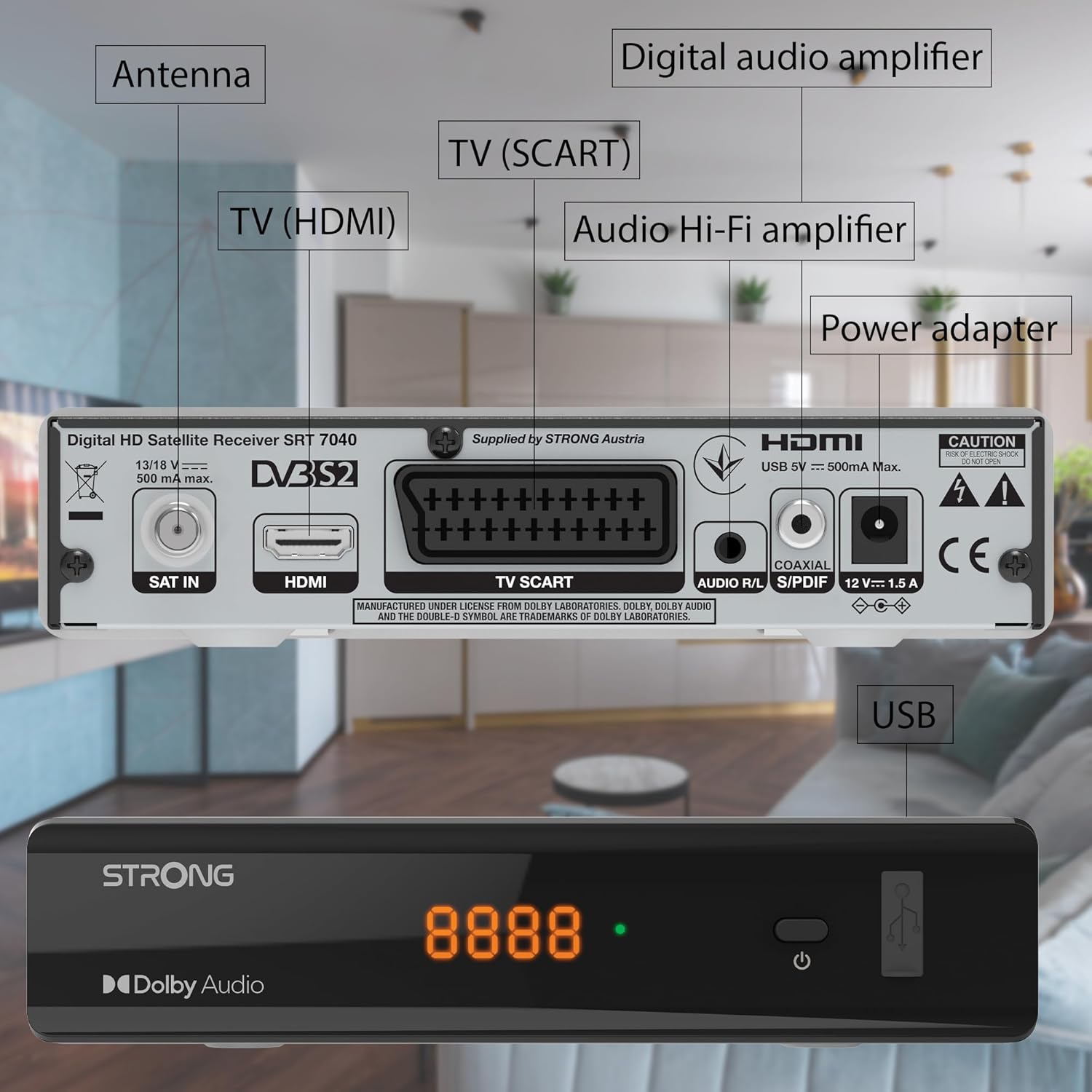
Image: The Strong SRT 7040 DTT Tuner displaying a timer icon, indicating its scheduling capabilities.
- Favorite Lists: Create customized lists of your preferred channels for quick access.
- ຄຳແປ: Enable or disable subtitles for compatible broadcasts using the SUB ປຸ່ມໃນຣີໂໝດ.
- ຄູ່ມືໂຄງການເອເລັກໂຕຣນິກ (EPG): ກົດ EPG ປຸ່ມ view ຂໍ້ມູນລາຍການສຳລັບການອອກອາກາດທີ່ຈະມາເຖິງ.
- ສຽງ Dolby: The receiver supports Dolby Audio for a high-quality sound experience.

Image: The Strong SRT 7040 DTT Tuner with the Dolby Audio logo, illustrating its sound processing capability.
3. ບໍາລຸງຮັກສາ
3.1 ການທໍາຄວາມສະອາດ
To clean the receiver, disconnect it from the power supply. Use a soft, dry cloth to wipe the exterior. Do not use liquid cleaners, aerosols, or abrasive materials, as these can damage the finish or internal components.
3.2 ການປັບປຸງຊອບແວ
ກວດສອບຜູ້ຜະລິດເປັນໄລຍະ website for available software updates. Updates can improve performance, add new features, or resolve issues. Software updates are typically performed via the USB port following specific instructions provided with the update file.
3.3 ຂໍ້ມູນຄວາມປອດໄພ
- ຢ່າເປີດຕົວຮັບສັນຍານ casing. ບໍ່ມີສ່ວນທີ່ຜູ້ໃຊ້ບໍລິການພາຍໃນ. ອ້າງອີງການບໍລິການທັງໝົດໃຫ້ກັບບຸກຄະລາກອນທີ່ມີຄຸນວຸດທິ.
- ຮັກສາເຄື່ອງຮັບສັນຍານໃຫ້ຫ່າງຈາກແສງແດດໂດຍກົງ, ແຫຼ່ງຄວາມຮ້ອນ, ແລະຄວາມຊຸ່ມຊື່ນ.
- ຮັບປະກັນການລະບາຍອາກາດທີ່ພຽງພໍອ້ອມອຸປະກອນເພື່ອປ້ອງກັນຄວາມຮ້ອນເກີນໄປ.
- ພຽງແຕ່ໃຊ້ອະແດບເຕີໄຟທີ່ສະຫນອງໃຫ້.
4. ການແກ້ໄຂບັນຫາ
If you encounter problems with your SRT 7040, consult the following table before contacting support.
| ບັນຫາ | ສາເຫດທີ່ເປັນໄປໄດ້ | ການແກ້ໄຂ |
|---|---|---|
| ບໍ່ມີພະລັງງານ | Power adapter not connected; Power outlet faulty | Check power adapter connection; Try a different power outlet |
| ບໍ່ມີສັນຍານ / ໜ້າຈໍດຳ | Satellite cable loose or disconnected; Incorrect input selected on TV; Satellite dish alignment issue | Check SAT IN cable connection; Ensure TV is on correct HDMI/SCART input; Perform a channel scan; Consult a professional for dish alignment if necessary |
| ການຄວບຄຸມໄລຍະໄກບໍ່ເຮັດວຽກ | Batteries depleted or incorrectly inserted; Obstruction between remote and receiver | Replace batteries; Ensure correct polarity; Remove any obstructions; Point remote directly at receiver |
| ຄຸນນະພາບຮູບບໍ່ດີ | Weak satellite signal; Incorrect display settings | Check satellite signal strength in menu; Adjust TV display settings; Ensure Full HD content is being broadcast |
5. ຂໍ້ມູນຈໍາເພາະ
The following are the technical specifications for the Strong SRT 7040 Digital Satellite HD Receiver:
- ຕົວແບບ: SRT 7040 (SAT FTA Full HD)
- ຍີ່ຫໍ້: ແຂງແຮງ
- ຂະໜາດ: 3.39 x 6.46 x 1.38 ນິ້ວ (8.6 x 16.4 x 3.5 cm)
- ນ້ໍາຫນັກລາຍການ: 9.2 ອອນສ໌ (260 ກຣາມ)
- ສີ: ດຳ
- ເຕັກໂນໂລຍີການເຊື່ອມຕໍ່: USB
- ສະບັບtage: 100 - 240 V
- ຄວາມຖີ່: 50 - 60 Hz
- ການບໍລິໂພກພະລັງງານ: 18 kWh (operational, typical)
- ຊ່ວງອຸນຫະພູມການເຮັດວຽກ: 0°C ເຖິງ 40°C
- ຄວາມຊຸ່ມຊື່ນພີ່ນ້ອງ: 10% - 95%
- ແບັດເຕີຣີ: ແບດເຕີຣີ້ AAA 2 ອັນ (ລວມສໍາລັບໄລຍະໄກ)
- ສະເພາະໄດ້ພົບກັບ: DVB-S2
- ລວມມີ: Wally Receiver
6. ການຮັບປະກັນແລະການສະຫນັບສະຫນູນ
For warranty information and technical support, please refer to the warranty card included in your product packaging or visit the official Strong webເວັບໄຊ. ຮັກສາໃບຮັບເງິນການຊື້ຂອງທ່ານໄວ້ເປັນຫຼັກຖານການຊື້ສໍາລັບການຮ້ອງຂໍການຮັບປະກັນ.
For further assistance, you may contact Strong customer service through the contact details provided on their official webເວັບໄຊ.