
Elite Aria
ຄູ່ມືຜູ້ໃຊ້ພັດລົມລະບາຍຄວາມຮ້ອນອັດສະລິຍະ Elite Aria
Model: Aria (Part No. 3204003750)
1. ບົດແນະນຳ
The Elite Aria Smart Cooling Fan is an advanced device designed to enhance your indoor cycling experience by replicating outdoor ride conditions. It features intelligent airflow adjustment based on your workout intensity and data, reaching speeds up to 50 km/h. The Aria fan offers extensive compatibility with various sensors and devices, ensuring a highly immersive and effective training environment.
This manual provides essential information for the safe and efficient operation, setup, and maintenance of your Elite Aria Smart Cooling Fan. Please read it thoroughly before using the product.
2. ຂໍ້ມູນຄວາມປອດໄພ
- ໃຫ້ແນ່ໃຈວ່າພັດລົມຖືກວາງຢູ່ເທິງພື້ນຜິວທີ່ມີລະດັບຄວາມຫມັ້ນຄົງເພື່ອປ້ອງກັນການບິດ.
- Keep hands, hair, and loose clothing away from the fan blades during operation.
- ຢ່າໃຊ້ພັດລົມໃນຂະນະທີ່ສາຍໄຟ ຫຼື ປລັກໄຟເສຍຫາຍ.
- ຢ່າຈຸ່ມພັດລົມລົງໃນນໍ້າ ຫຼື ໃຫ້ມັນຖືກຄວາມຊຸ່ມຊື່ນຫຼາຍເກີນໄປ.
- ຖອດພັດລົມອອກຈາກປລັກສຽບໄຟກ່ອນທີ່ຈະທໍາຄວາມສະອາດຫຼືດໍາເນີນການບໍາລຸງຮັກສາໃດໆ.
- ເຄື່ອງໃຊ້ນີ້ບໍ່ໄດ້ມີຈຸດປະສົງເພື່ອໃຊ້ໂດຍບຸກຄົນ (ລວມທັງເດັກນ້ອຍ) ທີ່ມີຄວາມສາມາດທາງຮ່າງກາຍ, ຄວາມຮູ້ສຶກ ຫຼືຈິດໃຈທີ່ຫຼຸດລົງ, ຫຼືຂາດປະສົບການ ແລະຄວາມຮູ້, ເວັ້ນເສຍແຕ່ວ່າພວກເຂົາໄດ້ຮັບການຊີ້ນໍາ ຫຼືຄໍາແນະນໍາກ່ຽວກັບການນໍາໃຊ້ເຄື່ອງໃຊ້ໂດຍບຸກຄົນທີ່ຮັບຜິດຊອບຄວາມປອດໄພຂອງເຂົາເຈົ້າ.
3. ເນື້ອໃນຊຸດ
ກວດສອບວ່າລາຍການທັງຫມົດແມ່ນມີຢູ່ໃນຊຸດ:
- Elite Aria Smart Fan Unit
- Power Adapter
- 2 x Activated Carbon Filters (pre-installed or separate)
- ຄູ່ມືຜູ້ໃຊ້ (ເອກະສານນີ້)
4. ຕັ້ງຄ່າ
4.1 ການຫຸ້ມຫໍ່ແລະການຈັດວາງ
- Carefully remove the Elite Aria Smart Cooling Fan from its packaging.
- Place the fan on a flat, stable surface in front of your training setup.
- Adjust the fan's angle to optimize airflow. The Aria features 10 adjustable positions, ranging from 0° to 50°, to best cover a cyclist's body shape.
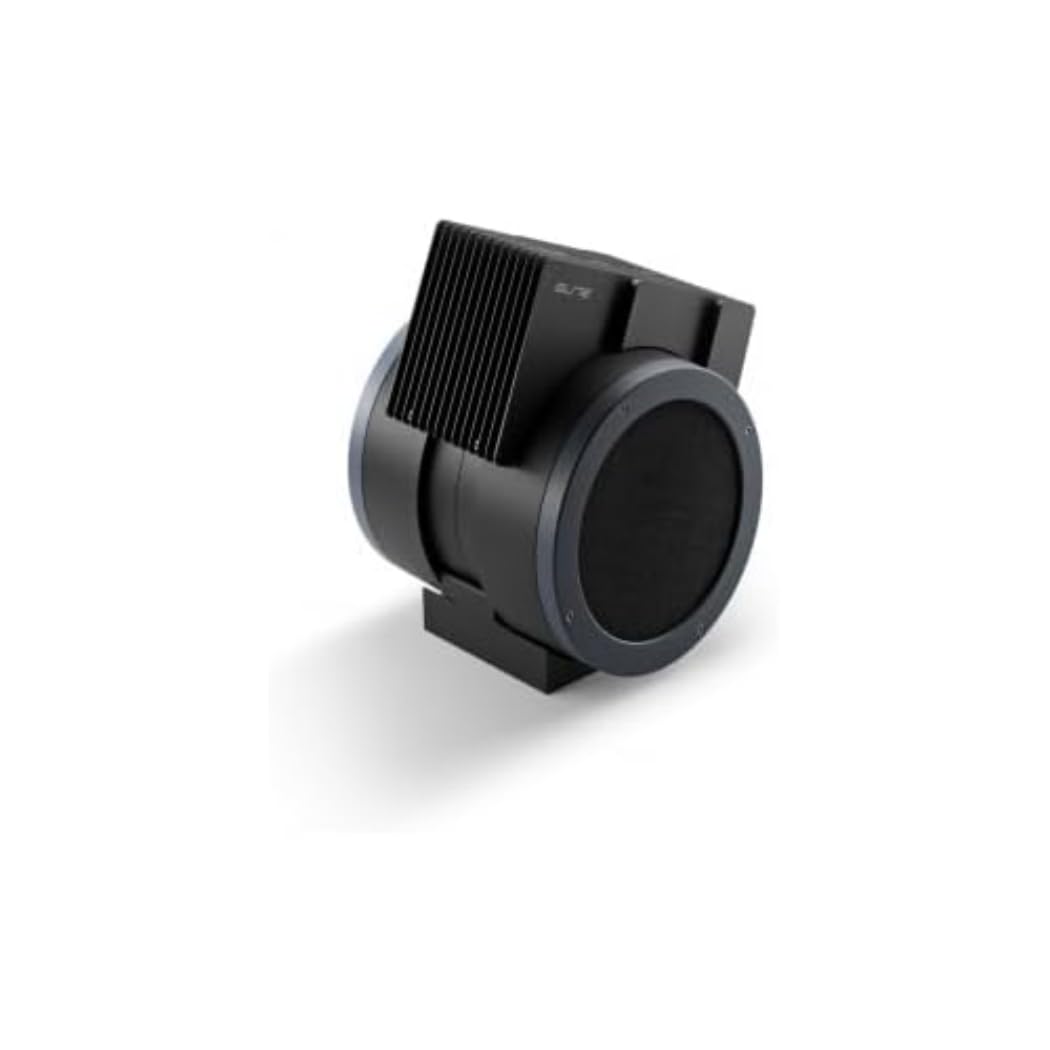
An image showing the Elite Aria Smart Cooling Fan, a black, cylindrical device with a rectangular top section containing cooling fins, designed for indoor cycling training.
4.2 ການເຊື່ອມຕໍ່ພະລັງງານ
- Connect the power adapter to the fan's power input port.
- ສຽບອະແດບເຕີໄຟເຂົ້າໄປໃນບ່ອນສຽບໄຟຟ້າທີ່ເຫມາະສົມ.
- The fan will power on in standby mode or manual mode, indicated by the control panel lights.
4.3 ການຕິດຕັ້ງຕົວກອງ (ຖ້າບໍ່ໄດ້ຕິດຕັ້ງໄວ້ລ່ວງໜ້າ)
The Aria includes 2 activated carbon filters designed to filter air and remove workout odors. If not pre-installed, follow these steps:
- Locate the filter compartments on the fan (refer to the diagram in the quick start guide if available).
- Insert the activated carbon filters into their respective slots. Ensure they are securely seated.
5. ຮູບແບບການເຮັດວຽກ
5.1 ແບບຄູ່ມື
The Aria fan can be operated manually using the small keyboard on the unit:
- ປຸ່ມເປີດປິດ: Press to turn the fan on/off or activate standby mode.
- ການປັບຄວາມໄວ: Use the dedicated buttons to cycle through 4 manual wind intensity levels.
- ໂໝດ ສະແຕນບາຍ: Activate standby mode when not actively training.
5.2 Smart Mode (Automatic Adjustment)
The Aria fan's primary feature is its ability to automatically adjust airflow based on your workout data. It communicates wirelessly with various sensors and devices:
- ANT+ FE-C & ANT+ Speed Devices/Sensors: For speed-based airflow.
- ANT+ Power Meters: For power-based airflow.
- ANT+ & BLE Heart Rate Monitors: For heart rate-based airflow.
- ANT+ Body Temperature Sensors: For body temperature-based airflow.
To pair with a device or sensor:
- Ensure your sensor/device is active and within range.
- On the Aria's keyboard, press the button to select the desired data source (speed, power, heart rate, body temperature).
- The fan will automatically search for and connect to compatible sensors. Once connected, airflow will adjust dynamically.
5.3 My E-Training App Control
The Elite Aria fan can also be controlled via the My E-Training app, providing quick access to all main functions and advanced settings:
- Download and install the My E-Training app on your smartphone or tablet.
- Open the app and ensure Bluetooth is enabled on your device.
- Follow the in-app instructions to connect to your Elite Aria fan.
- Through the app, you can select the device/sensor to be connected, adjust wind power percentage, and customize advanced settings to suit your workout needs.
Note: You do not need a subscription to the My E-Training app to access all of Aria's features within the app.
6. ບໍາລຸງຮັກສາ
6.1 ການທໍາຄວາມສະອາດ
- ຖອດພັດລົມອອກສະເໝີກ່ອນທຳຄວາມສະອາດ.
- ເຊັດພື້ນຜິວພາຍນອກຂອງພັດລົມໃຫ້ອ່ອນໆ, ງamp ຜ້າ. ຢ່າໃຊ້ເຄື່ອງເຮັດຄວາມສະອາດຂັດຫຼືສານລະລາຍ.
- ໃຫ້ແນ່ໃຈວ່າບໍ່ມີນ້ໍາເຂົ້າໄປໃນອົງປະກອບພາຍໃນ.
6.2 Activated Carbon Filter Replacement
The activated carbon filters help remove workout odors. They should be replaced periodically depending on usage and air quality.
- ຖອດພັດລົມອອກຈາກປລັກສຽບໄຟ.
- Locate the filter compartments.
- Carefully remove the spent filters.
- Insert new activated carbon filters, ensuring they fit snugly.
- Dispose of old filters responsibly.
7. ການແກ້ໄຂບັນຫາ
- ພັດລົມບໍ່ເປີດ:
- Check if the power cord is securely plugged into both the fan and the electrical outlet.
- ໃຫ້ແນ່ໃຈວ່າປລັກໄຟຟ້າໃຊ້ງານໄດ້.
- No automatic airflow adjustment:
- Ensure your sensors/devices are turned on and within range of the fan.
- Verify that the correct data source (speed, power, HR, temp) is selected on the fan's control panel or via the My E-Training app.
- Check battery levels of your external sensors.
- Try restarting both the fan and your sensors/devices.
- ກະແສລົມອ່ອນ:
- In manual mode, increase the speed level.
- In smart mode, ensure your workout intensity data is being correctly transmitted and interpreted.
- Check if the air intake or output is obstructed.
- Consider replacing the activated carbon filters if they are old or heavily used.
8. ຂໍ້ມູນຈໍາເພາະ
| ຄຸນສົມບັດ | ຂໍ້ມູນຈໍາເພາະ |
|---|---|
| ຊື່ຍີ່ຫໍ້ | ຊັ້ນສູງ |
| ຊື່ຕົວແບບ | ອາຣີຢາ |
| ເລກສ່ວນ | 3204003750 |
| ວັດສະດຸ | Thermoplastic |
| ຂະໜາດລາຍການ (LxWxH) | 12.2 x 11.81 x 14.17 ນິ້ວ |
| ຂະໜາດແພັກເກັດ (LxWxH) | 17.72 x 17.32 x 14.76 ນິ້ວ |
| ນ້ໍາຫນັກຊຸດ | 6.2 ກິໂລກຣາມ |
| ຄວາມໄວລົມສູງສຸດ | ສູງເຖິງ 50 ກິໂລແມັດຕໍ່ຊົ່ວໂມງ |
| ຕຳແໜ່ງທີ່ສາມາດປັບໄດ້ | 10 (0° to 50°) |
| ການເຊື່ອມຕໍ່ | ANT+ FE-C, ANT+ Speed, ANT+ Power, ANT+ HR, BLE HR, ANT+ Body Temperature |
| ອົງປະກອບລວມ | Aria Smart Fan, 2 Activated Carbon Filters |
9. ການຮັບປະກັນແລະການສະຫນັບສະຫນູນ
Elite products are manufactured to high standards and are covered by a limited warranty. For specific warranty terms and conditions, please refer to the warranty card included with your product or visit the official Elite webເວັບໄຊ.
For technical support, troubleshooting assistance, or to inquire about replacement parts (such as activated carbon filters), please contact Elite customer service through their official webເວັບໄຊ ຫຼືຂໍ້ມູນການຕິດຕໍ່ທີ່ສະໜອງໃຫ້ຢູ່ໃນການຫຸ້ມຫໍ່ຜະລິດຕະພັນຂອງທ່ານ.
ຊັບພະຍາກອນອອນໄລນ໌:
Ask a question about this manual
Ask about setup, troubleshooting, compatibility, parts, safety, or missing instructions. Manuals+ will review the question and use this page’s manual context to help answer it.