
MIABOO M23-002
MIABOO Wireless Lavalier Microphone User Manual
ຮູບແບບ: M23-002
1. ບົດແນະນຳ
This manual provides detailed instructions for the setup, operation, maintenance, and troubleshooting of your MIABOO Wireless Lavalier Microphone system. Please read this manual thoroughly before using the product to ensure optimal performance and longevity.

Figure 1: MIABOO Wireless Lavalier Microphone System Components.
The image displays the MIABOO wireless lavalier microphone system, including a compact charging case, two microphone transmitters, and one receiver. The transmitters and receiver are black with a sleek design, featuring a green indicator light and the "MIABOO" logo. One transmitter is shown being inserted into the charging case, illustrating the magnetic charging connection. Another transmitter and the receiver are shown separately, highlighting their individual forms. The receiver is depicted with a Lightning connector, indicating compatibility with Apple devices.
2. ເນື້ອໃນຊຸດ ແລະ ສ່ວນປະກອບຕ່າງໆ
Before proceeding, verify that all components are present in your package:
- Wireless Microphone Transmitter(s)
- Receiver (with Lightning or USB-C connector, depending on model)
- ກ່ອງສາກແບບພົກພາ
- ສາຍສາກ (USB-C)
- ຄູ່ມືຜູ້ໃຊ້
2.1 ອົງປະກອບຫຼາຍກວ່າview
Familiarize yourself with the main parts of your wireless microphone system:
- ເຄື່ອງສົ່ງໄມໂຄຣໂຟນ: Captures audio. Features a built-in clip for attachment to clothing.
- ຜູ້ຮັບ: Plugs into your recording device (phone, tablet). Receives audio from the transmitter.
- ຕູ້ສາກໄຟ: Stores and recharges the transmitter(s) and receiver.
3. ຄູ່ມືການຕິດຕັ້ງ
The MIABOO Wireless Lavalier Microphone system is designed for plug-and-play operation, requiring no complex setup or additional apps.
3.1 ການສາກໄຟເບື້ອງຕົ້ນ
Before first use, ensure both the transmitter(s) and the charging case are fully charged. Place the transmitter(s) and receiver into the charging case. Connect the charging case to a power source using the provided USB-C cable. The indicator lights will show charging status.
3.2 ການເຊື່ອມຕໍ່ກັບອຸປະກອນຂອງທ່ານ
- ສຽບໃນຕົວຮັບ: Insert the receiver into the Lightning port (for iOS devices) or USB-C port (for compatible Android/iPad models) of your smartphone or tablet. Ensure it is firmly seated.
- ເປີດເຄື່ອງສົ່ງສັນຍານ: Press and hold the power button on the microphone transmitter until the indicator light illuminates. The transmitter and receiver will automatically pair. A solid green light on both indicates a successful connection.
- ຕິດໄມໂຄຣໂຟນ: Clip the microphone transmitter to your clothing, ideally near your mouth, for optimal audio capture.
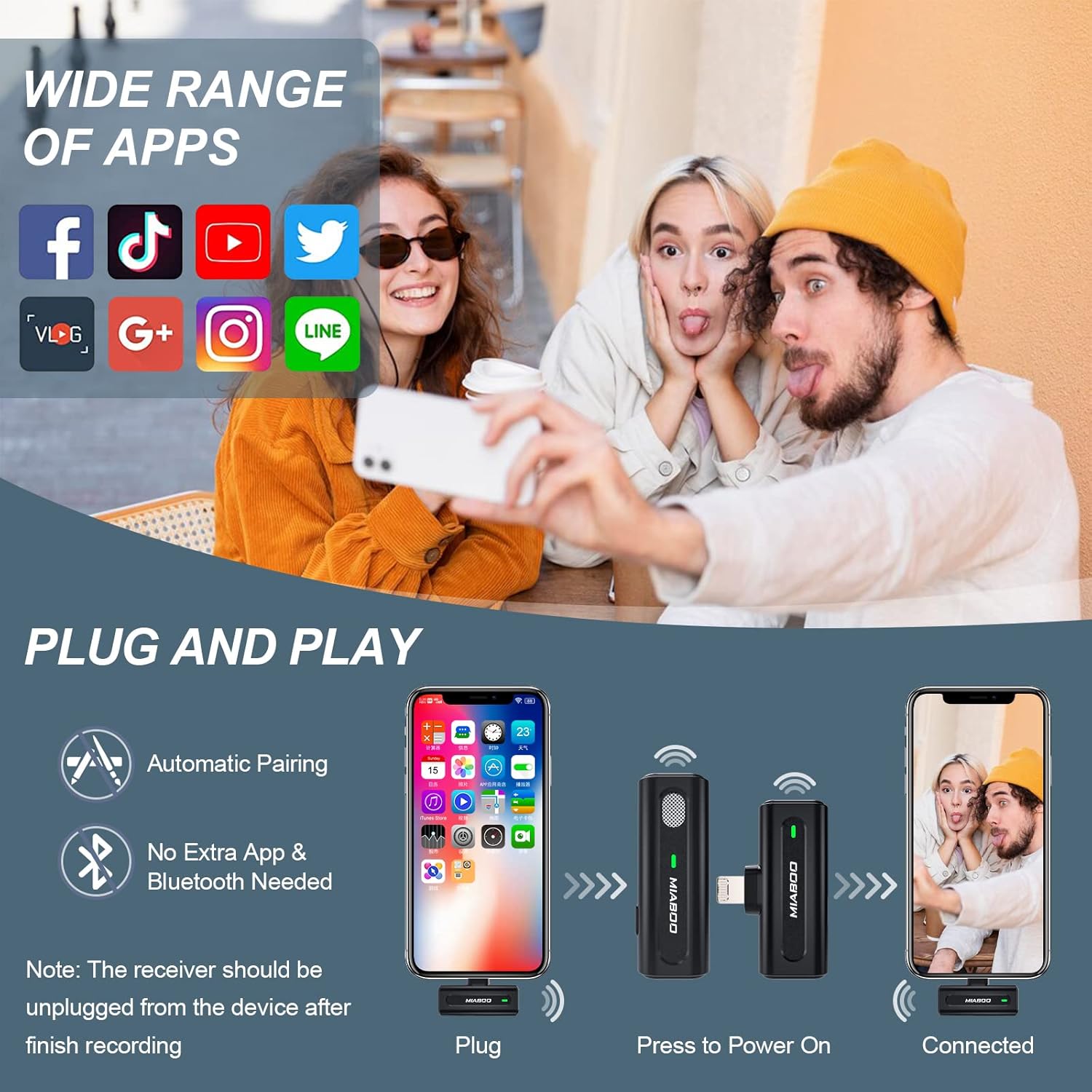
Figure 2: Plug and Play Setup.
This image illustrates the simple plug-and-play setup process. It shows a smartphone, the MIABOO receiver, and the microphone transmitter. The steps depicted are: 1) Plug the receiver into the phone, 2) Press the power button on the microphone, and 3) The devices are connected. Text overlays emphasize "Automatic Pairing" and "No Extra App & Bluetooth Needed." The image also highlights the wide range of compatible apps, including Facebook, TikTok, YouTube, Twitter, Vlog, Google+, Instagram, and LINE.
4. ຄໍາແນະນໍາການດໍາເນີນງານ
4.1 ການບັນທຶກສຽງ
Once the microphone and receiver are paired, open your preferred audio or video recording application on your device (e.g., Camera app, Voice Memos, TikTok, YouTube, etc.). The system will automatically use the external microphone for audio input. Begin recording as you normally would within the app.
4.2 ການຫຼຸດສຽງລົບກວນອັດສະລິຍະ
The MIABOO microphone features intelligent noise reduction technology to filter out ambient sounds and enhance voice clarity. This function operates automatically to provide clear audio in various environments.

Figure 3: Intelligent Noise Reduction.
This image visually represents the intelligent noise reduction capability of the microphone. It shows a "Before" section with a wavy, noisy audio waveform and an "After" section with a cleaner, more defined waveform, indicating the reduction of background noise. The microphone itself is depicted with blue circular waves emanating from it, symbolizing sound processing. The background shows two individuals engaged in a conversation, suggesting use in an interview or discussion setting.
4.3 ການຕິດຕາມເວລາຈິງ
The receiver is equipped with a 3.5mm audio jack, allowing you to plug in headphones for real-time audio monitoring. This enables you to listen to the audio being recorded as it happens, ensuring optimal sound quality.

Figure 4: Smart Features.
This image highlights two key features: "Smart Charging Port Design" and "Real-time Monitoring Function." The smart charging port is shown on the receiver, allowing a phone to be charged simultaneously while recording. The real-time monitoring function is illustrated by headphones plugged into the receiver's 3.5mm audio jack, enabling users to monitor audio status during recording. The image also shows a professional setting with individuals using the microphone for recording.
4.4 ປິດເຄື່ອງ
To power off the microphone transmitter, press and hold the power button until the indicator light turns off. To power off the receiver, simply unplug it from your device. It is recommended to unplug the receiver from your device after finishing recording to conserve battery.
5. ການບໍາລຸງຮັກສາແລະການດູແລ
Proper care will extend the life of your MIABOO Wireless Lavalier Microphone system:
- ທໍາຄວາມສະອາດ: Use a soft, dry cloth to clean the microphone, receiver, and charging case. Do not use liquid cleaners or solvents.
- ການເກັບຮັກສາ: Store the system in its charging case when not in use to protect it from dust and damage. Store in a cool, dry place.
- ການດູແລຫມໍ້ໄຟ: For optimal battery life, avoid fully discharging the batteries frequently. Recharge the system regularly, even if not in constant use.
6. ການແກ້ໄຂບັນຫາ
If you encounter issues with your MIABOO Wireless Lavalier Microphone, refer to the following common solutions:
| ບັນຫາ | ສາເຫດທີ່ເປັນໄປໄດ້ | ການແກ້ໄຂ |
|---|---|---|
| No sound recorded / Microphone not working. |
|
|
| ຄຸນນະພາບສຽງບໍ່ດີ / ສຽງຄົງທີ່. |
|
|
| ອາຍຸແບັດເຕີຣີສັ້ນ. |
|
|
7. ຂໍ້ມູນຈໍາເພາະ
| ຄຸນສົມບັດ | ລາຍລະອຽດ |
|---|---|
| ໝາຍເລກຕົວແບບ | M23-002 |
| ຍີ່ຫໍ້ | MIABOO |
| ການເຊື່ອມຕໍ່ | ໄຮ້ສາຍ (2.4GHz) |
| ຕົວເຊື່ອມຕໍ່ຜູ້ຮັບ | Lightning (for iOS devices) / USB-C (for compatible Android/iPad models) |
| ທ່າເຮືອຕິດຕາມກວດກາ | 3.5mm Audio Jack (on receiver) |
| ລະບົບສາຍສົ່ງ | Up to 70 feet (approx. 21 meters) in open areas |
| ອາຍຸແບັດເຕີຣີ (ຕົວສົ່ງ) | Approx. 6 hours per single charge |
| ຄວາມອາດສາມາດສາກໄຟໄດ້ | Provides more than 4 full recharges for the microphone |
| ອາຍຸແບັດເຕີຣີທັງໝົດ (ພ້ອມກ່ອງ) | ສູງສຸດ 42 ຊົ່ວໂມງ |
| ການຫຼຸດຜ່ອນສິ່ງລົບກວນ | ການຫຼຸດຜ່ອນສິ່ງລົບກວນອັດສະລິຍະ |
| ຄວາມເຂົ້າກັນໄດ້ | Smartphones, Tablets (iOS devices with Lightning port, select Android/iPad models with USB-C) |
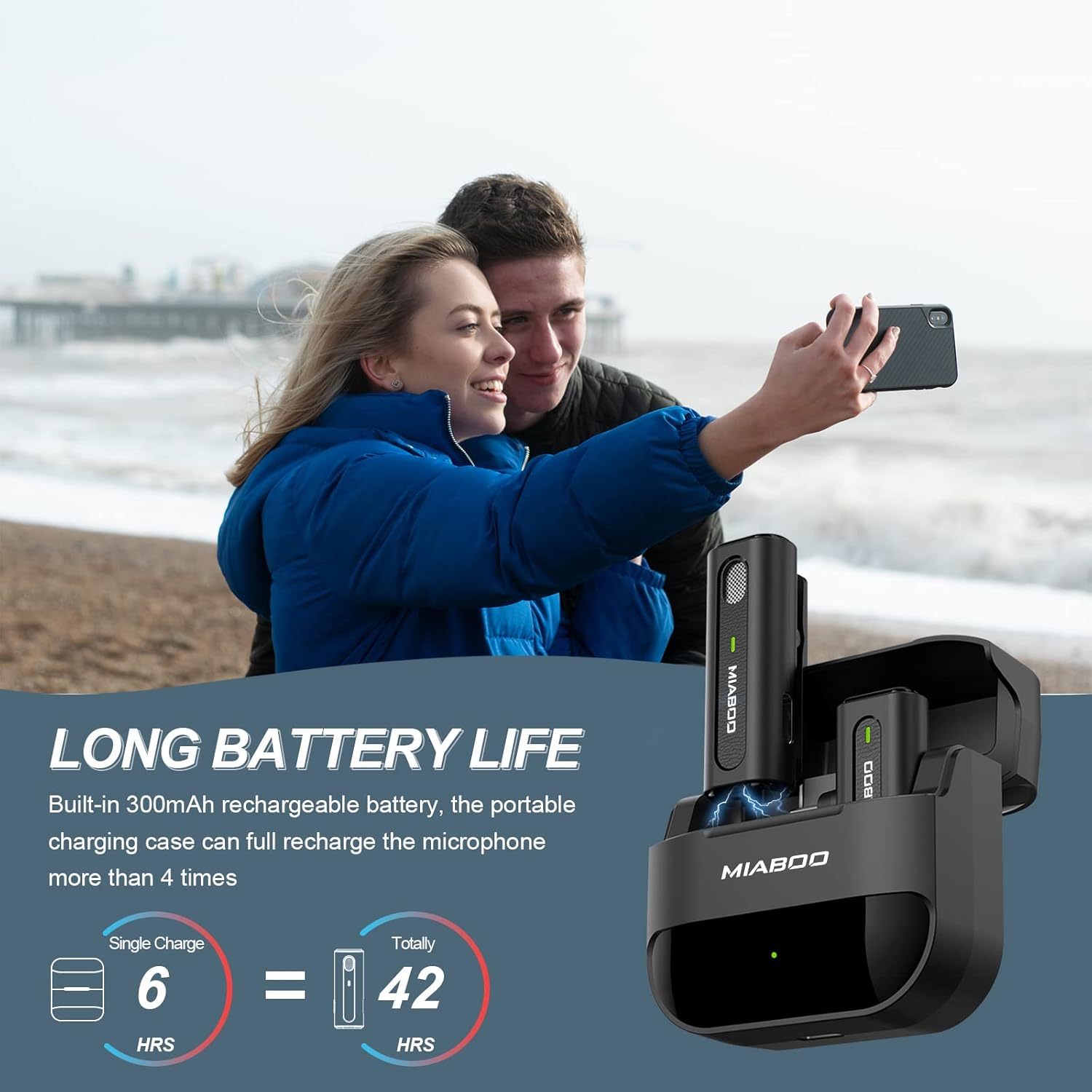
Figure 5: Extended Battery Life.
This image highlights the long battery life of the MIABOO wireless microphone system. It states that the built-in 300mAh rechargeable battery in the portable charging case can fully recharge the microphone more than 4 times. Visuals show "Single Charge = 6 HRS" and "Totally = 42 HRS," indicating the microphone's individual battery life and the total usage time with the charging case. The background features two individuals taking a selfie, suggesting the product's use for content creation.

Figure 6: Stable Transmission Range.
This image emphasizes the "Long Stable Transmission & Low Latency" features. It shows a graphic indicating "High Sensitivity" and "Stable Signal." A diagram illustrates a "Long Working Range" of 70 feet for the wireless lavalier microphone compared to 6.6 feet for a traditional microphone. The background features a person playing a guitar and recording with a smartphone, demonstrating the product's use in a creative context.

ຮູບທີ 7: ຄວາມເຂົ້າກັນໄດ້ຂອງອຸປະກອນ.
This image details the compatibility of the MIABOO wireless microphone with various Apple devices. It lists compatible iPhone models from iPhone 6/6 Plus up to iPhone 13/13 Pro/13 Pro Max, and iPad models including iPad 2nd/3rd/4th gen, iPad Air series (except 4th gen), and iPad Mini (except 6th gen). It explicitly states that iPad Pro series with Type-C port are not supported, reinforcing the Lightning connector focus for this specific model. The image also shows various use cases like live streaming, interviews, video recording, and vlogging.
8. ການຮັບປະກັນແລະການສະຫນັບສະຫນູນ
MIABOO products come with a standard manufacturer's warranty. For specific warranty terms and conditions, please refer to the product packaging or contact MIABOO customer support directly. If you require technical assistance or have questions not covered in this manual, please reach out to our support team.
ການຊ່ວຍເຫຼືອລູກຄ້າ:
- For the most up-to-date contact information, please visit the official MIABOO webເວັບໄຊ ຫຼືອ້າງອີງໃສ່ເອກະສານການຊື້ຂອງທ່ານ.
Ask a question about this manual
Ask about setup, troubleshooting, compatibility, parts, safety, or missing instructions. Manuals+ will review the question and use this page’s manual context to help answer it.